
Choose and adjust an ergonomic office chair to support your body during desk work. This guide is for anyone buying a chair or setting up one they already own; no specialist knowledge is needed. Allow 30–60 minutes to compare chair features, adjust the seat and backrest, and check the fit at your desk.

Get comfort and recovery gear delivered free with Prime
- Fast, free delivery on millions of items
- Prime Video, Amazon Music and more included
- Member-only deals all year

ELABEST X100 Ergonomic Mesh Office Chair with Footrest
- ✔ Lumbar support: 3D adjustable; 1.6 in depth, 2 in height, 15° rotation
- ✔ Armrests: 5D adjustable and flip-up
- ✔ Headrest: 3D adjustable, 28 cm

CYKOV Ergonomic Mesh Office Chair with Footrest
- ✔ Model: CY59B
- ✔ Recline: 90°–135°
- ✔ Headrest: Adjustable; 4.72 in with 60° swivel

Monhey Ergonomic Mesh Office Chair with Lumbar Support, Adjustable Height and Flip-Up Arms, Khaki
- ✔ Model: 6969SB
- ✔ Color: Khaki
- ✔ Back material: Breathable mesh
Difficulty: Beginner | Time: 30-60 minutes
What You’ll Need
Tools & Materials:
- Your desk and computer, or measurements of the desk height
- A tape measure or ruler
- The chair’s adjustment manual, if available
Knowledge:
- Ability to adjust desk and chair settings
- Awareness of any personal comfort or mobility needs
Try a chair in the kind of clothing you usually wear at work. If shopping online, check the return period and measure your desk before ordering. An ergonomic chair can support a comfortable setup, but it cannot guarantee relief from pain.
ELABEST X100 Ergonomic Mesh Office Chair with Footrest
The X100 ranks first because its adjustment range gives buyers more ways to shape the chair around their body and desk. Its 3D lumbar support moves in depth, height, and rotation, while the 5D flip-up armrests offer more positioning options than the adjustable armrests described for CYKOV. The headrest also adjusts in three dimensions, which may help users who want support beyond the lower back.That breadth comes with a learning curve: buyers may need time to find settings that feel right, whereas the Monhey’s simpler listed setup is easier to understand at a glance. The X100 includes an extendable footrest and three-stage recline, but CYKOV specifies a wider recline endpoint at 135°. We would choose ELABEST for fitting support during desk use, not simply for reclining. Its 300 lb capacity and five-year warranty are clearly stated in the supplied information, though the many controls make this a less appealing pick for anyone who wants a set-and-forget chair.
Pros:
- 3D adjustable lumbar support with depth, height, and rotation settings
- 5D flip-up armrests and a 3D adjustable headrest
- Extendable footrest and three-stage reclining mechanism
- BIFMA certification and a stated 300 lb capacity
Cons:
- The extensive adjustments may take time to configure
- Its three-stage recline is less specific than CYKOV’s stated 135° maximum
Best for: Buyers who want several ways to adjust lumbar, headrest, and arm support for a home office or gaming setup.
Not ideal for: People who prefer a simple chair with few controls or want the deepest specified recline.
Bottom line: We recommend the X100 for buyers who value a configurable desk fit more than a simple setup or maximum recline.
“We recommend the X100 for buyers who value a configurable desk fit more than a simple setup or maximum recline.”
CYKOV Ergonomic Mesh Office Chair with Footrest
CYKOV is the pick for buyers who want an office chair to do double duty during breaks. It reclines from 90° to 135° and includes a retractable footrest, giving it a more relaxation-oriented setup than the Monhey. An adjustable headrest and two-way lumbar support also allow some personalization, though the supplied adjustment details are narrower than the X100’s depth, height, and rotation settings.For an ergonomic desk chair, the key question is whether its support adjustments suit your working posture; a footrest and deeper recline are useful extras but do not answer that on their own. CYKOV’s 300 lb specification conflicts with 350 lb claims in the title and description, so we would verify the applicable capacity before purchase. Its five-year structural warranty is stated, but the capacity mismatch makes the product details less clear than ELABEST’s. Choose it when reclining comfort is a priority, and look elsewhere if precise fit adjustments or unambiguous specifications lead your checklist.
Pros:
- Reclines to a stated 135°
- Retractable footrest supports relaxed breaks
- Adjustable headrest and two-way lumbar support
- Five-year structural warranty is listed
Cons:
- Capacity is listed as 300 lb in specifications but 350 lb in the title and description
- Lumbar and arm adjustments are less fully detailed than the X100’s
- The relaxation features may matter less to buyers focused on desk posture
Best for: People who alternate computer work with reclining breaks and want an integrated footrest.
Not ideal for: Buyers who need finely adjustable armrests or want consistent capacity information before choosing.
Bottom line: We would choose CYKOV for its footrest and deep recline, after verifying its capacity and confirming that its support adjustments fit.
“We would choose CYKOV for its footrest and deep recline, after verifying its capacity and confirming that its support adjustments fit.”
Monhey Ergonomic Mesh Office Chair with Lumbar Support, Adjustable Height and Flip-Up Arms, Khaki
Monhey offers the most straightforward route into this comparison: a breathable mesh back, padded seat, adjustable lumbar support, and a recline that locks between 90° and 125°. Compared with CYKOV and ELABEST, it has no listed footrest or headrest, so it suits buyers who want fewer extras and a more conventional desk setup. Its flip-up arms can help when users need to move them out of the way, though the supplied information does not give a broader range of arm adjustments.The recline lock and swivel base give the chair some flexibility, but the X100 offers more detailed ways to tailor support and CYKOV reclines farther. Monhey’s main practical drawback is a specification conflict: its capacity is listed as both 300 and 330 lb. We would confirm the correct figure before buying, especially if capacity is a deciding factor. This is the simpler pick for someone who wants basic adjustability; it is less convincing for buyers seeking extensive fit tuning or a chair suited to reclining with leg support.
Pros:
- Adjustable lumbar support
- Mesh back and padded seat
- Recline locks between 90° and 125°
- Flip-up arms and assembly hardware and instructions are included
Cons:
- Capacity is listed as both 300 and 330 lb
- No footrest or headrest is listed
- Fewer adjustment details are provided than for the X100
Best for: Buyers seeking adjustable lumbar support and flip-up arms in a simpler mesh chair for computer or office use.
Not ideal for: People who want an integrated footrest, adjustable headrest, or extensively configurable arms and lumbar support.
Bottom line: We see Monhey as a practical, less feature-heavy choice when adjustable lumbar support matters more than extensive tuning or reclining extras.
“We see Monhey as a practical, less feature-heavy choice when adjustable lumbar support matters more than extensive tuning or reclining extras.”
As an Amazon Associate we earn from qualifying purchases.
Before You Start
Set up the chair on a level floor beside your usual desk. Check that its adjustment controls work and that the chair is stable. If you have persistent back, hip, or leg pain, numbness, or another health concern, ask a qualified health professional for individual advice.
Step-by-Step Instructions
Step 1: Measure your desk and work area
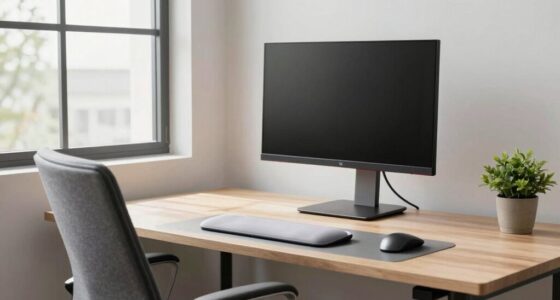
Measure the floor-to-desktop height and the space available under the desk. Note whether the desk has a fixed height or can be adjusted. Check the space needed for the chair base and armrests to move under or beside the desk.
Tip:Include any desk tray or apron beneath the desktop when checking knee clearance.
Check: You have the desk height, available clearance, and chair space written down.
Step 2: Choose a chair with adjustable fit
Compare chairs with adjustable seat height, backrest or lumbar support, and seat depth. Look for stable construction and controls you can reach while seated. Consider adjustable armrests if you use them, and breathable upholstery if the room tends to be warm. Check the chair’s size range against your body and the desk measurements.
Tip:Do not select a chair by the word “ergonomic” alone. The adjustments and dimensions need to suit your body and workstation.
Check: The chair offers the adjustments you need and fits within your workspace.
Step 3: Set the seat height
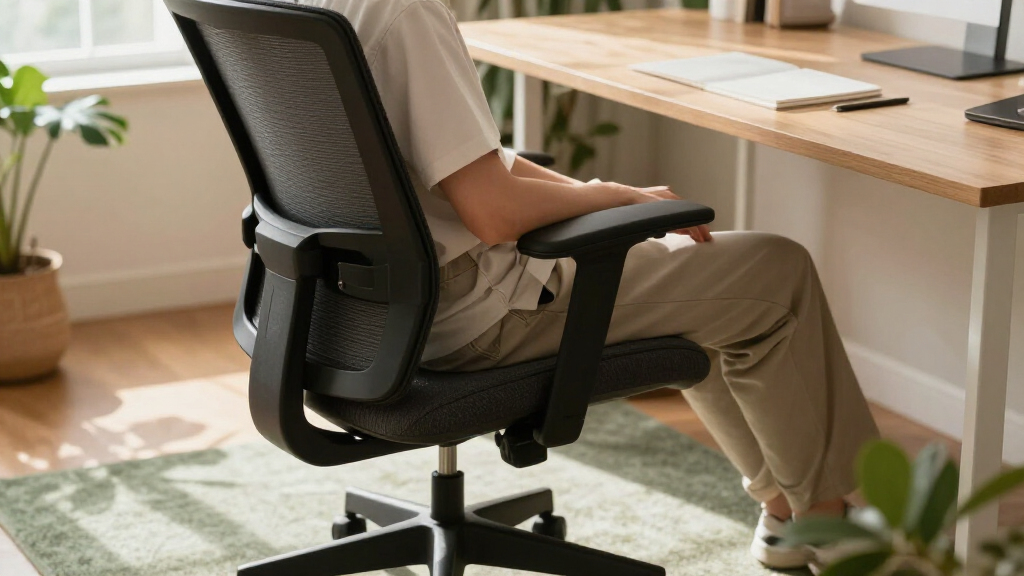
Sit back in the chair with your feet flat on the floor. Raise or lower the seat until your thighs are roughly level or slope slightly downward, with knees near hip height. Keep your shoulders relaxed and your feet supported. If the chair cannot go low enough for the desk, use a stable footrest; if your knees are too high, try a chair with a lower seat range.
Tip:Avoid letting your feet dangle or pressing the backs of your knees against the seat edge.
Check: Your feet rest securely, your thighs are supported, and the seat edge does not press into your knees.
Step 4: Adjust seat depth and back support
Sit fully back and slide the seat pan, if adjustable, until it supports most of your thighs. Leave a small gap—about two or three finger widths—between the front edge of the seat and the backs of your knees. Set the lumbar support so it meets the inward curve of your lower back. Adjust the backrest angle to a comfortable recline that lets you rest against it while working.
Tip:If the chair has no seat-depth control, check that its fixed seat leaves room behind your knees when you sit back.
Check: Your lower back feels supported, your thighs rest on the seat, and the seat edge does not dig into your legs.
Step 5: Position the armrests and desk
Lower or raise the armrests so your shoulders stay relaxed and your elbows sit close to your sides. Keep forearms roughly level while typing. Move the chair close enough to the desk that you can reach the keyboard without leaning forward. If armrests block the chair from moving close, lower them or move them aside.
Tip:Armrests should support your arms lightly. Do not shrug your shoulders to reach them.
Check: You can reach the keyboard with relaxed shoulders and elbows near your body.
Step 6: Align your screen and input devices
Place the monitor directly in front of you, about an arm’s length away as a starting point. Set its height so you can look at the screen without repeatedly bending your neck; adjust for your vision and screen size. Keep the keyboard and mouse close, at a height that lets your wrists stay mostly straight and your shoulders relaxed.
Tip:If you use a laptop for long sessions, add a separate keyboard and mouse so you can raise the screen without raising your hands.
Check: You can see the screen and use the keyboard and mouse without reaching, twisting, or leaning forward.
Step 7: Test the setup during normal work
Work in your usual position for 15–20 minutes. Notice pressure at the seat edge, lower back, shoulders, feet, and wrists. Make one small adjustment at a time, then check whether it improves comfort. Change posture periodically and take brief movement breaks; no single seated position needs to be held all day.
Tip:Comfort may vary during the day. Recheck the setup after moving the desk, changing footwear, or lending the chair to someone else.
Check: You can work with stable foot support, relaxed shoulders, supported thighs and back, and no obvious pressure point caused by the chair.
Common Mistakes to Avoid
- Choosing a chair based only on its label or appearance. —
Check adjustment ranges, seat dimensions, desk clearance, and the return policy before buying.
- Setting the seat too high so the feet do not reach the floor. —
Lower the seat or add a stable footrest that supports both feet.
- Sitting at the front of the seat and losing back support. —
Sit back against the backrest and adjust seat depth so the front edge leaves room behind your knees.
- Keeping one posture for hours because the chair feels supportive. —
Shift position and take short movement breaks throughout the workday.
Troubleshooting
Problem: Your feet do not rest flat after setting the chair to desk height.
Solution:
Lower the chair if the desk allows. Otherwise, use a stable footrest and keep your thighs supported without pressure behind the knees.
Problem: The seat edge presses into the backs of your knees.
Solution:
Slide the seat pan back or choose a chair with a shorter seat. Sit fully back and recheck the gap behind your knees.
Problem: The lumbar support feels like it is pushing too hard or sits in the wrong place.
Solution:
Reduce its depth or height, if adjustable, and reposition it near the curve of your lower back. If it remains uncomfortable, try a different backrest shape or chair.
Problem: Your shoulders tense while typing even after adjusting the chair.
Solution:
Check that the keyboard is close and near elbow height. Lower or move the armrests if they lift your shoulders, and adjust desk or chair height to let your arms rest comfortably.
What Success Looks Like
Your feet are supported, your knees have room, your seat supports your thighs without pressing behind them, and the backrest meets your lower back. You can reach the desk and screen without leaning or twisting, with relaxed shoulders and comfortable arms. The setup feels stable during ordinary work, and you can change position easily.
Next Steps
Recheck the fit after rearranging your desk or changing chairs. Follow the chair maker’s instructions for cleaning and maintenance, and check fasteners and wheels periodically. If discomfort persists or worsens despite reasonable adjustments and movement breaks, seek advice from a qualified health professional or workplace ergonomics specialist.
Frequently Asked Questions
Do I need an expensive ergonomic chair?
No. The fit and useful adjustments matter more than the price or label. Choose a stable chair that matches your body, desk, and work needs.
Should my knees be exactly at a right angle?
No exact angle suits everyone. Start with feet supported, thighs roughly level or sloping slightly down, and no pressure from the seat edge behind your knees.
Where should lumbar support sit?
Position it so it meets the natural inward curve of your lower back while you sit against the backrest. Adjust its height and depth until it feels supportive rather than forceful.
Can an ergonomic chair prevent back pain?
A well-fitted chair can support a comfortable posture, but it cannot prevent or treat every cause of back pain. Change positions regularly and seek professional advice for persistent symptoms.
Columbus Day / Indigenous Peoples' Day Picks
long weekend sales
As an affiliate, we earn on qualifying purchases.