This checklist is for people who spend long stretches at a desk and want to make their setup feel more comfortable. It covers a wrist rest, footrest, lumbar cushion, monitor light bar, compression wear, and massage ball.

Get comfort and recovery gear delivered free with Prime
- Fast, free delivery on millions of items
- Prime Video, Amazon Music and more included
- Member-only deals all year
Each section focuses on one place or routine that may need attention, with a named pick and a short list of details to check. The buying notes emphasize fit, adjustability, and compatibility so you can compare options against your own workspace and habits.
Use the checklist to identify what feels least comfortable first, then review the relevant section before choosing. Check product dimensions and setup requirements against your desk, chair, and body, and consider whether each item fits the way you work. A thoughtful fit matters more than filling every slot.
Wrist Rest
A wrist rest can make a difference in how your hands meet the desk during mouse and keyboard use. This set pairs an Ergonomic Mouse Pad with Wrist Support and a keyboard wrist rest, so check that both pieces suit your desk layout and the way you move between typing and pointing. The goal is a comfortable, neutral hand position; a rest should not force your wrists upward or keep them pressed into a hard edge while you type.
Before buying, measure the available space and compare the mouse pad’s footprint with your mouse movement area. Check the keyboard rest’s length against your keyboard, especially if it has a compact or unusual layout. Common mistakes include choosing a set that crowds the work surface, assuming every wrist rest fits every keyboard, or prioritizing softness without considering support and stability. Look at the materials and cleaning instructions, too, since these pieces sit under frequent contact. Placement and proportions matter: position the rests where your hands can settle between active movements rather than relying on them as a fixed typing perch. If your desk height or chair position keeps your arms angled awkwardly, adjust those first; accessories cannot correct a poor overall setup.
What to look for:
- Mouse pad dimensions that leave room for your usual mouse movement
- Keyboard rest length suited to your keyboard layout
- A height that supports a relaxed wrist position
- Stable placement that does not slide during use
- Materials and care instructions that fit your workspace
Ergonomic Mouse Pad with Wrist Support and Keyboard Wrist Rest Set

This ergonomic set includes a mouse pad and keyboard wrist rest crafted with memory foam for long-lasting support and comfort. The design features a 15-degree slope, massage beads, and a silky fabric surface to promote wrist health and precise control during extended use.
Pros:
- Provides ergonomic support to reduce wrist strain
- Comfortable massage bead design promotes blood flow
- Non-slip PU base ensures stability during use
- Easy to clean and maintain
Cons:
- May be too large for small desks
- Memory foam may flatten over time with heavy use
Best for: People who want mouse and keyboard wrist supports together
Not ideal for: Anyone with very limited desk space or an unusual keyboard size
Bottom line: Check the dimensions of both rests against your setup before choosing this coordinated set.
Footrest
A footrest can help you find a more comfortable seated position when your feet do not rest easily on the floor. The Step-to-Adjust Foot Rest is described as having infinite height adjustment, making its adjustment range and operation the first details to inspect. Set the height so your feet have steady support and your knees and hips feel comfortable, while avoiding a position that pushes your thighs into the chair edge.
Measure the clearance beneath your desk and check the footrest’s width and depth against the space available. Consider whether you can change the height while seated and whether the surface gives your feet a secure place to rest. A common mistake is choosing a footrest based only on adjustability while overlooking its footprint, stability, or how it fits with the chair and desk. Another is setting it too high or too low and keeping that position despite discomfort. Fit to your seated posture is the key: test a setting with your usual chair height and desk tasks, then make small adjustments. If more than one person uses the workspace, convenient adjustment can help accommodate different seated positions, but confirm that the controls and range work for each user before relying on it.
What to look for:
- Adjustment range that suits your chair and leg position
- Width and depth that fit beneath your desk
- A stable platform for resting both feet
- An adjustment method you can operate comfortably
- Clearance from chair legs and other under-desk items
Step-to-Adjust Foot Rest with Infinite Height Adjustment
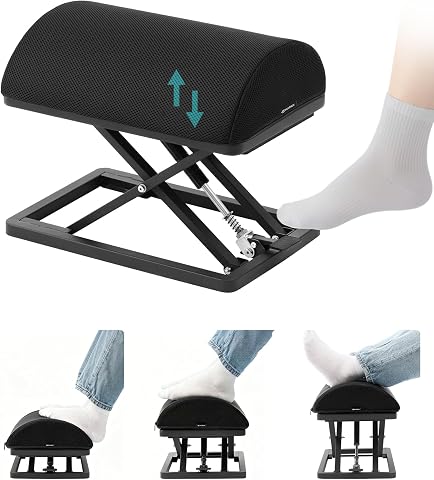
This carbon steel foot rest adjusts from 2.7 to 13.1 inches with a foot tap and has non-slip pads for stability. Its ergonomic high-density foam cushion has a removable, washable cover, and the foot rest arrives ready to use without assembly.
Pros:
- Adjusts height with a foot tap
- Sturdy carbon steel construction with non-slip pads
- Ergonomic foam cushion with washable cover
- Ready to use without assembly
Cons:
- Risk of finger entrapment during operation
- Heavy at 9.5 lb
Best for: People whose feet need adjustable support at a desk
Not ideal for: Workspaces with little clearance beneath the desk
Bottom line: Confirm the adjustment range and under-desk fit before settling on a footrest height.
Lumbar Cushion
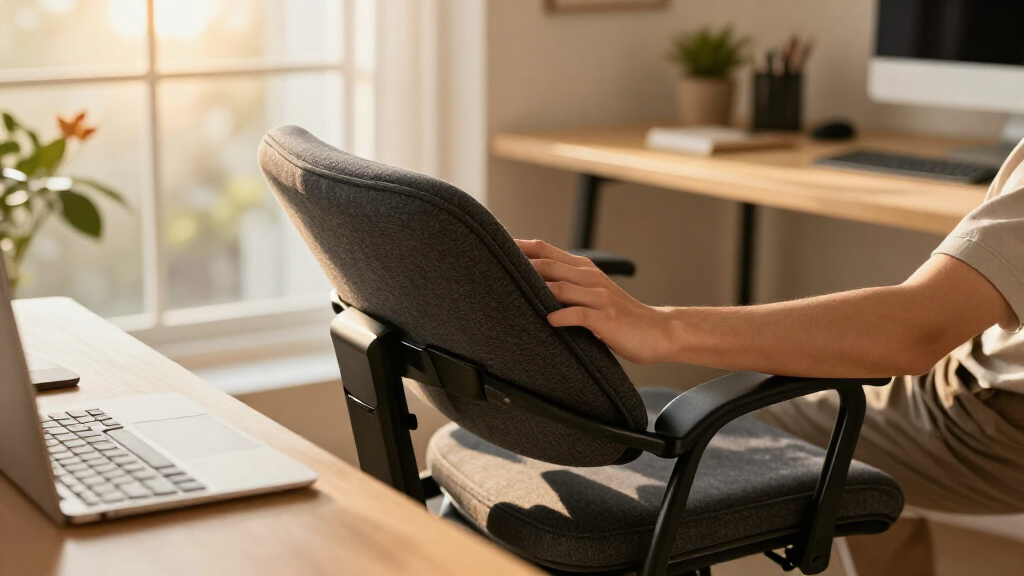
A lumbar cushion adds a support option for the back of a desk chair, but its shape and placement need to work with the chair and the person sitting in it. The Ergonomic Memory Foam Seat Cushion with Back Support combines seat and back support in its name, so check how both parts fit your chair. Look for product dimensions, attachment details, and guidance on positioning; these determine whether the cushion stays where you need it and leaves room to sit naturally.
Common buying mistakes include assuming that memory foam will feel comfortable to everyone, overlooking how a cushion changes the effective seat depth, or choosing a back section that does not line up with your lower back. Compare the cushion’s footprint with the chair seat, and check whether its straps or other securing method suit the chair design. If the chair has a pronounced contour, arms, or a narrow seat, make sure the added cushion does not crowd your posture. Personal fit matters more than a generic idea of support: a cushion should let you sit comfortably without pushing you too far forward or creating pressure at the seat edge. Review material and care information as well, particularly if you expect to use it throughout the workday. Reassess the chair height after adding the cushion.
What to look for:
- Seat and back dimensions that match your chair
- A shape that aligns comfortably with your lower back
- Attachment details suited to your chair design
- Seat depth after the cushion is installed
- Material and care guidance for regular use
Ergonomic Memory Foam Seat Cushion with Back Support

This extra-large memory foam cushion supports the hips and lower back during prolonged sitting, with a contoured L-shaped design intended to improve posture and distribute pressure. It has a removable, machine-washable breathable cover and an anti-slip bottom.
Pros:
- Provides support for both hips and lower back
- Extra-large surface area
- Removable cover is machine washable
- Anti-slip bottom helps keep it in place
Cons:
- Large dimensions may not fit every chair
- Relief claims are product descriptions and are not independently verified
Best for: People seeking a cushion with both seat and back support
Not ideal for: Chairs where added cushion depth crowds the seat
Bottom line: Check chair dimensions and seated position with the cushion in place.
Monitor Light Bar
A monitor light bar is a desk lighting option that sits at the screen, so compatibility and placement deserve close attention. The pick is the BenQ ScreenBar Halo 2 LED Monitor Light Bar with Wireless Controller. Before choosing it, check the monitor’s shape and thickness against the product’s mounting requirements, and review how the wireless controller is powered and used. A light bar should fit securely without interfering with the screen or other equipment.
Common mistakes include assuming a mount fits every monitor, failing to account for a curved or unusually shaped display, and overlooking space for the controller. Check the product’s dimensions and compatibility guidance, then compare them with your monitor bezel, webcam, and any accessories attached at the top of the screen. Consider where the light will fall on your desk and whether you can adjust it for your working position. Screen and mount fit are essential: even a well-equipped light bar is a poor choice if it cannot sit securely or blocks something you use. Review the available controls and setup instructions so the operating method feels practical at your desk. If you work across multiple displays, verify that the intended placement works with the monitor you use most and does not conflict with adjacent screens.
What to look for:
- Mount compatibility with your monitor’s shape and thickness
- Clearance for a webcam or other screen-top accessories
- Light placement suited to your desk and working position
- Controller setup and power requirements
- Space for the wireless controller within easy reach
BenQ ScreenBar Halo 2 LED Monitor Light Bar with Wireless Controller and Motion

The BenQ ScreenBar Halo 2 is an adjustable LED monitor light designed to reduce eye strain with glare-free illumination and customizable color temperature. It features wireless control, automatic on/off, and fits curved monitors, making it ideal for work, study, and gaming environments.
Pros:
- Reduces eye fatigue with glare-free, balanced illumination
- Wireless controller allows easy adjustment of brightness and color temperature
- Fits a wide range of monitor sizes and curved screens without damage
- High color accuracy (CRI > 95) suitable for professional work
Cons:
- Requires USB power source, limiting placement options
- May be more expensive compared to basic monitor lights
- Some users might find the setup complex
Best for: People who want a light bar with a wireless controller
Not ideal for: Monitors that do not meet the mounting requirements
Bottom line: Verify monitor fit and controller setup before adding this light bar.
Compression Socks
The listed pick is CompressionZ Women’s High Waisted Compression Leggings, which is leggings rather than socks. Keep that distinction in mind when deciding whether it fits the checklist slot or your intended use. Review the garment’s size chart and product details, and check what level of compression and coverage the manufacturer describes. Since this is a wearable item, comfort depends on accurate measurements and how the fabric feels during the activities for which you plan to use it.
Common mistakes include treating leggings and socks as interchangeable, choosing a size based only on a usual clothing size, and overlooking the high-waisted cut or full-leg coverage. Take the measurements requested by the size chart and check the garment’s inseam, waistband, and fit guidance where available. Consider whether the leggings suit your clothing preferences and the conditions in which you expect to wear them. Coverage and sizing should match your needs; do not assume a product intended for one kind of wear will substitute for another. Read the care instructions and fabric information before buying, particularly if you plan to wear the garment regularly. If you specifically want compression socks, confirm that this leggings pick is acceptable for your purpose before selecting it.
What to look for:
- A size chart based on the measurements requested
- Garment coverage and high-waisted design details
- Compression description provided by the manufacturer
- Fabric and care instructions
- Whether leggings match your intended use for this slot
CompressionZ Women’s High Waisted Compression Leggings

These high-waisted compression leggings offer a snug, supportive fit designed for active wear and recovery. Made from breathable, moisture-wicking fabric, they provide comfort and support during workouts, yoga, and everyday activities while maintaining shape and opacity wash after wash.
Pros:
- Supportive compression fit suitable for workouts and recovery
- Breathable, sweat-wicking fabric for all-day comfort
- High-rise waistband provides tummy control and stays in place
- Squat-proof and durable fabric maintains shape after washing
Cons:
- May feel too tight for some; sizing up recommended for more comfort
- No pockets in the standard version
Best for: People who want high-waisted compression leggings
Not ideal for: Anyone specifically shopping for compression socks
Bottom line: Confirm that leggings meet your needs before treating this pick as a sock alternative.
Massage Ball
A massage ball is a compact tool for targeted pressure, and its size affects where and how you can use it comfortably. The pick is the TriggerPoint MB5 Performance Foam Massage Ball, 5-Inch. Check the five-inch size against the areas you intend to work and the amount of pressure that feels manageable. Review the product’s material and usage guidance so you understand how it is meant to be used and cleaned.
A common mistake is choosing a ball without considering whether its size suits the target area or the user’s control. A larger ball may be easier to handle for some movements, while a smaller target may call for a different shape or tool; base the choice on the product details and your intended routine. Check whether you have a stable surface and enough clear space to use it safely. Control and comfort should guide your selection: begin gently and follow the manufacturer’s instructions rather than applying force that feels uncomfortable. Also consider storage and whether the material can be cared for as directed. If you are unsure whether this kind of tool is appropriate for you, seek advice from a qualified professional before using it. Keep the ball where it can be reached without adding clutter to your desk area.
What to look for:
- Five-inch size suited to your intended target areas
- Material details and care guidance
- Usage instructions from the manufacturer
- A stable surface and enough room for movement
- A pressure level you can control comfortably
TriggerPoint MB5 Performance Foam Massage Ball, 5-Inch

The TriggerPoint MB5 is a 5-inch, multi-density EVA foam ball designed for targeted self-massage of larger muscle groups, including the hips and shoulders. Its dense, compressible surface grips tissue to help loosen tight muscles, and the slip-resistant ball is washable and backed by a one-year manufacturer’s warranty.
Pros:
- Large surface area suits larger muscle groups such as hips and shoulders
- Dense, compressible foam supports targeted deep-tissue massage
- Slip-resistant and machine washable
- Backed by a one-year manufacturer’s warranty
Cons:
- Its 5-inch size may be less suited to small, isolated areas
- No customer review content was provided
Best for: People seeking a foam massage ball for their routine
Not ideal for: Anyone who needs a smaller or differently shaped tool
Bottom line: Check the ball’s size and use instructions against your comfort and intended routine.
Use a budget-first order by starting with the issue that most disrupts your workday, then compare the products that address it. Check fit and compatibility before adding accessories, and prioritize items that work with the chair, desk, and monitor you already use. You can build the setup gradually as needs become clearer.
Small, considered changes can make a desk feel more accommodating. Use this checklist to guide your comparisons, pay attention to your own comfort, and choose only the items that fit your workspace and routine. A well-matched setup starts with what you will actually use.
Fall Picks
fall essentials
As an affiliate, we earn on qualifying purchases.