Even if your workspace feels fine, subtle issues could still cause discomfort. Check if your chair and desk are at proper heights, and make sure your monitor is eye level. Pay attention to your posture, keeping shoulders relaxed and back supported. Incorporate regular movement and stretch breaks to reduce tension. Small adjustments often make a big difference over time. Keep exploring to find more ways to improve your comfort and prevent long-term issues.

Get comfort and recovery gear delivered free — and shop member deals
- Fast, free delivery on millions of items
- Access to Prime Big Deal Days deals on October 6–7
- Prime Video, Amazon Music and more included
Key Takeaways
- Reassess and adjust monitor height and tilt to ensure proper eye level and reduce neck strain.
- Incorporate regular movement and stretching to prevent subtle stiffness and muscle tension.
- Check and modify wrist and arm positions to maintain neutral alignment, even if the setup feels comfortable.
- Pay attention to body signals like headaches or tension, and tweak posture or support accordingly.
- Practice mindful posture resets throughout the day to address unnoticed misalignments or tension build-up.

Even if your workspace feels comfortable and everything seems to be in the right place, your body can still send signals that something’s off. You might think your setup is perfect, but small issues can cause discomfort or pain over time. That’s when paying attention to ergonomic accessories and your posture awareness becomes essential. Sometimes, the tiniest adjustments can make a big difference in how your body feels after a long day.
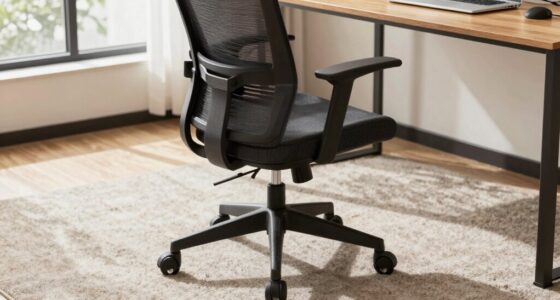
Start by examining your ergonomic accessories. Are your chair and desk at the right height? If your chair is too high or too low, you could be straining your neck, shoulders, or lower back without realizing it. Using an adjustable chair that supports your lumbar area can help maintain the natural curve of your spine. A footrest might also be necessary if your feet don’t rest flat on the ground, helping reduce pressure on your lower back and legs. Keep your monitor at eye level, so you aren’t tilting your head up or down. If needed, use risers or monitor stands to achieve this position, preventing neck strain. Ergonomic accessories aren’t just about gadgets; they’re about creating a setup that promotes natural, comfortable postures throughout the day.
Adjust your chair, desk, and monitor for optimal comfort and posture support throughout the day.
But accessories alone won’t fix everything. Posture awareness is key. Even with the best ergonomic tools, you might unknowingly adopt positions that cause tension. Regularly check in with how you’re sitting or standing. Are your shoulders relaxed and not hunched? Is your back supported? Are your wrists in a neutral position instead of bent at awkward angles? These small, conscious adjustments can prevent chronic pain. Incorporating posture awareness into your daily routine can significantly improve comfort and reduce strain. Developing habits that promote correct alignment, such as mindful sitting and standing, can help make these adjustments more natural. Remember that ergonomic setup can also influence your overall comfort, so ensuring your workspace is properly arranged is important. Incorporate brief breaks into your routine to stretch and reset your posture. Movements like shoulder rolls, neck stretches, or simple torso twists can alleviate built-up tension.
It’s also helpful to pay attention to how your body responds during the day. If you notice persistent stiffness, headaches, or discomfort, it’s a sign that something needs adjusting. Sometimes, it’s not just about the physical setup but about developing a habit of posture awareness. You can set reminders or use apps to prompt you to sit correctly or take breaks. Remember, the goal isn’t perfection but consistency. Small, mindful changes to your ergonomic accessories and posture awareness can profoundly reduce discomfort, making your workspace feel more comfortable—even if it initially seemed fine. Your body’s signals are valuable guides, so listen to them and tweak your setup accordingly.
adjustable ergonomic office chair
As an affiliate, we earn on qualifying purchases.
As an affiliate, we earn on qualifying purchases.
Frequently Asked Questions
How Can Mental Stress Affect Physical Discomfort Despite a Good Setup?
Stress impact can cause physical discomfort even if your setup feels right because the mind-body connection is powerful. When you’re mentally stressed, your muscles tense, and your posture can subtly shift, leading to aches or soreness. You might not realize it, but emotional strain affects your body’s physical state. Managing stress through relaxation techniques, mindfulness, or breaks can help ease this discomfort and improve your overall well-being.
Are There Specific Ergonomic Adjustments for Different Body Types?
Yes, tailor your ergonomic chair and adjustable desk to your body type. Shorter folks should lower the chair and raise the desk, while taller people need more legroom and higher surfaces. Curvy bodies might benefit from lumbar support or seat depth adjustments, and those with broader shoulders could opt for wider chairs. Remember, a one-size-fits-all setup is a myth—personalize your workspace for comfort, not just aesthetics.
How Long Should I Try a New Setup Before Deciding if It Works?
You should try a new setup for at least one to two weeks, giving your body enough time to adapt. During this period, focus on posture correction and workspace organization, making small adjustments as needed. Pay close attention to how your body feels after each workday. If discomfort persists, reassess your setup, but if you notice improvement, stick with it. Consistent evaluation helps identify what truly works for your body.
Can Internal Health Issues Cause Discomfort Even With Proper Setup?
Ever wonder if internal health issues could cause discomfort despite a proper setup? They definitely can. Dietary factors and hydration levels play significant roles in how your body feels. Even with perfect positioning, underlying conditions or nutritional imbalances might cause pain or discomfort. It is crucial to listen to your body and consult healthcare professionals if discomfort persists, as internal health factors often require targeted attention beyond setup adjustments.
What Role Does Sleep Quality Play in Physical Discomfort?
Sleep quality greatly impacts physical comfort. Poor sleep hygiene can lead to restless nights and inadequate restorative sleep, making your body more prone to discomfort. When you prioritize habits like consistent bedtimes, limiting screen time before bed, and creating a relaxing environment, you promote restorative sleep. This, in turn, helps your muscles and joints recover better, reducing pain and fatigue. Good sleep directly supports your physical well-being and overall comfort.
As an affiliate, we earn on qualifying purchases.
Conclusion
Sometimes, your setup might look perfect on paper, but your body whispers a different story. Think of your body as a delicate garden—it needs the right nutrients and care to thrive. When discomfort lingers, it’s like weeds sprouting unseen beneath the surface. Tweak your position, listen to your body’s signals, and nurture yourself like a gardener tending to fragile blooms. Only then can your body bloom in harmony, feeling just as fine as your setup looks.
As an affiliate, we earn on qualifying purchases.
As an affiliate, we earn on qualifying purchases.
Fall Picks
fall essentials
As an affiliate, we earn on qualifying purchases.