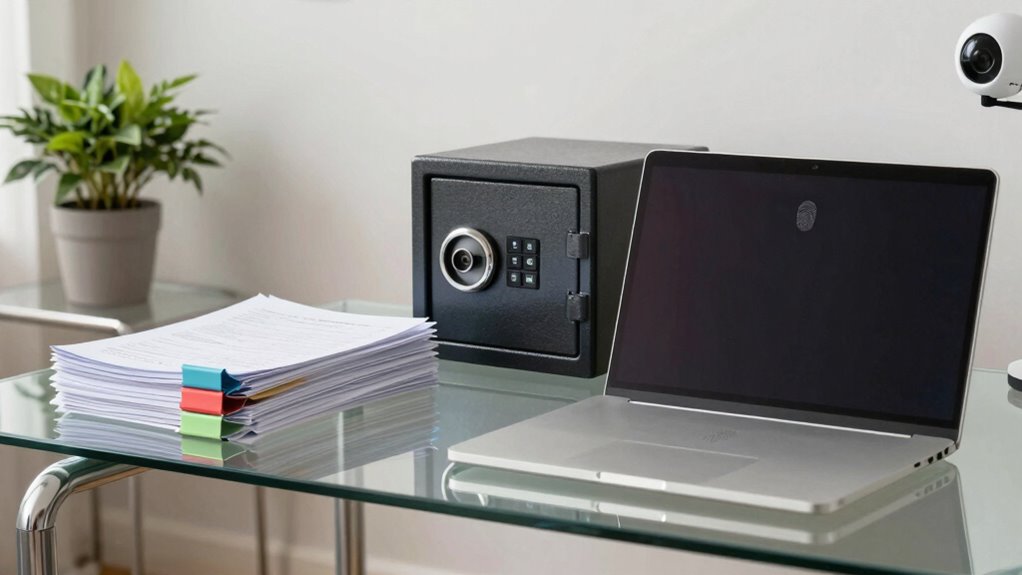

To protect your documents and devices in a home office, keep sensitive items locked away in safes or lockable cabinets when not in use. Use strong, unique passwords for Wi-Fi and regularly update your device software to prevent hacking. Back up important data automatically to the cloud and keep physical devices in lockable bags during transport. Installing security cameras and alarms adds extra deterrents. For more effective strategies, you’ll find helpful tips if you continue exploring this topic.

Get comfort and recovery gear delivered free with Prime
- Fast, free delivery on millions of items
- Prime Video, Amazon Music and more included
- Member-only deals all year
Key Takeaways
- Keep devices and sensitive documents locked away in safes or lockable cabinets when not in use.
- Use strong, unique passwords and encryption for Wi-Fi and all connected devices.
- Regularly update software and security patches to prevent vulnerabilities.
- Install security cameras and alarm systems to deter theft and unauthorized access.
- Implement cloud backups alongside physical security measures for comprehensive data protection.

Are you confident that your home office is secure enough to protect your sensitive documents and devices? If not, it’s time to evaluate your current security measures. One of the most effective ways to safeguard your important files is by implementing regular cloud backup. Cloud backup ensures that, even if your devices are stolen, damaged, or compromised by malware, your data remains safe and accessible from any location. You can set automatic backups so your files are consistently updated without extra effort, giving you peace of mind knowing your documents are protected against unexpected events. Additionally, relying solely on digital backups isn’t enough; you should also focus on physical security. Keeping your devices and documents locked away when not in use, using safes or lockable cabinets, helps prevent unauthorized access. This is especially vital if you have sensitive client information or personal data stored at home.
Physical security extends beyond just locking away documents. It’s wise to secure your entire home office with sturdy locks on doors and windows, and consider installing security cameras or alarm systems. These measures act as deterrents for potential thieves and provide evidence in case of a breach. When using portable devices like laptops and tablets, always keep them close and out of sight when not actively working. Carrying a lockable bag or case adds an extra layer of security during commutes or when moving around your home. You should also think about setting up a dedicated workspace that’s separate from common areas, making it less tempting for others to access your work-related items. Incorporating Indonesian decor masks can also add a cultural touch and create a more personalized and inspiring environment in your home office. Moreover, understanding the importance of cybersecurity can help you stay informed about new threats and best practices.
Furthermore, make sure your Wi-Fi network is protected by using a strong, unique password and enabling encryption protocols. An unprotected or weak Wi-Fi network can serve as a gateway for cybercriminals trying to access your devices remotely. Regularly update your device software and security patches, since outdated systems are more vulnerable to hacking. Taking these steps reduces your risk of data breaches and keeps your devices functioning securely. Remember, combining cloud backup with physical security measures creates an all-encompassing approach to protecting your home office. While digital safeguards shield your data, physical security prevents theft and unauthorized access to your devices and documents. Together, these strategies help you maintain control over your sensitive information and give you confidence in your home office’s security.
Products Worth Considering

Ring Alarm 8-Piece Kit (2nd Gen) Home Security System

Ring Alarm 14-Piece Wireless Security System Kit

Arlo Pro Wireless Security Camera, 2K HDR, 6th Generation, 4-Camera Kit
As an affiliate, we earn on qualifying purchases.
Frequently Asked Questions
How Often Should I Update My Home Office Security Measures?
You should update your home office security measures at least every three to six months. Regularly review your password management strategies, ensuring strong, unique passwords, and update them frequently. Incorporate the latest encryption techniques to safeguard sensitive data. Stay informed about security threats, and promptly implement updates or patches for your devices and software. Consistent updates help protect your documents and devices from evolving cyber threats effectively.
What Are the Best Practices for Secure Remote Access?
Ever had a moment when your remote work suddenly feels risky? To keep your data safe, use Virtual Private Networks to encrypt your connection and enable Multi-Factor Authentication for added security. Always update your software, avoid public Wi-Fi, and limit access to sensitive info. These best practices guarantee your remote access stays secure, protecting your work and personal information from potential threats.
How Can I Prevent Physical Theft of Devices?
To prevent physical theft of your devices, always use device locks, such as cable locks or cable locks with alarm features, and secure your equipment when not in use. Install surveillance cameras around your home office to deter thieves and monitor activity. Keep devices in locked drawers or cabinets and avoid leaving them in plain sight. These measures help safeguard your devices from theft and guarantee your sensitive information stays safe.
Are There Specific Software Protections for Mobile Devices?
Did you know that over 50% of mobile devices are vulnerable to hacking? You should definitely consider software protections like mobile encryption, which secures your data even if your device is lost or stolen. Also, review app permissions regularly, granting only necessary access. These steps help prevent unauthorized access, keeping your sensitive documents safe. Using strong passwords and enabling two-factor authentication further enhances your mobile security.
How Do I Securely Dispose of Sensitive Documents?
To securely dispose of sensitive documents, you should follow shredding protocols, ensuring all paper is thoroughly shredded to prevent data theft. For digital copies, use document encryption before deletion, making the data unreadable. Consider cross-cut shredding for added security and always double-check that electronic files are permanently erased. These steps help protect your information and prevent unauthorized access after disposal.
Conclusion
Think of your home office as a fortress, each document and device a precious treasure guarded by your vigilance. Lock doors on digital threats, shield your papers with careful habits, and stay alert like a watchful sentinel. By safeguarding these symbols of your work and trust, you create a sanctuary where productivity thrives and risks fade into the shadows. Keep your defenses strong, and your home office will remain a safe haven for your success.