If you want a reliable, responsive keyboard for work, a mechanical model may suit your needs better, especially if you value tactile feedback and durability. Mechanical keyboards react faster and can improve typing accuracy, making them ideal for intensive tasks. However, they tend to be noisier and more expensive than membrane options, which offer softer keys and quieter operation. To find out which fits your environment and preferences best, explore the detailed differences that follow.

Get comfort and recovery gear delivered free — and shop member deals
- Fast, free delivery on millions of items
- Access to Prime Big Deal Days deals on October 6–7
- Prime Video, Amazon Music and more included
Key Takeaways
- Mechanical keyboards offer faster response times and lower input delay, enhancing productivity for work tasks requiring precision.
- They provide tactile feedback and durability, reducing typing fatigue during long work sessions.
- Membrane keyboards tend to be quieter and more affordable, suitable for shared or quiet work environments.
- Mechanical options allow customization and aesthetic choices, which can improve user satisfaction and comfort.
- For long-term reliability and performance, mechanical keyboards generally deliver better value despite higher initial costs.
As an affiliate, we earn on qualifying purchases.
Understanding the Basic Differences Between Mechanical and Membrane Keyboards

While both mechanical and membrane keyboards serve the same basic purpose, their underlying designs differ considerably. Mechanical keyboards use individual key switch mechanisms for each key, providing tactile feedback and durability. These switches can vary in feel and sound, influencing your typing experience. In contrast, membrane keyboards rely on a rubber or silicone membrane beneath the keys, which registers keystrokes when pressed through pressure pads. The keycap materials also differ; mechanical keyboards often feature sturdy PBT or ABS keycaps that resist wear, while membrane keyboards tend to have thinner, more flexible keycaps that may wear faster. Additionally, the manufacturing quality of each keyboard type can significantly impact their performance and lifespan. The key feel of mechanical switches often offers more precise control, which can be crucial for tasks requiring accuracy.
As an affiliate, we earn on qualifying purchases.
Key Factors to Consider When Choosing a Keyboard for Work

When choosing a keyboard for work, your comfort and typing feel are vital factors. Consider how loud the keyboard is and whether noise might distract you or others nearby. Balancing these aspects guarantees you stay productive without unnecessary disruptions. Additionally, selecting a Free Floating keyboard can enhance ergonomics and improve typing precision, contributing to overall comfort during long work sessions.
Typing Comfort and Feel
Choosing a keyboard that feels comfortable and natural to type on can considerably boost your productivity and reduce fatigue during long work sessions. An ergonomic design guarantees your wrists and hands stay in a healthy position, minimizing strain. Pay attention to keycap material—smooth, high-quality keycaps can improve your typing feel and reduce finger fatigue. Mechanical keyboards often offer a more satisfying tactile response, making typing more engaging, while membrane keyboards tend to be softer and quieter. Consider how the key switches feel under your fingers; some prefer the crisp feedback of mechanical switches, others the gentle softness of membrane keys. Your comfort depends on your preferences for key travel, actuation force, and overall typing experience, helping you maintain focus without discomfort. Additionally, durable materials in the keyboard construction can ensure longevity and consistent performance over time.
A variety of key switch options is available to tailor the typing experience to your preferences, further enhancing comfort and efficiency.
Noise and Distraction Levels
The sound produced by your keyboard can profoundly impact your work environment, especially if you share a space or need to concentrate without interruptions. Mechanical keyboards tend to generate more noise, which can lead to increased distraction for you and others around you. If noise reduction is a priority, membrane keyboards generally produce quieter keystrokes, helping to minimize distractions and create a calmer workspace. This can be especially beneficial in open-plan offices or shared homes. Conversely, some mechanical keyboards offer quieter switches designed specifically for distraction minimization, but they may still be louder than membrane options. Consider your environment and your need for silence when choosing between the two, ensuring your keyboard supports a focused, disturbance-free work experience.
As an affiliate, we earn on qualifying purchases.
Typing Comfort and Ergonomics in Mechanical vs. Membrane Models

While both mechanical and membrane keyboards are popular choices, they differ considerably in how they feel during extended typing sessions. Mechanical keyboards often provide a satisfying tactile response, reducing finger fatigue with their ergonomic design. Membrane models tend to be softer, which can cause discomfort over time if your typing posture isn’t ideal. To visualize the difference, consider this table:
| Feature | Mechanical | Membrane | Your Experience |
|---|---|---|---|
| Key Resistance | Tactile, firm | Soft, sponge-like | Less strain, more control |
| Typing Feedback | Clear, audible click | Quiet, mushy | Better accuracy, less fatigue |
| Ergonomic Design | Often customizable | Generally basic | Supports better posture |
| Comfort Over Time | Higher, with proper setup | Lower, harder on fingers | Improves long-term comfort |
Choosing based on ergonomic design influences your overall typing posture and comfort.
customizable mechanical keyboard
As an affiliate, we earn on qualifying purchases.
As an affiliate, we earn on qualifying purchases.
Performance and Responsiveness for Professional Tasks

Your work depends on quick, accurate typing, so understanding how different keyboards affect speed and precision is vital. Key activation responsiveness and input delay can make or break your efficiency during tight deadlines. By comparing these factors, you’ll find the best fit for your professional needs. Additionally, connected keyboard technology enhances workflow by providing seamless integration with other devices, reducing latency and improving overall responsiveness. Incorporating performance metrics into your evaluation can help you choose the most suitable keyboard for demanding tasks. Considering wiring basics, such as cable quality and connection stability, can also impact overall responsiveness and reliability during long work sessions. Being aware of testing methodologies can further assist in assessing keyboard performance accurately. Paying attention to electrical noise and interference can help optimize your setup for consistent input accuracy.
Typing Speed and Accuracy
When it comes to professional tasks that demand quick and accurate typing, the choice between mechanical and membrane keyboards can considerably impact performance. Mechanical keyboards often enable higher typing speeds and better accuracy because their tactile feedback helps you register keystrokes more precisely. This tactile response not only enhances typing precision but also reduces the likelihood of mistakes during prolonged use. Additionally, keyboard responsiveness plays a crucial role in how quickly and accurately you can type during demanding tasks. Membrane keyboards, while generally softer and quieter, may lag slightly in responsiveness, which can affect your speed over long sessions. The design differences also influence user fatigue; mechanical keyboards typically provide more ergonomic options such as wrist rests and adjustable key layouts, helping to minimize strain during extended work periods. Aesthetic appeal also matters, as mechanical keyboards tend to have more customizable designs that can motivate you to work more comfortably. Furthermore, ergonomic benefits play a vital role in maintaining comfort and reducing discomfort over time. Ultimately, your choice influences how seamlessly you type, directly affecting your professional productivity.
Key Activation Responsiveness
Key activation responsiveness plays an essential role in professional tasks that require swift and accurate input. Your ability to quickly and reliably register keystrokes depends on this responsiveness. Mechanical keyboards generally offer superior key activation responsiveness due to their physical switches, providing immediate tactile feedback. This tactile feedback confirms your key press, reducing errors and increasing confidence during busy work sessions. Consider these points:
- Mechanical keyboards typically react faster, with less actuation force needed.
- Tactile feedback in mechanical switches enhances your awareness of a successful keystroke.
- Membrane keyboards often have a softer response, which can delay activation and reduce responsiveness.
Choosing a keyboard with better key activation responsiveness can boost your productivity and accuracy, especially during intensive typing tasks.
Latency and Input Delay
Latency and input delay directly impact your ability to perform professional tasks efficiently, as even slight delays can disrupt workflow and reduce accuracy. Mechanical keyboards generally offer lower latency, making switching preferences more seamless and responsive for tasks like coding or data entry. Membrane keyboards may introduce slightly more input delay, which can be noticeable during fast typing or precision work. Prioritizing low latency enhances your responsiveness, especially when timing is critical. Additionally, ergonomic benefits can influence your overall performance; a keyboard with minimal input delay reduces fatigue by decreasing the effort needed for accurate keystrokes. Choosing a keyboard with optimized latency and ergonomic design helps maintain your productivity and comfort during long work sessions, ensuring your input remains swift and precise throughout the day. Understanding latency and input delay can help you select the most suitable keyboard for your professional needs.
Noise Levels and Workplace Environment Impact

Mechanical keyboards are often louder than membrane models, which can substantially affect your workplace environment. The increased noise level may lead to coworker distraction or disturb the office space’s overall quiet. To manage this, consider these points:
- Use dampening pads or o-rings to reduce key noise on mechanical keyboards.
- Choose quieter switch types, like Cherry MX Silent or similar models.
- Position your keyboard away from shared work areas to minimize disruption.
- Opting for gelato flavors with milder textures can sometimes be a quieter alternative to high-impact typing, promoting a more peaceful workspace. Additionally, integrating connected technology such as noise-canceling peripherals can further enhance office tranquility.
If keeping noise levels low is a priority, membrane keyboards might be better suited, as they produce less sound and preserve a calmer office atmosphere. Being mindful of keyboard noise can help maintain productivity and prevent coworkers from feeling distracted during collaborative tasks.
Durability and Longevity of Mechanical and Membrane Keyboards

When considering the durability of your keyboard, it’s important to recognize that mechanical models generally outlast membrane ones due to their robust construction. Mechanical keyboards feature high-quality keycap material that resists wear and tear over time. Additionally, switch types like Cherry MX or Topre are built to withstand millions of keystrokes, making them more reliable for long-term use. Membrane keyboards, on the other hand, typically have softer keycap materials that degrade faster and switches that may fail sooner, leading to reduced lifespan. If you’re looking for a keyboard that can handle intensive daily use and maintain performance over years, a mechanical keyboard offers superior resilience. Its sturdy build ensures you’ll get more value and longevity from your investment. Durability of materials also plays a key role in determining the overall lifespan of a keyboard.
Maintenance and Cleaning Requirements

Cleaning your keyboard is essential for keeping it in good shape, but the ease of maintenance varies between models. Mechanical keyboards often have removable keys, making cleaning straightforward, while membrane keyboards can be more challenging to clean thoroughly. Consider how each type’s durability and wear resistance influence their long-term maintenance needs. Additionally, understanding the project management support provided by manufacturers can help ensure your keyboard remains in optimal condition over time. Regular cleaning can also extend the lifespan of your keyboard, especially when using proper cleaning techniques tailored to each type. For example, using compressed air can effectively remove dust and debris from internal components, reducing the risk of malfunctions. Proper maintenance can also prevent infection risks associated with accumulated dirt and bacteria on your keyboard surface. Maintaining a clean keyboard not only improves hygiene but also enhances overall performance and user experience.
Cleaning Procedures and Ease
Maintaining your keyboard’s cleanliness is essential for ideal performance and longevity. When cleaning, consider these key factors:
- Keyboard layout influences how easily you can access and clean each key; compact layouts may require more careful disassembly.
- Keycap material determines the cleaning method—plastic keycaps are often removable and washable, while others may need gentle wiping.
- Regularly removing keycaps allows you to clean beneath them, reducing dirt buildup and bacteria.
Membrane keyboards often have fewer crevices, making them easier to wipe down, whereas mechanical keyboards with removable keycaps require a bit more effort but allow for thorough cleaning. Knowing your keyboard’s layout and keycap material helps streamline your cleaning routine, ensuring it stays in top shape.
Durability and Wear Resistance
Mechanical keyboards typically offer superior durability and wear resistance compared to membrane models, making them a more reliable choice for heavy or prolonged use. The keycap material, often PBT or ABS, influences how well the keys withstand frequent typing without fading or cracking. PBT keycaps generally last longer and resist wear better than ABS ones. Additionally, switch lifespan plays a vital role; mechanical switches are rated for hundreds of thousands of keystrokes, far exceeding membrane switches. This means your keyboard will maintain performance over time, even with daily heavy use. Proper maintenance, like regular cleaning and avoiding excessive force, can extend the lifespan further. Furthermore, selecting high-quality materials and switch types can significantly improve the overall wear resistance of your keyboard. Overall, mechanical keyboards provide a more durable, long-lasting option thanks to their resilient keycap materials and longer switch lifespan. Regular upkeep, such as cleaning with appropriate tools, also helps preserve their durability over years of use.
Cost and Budget Considerations

When comparing mechanical and membrane keyboards, cost is a major factor to contemplate. The price differences between the two types can considerably impact your decision. Mechanical keyboards tend to be more expensive upfront, often costing three times more than membrane options. However, they’re known for durability, which can save you money long-term. If you’re on a tight budget, here are some tips:
Mechanical keyboards cost more initially but offer greater durability and long-term savings.
- Look for budget-friendly options in both categories.
- Consider refurbished or older models to cut costs.
- Weigh the long-term value—sometimes spending more initially pays off later.
While membrane keyboards are typically more affordable, mechanical keyboards offer better durability and feel, which might justify the higher price for many users. Ultimately, your budget and needs will guide the best choice.
Aesthetic and Customization Options

If you’re looking to personalize your keyboard’s appearance, both mechanical and membrane options offer various aesthetic options and customization features, but mechanical keyboards generally provide more extensive choices. Mechanical keyboards often have customizable keycaps, allowing you to select different colors, materials, and designs to match your style. RGB backlighting is common, enabling you to create vibrant lighting effects or subtle glows. You can also replace switches or add artisan keycaps for a unique look. Membrane keyboards tend to have limited aesthetic options, often focusing on basic color schemes without extensive lighting or customization. Overall, if visual personalization is important, mechanical keyboards give you more flexibility to tailor your setup to your preferences.
Which Keyboard Type Is Better Suited for Specific Work Scenarios
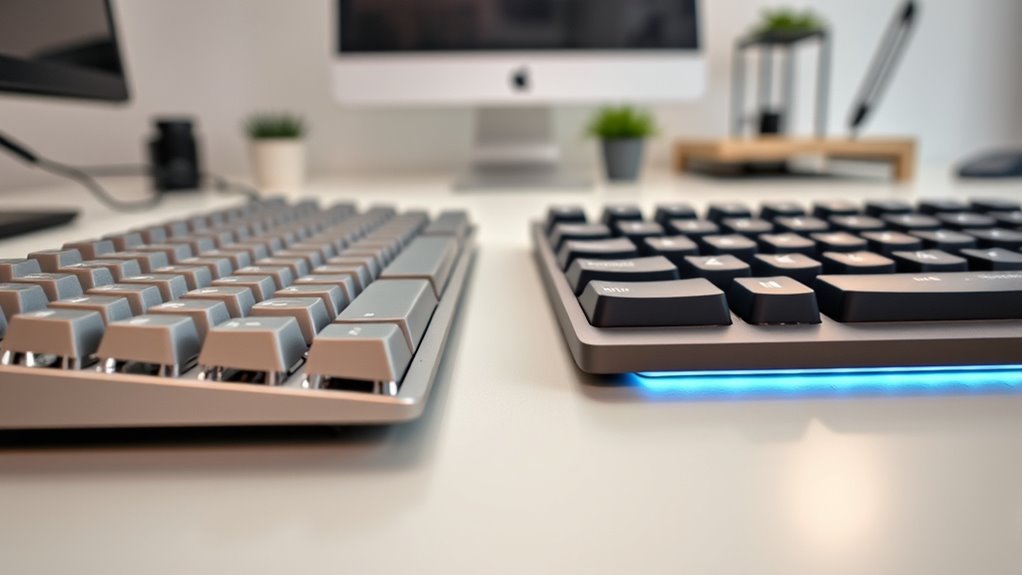
Choosing the right keyboard for your work scenario depends on your specific needs and priorities. Different tasks demand different features. For example:
- If you’re typing for long hours, a membrane keyboard with ergonomic benefits, like cushioned keys and wrist support, helps reduce fatigue.
- For creative work or frequent aesthetic customization, mechanical keyboards offer customizable keycaps and lighting, enhancing your workspace’s look.
- When precision and tactile feedback matter, such as coding or gaming, mechanical keyboards excel, providing better control and durability.
Ultimately, your choice hinges on balancing ergonomic benefits with aesthetic customization. If comfort is your priority, a membrane keyboard might suit you better. For a personalized, high-performance setup, a mechanical keyboard is often the better fit.
Frequently Asked Questions
How Do Mechanical and Membrane Keyboards Affect Typing Speed?
Mechanical keyboards typically boost your typing speed due to their tactile feedback, helping improve accuracy, but they can be noisier. Membrane keyboards tend to be quieter and may slow you down slightly because of less distinct key presses. If you prioritize speed and accuracy, mechanical keyboards are often better, but if noise levels matter, membrane keyboards might suit you more. Your choice impacts how quickly and accurately you type daily.
Are Membrane Keyboards More Energy-Efficient Than Mechanical Ones?
You’ll find membrane keyboards generally more energy-efficient than mechanical ones, using about 20-30% less power. This makes them a smart choice if you want to conserve energy, especially with multiple devices. Membrane keyboards’ lower energy consumption boosts power efficiency, helping your devices last longer on a single charge or reduce electricity costs. So, if saving energy is a priority, membrane keyboards are a practical, eco-friendly option for your work setup.
Can I Customize Key Switches on Membrane Keyboards?
You can’t typically customize switch types on membrane keyboards, as they don’t have individual switches like mechanical ones. However, some membrane keyboards offer switch replacement options or hotspot areas for customization. If switch customization is important, you might want to contemplate a mechanical keyboard, which allows for easy switch replacement and modification, giving you more control over your typing experience.
Which Keyboard Type Offers Better Compatibility With Different Devices?
You’ll find membrane keyboards generally offer better compatibility with various devices, providing seamless device connectivity and cross-platform compatibility. They connect effortlessly via USB or Bluetooth, making switching between computers, tablets, and smartphones smooth and simple. Mechanical keyboards, while durable, may require specific drivers or adapters, limiting their compatibility. So, if you need a versatile, plug-and-play option across multiple platforms, a membrane keyboard is your best bet.
Do Mechanical Keyboards Require More Maintenance Than Membrane Models?
Mechanical keyboards do require more maintenance than membrane models. You’ll need to check keycap durability regularly and clean out debris to keep them functioning smoothly. Additionally, switch lubrication can help reduce noise and improve feel, but it’s an extra step. Unlike membrane keyboards, mechanical ones demand ongoing care to maintain their performance, especially if you use them heavily. Regular cleaning and occasional switch lubrication are key to keeping your mechanical keyboard in top shape.
Conclusion
Ultimately, choosing between mechanical and membrane keyboards is like picking the right tool for your craft. Mechanical keyboards release a symphony of satisfying keystrokes, perfect for those who crave precision and durability, while membrane models keep things quiet and smooth, ideal for a bustling workspace. Consider your needs and workspace vibe—your perfect keyboard awaits, ready to become the trusted compass guiding your daily tasks through the digital landscape.
Fall Picks
fall essentials
As an affiliate, we earn on qualifying purchases.