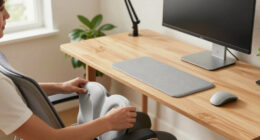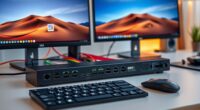
To upgrade your video calls using your phone or DSLR, start by choosing a compatible app or video capture device. For phones, apps like EpocCam or iVCam are easy to set up. For DSLRs, use a compatible capture card and camera software. Make certain your device has proper lighting and positioning at eye level for a professional look. Improving audio with quality microphones also helps. Keep experimenting with your setup, and you’ll discover even more ways to enhance your video quality.

Get comfort and recovery gear delivered free — and shop member deals
- Fast, free delivery on millions of items
- Access to Prime Big Deal Days deals on October 6–7
- Prime Video, Amazon Music and more included
Key Takeaways
- Use dedicated apps or software to connect your phone or DSLR to your computer as a webcam.
- Invest in a reliable video capture card for DSLR setups to ensure stable video transmission.
- Improve video quality with proper lighting, such as natural light or softbox/ring lights, and position your camera at eye level.
- Enhance audio clarity by using external microphones and soundproofing your recording environment.
- Regularly test and adjust your setup for optimal video and audio performance before important calls.

If you want to improve your video quality for calls, streams, or recordings, turning your phone or DSLR into a webcam is a smart solution. This setup can dramatically elevate your professional appearance and make your streams look more polished. To get started, focus on establishing a good lighting setup. Proper lighting is vital because it enhances clarity, reduces shadows, and highlights your features, creating a more engaging visual experience. Natural light works well if you position yourself near a window during the day, but for consistent results, invest in softbox lights or ring lights. These can provide even, flattering illumination that minimizes harsh shadows and ensures your face is well-lit, regardless of the time of day or your surroundings. Remember, the right lighting can make a significant difference in video quality, so experiment with different angles and intensities until you find what looks best.
Alongside lighting, pay attention to your audio quality. Clear, crisp sound is just as important as sharp visuals because it keeps your audience engaged and ensures your message comes across effectively. Use a good quality microphone, whether it’s a dedicated external mic or even a decent lapel mic, to reduce background noise and enhance voice clarity. Avoid relying solely on your camera’s built-in microphone, which often picks up echo or ambient sounds. Position the microphone close to your mouth, and consider using soundproofing or soft materials to dampen echo and further improve audio quality. Combining high-quality audio with excellent visuals creates a professional setup that viewers will appreciate. Additionally, choosing equipment compatible with your devices can improve overall stability and performance smart home integration.
Once you’ve optimized your lighting and audio, you’ll need to connect your phone or DSLR to your computer. Using a reliable video capture card for your DSLR or a compatible app for your phone, you can easily turn these devices into high-definition webcams. Most apps are user-friendly and offer step-by-step instructions, making setup straightforward even if you’re new to this process. Keep in mind that updating your device’s firmware and software can prevent connectivity issues and ensure smooth performance. Also, position your camera at eye level to establish a natural connection with your viewers, which adds to the professionalism and engagement of your video.
Frequently Asked Questions
Can I Use a Tablet as a Webcam?
Yes, you can use a tablet as a webcam. Check your tablet’s compatibility with webcam apps and your computer system first. You’ll also want to explore camera mounting options, like tripods or stands, to keep your tablet steady during calls. With the right app and setup, your tablet’s camera can deliver clear video quality, making it a convenient and cost-effective alternative to dedicated webcams.
What Are the Best Apps for Turning Phones Into Webcams?
Think of your phone as a window to the world; the best apps like DroidCam and EpocCam turn it into a webcam through a wireless connection. These apps are compatible with various operating systems and offer easy setup, making your video calls sharper. Choose one that fits your device, ensuring smooth app compatibility and a stable wireless connection. Now, your calls will be clearer and more professional, opening new windows of opportunity.
How Do I Ensure Low Latency During Video Calls?
To guarantee low latency during video calls, you should prioritize network stability by using a wired Ethernet connection instead of Wi-Fi whenever possible. Also, optimize your hardware by closing unnecessary apps and updating your device drivers or firmware. This reduces processing delays and stabilizes the connection, resulting in smoother video. Regularly check your internet speed and ensure your webcam setup is compatible and optimized for minimal lag.
Are There Compatibility Issues With Different Video Conferencing Platforms?
Imagine your camera stream flowing seamlessly into every platform you use. Compatibility issues can be minimized by checking each platform’s supported software and ensuring you have the latest updates installed. Keep your software current; it’s like tuning your instrument before a concert. This way, your DSLR or phone camera works smoothly across platforms, preventing glitches and ensuring your video quality stays sharp no matter where you connect.
How Do I Secure My Camera Feed From Unauthorized Access?
You secure your camera feed by enabling camera encryption if available, which encrypts the data during transmission. Set strict access permissions on your device and app, allowing only trusted users to access the camera. Regularly update your software to patch security vulnerabilities. Use strong, unique passwords for your accounts and disable remote access features unless necessary. These steps help prevent unauthorized access and keep your video feed private.
Conclusion
Using your phone or DSLR as a webcam truly upgrades your video calls, offering sharper images and better flexibility. It’s a simple, cost-effective way to improve your online presence. Some might think dedicated webcams are always better, but with the right setup, your smartphone or camera can outperform many. This proves that with a little effort, you can turn everyday devices into powerful tools, enhancing your communication without breaking the bank.
Fall Picks
fall essentials
As an affiliate, we earn on qualifying purchases.