For a comfortable home office, keep your room temperature between 68-72°F (20-22°C) to stay focused and avoid fatigue. Maintain air quality by ensuring good ventilation, using air purifiers, and balancing humidity around 40-60%. Proper airflow reduces stale air and prevents musty odors, creating a healthier environment. Achieving the right temperature and air quality boosts your comfort and productivity—stick around to discover simple ways to optimize your workspace even further.
Key Takeaways
- Maintain indoor temperatures between 68°F and 75°F (20°C-24°C) for optimal comfort and productivity.
- Keep humidity levels between 40% and 60% to prevent dryness or excess moisture.
- Ensure proper ventilation with fresh air exchange using windows, exhaust fans, or air purifiers.
- Use air purifiers with HEPA filters to reduce airborne pollutants and improve air quality.
- Regularly monitor temperature and humidity to adjust ventilation and humidification systems accordingly.

Creating a comfortable home office starts with the right room temperature and air quality. When you’re working from home, it’s essential to create an environment that keeps you alert and focused. One key aspect is ensuring proper ventilation strategies. Good airflow prevents stale air from building up and helps regulate temperature naturally. If your space feels stuffy, consider opening windows or using exhaust fans to introduce fresh air. Modern ventilation systems can also help maintain consistent airflow, especially if you’re in a closed room. Proper ventilation doesn’t just improve air freshness; it also reduces indoor pollutants, making your workspace healthier. Additionally, using air purifiers equipped with HEPA filters can further enhance indoor air quality by removing airborne particles, allergens, and pollutants. Humidity control is equally important to maintain comfort. Too much moisture can lead to a muggy, uncomfortable environment, while too little can cause dryness that irritates your eyes, skin, and respiratory system. Ideally, indoor humidity levels should stay between 40% and 60%. To achieve this, you might use a humidifier during dry months or a dehumidifier when the air feels damp. Controlling humidity not only makes the room more pleasant but also protects electronic equipment and furnishings from damage caused by excess moisture or dryness. You should also be mindful of how ventilation strategies and humidity control work together. For instance, if you’re using a humidifier, make sure your ventilation isn’t allowing too much dry air to enter, which could negate the benefits. Conversely, if you’re running a dehumidifier, ensure your ventilation doesn’t introduce excessive moisture. Balancing these elements creates a stable environment where temperature feels consistent, and air quality is ideal. In addition to mechanical systems, simple habits can help. Regularly opening windows during the day can enhance ventilation and help regulate humidity naturally. Keep an eye on indoor air quality using a hygrometer to monitor humidity levels and adjust your systems accordingly. If you notice musty odors or excess condensation, it’s a sign you need to tweak your ventilation or humidity controls. Remember, maintaining a steady temperature combined with proper humidity levels creates an environment where you can work comfortably for hours without distraction. Ensuring proper air circulation helps promote a healthier, more comfortable workspace. Ultimately, a well-ventilated space with humidity control fosters better concentration, reduces fatigue, and promotes overall well-being. By paying attention to these factors, you’re not just creating a comfortable home office—you’re investing in your health and productivity. Maintaining the right balance of air quality and temperature ensures your workspace remains inviting, fresh, and conducive to work at all times.

Samsonite Lumbar Support Pillow for Office Chair, Lower Back Support for Car, Back Pillow Desk Chair Cushion with Memory Foam, Improved Posture Backrest
- Contouring Memory Foam: Supports spine and maintains posture
- Adjustable Secure Fit: Fits office chairs and car seats
- Ventilated Mesh Cover: Enhances airflow and cooling
As an affiliate, we earn on qualifying purchases.
Frequently Asked Questions
How Does Humidity Affect Comfort in a Home Office?
Humidity levels directly impact your comfort in a home office. When humidity is too high, you might feel sticky, sweaty, or stuffy, making it hard to concentrate. Low humidity can cause dryness, irritation, and discomfort. By maintaining proper moisture control, ideally between 40-60%, you keep the air balanced. This creates a pleasant environment, reduces fatigue, and helps you stay focused and productive throughout your workday.
What Are the Signs of Poor Air Quality Indoors?
You might notice a lingering musty smell, frequent sneezing, or headaches—clear signs your indoor air quality is poor. An air purifier can help remove pollutants, but if odors persist or your ventilation system isn’t working well, these issues worsen. Pay attention to condensation on windows or stuffy rooms. These subtle clues warn you that your environment needs better airflow and cleaner air to stay healthy and comfortable.
Can Plants Improve Air Quality in My Home Workspace?
Yes, plants can improve air quality in your home workspace. They offer plant benefits like natural air purification by absorbing toxins and increasing humidity. Adding greenery not only enhances the look of your office but also helps reduce airborne pollutants, creating a healthier environment. Keep in mind some plants are more effective than others, so choose those known for their air-purifying qualities to maximize your workspace’s air quality benefits.
How Often Should I Change My Air Filters?
Think of your air filter as a diligent gatekeeper; it needs regular breaks to stay effective. You should change your air filter every 1 to 3 months, depending on usage and air quality. Following a consistent filter maintenance schedule keeps your home’s air fresh and clean, preventing dust and allergens from building up. Don’t wait until the filter’s lifespan is up—stay proactive to breathe easy in your workspace.
What Are the Health Risks of Temperature Fluctuations?
Temperature fluctuations can harm your health by disrupting thermal comfort, causing stress, fatigue, and headaches. Rapid changes may weaken your immune system and increase susceptibility to colds or respiratory issues. Additionally, inconsistent temperatures can worsen air pollution indoors, trapping pollutants and allergens. Staying consistent with your home’s temperature helps maintain better air quality and reduces health risks like respiratory irritation and thermal discomfort, keeping you healthier and more comfortable.

Lumbar Support Pillow for Office Chair,Mothers Day Gifts for Mom, Back Support Pillow for Car, Office Supplies, Chair Cushions, Back Pain Relief Improve Posture, Mesh Cover Double Adjustable Straps
- Extended Adjustable Straps: Fits more chairs securely
- Ergonomic Back Support: Relieves back pain and tightness
- Supports Proper Posture: Maintains natural spine curve
As an affiliate, we earn on qualifying purchases.
Conclusion
Maintaining the right room temperature and air quality can boost your productivity by up to 15%. Keep your home office between 68-72°F and guarantee proper ventilation to stay alert and comfortable. Did you know that indoor air can be two to five times more polluted than outdoor air? By paying attention to these factors, you create a healthier, more efficient workspace, making every workday more enjoyable and effective.
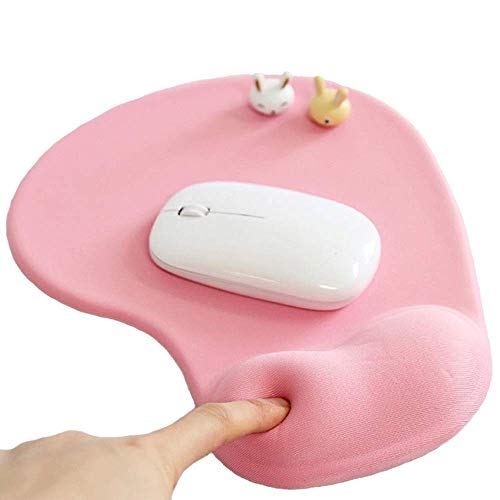
Office Mousepad with Gel Wrist Support - Ergonomic Gaming Desktop Mouse Pad Wrist Rest - Design Gamepad Mat Rubber Base for Laptop Computer -Silicone Non-Slip Special-Textured Surface (01Pink)
- Ergonomic Gel Wrist Support: Cradles wrist to reduce strain
- Smooth Lycra Surface: Ensures seamless, precise mouse movement
- Non-Slip Rubber Base: Provides stable, secure placement
As an affiliate, we earn on qualifying purchases.

Sushret Mouse Pad and Keyboard Wrist Rest, 3-in-1 Gel Memory Foam Ergonomic Mouse Pad with Wrist Rest Set,Gaming Mousepad Arm Cushion Support for Computer Office Desk Accessories Cute Setup,Sage Green
- Breathable, Long-Lasting Comfort: Smooth milk fiber surface with supportive memory foam
- Two Comfort Options: Standard memory foam or upgraded gel + foam version
- Anti-Slip PU Base: Stable grip for secure placement during use
As an affiliate, we earn on qualifying purchases.