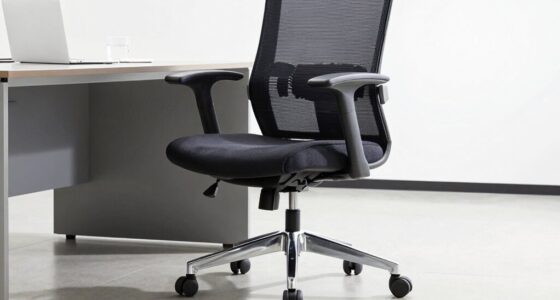

To spot ergonomic red flags in under 5 minutes, start by checking if your shoulders are relaxed or hunched and see if your head tilts forward or your neck cranes. Look for signs of discomfort, like stiffness or the need to shift often, and confirm your monitor is at eye level. Notice if your feet are flat and your workspace supports relaxed arms and wrists. Catching these early cues can help prevent long-term issues—keep going for more tips.

Get comfort and recovery gear delivered free — and shop member deals
- Fast, free delivery on millions of items
- Access to Prime Big Deal Days deals on October 6–7
- Prime Video, Amazon Music and more included
Key Takeaways
- Check if shoulders are relaxed and not hunched or tense during work.
- Observe if the head tilts forward or neck cranes, indicating poor monitor placement.
- Ensure feet are flat on the floor or footrest, not dangling or unsupported.
- Look for slouching, leaning forward, or rounded shoulders while working.
- Identify persistent discomfort or frequent adjustments that suggest workstation misalignment.

Are you aware of the warning signs that indicate your workspace might be causing ergonomic issues? If not, taking just a few minutes to assess your environment can make a big difference. The key is to quickly identify red flags that suggest your workstation setup isn’t supporting your body properly. You don’t need to be an expert—just focus on your posture, equipment placement, and any discomfort you’re experiencing. Your goal is to spot issues early before they develop into chronic problems.
Start by doing a quick posture analysis. Sit in your usual position at your desk and ask yourself if you’re slouching, leaning forward, or craning your neck. A poor posture often signals that your workstation setup isn’t aligned with your body’s natural ergonomics. Are your shoulders relaxed or hunched? Is your back supported by your chair’s lumbar support? If your head tilts forward or your shoulders round inward, these are red flags. Pay attention to whether your feet are flat on the floor or on a footrest, and if your knees are bent at a comfortable angle. If you find yourself stretching or adjusting constantly, it’s a sign that your current setup isn’t optimal. Recognizing ergonomic red flags early can help you prevent long-term discomfort and injury. Additionally, understanding workplace ergonomics can guide you in making informed adjustments that promote comfort and health. Being aware of ergonomic principles can also help you optimize your workspace for better posture and reduced strain. Incorporating proper adjustments can make a significant difference in maintaining good posture throughout your workday. Remember, small ergonomic improvements can lead to a more comfortable and productive work environment.
Check your posture: are your shoulders relaxed, back supported, and feet flat for optimal comfort?
In just five minutes, you can identify many red flags by paying attention to how your body feels and how your equipment is arranged. Notice if you’re experiencing discomfort, stiffness, or pain—these are signs your workstation isn’t supporting good ergonomics. Small adjustments can improve your posture and reduce strain, making your workday more comfortable and preventing long-term injuries. Remember, the proper setup plays a crucial role in maintaining your overall health and wellbeing while working. The goal is to create a workspace that encourages healthy posture and minimizes unnecessary stress on your body. With a quick posture analysis and a keen eye on your workstation setup, you can spot ergonomic red flags before they become a problem.
ergonomic office chair with lumbar support
As an affiliate, we earn on qualifying purchases.
As an affiliate, we earn on qualifying purchases.
Frequently Asked Questions
Can Ergonomic Issues Cause Long-Term Health Problems?
Yes, ergonomic issues can cause long-term health problems if you ignore them. Poor posture correction and improper equipment adjustments lead to chronic pain, joint issues, and repetitive strain injuries. When you maintain correct posture and regularly adjust your workspace, you reduce these risks. Identifying red flags early helps you prevent long-term damage, ensuring your body stays healthy and comfortable during prolonged work sessions.
Are Ergonomic Red Flags the Same for All Work Environments?
No, ergonomic red flags aren’t the same across all work environments. You need to take into account workplace-specific factors like workstation customization and employee training. For example, a desk setup might be fine in an office but inadequate in a manufacturing setting. Pay attention to issues like poor posture, awkward positions, or repetitive motion that differ depending on your environment. Tailoring ergonomic solutions ensures you address the unique needs of each workspace.
How Often Should Ergonomic Assessments Be Performed?
You should perform ergonomic assessments at least once every six months to guarantee your workstation setup remains ideal. Regular assessments help you identify issues with your posture correction and workstation ergonomics early. If you notice discomfort or new symptoms, do an assessment sooner. Maintaining good posture, adjusting your workspace, and addressing ergonomic red flags promptly can greatly reduce strain and prevent injuries, keeping your work environment safe and comfortable.
What Tools Can Help Identify Ergonomic Red Flags Quickly?
You can use wearable devices and ergonomic checklists to quickly identify red flags. Wearables monitor posture and movement in real-time, alerting you to issues like slouching or strain. Ergonomic checklists provide a quick visual guide to assess workstation setup and body positioning. Combining these tools helps you spot potential problems fast, ensuring you can make immediate adjustments to prevent discomfort or injury.
Do Ergonomic Red Flags Vary by Age or Physical Condition?
Think of ergonomic red flags as warning signs on a trail. As you age, your trail markers—like age-related ergonomics—may shift, making certain hazards more obvious or subtle. Physical condition considerations also influence what feels uncomfortable or risky. You, as a hiker, need to recognize that these signs vary depending on your age and physical state, helping you adjust your path to stay safe and comfortable.
adjustable monitor stand for eye level
As an affiliate, we earn on qualifying purchases.
As an affiliate, we earn on qualifying purchases.
Conclusion
So, next time you ignore those red flags, remember: your body’s trying to tell you something’s wrong—yet, somehow, you keep pushing through. It’s ironic, isn’t it? We chase productivity but overlook the signs that could save us from pain. Spotting ergonomic red flags in five minutes might seem small, but ignoring them could turn your workday into a long, painful saga. Pay attention now—your future self will thank you, or maybe just complain a little less.
As an affiliate, we earn on qualifying purchases.
ergonomic keyboard and mouse set
As an affiliate, we earn on qualifying purchases.
As an affiliate, we earn on qualifying purchases.
Fall Picks
fall essentials
As an affiliate, we earn on qualifying purchases.