TL;DR
An ergonomic office chair is designed to support different postures and adjust to your body and workstation. Check seat height and depth, back support, armrests, and stability, then adjust your desk and screen to match. Comfort also depends on changing positions and taking movement breaks; a chair alone cannot guarantee pain prevention or relief.
By midafternoon, your chair can feel like a hard ledge, your shoulders creep toward your ears, and your feet search for a comfortable place to land. A chair with the word “ergonomic” on its label may help you make adjustments, but that label does not tell you whether its dimensions suit your body or desk.

Get comfort and recovery gear delivered free with Prime
- Fast, free delivery on millions of items
- Prime Video, Amazon Music and more included
- Member-only deals all year
This guide explains what to check before you buy, how to set up the chair you already own, and why comfort depends on more than sitting in one “perfect” pose. You’ll get practical fit checks, a comparison of common materials, and a simple setup sequence you can try at your desk. The goal is supportive, comfortable work—not a promise that a chair will prevent or treat pain.
Set seat height with your feet on the floor or a footrest, then leave a small gap behind your knees.
Adjust back support to feel comfortable and allow position changes; a stronger lumbar curve is not always better.
Set armrests so they support your forearms without lifting your shoulders or blocking the desk.
Compare mesh and padding by personal comfort, fit, and care needs rather than material alone.
Check dimensions, warranty, return options, and replacement parts; price and feature count do not guarantee a good fit.
What an Ergonomic Office Chair Should Let You Change
An ergonomic office chair is a chair designed to support a range of postures and let you adjust its fit to your body and workstation. Useful controls often include seat height and depth, backrest recline, and armrest position. Those adjustments matter because a chair is the contact point between your body and the desk: if its seat is too high, your feet may dangle; if its arms or depth are wrong, you may have to reach or shift forward. The point is practical: you can make the chair suit your proportions instead of trying to make your body suit a fixed seat.
Think of setting up a chair like adjusting a bicycle before a ride. You might move the saddle and handlebars so you can reach comfortably; with a chair, you adjust the seat, back, and arms so you can work without feeling squeezed or stretched. A bicycle that fits poorly can still roll, but the rider has to compensate; a chair can be usable while still encouraging awkward reaches or pressure points. If the controls are difficult to find or the adjustments don’t cover your needs, a long list of features won’t help much.
For example, imagine working from home at a compact desk. A chair with armrests that cannot move may stop you from rolling close enough to reach the keyboard. That can leave you leaning forward, even though the chair has a “premium” label. Lowering or repositioning the arms could solve the mismatch, while a model with fixed arms may simply not suit that desk. Fit and usable adjustments matter more than the name on the box.
“Ergonomic” does not guarantee a medical benefit or a universal certification. Check the chair’s actual dimensions and adjustment range, and, if possible, try it before you buy. Your height, body proportions, tasks, and preferences all affect whether a chair feels suitable. More adjustments can offer more ways to get a fit, but they add little value if the range is wrong for you or the controls are confusing.
Products Worth Considering
Bose SoundLink Max Portable Bluetooth Speaker, IP67 Waterproof, Black

Hisense 75-Inch U7 Mini-LED ULED 4K UHD Smart Google TV (75U7SG)

Sonos Arc Ultra Soundbar with Dolby Atmos, Black
As an affiliate, we earn on qualifying purchases.
Check Seat Height and Depth With Two Simple Fit Tests
Set seat height so your feet rest on the floor or a footrest, then check that the seat supports your thighs without pressing into the backs of your knees. These two checks give you a practical starting point; they’re more useful than copying a picture of someone else’s posture, because people’s legs and desks differ. Together they balance two needs: stable support from your feet and enough seat contact to avoid concentrating pressure at the front edge.
Start with the height. Sit back, place your feet flat if they reach, and notice whether your knees feel comfortable rather than jammed up or hanging. If you need the seat high to reach a tall desk, a footrest can give your feet somewhere steady to land. Supporting your feet gives your legs a stable base; dangling feet can make it harder to settle comfortably. Picture a person at a kitchen counter turned makeshift desk: raising the chair alone might leave their feet dangling, so the footrest completes the setup. If the desk still makes your shoulders rise or forces your arms into an awkward position, the chair height may not solve the whole workstation mismatch.
Next, check the depth. With your back against the backrest and feet supported, leave a small gap between the seat’s front edge and the backs of your knees. The seat should carry most of your thighs without pressing into them. That gap leaves room for the seat edge without sacrificing too much support: a seat that is too deep may press behind your knees or encourage you to slide forward, while one that is too shallow gives less thigh support and may feel unstable. If the seat is adjustable, moving it can help; if it is fixed, your body proportions may make another chair a better match.
Try this test after sitting for a few minutes, not just during a quick showroom perch. Your clothes, movement, and work habits can change how the seat feels. Notice whether you can sit back, shift position, and keep your feet supported without repeatedly readjusting. A coworker who is shorter than you may prefer a different seat depth even when you share the same desk, so a single setting is not a reliable fit standard for everyone.
Choose Back Support That Moves With You
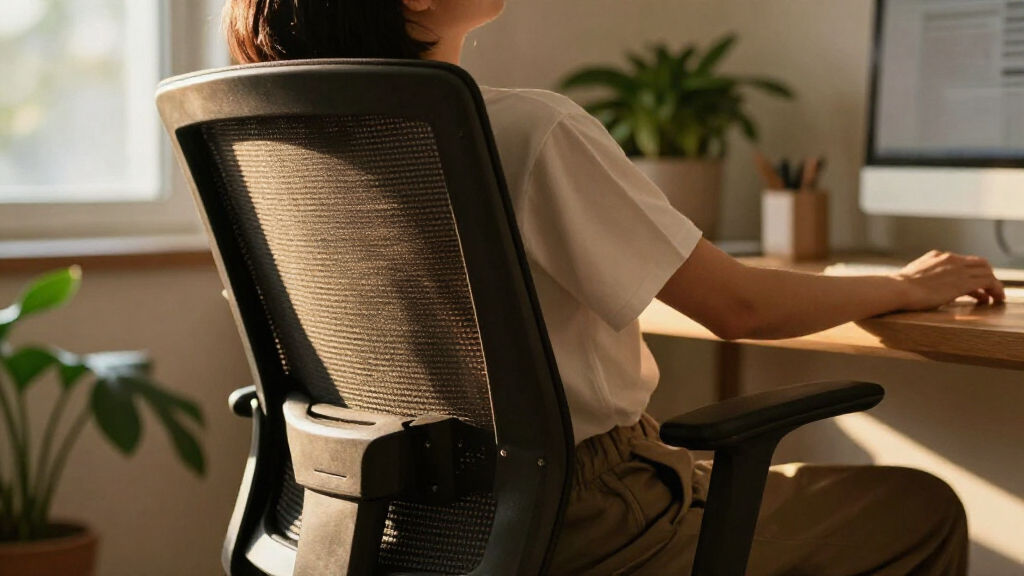
Good back support feels comfortable and lets you change position; it does not force you to hold one rigid pose all day. A backrest should support your lower back in a way that suits its shape and position, while letting you recline or shift when you need to. A pronounced lumbar curve is not automatically better if it presses in the wrong place. Pressure in one spot can make a feature intended as support feel distracting, so adjustability and personal comfort matter more than how prominent the curve looks.
Think of the backrest like a hand resting lightly behind you: supportive, but not pushing you into a fixed position. If a lumbar pad feels like a hard lump, try adjusting its height or pressure, if the chair allows it. If it still feels intrusive, the backrest shape may not suit you. One person may like a firm curve during focused typing, while someone else may prefer a flatter backrest that moves with them during calls. These preferences can also vary with the task, which is one reason a backrest that allows recline or adjustment can be useful.
An active sitting design may use a flexible back or recline mechanism that encourages movement. That can make it easier to vary your posture, but a chair with sensors or posture reminders cannot replace a comfortable fit or a walk to refill your water. A reminder might nudge you to stand after a long spreadsheet session; it cannot decide what movement works for you. Treat such features as prompts, not proof that the chair fits or that you are moving enough.
There is no single ideal sitting posture to maintain for an entire workday. Changing position helps avoid treating one pose as a fixed target, and movement breaks add activity that chair adjustments cannot provide. Use the chair to support comfortable positions, then change them as your schedule allows. If you have persistent or severe pain, get advice from a qualified health professional; a chair is not a diagnosis or treatment.
Set Armrests and Your Desk So Your Shoulders Can Relax
Armrests should support your forearms without lifting your shoulders or keeping you too far from the desk. Adjust them so your shoulders can rest naturally as you sit, then check whether you can roll close enough to reach your keyboard and mouse. This matters because raised shoulders or repeated forward reaches can make an otherwise comfortable chair awkward to use. Arms that feel supported in the showroom may still get in the way of your work surface at home.
Use this quick sequence when you set up an ergonomic office:
- Set seat height with your feet supported.
- Adjust seat depth so it supports your thighs without pressing behind your knees.
- Set the backrest and recline to a comfortable position.
- Move armrests until your forearms feel supported and your shoulders stay relaxed.
- Place your keyboard and mouse within easy reach, and set your screen where you can look comfortably.
The order helps because each adjustment affects the next: armrests are easier to judge once your seat and back are set, and desk reach is easier to assess once your sitting position is stable. Suppose you spend the morning writing emails and the afternoon on video calls. If your armrests bump the desk, you may sit too far back and reach forward for the keyboard. Lowering or repositioning the arms—or choosing a chair with arms that move out of the way—can make it easier to get close to the desk. The tradeoff is that removing arm support may leave your forearms unsupported during tasks, so try the position you will actually use.
Chair adjustments work best alongside the rest of the workstation. You should be able to reach your keyboard and mouse without stretching, and the screen should sit where looking at it feels comfortable. If you change desk or chair height, recheck the other contact points: a seat setting that supports your feet may alter how your arms line up with the desk. Treat the chair and desk as a team: adjusting one without checking the other can leave you compensating with your shoulders or back.
Compare Mesh, Padding, and Features Before You Buy
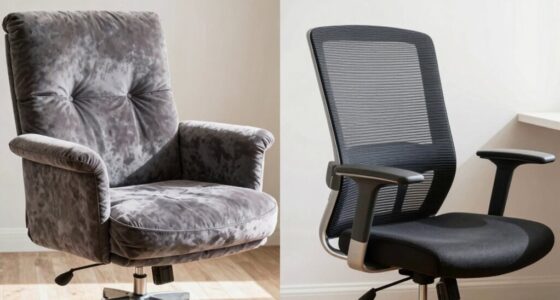
Mesh may feel cooler, while padded upholstery may feel softer; neither material is best for everyone. Compare how a chair feels after you sit in it, how it fits your body, and whether its parts suit your workspace. Material changes the experience at the seat and back, but it cannot make the wrong dimensions fit. The material you notice first can matter less than a seat that presses behind your knees or armrests that block your desk.
| Feature | What you may like | What to check |
|---|---|---|
| Mesh | Airflow and a lighter feel | Whether the tension and seat edge feel comfortable |
| Padded upholstery | A softer, cushioned surface | Whether the padding stays comfortable during longer sessions |
| More adjustments | More ways to match the chair to your body | Whether the controls are easy to use and suit your needs |
| Modular or lower-impact materials | Parts that may be replaceable and material choices you prefer | Manufacturer details, care instructions, and parts availability |
Picture testing two chairs in a warm home office: one has a breathable mesh seat that feels cool but too firm, while a padded chair feels soft at first and then presses into the thighs. The first may help with heat but still feel uncomfortable under pressure; the second’s initial softness may not last through a longer session. That short tryout points to what you should investigate further, not a universal rule about materials. Try sitting long enough to notice pressure and movement, and check whether the seat edge suits your legs.
Price alone does not establish fit or durability. Compare the chair’s dimensions, warranty, care instructions, and availability of replacement parts. A longer warranty or replaceable component can matter if you expect to keep the chair for years, while a complex feature may be wasted if you do not need it. Recent designs may offer more adjustment options, breathable fabrics, recycled materials, or modular construction, but product claims and availability change, so check the manufacturer’s current specifications.
Make a Shortlist That Fits Your Body and Budget
Choose a chair by checking fit, adjustments, and service details, not by counting features or trusting a high price. A chair should work for your body, your tasks, and the space around your desk. If possible, try it in person or buy from a seller with a clear return policy, since a five-minute sit can reveal discomfort that a product photo cannot. A trial also helps you judge controls and reach, details that specifications alone may not capture.
Start with the dimensions that matter to you. If you are short, check whether the seat can move low enough and whether its depth leaves a gap behind your knees. If you work in a small room, measure how far the chair can roll under the desk and whether its base fits between furniture. For instance, a wide chair with fixed arms may feel luxurious in a showroom and become awkward beside a narrow home desk. This is a space tradeoff: a broader base or fixed arms may limit how close you can sit, even if the chair feels comfortable in an open display area.
Then check the working details: are the controls easy to reach, does the backrest recline comfortably, and can you adjust the arms out of the way? Read the warranty and see whether the maker offers parts you could replace. Warranty terms and parts availability can affect the cost of keeping a chair usable over time, though they do not tell you whether it fits today. These checks can help you compare two models with very different prices without assuming the more expensive one will suit you better.
Before ordering, write down your desk height, the space under it, and any seat dimensions you know work for you. That little list turns shopping from a guessing game into a practical comparison. Check which needs are essential—such as reaching the desk with your feet supported—and which are preferences, such as a particular fabric or extra recline setting. If a chair cannot meet a basic fit need, an extra feature is unlikely to make it the right match.
Frequently Asked Questions
What makes an office chair ergonomic?
An ergonomic chair lets you adjust its fit to your body and workstation. Look for a suitable seat, comfortable back support, useful armrest adjustments, and a stable base; the label alone does not guarantee a fit.
Should my feet touch the floor when I sit?
Ideally, your feet rest on the floor or a footrest while you sit comfortably. If the chair needs to be high to match your desk, a footrest can support your feet.
How do I know if the seat is the right depth?
With your feet supported and back against the backrest, the seat should support most of your thighs while leaving a small gap behind your knees. If the front edge presses into them, adjust the depth if you can or try another chair.
Is a mesh chair better than a padded chair?
Neither is universally better. Mesh may feel cooler, while padding may feel softer; comfort, seat fit, build quality, and care needs matter more than the material by itself.
Can an ergonomic chair prevent back pain?
A well-fitted chair may make desk work more comfortable for some people, but it cannot guarantee that pain will be prevented or relieved. Workstation setup, movement, and individual health also play a part; seek qualified advice for persistent or severe pain.
Are expensive ergonomic chairs worth the price?
Some higher-priced chairs offer more adjustments, materials, or warranty coverage, but cost does not guarantee a good match. Compare the dimensions and return policy, and try the chair if possible.
Conclusion
Start with the fit checks: support your feet, leave room behind your knees, and set the backrest and arms so you can work comfortably. Then arrange your desk and screen to match, and make space in your day to shift position and move.
The best chair is the one that works with your body and your workday—not the one with the most impressive label. Let comfort be something you adjust as you go, like turning a lamp until the page is clear.