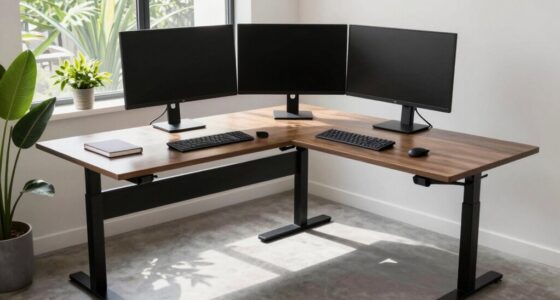
To create a comfy standing desk area, start by organizing your workspace and choosing ergonomic accessories like a monitor stand, ergonomic keyboard, and anti-fatigue mat to reduce strain. Incorporate a height-adjustable desk or converter to switch between sitting and standing easily, along with a stool for rest. Good lighting and tidy cables contribute to comfort, while accessories that support your posture keep you supported throughout long sessions. Keep exploring to discover even more tips for a perfect setup.
Key Takeaways
- Use an anti-fatigue mat with cushioning and slip resistance to reduce foot and leg strain while standing.
- Incorporate an adjustable stool or sit-stand chair to allow comfortable posture shifts during work sessions.
- Position ergonomic accessories like monitor stands and keyboard trays at eye level and within easy reach.
- Ensure proper lighting and cable management to create a clutter-free, visually comfortable workspace.
- Keep the area organized with storage solutions to minimize movement and promote a healthy, efficient environment.

Creating a comfortable standing desk area is essential for maintaining productivity and reducing discomfort during long work sessions. When you prioritize ergonomic accessories and workspace organization, you set yourself up for a more efficient and enjoyable work environment. The right accessories help prevent fatigue and strain, allowing you to stay focused longer. Start by evaluating your workspace and identifying what needs improvement. A cluttered desk can lead to unnecessary stress and distraction, so organizing your space is a crucial first step. Use storage solutions like shelves, drawers, or cable management tools to keep your essentials within reach but out of the way.
Prioritize workspace organization to reduce stress and improve efficiency during long standing work sessions.
Ergonomic accessories play a vital role in creating a setup that supports your body. A quality monitor stand or adjustable arm ensures your screen stays at eye level, reducing neck strain. Adding a keyboard tray or an ergonomic keyboard allows you to maintain a natural wrist position, preventing repetitive strain injuries. A comfortable, anti-fatigue mat is a simple yet effective upgrade that minimizes pressure on your feet and legs as you stand. When choosing a mat, look for one with sufficient cushioning and slip resistance to enhance safety and comfort. Additionally, incorporating workspace organization techniques can streamline your environment and promote better posture.
To further improve your workspace organization, consider incorporating a height-adjustable desk or a standing desk converter. These allow you to switch between sitting and standing seamlessly, promoting movement and reducing stiffness. When outfitting your area, include a sturdy stool or sit-stand chair. This gives you an option to rest and shift your posture without completely sitting down, which can help alleviate pressure on your lower back and legs. Position your accessories so that everything you need is easily accessible, minimizing unnecessary movement that could cause discomfort or strain.
Lighting also matters—good task lighting reduces eye strain, making it easier to focus. Keep your cables tidy with clips or sleeves to prevent tangling and tripping hazards. Remember, workspace organization isn’t just about aesthetics; it’s about creating a functional environment that encourages good posture and easy movement. When your tools and accessories are thoughtfully arranged, you’ll spend less time searching for items and more time working efficiently. Incorporate ergonomic accessories that support proper body alignment, and keep your workspace tidy to foster a productive, comfortable standing desk area. By paying attention to these details, you’ll enjoy a healthier, more sustainable work routine that keeps you energized and focused throughout the day.

Lumbar Support Pillow for Office Chair,Mothers Day Gifts for Mom, Back Support Pillow for Car, Office Supplies, Chair Cushions, Back Pain Relief Improve Posture, Mesh Cover Double Adjustable Straps
- Extended Adjustable Straps: Fits more chairs securely
- Ergonomic Back Support: Relieves back pain and tightness
- Supports Proper Posture: Maintains natural spine curve
As an affiliate, we earn on qualifying purchases.
Frequently Asked Questions
What Are the Best Materials for Standing Desk Mats?
You should choose standing desk mats made from high-quality ergonomic design cushioning materials like foam, rubber, or gel. These materials provide excellent support, reduce fatigue, and improve comfort throughout your workday. Look for mats with dense, durable cushioning that absorbs shock and offers stable footing. Prioritizing these materials guarantees your standing desk setup stays comfortable, minimizes strain, and promotes better posture during long hours.
How Often Should I Switch Between Sitting and Standing?
Think of switching between sitting and standing as a dance that keeps you balanced. You should change positions every 30 to 60 minutes to maximize ergonomic benefits and prevent muscle fatigue. This rhythm allows your muscles to rest and recover, reducing strain. Regular adjustments help you stay comfortable and alert, making your workspace feel like a well-choreographed routine that keeps you moving smoothly throughout the day.
Can a Stool Improve Comfort During Standing Work?
Yes, a stool can improve your comfort during standing work by promoting an ergonomic posture and providing foot support. It encourages you to shift weight, reducing fatigue and strain on your legs and lower back. Using a stool allows you to alternate between standing and sitting, helping maintain better alignment and circulation. Incorporate it into your setup to stay comfortable and focused during long periods of standing.
What Height Should a Standing Desk Be Set At?
Imagine your workspace as a symphony where every note must be perfect. Set your standing desk to elbow height—generally around 39-45 inches—so you maintain an ergonomic posture. Adjust the desk height to guarantee your forearms are parallel to the floor and your shoulders stay relaxed. Proper desk height adjustment minimizes strain, boosts comfort, and keeps you energized throughout your workday.
Are There Portable Options for a Standing Desk Setup?
Yes, you have several portable solutions for a standing desk setup. You can choose adjustable laptop stands, portable desk converters, or foldable workstations that easily move with you. These mobility options allow you to switch between sitting and standing throughout the day, making it convenient to work comfortably anywhere. Look for lightweight, compact designs that fit your space and needs, ensuring you stay active and ergonomic on the go.
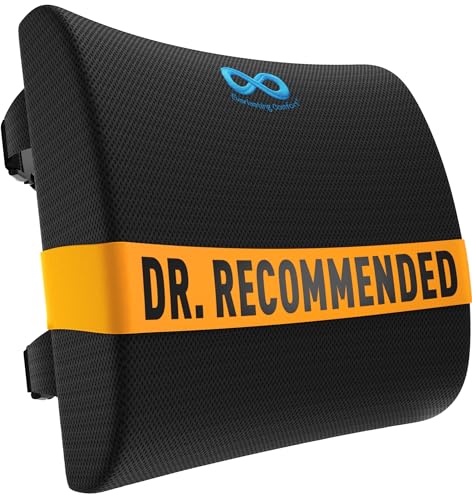
Everlasting Comfort The Original Lumbar Support Pillow for Office Chair - Improves Posture, Promotes Back Pain Relief - Superior Back Support for Gaming and Desk Chairs - Lumbar Pillow for Car, Couch
- High-Density Memory Foam: Balances firm support with comfort
- Supports Natural Spine Curve: Encourages better posture and reduces slouching
- Versatile Use: Suitable for office chairs, cars, couches, and recliners
As an affiliate, we earn on qualifying purchases.
Conclusion
Creating your ideal standing desk area is like crafting a cozy nook amidst a bustling world. With the right mat, stool, and thoughtful touches, you’ll find yourself gently sinking into comfort, making each work session feel like a peaceful retreat. Embrace these small details, and watch how they subtly transform your space into a sanctuary where productivity and relaxation dance in harmony. After all, a little comfort goes a long way in brightening your day.

Samsonite Lumbar Support Pillow for Office Chair, Lower Back Support for Car, Back Pillow Desk Chair Cushion with Memory Foam, Improved Posture Backrest
- Contouring Memory Foam: Supports spine and maintains posture
- Adjustable Secure Fit: Fits office chairs and car seats
- Ventilated Mesh Cover: Enhances airflow and cooling
As an affiliate, we earn on qualifying purchases.