If you’re looking to create a more comfortable and ergonomically sound workspace, you’ve come to the right place. This comprehensive checklist is designed for professionals, remote workers, and anyone eager to improve their desk setup for better health and productivity. Whether you’re setting up a new office or upgrading existing equipment, you’ll find practical tips and trusted product recommendations here.
This guide is organized into key categories that cover all the essential ergonomic tools. Each section features a detailed overview, including what to look for when choosing, common mistakes to avoid, and compatibility advice. Use this checklist as a handy reference to make informed decisions and assemble a workspace that promotes comfort and efficiency.
To get started, simply review each section carefully and consider your specific needs and space constraints. Remember, ergonomic investments are about quality and fit—prioritize comfort and adjustability over price alone. With these insights, you’ll be well on your way to a healthier, more productive work environment.
Ergonomic Office Chairs
An ergonomic office chair is the cornerstone of a healthy workspace. The Steelcase Gesture Office Chair is designed to support a wide range of postures, making it ideal for long hours at the desk. Its adjustable features, including armrests and lumbar support, help maintain proper alignment and reduce strain. When choosing a chair, focus on adjustable height, seat depth, and lumbar support to ensure a personalized fit. An incorrect chair size can lead to discomfort and long-term health issues, so test for proper fit and adjustability before purchasing.
Common mistakes include selecting a chair based solely on appearance or ignoring adjustability options. Always verify that the chair suits your height and desk setup. Consider the material and cushioning as well; breathable fabrics and sufficient padding promote comfort during extended use. Additionally, check the base and wheels for stability and ease of movement, especially if you have a dynamic work routine. An ergonomic chair should encourage good posture without sacrificing comfort.
What to look for:
- Adjustable seat height and depth
- Lumbar support that fits your spine
- Breathable, durable fabric
- Smooth-rolling casters suitable for your flooring

Steelcase Gesture Office Chair - Ergonomic Work Chair with Wheels for Carpet - Comfortable - Intuitive-to-Adjust for Desk - 360-Degree Arms - Graphite Gray Fabric
Ergonomic Chair Design: The Gesture chair by Steelcase is expertly designed to redefine the relationship between you and...
As an affiliate, we earn on qualifying purchases.
Steelcase Gesture Office Chair – Ergonomic Work Chair with Wheels for Carpet – C

The Steelcase Gesture Office Chair is an ergonomic, adjustable chair designed for long hours of comfortable use. It features 360-degree arms, a contoured back, and intuitive adjustments to support various postures and enhance productivity.
Pros:
- Ergonomic design supports long hours of comfortable sitting
- Adjustable features for personalized fit
- Contoured back aligns with natural spine shape
- Smooth-rolling wheels suitable for carpeted floors
Cons:
- May be expensive compared to basic office chairs
- Adjustments might require some time to master
Best for: Long hours at a desk
Not ideal for: Limited adjustability or poor lumbar support
Bottom line: Invest in a chair that fits your body and workspace.

FLEXISPOT Executive Standing Desk with Drawer, 55 x 24 Inch Sit-Stand Workstation with Hidden Storage and Wireless Charging, Fluted Japandi Design, Brown
JAPANDI FLUTED DESIGN: Inspired by Japandi aesthetics, this executive standing desk features sculptural fluted legs and a refined...
As an affiliate, we earn on qualifying purchases.
Adjustable Standing Desks
An adjustable standing desk like the FLEXISPOT Executive Standing Desk allows you to switch between sitting and standing, which can help reduce fatigue and improve posture. The 55 x 24-inch surface provides ample space for multiple monitors, keyboard, and other essentials. When choosing a sit-stand desk, prioritize models with smooth height adjustments, sturdy construction, and easy-to-use controls. Proper height adjustment ensures your monitor is at eye level and your elbows are at a comfortable 90-degree angle, preventing strain.
Many buyers make the mistake of selecting a desk that is either too high or too low, which can cause neck, shoulder, or back pain. Measure your standing and sitting heights to choose the right model. Look for desks with a wide adjustment range and stability features, especially if you use heavy equipment. Consider desks with integrated storage or drawers for convenience, but ensure they do not compromise stability. Compatibility with existing furniture and your workspace layout should also influence your choice.
What to look for:
- Smooth height adjustment mechanism
- Sturdy frame and base
- Adequate surface space
- Easy-to-use controls
Amazon Product B0G3PJC1DJ
As an affiliate, we earn on qualifying purchases.
FLEXISPOT Executive Standing Desk with Drawer, 55 x 24 Inch Sit-Stand Workstatio

The FLEXISPOT Executive Standing Desk features a sleek Japandi-inspired design with fluted legs and a refined silhouette. It offers adjustable height, integrated wireless charging, and concealed storage to create a clean, organized, and modern workspace.
Pros:
- Stylish Japandi design with fluted legs
- Adjustable height for sit-stand comfort
- Integrated wireless charging surface
- Concealed storage keeps workspace tidy
Cons:
- Assembly may require some effort for beginners
- Limited color options
- Price may be high for budget-conscious buyers
Best for: Alternating sitting and standing
Not ideal for: Limited height range or wobbliness
Bottom line: Choose a desk that adapts to your work style seamlessly.

Secretlab Magnus Monitor Arm (Heavy Duty Edition) - Designed for Ultrawide Monitors - Up to 57 inches, 18 to 35lbs - Includes Heavy-Duty tilt Pivot
Made exclusively for ultrawide gaming monitors, including the Samsung Odyssey Neo G9 gaming monitor. Find the perfect position...
As an affiliate, we earn on qualifying purchases.
Lumbar Support Cushions
A lumbar support cushion like the Ergonomic Waist Support and Seat Cushion can make a significant difference in maintaining proper spinal alignment. Its L-shaped memory foam pad contours to your lower back, providing targeted support that reduces fatigue and discomfort. When selecting a lumbar cushion, look for adjustable straps or positioning options to ensure a snug fit. The material should be breathable and durable, especially if you sit for extended periods.
Common pitfalls include choosing cushions that are too soft or too firm, which may not provide adequate support. Also, ensure the cushion is compatible with your chair’s size and shape. Proper placement is key—position the cushion so that it supports the natural curve of your lumbar spine. For added comfort, choose cushions with removable covers for easy cleaning. Remember, the right lumbar support can help prevent chronic back pain and improve your overall posture.
What to look for:
- Adjustable straps or positioning features
- Memory foam or supportive material
- Breathable fabric cover
- Compatibility with your chair size
Ergonomic Waist Support and Seat Cushion, L-Shaped Memory Foam Pad, Hollow Desig
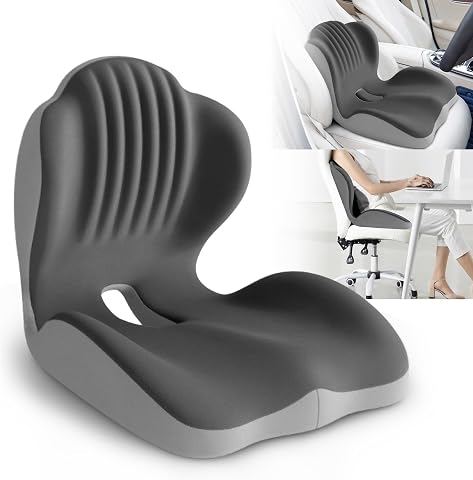
This ergonomic seat cushion features a hollow design and high-density memory foam to support the lumbar and coccyx, promoting better posture and reducing lower back and hip pain. Suitable for office chairs, car seats, wheelchairs, and gaming chairs, it provides long-lasting comfort and support for extended sitting periods.
Pros:
- Provides ergonomic support to reduce back and hip pain
- Universal fit suitable for various chairs and seats
- Made with durable, long-lasting memory foam
Cons:
- May have an initial odor that dissipates over time
- Size may not be suitable for users over 80 kg
- Requires 1-3 hours to regain shape after unpacking
Best for: Reducing lower back strain
Not ideal for: Lack of adjustability or poor fit
Bottom line: Select a lumbar cushion that offers firm, adaptable support.
Monitor Arms & Stands
The Secretlab Magnus Monitor Arm (Heavy Duty Edition) is designed to keep your monitor at the perfect height and angle, reducing neck strain and improving ergonomics. Adjustable monitor arms are essential for customizing your workspace, especially if you use multiple screens or need to switch positions frequently. When choosing a monitor arm, look for compatibility with your monitor size and weight, as well as smooth adjustment mechanisms that allow for height, tilt, and swivel adjustments. Secure mounting options ensure stability, even with heavy or multiple monitors.
Many overlook the importance of proper monitor positioning, which can lead to neck and eye strain. Avoid fixed stands that limit adjustability, and opt for versatile arms that allow you to set your screens at eye level and close to your line of sight. Check for cable management features to keep your workspace tidy. Properly mounted monitors can also improve desk space and overall ergonomics, making your work setup more efficient and comfortable.
What to look for:
- Compatibility with monitor size and weight
- Adjustability for height, tilt, and swivel
- Secure mounting options
- Cable management features
Secretlab Magnus Monitor Arm (Heavy Duty Edition)
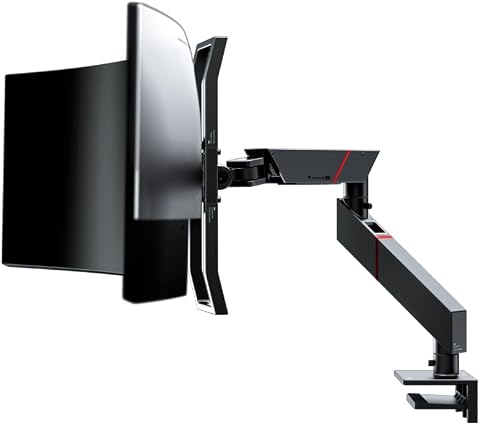
The Secretlab Magnus Monitor Arm is designed for ultrawide gaming monitors up to 57 inches and 35 lbs. It features smooth, dynamic movement with a tensile spring mechanism, secure VESA mounting, and easy cable management.
Pros:
- Designed specifically for ultrawide monitors, including large gaming screens
- Smooth, dynamic movement with premium tensile spring mechanism
- Secure VESA mounting with double lock mechanism
- Easy cable management with built-in channels and magnetic sheaths
Cons:
- May be heavy to install for some users
- Designed primarily for ultrawide monitors, not suitable for smaller screens
- Requires a desk thickness between 10mm and 50mm
Best for: Multi-monitor setups
Not ideal for: Incompatible or limited adjustability
Bottom line: Invest in a monitor arm that enhances your viewing comfort.
Anti-Fatigue Mats
While no specific product is recommended, an anti-fatigue mat can be a game-changer for those who stand for long periods. These mats provide cushioning and shock absorption, reducing pressure on your feet, legs, and lower back. When selecting an anti-fatigue mat, look for a high-quality, non-slip surface and sufficient thickness to provide comfort without compromising stability. Consider the size and shape to ensure it fits comfortably in your workspace and accommodates your standing position.
Common mistakes include choosing mats that are too thin, which offer minimal relief, or those that slip easily on smooth floors. Proper placement is essential—position the mat directly under your standing area for maximum benefit. Regularly inspect for wear and tear, and clean as needed to maintain safety and hygiene. Incorporating an anti-fatigue mat can significantly enhance your standing desk experience, helping you stay comfortable and focused throughout the day.
What to look for:
- High-quality, non-slip surface
- Adequate thickness for cushioning
- Size that fits your workspace
- Durable and easy to clean
Desk Footrests
The DeskCycle Under Desk Elliptical Machine with magnetic resistance offers a unique way to stay active while working. This compact elliptical provides low-impact exercise, helping improve circulation and reduce fatigue. When selecting a desk footrest or under-desk equipment, consider size, resistance levels, and noise level. A good footrest should be stable, quiet, and adjustable to fit your height and workspace constraints. Maintaining proper foot positioning supports your legs and back, promoting better posture overall.
Many users make the mistake of choosing equipment that is either too bulky or too noisy, disrupting their workflow. Look for products with adjustable resistance to match your activity level and ensure smooth operation. Compatibility with your desk height and available space is also crucial. A well-chosen under-desk elliptical can turn a passive sitting session into an opportunity for movement, making your workday more dynamic and health-conscious.
What to look for:
- Adjustable magnetic resistance
- Quiet operation
- Compact size
- Stable base for safety
DeskCycle Under Desk Elliptical Machine with Magnetic Resistance

The DeskCycle Under Desk Elliptical Machine is a compact, quiet exercise bike designed for seated leg workouts. It features magnetic resistance with 8 levels, a large LCD display, and adjustable pedals, making it suitable for improving fitness, increasing productivity, and physical therapy.
Pros:
- Quiet and smooth operation
- Adjustable resistance levels for customized workouts
- Large LCD display for tracking workout metrics
- Adjustable pedals for versatile elliptical motion
Cons:
- Limited weight capacity of 40 lbs
- May be less suitable for intense or heavy users
- Requires space under a desk for optimal use
Best for: Incorporating movement into your day
Not ideal for: Unstable or noisy equipment
Bottom line: Opt for a stable, adjustable under-desk elliptical for better circulation.
Before finalizing your ergonomic upgrades, consider your budget and prioritize the items that will make the most immediate impact on your comfort. Starting with a quality chair and adjustable desk can set a strong foundation for your workspace. Remember, ergonomic improvements are investments in your health and productivity, so choose wisely and take your time to select the right products.
With this checklist as your guide, you’re well-equipped to create a workspace that supports your well-being and enhances your work experience. Happy shopping, and enjoy the benefits of a more comfortable, ergonomic office setup!