When searching for a monitor light bar, the main goal is to enhance your workspace lighting without causing glare or screen reflection. The BenQ ScreenBar Pro stands out as the best overall for its balanced features and eye-care technology, while the Xiaomi Mi Computer Monitor Light Bar offers a budget-friendly choice with solid performance. Other standout options include models with customizable color temperatures and wireless controls for added convenience. The key tradeoffs often involve balancing price, ease of use, and advanced features like auto-dimming or RGB backlights. Continue reading for a detailed breakdown of these options and how to choose the best fit for your setup.

Get comfort and recovery gear delivered free — and shop member deals
- Fast, free delivery on millions of items
- Access to Prime Big Deal Days deals on October 6–7
- Prime Video, Amazon Music and more included
Complete the kit



Key Takeaways
- The top picks all excel in reducing glare and eye strain, which is essential for long hours at the screen.
- Auto-dimming and adjustable color temperature are features that significantly improve usability, especially in varied lighting conditions.
- Wireless controls and remote dimming add convenience but often come at a higher price point.
- Budget options like Xiaomi still offer reliable performance, but may lack some premium features like RGB lighting or extensive adjustability.
- Design compatibility, especially for curved or ultrawide monitors, is crucial for seamless integration and effective illumination.
| Quntis Curved Monitor Light Bar 15 RGB Backlight for 34+ Inch Screens |  | Best for Large Ultrawide and Curved Monitors | Length: 26 inches | Curvature Compatibility: 34+ inch monitors, 800R to 3000R | Color Temperature: 3000K to 6500K | VIEW ON AMAZON | See Our Full Breakdown |
| BenQ ScreenBar Pro LED Monitor Light Bar (Silver) |  | Best for Glare-Free, Ergonomic Illumination | Brightness: Over 1000lx central, 500lx range | Monitor Compatibility: 0.17″ – 2.56″ thick, 1000-1800R curvature | Sensor Range: 24″ ± 4″ diameter | VIEW ON AMAZON | See Our Full Breakdown |
| Monitor Light Bar, Eye-Care USB Reading Monitor Lamp, 11.8” LED Computer Lights with Ultrawide Lighting, Dimmable Desk Light for Home Office Gaming |  | Best for Compact, Budget-Friendly Task Lighting | Light Source Type: LED | Power Source: USB | Voltage: 5 volts | VIEW ON AMAZON | See Our Full Breakdown |
| BenQ ScreenBar Pro LED Monitor Light Bar (Black) |  | Best for Premium, Automatic Eye Care | Brightness: Over 1000lx central, 500lx range | Monitor Compatibility: 0.17″ – 2.56″ thick, 1000-1800R curvature | Sensor Range: 24″ ±4″ diameter | VIEW ON AMAZON | See Our Full Breakdown |
| BenQ ScreenBar Halo 2 LED Monitor Light Bar with Wireless Controller and Eye-Care Technology |  | Best for Wireless Convenience and Ambient Backlighting | Backlight: Adjustable ambient | Front Light Technology: Asym-Light | Brightness Range: Stepless | VIEW ON AMAZON | See Our Full Breakdown |
| Quntis Computer Monitor Lamp, Screen Monitor Light Bar for Eye Care, Dimmable USB Reading LED Task Lamp with Auto-Dimming, Touch Control, No Glare, Space-Saving Home Office Desk Light |  | Best Overall for Eye Comfort and Space Efficiency | Light Source Type: LED | Number of Light Sources: 78 | Wattage: 5 watts | VIEW ON AMAZON | See Our Full Breakdown |
| Xiaomi Mi Computer Monitor Light Bar |  | Best for Minimalist, Space-Saving Workspace Lighting | Wireless Remote Control: Yes | Color Rendering Index: Ra95 | Flicker Free: Yes | VIEW ON AMAZON | See Our Full Breakdown |
| BenQ ScreenBar LED Monitor Light Bar – Auto-dimming, Adjustable Brightness and Color Temperature, No Screen Glare, Space-Saving, Eye-Care USB Monitor Lamp | 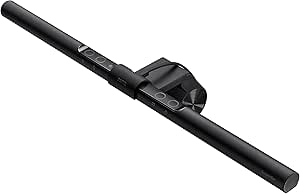 | Best for Versatile, Adjustable Workspace Illumination | Bulb Base: E26 Medium | Switch Type: Touch | Additional Features: Adjustable Color Temperature, Color Changing, Dimmable | VIEW ON AMAZON | See Our Full Breakdown |
| Monitor Light Bar, Eye-Care USB Computer Monitor Lamp for Home Office Gaming, 15.7” Ultrawide LED Light, 3 Color Temperatures Stepless Dimming Screen Bar |  | Best for Wide Coverage and Large Screens | Size: 15.7 inches | Brightness: 900 lux | Color Temperatures: 3000K-6500K | VIEW ON AMAZON | See Our Full Breakdown |
| Quntis Computer Monitor Light Bar with Backlight | 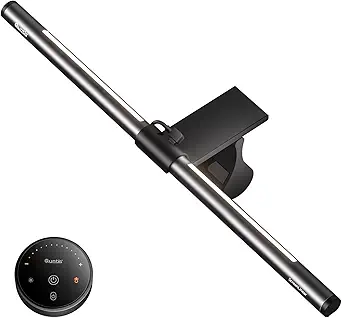 | Best for Multi-Mode, Smart Lighting Control | Length: 16.1 inches | Lighting Modes: 3 modes (Work, Immersive, Design) | Backlight Adjustment: Brightness only | VIEW ON AMAZON | See Our Full Breakdown |
| Quntis White Monitor Light Bar with Backlight |  | Best Overall for Versatile Adjustable Lighting | Length: 16.1 inches (41 cm) | Color: White | CRI: 95 | VIEW ON AMAZON | See Our Full Breakdown |
| YEELIGHT Monitor Light Bar, USB Eye-Care Desk Lamp with Stepless Dimming and Color Temperature Adjustment |  | Best for High-Color Accuracy and Sleek Design | Bulb Base: B15D | Switch Type: Touch | Additional Features: Dimmable | VIEW ON AMAZON | See Our Full Breakdown |
| Quntis Monitor Light Bar with Remote Control, Dimmable Screen Light for Curved and Flat Monitors |  | Best for Auto-Dimming and Timer Features | Size: 20.1 inches | Color Temperature: 3000K-6500K | CRI: 95 | VIEW ON AMAZON | See Our Full Breakdown |
| monitor light bar | Power Source |
|---|---|
| Quntis Curved Monitor Light Ba | USB |
| BenQ ScreenBar Pro LED Monitor | USB-C or included adapter |
| Monitor Light Bar | USB |
| BenQ ScreenBar Pro LED Monitor | — |
| BenQ ScreenBar Halo 2 LED Moni | — |
| Quntis Computer Monitor Lamp | — |
| Xiaomi Mi Computer Monitor Lig | — |
| BenQ ScreenBar LED Monitor Lig | Corded Electric |
| Monitor Light Bar | USB |
| Quntis Computer Monitor Light | USB |
| Quntis White Monitor Light Bar | — |
| YEELIGHT Monitor Light Bar | USB |
| Quntis Monitor Light Bar with | USB |
More Details on Our Top Picks
Quntis Curved Monitor Light Bar 15 RGB Backlight for 34+ Inch Screens
The Quntis Curved Monitor Light Bar excels at illuminating expansive ultrawide and curved screens over 34 inches, making it ideal for immersive gaming or creative work. Its adjustable color temperature and RGB modes allow for personalized ambiance, surpassing simpler single-color options like the Monitor Light Bar. The space-saving hanging design avoids clutter and fits various monitor sizes, but its reliance on USB power and complex remote controls may deter less tech-savvy users. Compared to the BenQ ScreenBar, it offers more RGB options but lacks waterproofing and is more suited to dry environments. Tradeoffs include limited waterproofing and a slightly more complex setup.
Pros:- Adjustable color temperature and brightness for tailored lighting
- 15 RGB backlight modes to enhance ambiance
- Space-efficient hanging mount fits various monitor sizes and curves
- Eye-friendly design with anti-blue light certification
Cons:- Requires USB connection, limiting placement flexibility
- Limited waterproofing, unsuitable for humid environments
- Remote control can be complex for some users
Best for: Buyers with large, curved, ultrawide monitors seeking customizable, eye-friendly lighting for creative or gaming use
Not ideal for: Users with small or flat monitors, or those who prefer plug-and-play simplicity without remote controls
- Length:26 inches
- Curvature Compatibility:34+ inch monitors, 800R to 3000R
- Color Temperature:3000K to 6500K
- Brightness Levels:4 preset + stepless
- RGB Modes:15
- Power Source:USB
- Material:Aluminum
- Mounting Type:Hanging
- Dimensions:66 cm (26 inches)
Our verdict“This pick is perfect for those with large, curved monitors who want highly customizable and immersive lighting options.”
BenQ ScreenBar Pro LED Monitor Light Bar (Silver)
The BenQ ScreenBar Pro sets itself apart with ultrawide, glare-free lighting designed to reduce eye strain during long work or gaming sessions. Its adjustable brightness and color temperature, combined with a smart motion sensor, make it a straightforward upgrade over basic bars like the Monitor Light Bar. However, its compatibility depends on monitor size and curvature—ideal for monitors between 0.17″ and 2.56″ thick—and it’s not as portable, making it less suitable for users needing flexible setups. Compared with the Quntis Curved Light, it offers more automatic features but at a higher price point. Tradeoffs involve limited monitor compatibility and a fixed setup for desktop use.
Pros:- Glare-free, ultrawide lighting enhances comfort
- Motion sensor automatically toggles the light, saving energy
- Easy to install without blocking camera or screen
- Adjustable brightness and color temperature for personalized settings
Cons:- Requires specific monitor size and curvature for optimal fit
- Limited to USB-C power, reducing placement options
- Some users may find the sensor sensitivity overly adjustable
Best for: Office workers and professionals seeking an automatic, glare-free lighting solution compatible with standard monitor sizes
Not ideal for: Gamers or creative users with non-standard monitor curves or those who need a portable lighting option
- Brightness:Over 1000lx central, 500lx range
- Monitor Compatibility:0.17″ – 2.56″ thick, 1000-1800R curvature
- Sensor Range:24″ ± 4″ diameter
- Power Source:USB-C or included adapter
Our verdict“Ideal for office environments where automatic, glare-free illumination boosts productivity and comfort.”
Monitor Light Bar, Eye-Care USB Reading Monitor Lamp, 11.8” LED Computer Lights with Ultrawide Lighting, Dimmable Desk Light for Home Office Gaming
This 11.8-inch LED monitor light bar offers straightforward illumination for home office or gaming setups at a budget-friendly price. Its adjustable brightness and color temperature allow for comfortable, eye-friendly lighting, comparable to larger, more feature-rich options like the BenQ ScreenBar. Its compact size and easy clip mounting make it ideal for smaller desks, but the plastic construction and narrow beam angle may limit durability and coverage. Compared to the Quntis, it sacrifices some customization but remains easy to use. Tradeoffs include limited beam width and plastic build quality.
Pros:- Provides bright, uniform, and adjustable light
- Easy to install without tools using a clip
- USB powered with stepless dimming and memory function
- Compact size fits small desks
Cons:- Narrow beam angle limits coverage area
- Plastic construction may feel less durable
- Limited to a single, narrow light source
Best for: Budget-conscious users with small to medium monitor setups needing simple, adjustable lighting
Not ideal for: Users with large monitors or those seeking extensive RGB or automatic features
- Light Source Type:LED
- Power Source:USB
- Voltage:5 volts
- Mounting Type:Clamp
- Special Features:Dimmable, Memory function
- Item Dimensions:11.8″L x 0.78″W x 3.3″H
Our verdict“This light bar suits budget-minded users who want simple, effective illumination for smaller or standard monitor setups.”
BenQ ScreenBar Pro LED Monitor Light Bar (Black)
The BenQ ScreenBar Pro in black offers premium, glare-free lighting with automatic features like motion sensing, making it suitable for demanding professional environments. Its wide, flicker-free illumination reduces eye fatigue and enhances focus, outperforming basic models like the Monitor Light Bar in automatic adjustability. Its compatibility with a variety of monitor sizes and curvature ensures broad usability, though its higher price and fixed desk setup limit portability. Compared with the Quntis Curved Light, it emphasizes automatic convenience and high-quality optics, but at a premium cost. Tradeoffs are higher cost and less flexibility for mobile use.
Pros:- Glare-free, flicker-free lighting reduces eye fatigue
- Automatic motion sensor for effortless operation
- High color accuracy (CRI > 95) for color-critical work
- Easy to install without blocking camera
Cons:- Higher price compared to basic or manual models
- Requires specific monitor thickness and curvature for optimal fit
- Less portable due to fixed desk setup
Best for: Professionals and premium users seeking automatic, eye-friendly lighting with high color accuracy
Not ideal for: Casual users or those with limited budgets who prefer simple plug-and-play solutions
- Brightness:Over 1000lx central, 500lx range
- Monitor Compatibility:0.17″ – 2.56″ thick, 1000-1800R curvature
- Sensor Range:24″ ±4″ diameter
- Lighting Features:Flicker-free, auto on/off, ambient adjustment
- Lifespan:Over 50,000 hours
- Control:Wireless dial with display
Our verdict“Best suited for professionals who prioritize automatic, high-precision lighting and are willing to invest in quality.”
BenQ ScreenBar Halo 2 LED Monitor Light Bar with Wireless Controller and Eye-Care Technology
The BenQ ScreenBar Halo 2 combines adjustable front lighting with ambient backlighting, making it a versatile choice for users who want balanced, eye-friendly illumination. Its wireless dial offers precise control over brightness and color temperature, adding convenience over wired options like the BenQ ScreenBar Pro. Its anti-glare, asymmetrical light design reduces eye strain in various environments, and the ambient backlight enhances the overall workspace ambiance. However, its higher price and specific monitor compatibility—0.17″ to 2.36″ thick, 1000R to 1800R curved—may limit some users. Compared to the Quntis RGB Light Bar, it excels in automatic and ambient features but comes at a premium. Tradeoffs involve cost and setup complexity for advanced features.
Pros:- Adjustable ambient backlight reduces overall eye strain
- Wireless control with a sleek dial for easy adjustments
- Anti-glare, asymmetrical front light reduces direct eye exposure
- Long lifespan and high color accuracy
Cons:- More expensive than basic monitor lights
- Requires monitor with specific thickness and curvature
- Setup may be slightly complex for some users
Best for: Users seeking a premium, wireless-controlled lighting solution with ambient backlighting for work or gaming
Not ideal for: Budget-conscious buyers or those with non-standard monitor sizes or limited space for setup
- Backlight:Adjustable ambient
- Front Light Technology:Asym-Light
- Brightness Range:Stepless
- Color Temperature Range:2700K – 6500K
- Monitor Compatibility:0.17″ – 2.36″ thick, 1000R – 1800R
- Lifespan:Over 50,000 hours
- Control:Wireless dial with display
- Lighting Features:Flicker-free, auto on/off, blue-light hazard-free
Our verdict“This model suits those who want a high-end, wireless, customizable lighting experience with ambient effects.”
Quntis Computer Monitor Lamp, Screen Monitor Light Bar for Eye Care, Dimmable USB Reading LED Task Lamp with Auto-Dimming, Touch Control, No Glare, Space-Saving Home Office Desk Light
The Quntis Monitor Light stands out for its flicker-free, blue light hazard-free illumination that effectively reduces eye strain, making it ideal for prolonged work or gaming sessions. Its space-saving clip-on design minimizes clutter and glare, especially when compared to larger, more fixed options like the BenQ ScreenBar. Auto-dimming and customizable brightness plus color temperature allow for tailored lighting, but the reliance on a USB power source limits flexibility for those without easy monitor access or USB hubs. Unlike the Xiaomi Mi, which is easier to attach but offers fewer customization options, Quntis provides a more comprehensive lighting experience for dedicated workspace setups.
Pros:- Reduces eye strain with flicker-free, blue light hazard-free illumination
- Space-saving clip-on design with no glare on the screen
- Auto-dimming with customizable brightness and color temperature
Cons:- Limited to USB power source, reducing portability
- No waterproof rating, unsuitable for outdoor use
- Requires direct contact with monitor for mounting
Best for: Individuals seeking a flicker-free, eye-friendly light that saves desk space and offers customization for long hours of work or gaming.
Not ideal for: Users who need outdoor or waterproof lighting or do not want to be tethered to a USB power source, as this model is only suitable for indoor monitor setups.
- Light Source Type:LED
- Number of Light Sources:78
- Wattage:5 watts
- Color Temperature:3000K-6500K
- Control Method:Touch
- Mounting Type:Clip On
Our verdict“This pick is ideal for users prioritizing eye comfort and desk space in a dedicated indoor workspace.”
Xiaomi Mi Computer Monitor Light Bar
The Xiaomi Mi Light Bar provides a sleek, magnetic attachment that seamlessly integrates with your monitor, saving desk space compared to bulkier options like the BenQ ScreenBar. Its adjustable color temperature and brightness create a comfortable environment, with high color accuracy (Ra95) that benefits creative work. However, it relies on a USB Type-C port for power, which can be a limitation for users without such connections or in need of plug-and-play flexibility. While its minimalist design is attractive, the remote control’s range isn’t specified, which could hinder ease of use during busy work sessions. Compared to the Quntis, it offers a more aesthetic look but less functional customization.
Pros:- Space-saving design attaching magnetically to monitor
- Adjustable color temperature and brightness
- High color accuracy with Ra95 for true-to-life colors
Cons:- Requires USB Type-C port for power, limiting compatibility
- Limited remote control range and detail
- No waterproof or dust resistance features
Best for: Designers and office workers who want a discreet, space-efficient light that enhances color accuracy and visual comfort.
Not ideal for: People with monitors lacking a USB Type-C port or those requiring outdoor or rugged lighting conditions, as it’s designed mainly for indoor, sleek setups.
- Wireless Remote Control:Yes
- Color Rendering Index:Ra95
- Flicker Free:Yes
- Connection Port:USB Type-C
- Installation:Magnetic attachment
- Design:Asymmetric polished
Our verdict“This model suits users who prioritize aesthetics and color fidelity in a compact form factor for indoor use.”
BenQ ScreenBar LED Monitor Light Bar – Auto-dimming, Adjustable Brightness and Color Temperature, No Screen Glare, Space-Saving, Eye-Care USB Monitor Lamp
The BenQ ScreenBar excels with its adjustable brightness and color temperature, providing personalized lighting that reduces glare and eye fatigue, especially compared to fixed, non-adjustable lights. Its secure clamp design offers compatibility with various monitor sizes, making it more flexible than clip-on models like the Quntis. The long-lasting LED and simple USB power make it reliable for daily use. However, its reliance on a USB connection can limit portability, and the compatibility with some monitor back designs may vary, which could complicate installation for certain users. Unlike the Xiaomi Light Bar’s minimalist approach, the BenQ provides more control but at the cost of added complexity and size.
Pros:- Adjustable brightness and color temperature for tailored lighting
- Flicker-free and anti-blue light technology for eye comfort
- Secure clamp fits various monitor sizes and prevents glare
- Long-lasting LED with a 17-year lifespan
Cons:- Dependent on USB power, limiting mobility
- Compatibility issues with some monitor back designs
- Limited to desk or monitor mounting only
Best for: Professionals who need customizable, glare-free lighting with a secure mount on diverse monitor sizes for extended work sessions.
Not ideal for: Those looking for a portable, minimalist setup or who lack a dedicated USB port, as it is mainly suited for desk-bound setups.
- Bulb Base:E26 Medium
- Switch Type:Touch
- Additional Features:Adjustable Color Temperature, Color Changing, Dimmable
- Light Source Type:LED
- Power Source:Corded Electric
- Mounting Type:Clamp
Our verdict“This option makes the most sense for users seeking highly customizable, comfortable lighting that stays securely mounted on their workspace monitor.”
Monitor Light Bar, Eye-Care USB Computer Monitor Lamp for Home Office Gaming, 15.7” Ultrawide LED Light, 3 Color Temperatures Stepless Dimming Screen Bar
This ultrawide Monitor Light Bar provides extensive coverage for large screens and desks, outperforming narrower options like the Xiaomi in scope. Its stepless dimming and adjustable color temperatures create a highly customizable environment, especially useful for gamers or multitaskers with expansive setups. The simple clamp installation makes setup quick and space-efficient. Nonetheless, its reliance on USB power limits flexibility, and the manual adjustments might be cumbersome during intense work or gaming sessions. Compared with smaller, more portable lights, this model prioritizes coverage over portability, making it best suited to fixed, large monitor configurations.
Pros:- Wide coverage suitable for large screens and desks
- Stepless brightness and color temperature adjustments
- Easy to install with clamp-on design
- Reduces eye strain with asymmetric, eye-friendly lighting
Cons:- Limited to USB power, reducing mobility
- May require manual tuning for best settings during extended use
- Could be incompatible with very thick monitors
Best for: Gamers and professionals with large, ultrawide monitors seeking broad, customizable lighting to reduce eye strain across the entire workspace.
Not ideal for: Users with small or standard monitors, or those looking for portable, easy-to-move lights, since this bar is designed to stay mounted and covers a wide area.
- Size:15.7 inches
- Brightness:900 lux
- Color Temperatures:3000K-6500K
- Power Source:USB
- Installation:Clamp-on
Our verdict“Ideal for users with large screens who want consistent, wide-area illumination that minimizes eye fatigue during long sessions.”
Quntis Computer Monitor Light Bar with Backlight
The Quntis Monitor Light Bar with Backlight introduces multiple lighting modes, including work, immersive, and design settings, making it versatile for different tasks compared to single-mode lights like the Xiaomi or BenQ. Its smart memory function ensures your preferred settings are retained, and the remote control with stepless dimming offers convenience. The backlight feature adds a layer of visual comfort, especially during gaming or multimedia use. However, the backlight brightness adjustment is limited to brightness, not color, and it requires a USB connection, which could restrict placement options. While less sleek than the Xiaomi Light Bar, its multi-mode functionality makes it suitable for users who want various lighting atmospheres in a single device.
Pros:- Glare-free, comfortable illumination reduces eye strain
- Multiple lighting modes for different tasks
- Remote control with stepless dimming and memory function
- Easy to install with sliding weighted clip
Cons:- Backlight brightness adjustment limited to brightness only
- No adjustable color temperature for backlight
- Requires USB power, limiting placement flexibility
Best for: Home users and gamers who benefit from multiple lighting modes and want smart controls for dynamic, multi-tasking environments.
Not ideal for: Those needing adjustable color temperature or outdoor use, as the backlight adjustment is limited and it’s primarily designed for indoor desk setups.
- Length:16.1 inches
- Lighting Modes:3 modes (Work, Immersive, Design)
- Backlight Adjustment:Brightness only
- LED Beads:84
- Color Rendering Index:Ra95
- Power Source:USB
Our verdict“This model suits users who want versatile, multi-mode lighting with smart controls for varied indoor activities.”
Quntis White Monitor Light Bar with Backlight
This Quntis model distinguishes itself through its dual lighting design, combining front and backlighting to create a glare-free environment that enhances both eye comfort and display accuracy. Compared with the Quntis Computer Monitor Lamp, this option adds backlight adjustment, though it only allows brightness control, not color. Its minimalist form saves desk space, and the remote control offers convenient settings management, making it ideal for users who value customizable, flicker-free illumination. The main tradeoff is its limited backlight control—only brightness, not color—which might not satisfy those seeking more ambient lighting effects. This pick suits professionals or gamers requiring steady, glare-free light with minimal clutter.
Pros:- Glare-free, eye-friendly lighting with adjustable brightness and color temperature
- Space-saving minimalist design with secure monitor attachment
- Remote control for convenient adjustments and smart memory function
Cons:- Backlight brightness only adjustable, not color
- Limited to monitor mounting, may not fit all monitor types
Best for: Designers, serious gamers, or remote workers who want a sleek, adjustable lighting solution with fine control and minimal desk footprint.
Not ideal for: Users seeking full-color ambient backlighting or waterproof features, as this model lacks color adjustment and dust resistance.
- Length:16.1 inches (41 cm)
- Color:White
- CRI:95
- LED Beads:84
- Backlight Adjustment:Brightness only
- Remote Control:Yes
- Memory Function:Yes
Our verdict“This monitor light bar is best suited for users who want flexible, glare-free lighting with minimal desk clutter and easy remote control.”
YEELIGHT Monitor Light Bar, USB Eye-Care Desk Lamp with Stepless Dimming and Color Temperature Adjustment
The YEELIGHT monitor light stands out for its high CRI of 95, ensuring true-to-life colors, making it a strong choice for content creators or designers. Unlike the Quntis White Monitor Light Bar, it relies on a USB power connection, which can limit placement flexibility but offers a modern, durable all-metal build. Its flicker-free, adjustable brightness and color temperature make it highly customizable, reducing eye strain during long use sessions. However, the need for a USB port may restrict its placement, and some users might find the touch controls less tactile than physical buttons. Overall, this light bar makes the most sense for users prioritizing color fidelity and a sleek aesthetic.
Pros:- Adjustable brightness and color temperature for personalized lighting
- High color rendering index (Ra95) ensures true-to-life colors
- Space-saving, easy to install, and compatible with various monitor sizes
Cons:- Requires USB power connection, limiting placement options
- Limited waterproofing, not suitable for humid environments
Best for: Content creators, artists, or photo editors who need precise color rendering and flicker-free illumination.
Not ideal for: Those with limited USB ports or who need waterproof features, as it isn’t designed for humid or outdoor environments.
- Bulb Base:B15D
- Switch Type:Touch
- Additional Features:Dimmable
- Light Source Type:LED
- Power Source:USB
- Wattage:5 watts
- Materials & Care:Aluminum
Our verdict“This monitor light bar is ideal for users who need precise color accuracy and a modern, durable design, accepting the USB power requirement.”
Quntis Monitor Light Bar with Remote Control, Dimmable Screen Light for Curved and Flat Monitors
This 20.1-inch Quntis model offers a larger coverage area and auto-dimming capabilities, which can adapt brightness based on ambient light levels—making it more suitable for prolonged use than the YEELIGHT or the basic Quntis model. Its adjustable color temperature (3000K-6500K) and high CRI of 95 deliver effective glare reduction and eye comfort. The stable clip fits most monitor sizes, but the reliance on USB power limits flexibility. The remote control provides auto-dimming and timer functions, which benefit users who prefer automation and minimal manual adjustments. However, some find the remote setup less intuitive, and the size may be cumbersome for smaller desks. This light bar is best for those who want auto-dimming and a customizable lighting environment.
Pros:- Adjustable brightness and color temperature for various scenarios
- Reduces glare and eye fatigue effectively
- Fits most monitors securely with stable clip
- Auto-dimming and timer features add convenience
Cons:- Requires USB power connection, limiting placement
- Remote control setup can be complex for some users
Best for: Gamers or remote workers who value auto-dimming, timer options, and a larger lighting coverage for extended sessions.
Not ideal for: Users with very small desks or who prefer simple, plug-and-play solutions without remote controls, due to remote setup complexity.
- Size:20.1 inches
- Color Temperature:3000K-6500K
- CRI:95
- Power Source:USB
- Lighting Features:Auto-dimming, timer
- Adjustable Rotation:45°
Our verdict“This monitor light bar suits users seeking a larger coverage with automatic adjustments and timer options for comfortable long-term use.”

How We Picked
Products were evaluated based on their brightness, color temperature range, ease of installation, build quality, and additional features like dimming controls or RGB backlights. We prioritized models that balance performance with usability, selecting options suitable for different budgets and user needs. The ranking reflects a mix of technical performance, user convenience, and durability, ensuring that each pick offers distinct advantages for specific types of users. By comparing these criteria across all 13 products, we identified which models deliver the best value, functionality, and compatibility for a variety of workspace setups.| monitor light bar | Power Source |
|---|---|
| Quntis Curved Monitor Light Ba | USB |
| BenQ ScreenBar Pro LED Monitor | USB-C or included adapter |
| Monitor Light Bar | USB |
| BenQ ScreenBar Pro LED Monitor | — |
| BenQ ScreenBar Halo 2 LED Moni | — |
| Quntis Computer Monitor Lamp | — |
| Xiaomi Mi Computer Monitor Lig | — |
| BenQ ScreenBar LED Monitor Lig | Corded Electric |
| Monitor Light Bar | USB |
| Quntis Computer Monitor Light | USB |
| Quntis White Monitor Light Bar | — |
| YEELIGHT Monitor Light Bar | USB |
| Quntis Monitor Light Bar with | USB |
Factors to Consider When Choosing Monitor Light Bar
Choosing the right monitor light bar involves considering several key factors that influence both comfort and usability. Beyond basic brightness, features like adjustable color temperature and auto-dimming can make a significant difference in reducing eye strain. Compatibility with different monitor sizes, especially ultrawide or curved screens, is also critical for achieving an even light distribution. Price point and additional controls, such as remote dimming or RGB lighting, vary widely, so understanding your specific needs helps avoid overspending on unnecessary features or missing out on critical ones. Carefully weighing these factors ensures you select a light bar that enhances your work environment effectively.Brightness and Color Temperature
Brightness levels determine how well the light illuminates your workspace without causing glare. Look for models with adjustable brightness and color temperature, which can be tailored to different tasks or times of day. Cooler temperatures aid in focus, while warmer tones create a relaxed atmosphere. Auto-dimming features are especially useful for maintaining consistent lighting as ambient light changes, reducing eye fatigue over long periods.
Compatibility and Design
Not all light bars fit seamlessly on every monitor. Consider the size and curvature of your screen—ultrawide or curved monitors require longer or more adjustable light bars for even coverage. Some models attach via magnets or clips, which should be sturdy enough to hold the weight without slipping. Compatibility also includes power sources; USB-powered options provide flexibility, but some premium models may have dedicated adapters.
Ease of Use and Controls
Intuitive controls, such as remote dimming or touch-sensitive adjustments, can significantly enhance user experience. Wireless controls are especially convenient, eliminating cable clutter. However, more complex controls might have a learning curve or require frequent adjustments. Consider whether you prefer physical buttons, remote controls, or app-based adjustments, depending on your workspace setup and comfort level.
Additional Features and Value
Features like RGB backlighting, customizable presets, or auto-off timers add versatility but can increase cost. Decide which extras are truly beneficial for your use case—if you need mood lighting or dynamic color effects, prioritize RGB options. For basic task lighting, simpler models with adjustable brightness and color temperature may suffice, providing better value without unnecessary features.
Price and Durability
Monitor light bars span a wide price range, often correlating with build quality and feature set. Cheaper models might use lower-quality materials or lack advanced controls, affecting longevity and performance. Investing in a well-built, reliable model can save money long-term by reducing the need for replacements or repairs. Balance your budget with the features you need most to find the best overall value.
Frequently Asked Questions
Will a monitor light bar cause glare on my screen?
When properly positioned, a monitor light bar should illuminate the workspace without creating glare or reflections on your screen. Most models have adjustable brightness and angle controls to help you find the optimal setup. Proper placement, such as mounting above or below the monitor rather than directly in front of it, minimizes glare while maximizing illumination. Ensuring your light bar has good diffusion features can also reduce harsh reflections.
Can I use a monitor light bar on curved or ultrawide monitors?
Yes, but compatibility depends on the length and design of the light bar. Longer or flexible models are better suited for ultrawide or curved screens, providing even light coverage across the entire monitor surface. Some models come with adjustable arms or extendable features to fit various sizes. Check the product dimensions and mounting options carefully to ensure a seamless fit for your specific monitor type.
Are RGB backlit monitor light bars worth the extra cost?
RGB backlit options are primarily aimed at users who want customizable lighting effects for ambiance or aesthetic purposes. If your focus is purely on improving visibility and reducing eye strain, standard adjustable models often provide sufficient illumination. The extra cost for RGB lighting may not be justified if you don’t plan to use the color effects regularly, but it can add a fun, personalized touch to your workspace for those who value visual flair.
How important is auto-dimming in a monitor light bar?
Auto-dimming significantly enhances usability by automatically adjusting brightness based on ambient light, reducing eye strain and eliminating manual adjustments. This feature is especially beneficial if your workspace’s lighting environment varies throughout the day. While it adds convenience and can improve comfort, it often comes with a higher price tag. Consider whether you prioritize automation or are comfortable with manual controls when choosing your model.
Should I prioritize a model with RGB lighting or basic functionality?
This depends on your primary needs. If your goal is to improve task lighting and reduce eye fatigue, basic models with adjustable brightness and color temperature are usually sufficient and more cost-effective. However, if you enjoy customizing your workspace’s aesthetic or want dynamic lighting effects, investing in an RGB backlit model may be worthwhile. Weigh how much value you place on visual customization versus straightforward functionality to make the best choice.
Conclusion
The best overall choice for most users is the BenQ ScreenBar Pro, thanks to its balance of eye-care features and ease of use. Budget-conscious buyers should consider the Xiaomi Mi Computer Monitor Light Bar, which offers reliable performance at a lower price. For those seeking premium features like RGB lighting and wireless controls, higher-end models like the BenQ ScreenBar Halo deliver advanced customization. Beginners or casual users benefit from straightforward, easy-to-install options, while professionals needing precise lighting might prioritize auto-dimming and color temperature adjustments. Ultimately, selecting the right monitor light bar depends on your specific workspace needs, budget, and aesthetic preferences.
Fall Picks
fall essentials
As an affiliate, we earn on qualifying purchases.