If you’re looking for the 15 best monitor calibration tools for 2026, I recommend considering high-end devices like the Datacolor SpyderPro for professional accuracy and compatibility with advanced displays. For quick adjustments, tools like Calibrite Display Plus HL and SpyderExpress offer reliable, user-friendly options suitable for most users. Whether you need high brightness measurements or multi-monitor support, there’s a tool for your needs. Keep exploring to find the perfect calibration solution for your setup.
Key Takeaways
- Highlight top-tier calibration tools supporting high-brightness displays like QD-OLED, Mini-LED, and Apple XDR for professional accuracy.
- Include user-friendly options for quick, reliable calibration suitable for multi-monitor setups and casual use.
- Emphasize tools with advanced features like ambient light measurement, 3D LUT export, and multi-color space support.
- Cover portable, durable devices with compatibility across Mac, Windows, and professional editing software.
- Focus on tools offering comprehensive calibration for high-end video, photo, and content creation workflows.
| Datacolor SpyderPro Monitor Calibration & Light Meter |  | Professional Calibration | Display Compatibility: Supports ultra-bright displays (QD-OLED, Mini-LED, Apple XDR up to 12,000 nits) | Brightness Measurement/Calibration Range: Up to 12,000 nits | Software Compatibility/Features: Supports 3D LUT export, advanced calibration, content credentials, ambient light sync | VIEW LATEST PRICE | See Our Full Breakdown |
| Datacolor SpyderExpress |  | Quick & Easy | Display Compatibility: Supports latest displays (Liquid Retina XDR, MacBook M4 mini-LED, OLED, mini-LED) | Brightness Measurement/Calibration Range: Not specified; quick calibration (90s) | Software Compatibility/Features: Software upgradeable; includes ambient light adjustment, multi-display profiling, DevicePreview | VIEW LATEST PRICE | See Our Full Breakdown |
| Calibrite Display Plus HL (CCDIS3PLHL) | 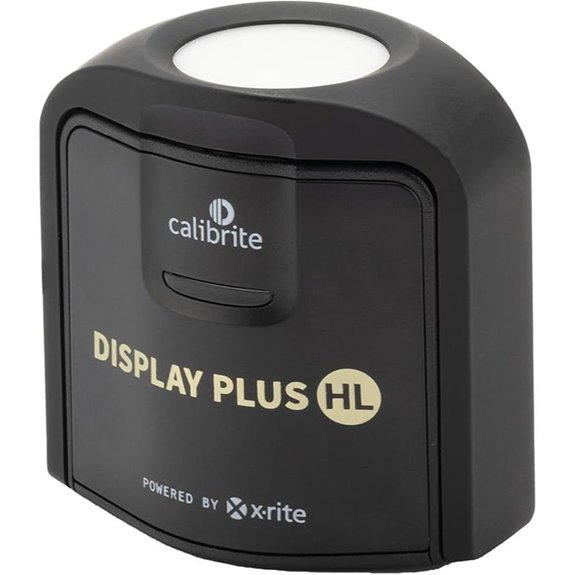 | High-Luminance Expert | Display Compatibility: Measures high luminance up to 10,000 nits; compatible with LCD, OLED, mini-LED, Apple XDR | Brightness Measurement/Calibration Range: Up to 10,000 nits | Software Compatibility/Features: Calibrite PROFILER software, customizable profiles, validation tools | VIEW LATEST PRICE | See Our Full Breakdown |
| Datacolor SpyderPro Monitor Calibration & Light Meter | | Ultimate Compatibility | Display Compatibility: Supports ultra-bright displays (QD-OLED, Mini-LED, Apple XDR up to 12,000 nits) | Brightness Measurement/Calibration Range: Up to 12,000 nits | Software Compatibility/Features: Supports 3D LUT, advanced calibration, content credentials, ambient light sync | VIEW LATEST PRICE | See Our Full Breakdown |
| Datacolor SpyderExpress | | Fast & Precise | Display Compatibility: Supports latest displays (Liquid Retina XDR, MacBook M4 mini-LED, OLED, mini-LED) | Brightness Measurement/Calibration Range: Supports latest high-brightness displays | Software Compatibility/Features: Upgradeable software; ambient light, multi-profile, DevicePreview | VIEW LATEST PRICE | See Our Full Breakdown |
| Calibrite Display Pro HL (CCDIS3HL) |  | User-Friendly | Display Compatibility: Measures up to 3,000 nits; compatible with LCD, mini-LED, OLED, Apple XDR | Brightness Measurement/Calibration Range: Up to 3,000 nits | Software Compatibility/Features: Calibrite PROFILER software, adjustable calibration settings | VIEW LATEST PRICE | See Our Full Breakdown |
| Calibrite Video Photo Kit (Display Plus HL & Passport Video 2) |  | High-End Accuracy | Display Compatibility: Measures up to 10,000 nits; compatible with LCD, OLED, mini-LED, Apple XDR | Brightness Measurement/Calibration Range: Up to 10,000 nits | Software Compatibility/Features: Includes Calibrite PROFILER, supports profiles, presets, and camera calibration | VIEW LATEST PRICE | See Our Full Breakdown |
| Calibrite Display 123 Colorimeter (CCDIS123) |  | Advanced Features | Display Compatibility: Supports multiple displays for calibration | Brightness Measurement/Calibration Range: Not specified; simple calibration | Software Compatibility/Features: Calibrite software, simple 1-2-3 setup, multiple modes | VIEW LATEST PRICE | See Our Full Breakdown |
| Datacolor Spyder X Pro Monitor Calibrator |  | Versatile & Reliable | Display Compatibility: Supports multiple monitors and high-end displays | Brightness Measurement/Calibration Range: Not specified; high accuracy for professional display | Software Compatibility/Features: Software with easy calibration, multiple targets, room-light monitoring | VIEW LATEST PRICE | See Our Full Breakdown |
| Calibrite Photo Kit – Display Pro HL and Passport Photo 2 (CCHL-PP2) |  | Precision for Professionals | Display Compatibility: Compatible with high-luminance displays and cameras | Brightness Measurement/Calibration Range: Up to 3,000 nits | Software Compatibility/Features: Supports ICC, DNG profiles, camera calibration software | VIEW LATEST PRICE | See Our Full Breakdown |
| Calibrite Creator Kit – Display 123 and Passport Video 2 (CC123-PPV2) | 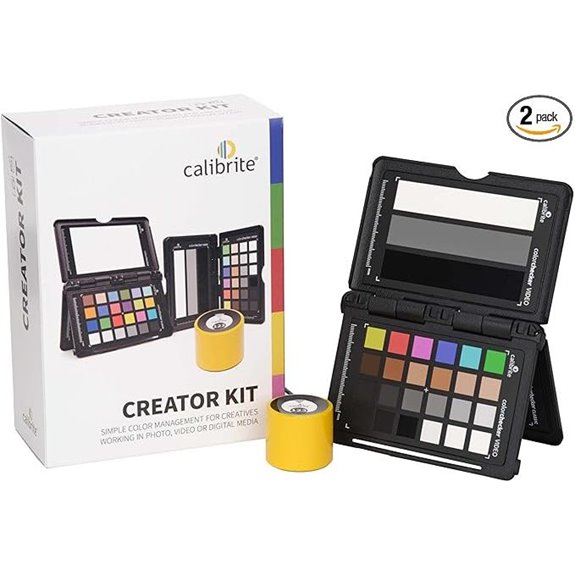 | Multi-Display Support | Display Compatibility: Supports multiple monitors and high-end displays | Brightness Measurement/Calibration Range: Up to 3,000 nits | Software Compatibility/Features: User-friendly software, profile management, calibration targets | VIEW LATEST PRICE | See Our Full Breakdown |
| Calibrite ColorChecker Passport Photo 2 (CCPP2) |  | Beginner-Friendly | Display Compatibility: Supports multiple scene positions and various display types | Brightness Measurement/Calibration Range: Not specified; targets for color calibration | Software Compatibility/Features: Camera calibration software, profile creation, scene targets | VIEW LATEST PRICE | See Our Full Breakdown |
| Calibrite ColorChecker Display Pro (CCDIS3) |  | High-Precision | Display Compatibility: Compatible with LCD, OLED, mini-LED, Apple XDR | Brightness Measurement/Calibration Range: Not specified; high precision | Software Compatibility/Features: Compatible with ccProfiler, i1Profiler; versatile calibration | VIEW LATEST PRICE | See Our Full Breakdown |
| Spyder Photo/Video Color Management Kit |  | All-in-One Kit | Display Compatibility: Supports multiple display types, including high-end monitors | Brightness Measurement/Calibration Range: Up to 3,000 nits | Software Compatibility/Features: Includes calibration and camera profiling software | VIEW LATEST PRICE | See Our Full Breakdown |
| Calibrite ColorChecker Passport Video 2 (CCPPV2) | 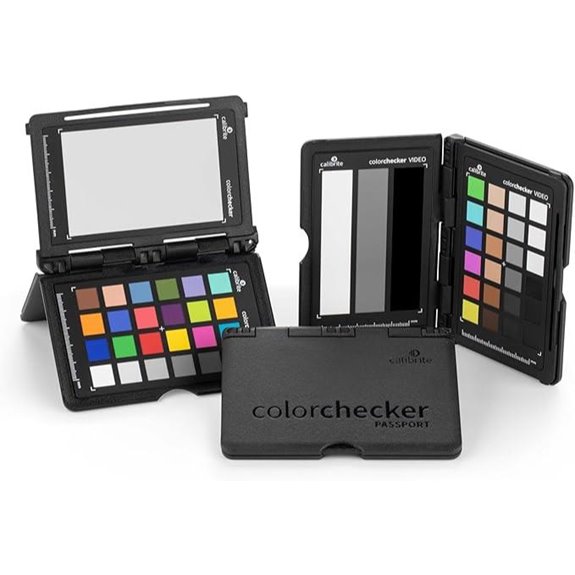 | Comprehensive Workflow | Display Compatibility: Supports multiple displays including high-luminance types | Brightness Measurement/Calibration Range: Not specified; includes camera profiling | Software Compatibility/Features: Camera and display calibration software included | VIEW LATEST PRICE | See Our Full Breakdown |
More Details on Our Top Picks
Datacolor SpyderPro Monitor Calibration & Light Meter
If you’re serious about professional-grade color accuracy, the Datacolor SpyderPro Monitor Calibration & Light Meter stands out as an ideal choice. It supports ultra-bright displays like QD-OLED, Mini-LED, and Apple XDR, with brightness levels up to 12,000 nits, ensuring precise calibration for high-end monitors. The device offers 3D LUT export, allowing exact color translation across different screens and color spaces. It also includes tools like Device Preview Plus for side-by-side image comparison, pixel sampling, and batch processing. Plus, with Content Credentials integration and ambient light measurement capabilities, it guarantees consistent, authentic, and perfectly calibrated visuals every time.
- Display Compatibility:Supports ultra-bright displays (QD-OLED, Mini-LED, Apple XDR up to 12,000 nits)
- Brightness Measurement/Calibration Range:Up to 12,000 nits
- Software Compatibility/Features:Supports 3D LUT export, advanced calibration, content credentials, ambient light sync
- Measurement Capabilities:Precise color calibration, ambient light measurement
- Portability/Design:Desktop device, includes light meter sync
- Content & Color Management Features:Embeds Content Credentials, supports color space management
- Additional Feature:Supports ultra-bright displays up to 12,000 nits
- Additional Feature:Includes advanced image processing tools
- Additional Feature:Embeds creator info with Content Credentials
Datacolor SpyderExpress
The Datacolor SpyderExpress stands out as an ideal choice for creators who need quick, reliable color calibration without the complexity of advanced tools. It’s perfect for editing photos, designing graphics, or producing content, ensuring your colors are accurate and lifelike. Supporting the latest displays like Liquid Retina XDR, MacBook M4 mini-LED, OLED, and advanced mini-LED screens, it can calibrate up to three monitors simultaneously. The calibration process takes about 90 seconds, making it considerably faster than other entry-level options. With simple software, anyone can set it up in three easy steps, saving profiles and recalibrating effortlessly to maintain true-to-life colors.
- Display Compatibility:Supports latest displays (Liquid Retina XDR, MacBook M4 mini-LED, OLED, mini-LED)
- Brightness Measurement/Calibration Range:Not specified; quick calibration (90s)
- Software Compatibility/Features:Software upgradeable; includes ambient light adjustment, multi-display profiling, DevicePreview
- Measurement Capabilities:Quick calibration (~90s), multi-display profiling
- Portability/Design:Small, portable, easy setup
- Content & Color Management Features:Ensures accurate colors, supports profiles
- Additional Feature:Can calibrate up to three monitors
- Additional Feature:Software upgrade options available
- Additional Feature:Fast calibration in approximately 90 seconds
Calibrite Display Plus HL (CCDIS3PLHL)
For professionals working with high-brightness displays, the Calibrite Display Plus HL (CCDIS3PLHL) stands out as a top choice due to its ability to measure up to 10,000 nits with an advanced HL sensor. This calibration tool guarantees accurate color profiling for displays like Apple XDR and mini-LED screens, making it perfect for high-end video editing, photography, and design work. Compatible with Mac and Windows, it comes with Calibrite PROFILER software and a USB-C connection. Its portable design, recyclable packaging, and support for emerging display technologies make it a reliable, future-proof tool for demanding professionals.
- Display Compatibility:Measures high luminance up to 10,000 nits; compatible with LCD, OLED, mini-LED, Apple XDR
- Brightness Measurement/Calibration Range:Up to 10,000 nits
- Software Compatibility/Features:Calibrite PROFILER software, customizable profiles, validation tools
- Measurement Capabilities:High-accuracy measurements, customizable validation
- Portability/Design:Compact, travel-friendly design
- Content & Color Management Features:Custom profiles, validation tools
- Additional Feature:Measures up to 10,000 nits luminance
- Additional Feature:Supports high-luminance display profiling
- Additional Feature:Replaces older calibration models
Datacolor SpyderPro Monitor Calibration & Light Meter
Designed for professionals who demand peak accuracy, the Datacolor SpyderPro Monitor Calibration & Light Meter excels at handling ultra-bright displays like QD-OLED, Mini-LED, and Apple XDR, with brightness levels reaching up to 12,000 nits. It supports a wide range of high-end monitors, ensuring precise calibration across OLED and advanced screens. The device features 3D LUT export for exact color translation and includes tools like Device Preview Plus for side-by-side image comparisons. Additionally, it integrates Content Credentials for verifying content authenticity and syncs with light meters to capture ambient lighting. This extensive tool guarantees consistent, accurate visuals in demanding professional environments.
- Display Compatibility:Supports ultra-bright displays (QD-OLED, Mini-LED, Apple XDR up to 12,000 nits)
- Brightness Measurement/Calibration Range:Up to 12,000 nits
- Software Compatibility/Features:Supports 3D LUT, advanced calibration, content credentials, ambient light sync
- Measurement Capabilities:Precise color calibration, ambient light capture
- Portability/Design:Desktop device, includes light measurement tools
- Content & Color Management Features:Content credentials, color consistency
- Additional Feature:Supports ultra-bright displays up to 12,000 nits
- Additional Feature:Includes advanced image processing tools
- Additional Feature:Embeds creator info with Content Credentials
Datacolor SpyderExpress
If you want quick, reliable color calibration without hassle, Datacolor SpyderExpress is an excellent choice. It’s designed for creators who need accurate, lifelike colors in their work, whether editing photos, designing graphics, or producing content. It supports the latest displays, like Liquid Retina XDR, MacBook M4 mini-LED, OLED, and advanced mini-LED screens, and can calibrate up to three monitors at once. The process takes about 90 seconds—three times faster than many entry-level tools—making calibration fast and effortless. With simple software that can be upgraded for advanced features, it offers a straightforward, dependable solution for ensuring your screens display true colors every time.
- Display Compatibility:Supports latest displays (Liquid Retina XDR, MacBook M4 mini-LED, OLED, mini-LED)
- Brightness Measurement/Calibration Range:Supports latest high-brightness displays
- Software Compatibility/Features:Upgradeable software; ambient light, multi-profile, DevicePreview
- Measurement Capabilities:Fast calibration, multi-display support
- Portability/Design:Portable, easy to set up
- Content & Color Management Features:Advanced profiles, content authenticity
- Additional Feature:Supports multiple monitor types
- Additional Feature:No additional hardware needed for upgrades
- Additional Feature:Recalibrate easily before editing
Calibrite Display Pro HL (CCDIS3HL)
The Calibrite Display Pro HL (CCDIS3HL) stands out as the top choice for professionals who need precise color accuracy on high-luminance displays. Its advanced HL sensor can measure up to 3,000 nits, ensuring accurate calibration for high-end screens like OLED, mini-LED, and Apple XDR panels. The included Calibrite PROFILER software is compatible with Mac and Windows, offering customizable options such as White Point, Gamma, and Uniformity Check. With USB-C connectivity and a compact, eco-friendly design, it’s perfect for on-the-go use. This tool replaces older models, making it ideal for critical visual work where color precision is non-negotiable.
- Display Compatibility:Measures up to 3,000 nits; compatible with LCD, mini-LED, OLED, Apple XDR
- Brightness Measurement/Calibration Range:Up to 3,000 nits
- Software Compatibility/Features:Calibrite PROFILER software, adjustable calibration settings
- Measurement Capabilities:Accurate high luminance measurement, profiling
- Portability/Design:Small, lightweight (4.9 oz)
- Content & Color Management Features:Customizable calibration, validation
- Additional Feature:Measures high luminance up to 3,000 nits
- Additional Feature:Fully recyclable packaging
- Additional Feature:Supports customizable calibration options
Calibrite Video Photo Kit (Display Plus HL & Passport Video 2)
For professional video and photo workflows requiring precise color accuracy, the Calibrite Video Photo Kit (Display Plus HL & Passport Video 2) stands out as an excellent choice. It includes the Passport Video 2 with video targets, enabling accurate color profiling and custom white balance for both stills and moving images. The Display Plus HL colorimeter measures up to 10,000 nits, ensuring high-precision calibration for LCD, OLED, and Apple XDR displays. The Calibrite Profiler software offers customizable presets, gamma, and white point adjustments, compatible with Mac and Windows. This kit supports color management across multi-camera setups, maintaining consistent, professional-grade visual fidelity.
- Display Compatibility:Measures up to 10,000 nits; compatible with LCD, OLED, mini-LED, Apple XDR
- Brightness Measurement/Calibration Range:Up to 10,000 nits
- Software Compatibility/Features:Includes Calibrite PROFILER, supports profiles, presets, and camera calibration
- Measurement Capabilities:Precise high-luminance measurement, calibration
- Portability/Design:Compact, travel pouch included
- Content & Color Management Features:Supports color profiles, camera profiles
- Additional Feature:Includes multiple calibration targets
- Additional Feature:Supports mixed lighting environments
- Additional Feature:Features camera calibration tools
Calibrite Display 123 Colorimeter (CCDIS123)
Designed for both beginners and professionals, the Calibrite Display 123 Colorimeter simplifies monitor calibration with its straightforward 1-2-3 process, making it easy to achieve accurate and consistent colors across multiple displays. Its user-friendly setup supports two monitors, perfect for multi-monitor setups. You can choose between Native or Photo brightness modes to suit your working environment. This device ensures true-to-life colors for photo editing, gaming, or home decorating. Easy to use and reliable, the Calibrite Display 123 helps maintain precise color accuracy, enhancing your viewing experience without the hassle of complex calibration procedures.
- Display Compatibility:Supports multiple displays for calibration
- Brightness Measurement/Calibration Range:Not specified; simple calibration
- Software Compatibility/Features:Calibrite software, simple 1-2-3 setup, multiple modes
- Measurement Capabilities:Basic calibration with easy setup
- Portability/Design:Portable, simple plug-and-play
- Content & Color Management Features:Basic color calibration, simple color management
- Additional Feature:Supports dual-monitor calibration
- Additional Feature:Simple 1-2-3 setup process
- Additional Feature:Supports native or photo brightness modes
Datacolor Spyder X Pro Monitor Calibrator
Looking for a monitor calibrator that’s perfect for beginners yet delivers professional results? The Datacolor Spyder X Pro is an excellent choice. It features a groundbreaking lens-based color engine that provides higher accuracy across multiple monitors, including laptops and desktops. Its user-friendly interface makes calibration quick and easy, with just one or two clicks and a simple wizard workflow. The device offers 12 predefined calibration targets and room-light monitoring to guarantee consistent color, shadow detail, and white balance. Plus, SpyderProof lets you compare before-and-after images, making it ideal for photographers and digital artists seeking precise, reliable color reproduction with minimal effort.
- Display Compatibility:Supports multiple monitors and high-end displays
- Brightness Measurement/Calibration Range:Not specified; high accuracy for professional display
- Software Compatibility/Features:Software with easy calibration, multiple targets, room-light monitoring
- Measurement Capabilities:Accurate color measurement, room-light monitoring
- Portability/Design:Small, ergonomic design
- Content & Color Management Features:Ensures color fidelity, profile management
- Additional Feature:Features a lens-based color engine
- Additional Feature:Supports multi-device calibration
- Additional Feature:Includes room-light monitoring
Calibrite Photo Kit – Display Pro HL and Passport Photo 2 (CCHL-PP2)
The Calibrite Photo Kit – Display Pro HL and Passport Photo 2 (CCHL-PP2) stands out as an ideal choice for professionals who demand ultimate color accuracy in their workflows. Its high-luminance Display Pro HL colorimeter measures up to 3,000 nits, perfect for high-end photo editing. The included Passport Photo 2 offers a 24-patch target and various color targets for precise calibration under different lighting conditions. Compatible with LCD, OLED, mini-LED, and Apple XDR displays, it supports custom ICC profiles, white points, and gamma settings. Paired with Calibrite’s professional software, it guarantees consistent, accurate color reproduction across monitors and camera systems.
- Display Compatibility:Compatible with high-luminance displays and cameras
- Brightness Measurement/Calibration Range:Up to 3,000 nits
- Software Compatibility/Features:Supports ICC, DNG profiles, camera calibration software
- Measurement Capabilities:Camera calibration and display profiling
- Portability/Design:Portable, includes travel pouch
- Content & Color Management Features:Camera and display color management
- Additional Feature:Includes camera calibration software
- Additional Feature:Designed for high-precision workflows
- Additional Feature:Compatible with emerging display tech
Calibrite Creator Kit – Display 123 and Passport Video 2 (CC123-PPV2)
Creative professionals who need reliable, all-in-one calibration tools will find the Calibrite Creator Kit – Display 123 and Passport Video 2 an excellent choice. This kit includes the Display 123 colorimeter, which calibrates up to two monitors via USB-C, ensuring consistent color accuracy across screens. The Passport Video 2 provides targets for precise white balance, exposure, and custom camera profiles, ideal for video and photo workflows. Its user-friendly software simplifies adjustments, matching display output with final results. Designed for content creators working in complex lighting or with multiple cameras, this kit offers confidence in accurate color reproduction and streamlined editing.
- Display Compatibility:Supports multiple monitors and high-end displays
- Brightness Measurement/Calibration Range:Up to 3,000 nits
- Software Compatibility/Features:User-friendly software, profile management, calibration targets
- Measurement Capabilities:Precise color and white balance, multi-device calibration
- Portability/Design:Compact, pocket-sized
- Content & Color Management Features:Accurate color matching, multi-device profiles
- Additional Feature:Supports USB-C monitor calibration
- Additional Feature:Includes targets for both photo/video
- Additional Feature:User-friendly workflow tools
Calibrite ColorChecker Passport Photo 2 (CCPP2)
If you’re a photographer or digital artist seeking accurate color reproduction, the Calibrite ColorChecker Passport Photo 2 (CCPP2) stands out as an essential tool. It allows me to set exposure with a handheld meter and create custom in-camera white balances, eliminating the need for later corrections. I can build precise camera profiles tailored to my camera, lens, and lighting setups, whether working with DNG or ICC workflows. Its ability to evaluate shadow details and detect highlight clipping helps me maintain color consistency and image quality. Plus, its portable case and adjustable positions make it easy to carry and use in various shooting environments.
- Display Compatibility:Supports multiple scene positions and various display types
- Brightness Measurement/Calibration Range:Not specified; targets for color calibration
- Software Compatibility/Features:Camera calibration software, profile creation, scene targets
- Measurement Capabilities:Camera and display measurement, scene evaluation
- Portability/Design:Portable, includes lanyard
- Content & Color Management Features:Camera calibration, color control
- Additional Feature:Portable with adjustable positions
- Additional Feature:Facilitates multiple scene setups
- Additional Feature:Includes in-camera white balance
Calibrite ColorChecker Display Pro (CCDIS3)
For professionals seeking high-precision display and projector calibration, the Calibrite ColorChecker Display Pro (CCDIS3) stands out due to its user-friendly design and versatile features. It works seamlessly with ccProfiler or i1Profiler software, ensuring accurate color profiling across various display types. Its optical design guarantees high repeatability, providing consistent results whether calibrating a monitor or projector. The rotatable diffuser arm adds flexibility, serving as a stand, ambient light sensor, or cover for optics. With an integrated tripod mount and reliable power from X-Rite, this device combines portability, versatility, and precision for demanding calibration tasks.
- Display Compatibility:Compatible with LCD, OLED, mini-LED, Apple XDR
- Brightness Measurement/Calibration Range:Not specified; high precision
- Software Compatibility/Features:Compatible with ccProfiler, i1Profiler; versatile calibration
- Measurement Capabilities:High repeatability, projector and display calibration
- Portability/Design:Small, portable, tripod mount
- Content & Color Management Features:Color and projector profiling, high precision
- Additional Feature:Integrated tripod mount
- Additional Feature:Multi-function diffuser arm
- Additional Feature:Designed for projector calibration
Spyder Photo/Video Color Management Kit
The Spyder Photo/Video Color Management Kit stands out as an essential tool for photographers and videographers who need precise and reliable color calibration across their entire workflow. It includes tools like the SpyderPro for accurate monitor calibration, ensuring consistent color with the latest display tech. The Spyder Cube improves white balance, exposure, and contrast, surpassing traditional grey cards. The Spyder Checkr Photo Card Set offers customizable options for hybrid workflows, while the Spyder Checkr Video provides detailed color info at a glance. Overall, this kit guarantees accurate color capture and display, supporting professional-quality photos and videos from shoot to edit.
- Display Compatibility:Supports multiple display types, including high-end monitors
- Brightness Measurement/Calibration Range:Up to 3,000 nits
- Software Compatibility/Features:Includes calibration and camera profiling software
- Measurement Capabilities:Color and exposure measurement, camera profiling
- Portability/Design:Portable, durable case included
- Content & Color Management Features:Color management, workflow tools
- Additional Feature:Includes SpyderCube for white balance
- Additional Feature:Supports hybrid photo/video workflows
- Additional Feature:Cost-effective color management tools
Calibrite ColorChecker Passport Video 2 (CCPPV2)
Professionals seeking precise color control in photography and videography will find the Calibrite ColorChecker Passport Video 2 (CCPPV2) to be an essential tool, thanks to its all-encompassing set of targets and user-friendly software. It includes a ColorChecker Classic for custom camera profiles, a White Balance target for accurate in-camera adjustments, and two video targets for in-camera or post-production use. Compact and durable, it fits easily into a camera bag, with a protective case and lanyard for convenience. This kit guarantees consistent color matching across multiple cameras and lighting conditions, streamlining your workflow and improving overall color accuracy in both stills and videos.
- Display Compatibility:Supports multiple displays including high-luminance types
- Brightness Measurement/Calibration Range:Not specified; includes camera profiling
- Software Compatibility/Features:Camera and display calibration software included
- Measurement Capabilities:Color measurement, camera and display calibration
- Portability/Design:Compact, easy to carry
- Content & Color Management Features:Camera calibration, color accuracy in workflows
- Additional Feature:Durable, portable design
- Additional Feature:Multiple targets for calibration
- Additional Feature:Suitable for in-camera and post-production
Factors to Consider When Choosing a Monitor Calibration Tool

When choosing a monitor calibration tool, I consider factors like display compatibility and whether it supports my specific screen type. I also prioritize features such as brightness measurement range, ease of use, and the calibration software’s capabilities. Additionally, portability and design matter if I need a device that’s convenient to carry or fits seamlessly into my workspace.
Display Compatibility Needs
Choosing the right monitor calibration tool depends heavily on verifying compatibility with your specific display type and setup. First, you need to verify that the device supports your monitor’s technology, whether it’s OLED, LCD, mini-LED, or QD-OLED. If you work with high-brightness displays, make sure the tool can handle luminance levels up to 10,000 or even 12,000 nits. Compatibility with your operating system is also vital; ensure it works seamlessly on Mac, Windows, or both. For multi-monitor setups, confirm that the calibration device can manage three or more screens simultaneously. Additionally, if you use advanced or professional monitors like Apple XDR, check for support to achieve precise color calibration. Ensuring these compatibility needs are met guarantees accurate and efficient calibration.
Brightness Measurement Range
The brightness measurement range of a calibration tool determines how accurately it can gauge a display’s luminance levels, which is vital for achieving precise color and contrast calibration. A wider range, like up to 10,000 or 12,000 nits, is essential for calibrating ultra-bright displays such as OLED, mini-LED, or XDR panels. For standard screens, a range of 1,000 to 3,000 nits generally suffices for accurate calibration. Measuring high luminance levels ensures white point and contrast accuracy, especially in bright environments. Choosing a tool with an appropriate measurement range prevents inaccuracies caused by insufficient capacity, guaranteeing your calibration is precise and reliable. Always match the brightness measurement range to your display’s maximum luminance to attain ideal calibration results.
Calibration Software Features
Selecting the right calibration software involves considering features that guarantee accurate and consistent results across different workflows. I look for support for multiple color spaces like sRGB, Adobe RGB, and DCI-P3, which ensure versatility for various projects. Advanced features such as ambient light measurement and automatic profile adjustments help maintain color accuracy in real-world lighting conditions. A user-friendly interface with step-by-step guidance makes calibration accessible, regardless of experience level. Customizable settings for White Point, Gamma, and Profile Validation give me precise control over calibration outcomes. Additionally, compatibility with third-party editing and color management software ensures smooth integration into my professional workflow. These features help me achieve consistent, reliable color accuracy tailored to my specific needs.
Ease of Use
A user-friendly calibration tool makes the entire process much easier by offering an intuitive interface that guides you through each step. Clear instructions and guided workflows are essential, especially if you’re new to calibration, guaranteeing you get accurate results without needing technical expertise. Look for tools that support quick measurements, ideally completed within a few minutes, so you don’t waste time. Automated or one-click calibration features markedly improve ease of use by reducing manual adjustments, making the process straightforward. Additionally, portability and minimal hardware connections help streamline calibration, allowing you to perform it easily in different environments. Overall, choosing a tool that emphasizes simplicity and efficiency guarantees calibration is a hassle-free experience, even for those unfamiliar with the technical details.
Portability and Design
When choosing a monitor calibration tool, portability and thoughtful design can make a significant difference in your workflow. A compact, lightweight device is essential for easy transport, especially if you work across multiple locations. Recyclable packaging and included travel pouches not only protect the device but also support environmental sustainability. Ergonomic features like adjustable stands or diffusers improve usability in various environments, making setup quick and effortless. Small form factors with integrated mounts or stands streamline positioning, saving time during calibration sessions. For fieldwork or on-the-go tasks, a rugged, durable construction ensures the device withstands transportation and rough conditions while maintaining calibration accuracy over time. Prioritizing these design elements helps optimize efficiency and convenience in diverse working scenarios.
Price and Value
Considering the importance of portability and design in a calibration tool, it’s equally essential to assess its price and overall value. I recommend evaluating whether the tool offers a good balance of features and cost to meet your needs. Higher-priced options often provide benefits like improved accuracy, higher luminance measurement, or software updates that justify the investment. It’s also vital to compare the costs against compatibility with your display types and the support offered. Remember, investing in a more advanced device can save you time and money long-term by ensuring precise color management, especially in professional workflows. Ultimately, choosing a calibration tool that offers the right features at a fair price ensures you get the best value for your investment.
Frequently Asked Questions
Which Calibration Tool Offers the Best Color Accuracy for Professional Photography?
I believe the X-Rite i1Display Pro Plus offers the best color accuracy for professional photography. It provides precise calibration, ensuring my monitor displays true-to-life colors essential for editing. Its advanced features, like ambient light measurement and fast calibration, save me time and improve my workflow. I’ve found it consistently reliable for achieving consistent, accurate results, making it my top choice for professional-grade monitor calibration.
How Often Should I Calibrate My Monitor for Optimal Results?
I recommend calibrating your monitor at least once a month for the best results, especially if you work with color-sensitive projects. If your environment changes frequently or you notice color inconsistencies, consider calibrating more often—perhaps every two weeks. Regular calibration ensures your display remains accurate, helping you maintain consistency across your work. Don’t forget that ambient lighting and monitor aging can also affect color accuracy, so stay vigilant.
Are There Specific Calibration Tools Suitable for Gaming or Multimedia Use?
Absolutely, for gaming and multimedia, I recommend tools like the X-Rite i1Display Pro and Datacolor SpyderX Elite. These calibrators deliver precise color accuracy and quick setup, making your visuals pop with vibrant colors and accurate tones. I’ve found them especially helpful for ensuring that your gaming experience is immersive and multimedia editing is spot-on. They’re user-friendly and deliver professional-grade results, so I always trust them for my calibration needs.
Can These Calibration Tools Be Used Across Multiple Monitors Simultaneously?
Sure, because juggling multiple monitors with different calibration needs is just a walk in the park, right? In reality, most calibration tools are designed for a single monitor at a time. Some advanced software may support multi-monitor setups, but you’ll usually need to calibrate each display individually. So, don’t expect a one-click miracle—prepare for some patience and manual tweaking to keep all monitors looking perfect.
Do Calibration Tools Support Different Operating Systems Like Windows and Macos?
Yes, many calibration tools support both Windows and macOS. I’ve used some that are compatible with multiple operating systems, making it easier to calibrate different computers without needing separate devices. Just check the software specifications before purchasing to verify it works with your OS. This way, I can confidently calibrate all my monitors, regardless of whether I’m on Windows or Mac, ensuring consistent color accuracy across devices.
Conclusion
So, I’ve shared my top picks for monitor calibration tools, but the real question is—will you choose the one that perfectly fits your needs? Each option has its strengths, and the right choice could transform your visual work forever. Are you ready to discover true color accuracy and elevate your projects? The decision’s yours, but trust me, once you calibrate, you’ll never look at your screen the same way again. The best tool is waiting—are you ready to find it?