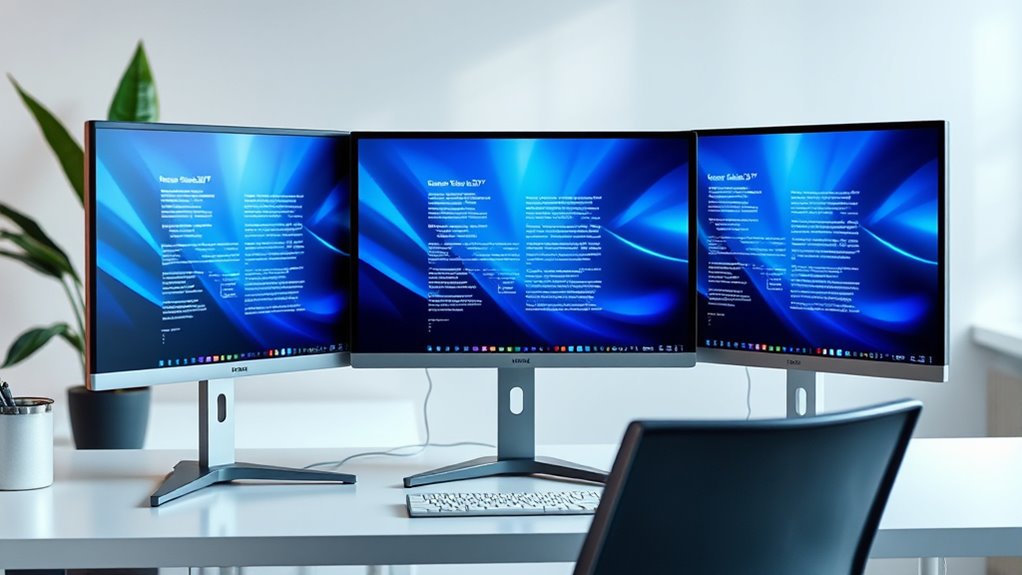

Finding the right 32 inch office monitor involves balancing screen size, resolution, color accuracy, and budget. The Dell 32 Plus 4K Monitor stands out as the overall best, thanks to its sharp 4K resolution and wide color coverage. For gamers needing a versatile option, the Samsung Odyssey G5 G50F offers high refresh rates and fast response times, though it sacrifices some color accuracy. Budget-conscious buyers should consider the Philips 32E1N1100L for a frameless design at a lower price. Each option involves tradeoffs: higher resolution vs. affordability, or gaming features vs. color fidelity. Continue reading for a detailed breakdown of these 14 choices.
Complete the kit



Key Takeaways
- High-resolution 4K monitors deliver sharper images but often come with a higher price tag and may require more powerful hardware.
- Gaming-focused monitors prioritize refresh rate and response time, which might compromise color accuracy or professional features.
- IPS panels dominate for color accuracy and viewing angles, but VA panels can offer better contrast at a lower cost.
- Built-in features like USB-C, speakers, and adjustable stands add convenience but may add to the price.
- Price often correlates with feature set; premium models include better color, resolution, and build quality, while budget options focus on essential features.
| KTC H32T13 32-Inch QHD IPS Monitor, 120Hz, HDR10, Adaptive Sync |  | Best Overall for Versatile Office and Entertainment Use | Model: H32T13 | Screen Size: 32 inches | Panel Type: IPS | VIEW ON AMAZON | See Our Full Breakdown |
| Dell 32 Plus 4K Monitor – S3225QS – 31.5-inch 4K (3840 x 2160) VA Panel, AMD FreeSync Premium, 99% sRGB, 95% DCI-P3, Ash White |  | Best for Vivid Visuals and Color Accuracy in Professional Settings | Display Size: 31.5 inches | Resolution: 3840 x 2160 (4K) | Panel Type: VA | VIEW ON AMAZON | See Our Full Breakdown |
| LG 32UR550K-B 32-inch 4K UHD HDR Monitor |  | Best for Ergonomic Flexibility and Bright Visuals | Display Size: 32 inches | Resolution: 3840 x 2160 (4K UHD) | HDR: HDR10 | VIEW ON AMAZON | See Our Full Breakdown |
| Samsung 32” Odyssey G5 G50F QHD Gaming Monitor, 180Hz, Fast IPS, HDR10, G-Sync Compatible, 1ms Response, Adjustable Stand |  | Best for High-Performance Gaming and Fast Action | Screen Size: 32 inches | Resolution: 2560 x 1440 (QHD) | Refresh Rate: 180Hz | VIEW ON AMAZON | See Our Full Breakdown |
| Philips 32E1N1100L 32-Inch Frameless Full HD Monitor |  | Best Budget-Friendly Full HD Option with Large Screen | Model: 32E1N1100L | Screen Size: 32 inches (31.5 inches viewable) | Resolution: 1920 x 1080 | VIEW ON AMAZON | See Our Full Breakdown |
| Samsung 32-inch S3 (S39GD) FHD Curved Monitor with 100Hz Refresh Rate and Built-in Speakers |  | Best Overall for Versatile Use | Screen Size: 32 inches | Resolution: Full HD (FHD) | Refresh Rate: 100Hz | VIEW ON AMAZON | See Our Full Breakdown |
| LG 32U631A-B 32-inch QHD IPS Computer Monitor with HDR10, 100Hz, USB-C | 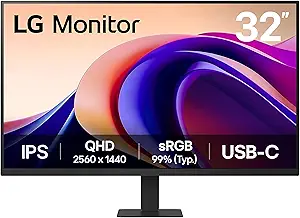 | Best for Vivid Visuals and Versatile Connectivity | Display Size: 32 inches | Resolution: 2560 x 1440 (QHD) | Panel Type: IPS | VIEW ON AMAZON | See Our Full Breakdown |
| ViewSonic VX3276-4K-MHD 32 Inch 4K UHD IPS Monitor with HDR10 and Eye Care Technology |  | Best for Ultra-High-Resolution Clarity | Size: 32 inches | Resolution: 3840 x 2160 (4K UHD) | Panel Type: IPS | VIEW ON AMAZON | See Our Full Breakdown |
| ViewSonic VS3225-2K 32-Inch 1440p IPS Monitor |  | Best for Balanced Resolution and Features | Screen Size: 32 inches | Resolution: 2560 x 1440 (QHD) | Panel Type: IPS | VIEW ON AMAZON | See Our Full Breakdown |
| ViewSonic VX3276-MHD 32 Inch 1080p IPS Monitor |  | Best for Budget-Friendly Full HD Clarity | Size: 32 inches | Resolution: 1920 x 1080p | Display Technology: IPS | VIEW ON AMAZON | See Our Full Breakdown |
| LG 32MR50C-B 32-Inch Curved Full HD 100Hz Monitor |  | Best for Curved Experience and Everyday Productivity | Screen Size: 32 inches | Display Type: Curved VA | Resolution: 1920 x 1080 Full HD | VIEW ON AMAZON | See Our Full Breakdown |
| KTC H32T13 32-Inch 1440p IPS Monitor, 120Hz |  | Best for Color Accuracy and Creative Tasks | Screen Size: 32 inches | Panel Type: IPS | Resolution: 2560 × 1440 | VIEW ON AMAZON | See Our Full Breakdown |
| Samsung 32-Inch 75Hz Borderless Monitor with AMD FreeSync |  | Best for Stylish Design and General Use | Screen Size: 32 inches | Display Type: Flat | Refresh Rate: 75Hz | VIEW ON AMAZON | See Our Full Breakdown |
| ViewSonic VA3209M 32-Inch Full HD IPS Monitor with Built-In Speakers |  | Best for Home Office and Multimedia Functionality | Screen Size: 32 inches | Resolution: 1920×1080 Full HD | Panel Type: IPS | VIEW ON AMAZON | See Our Full Breakdown |
| inch office monitor | Resolution | Refresh Rate | Screen Size | Panel Type |
|---|---|---|---|---|
| KTC H32T13 32-Inch QHD IPS Mon | 2560 x 1440 (QHD) | 120Hz | 32 inches | IPS |
| Dell 32 Plus 4K Monitor | 3840 x 2160 (4K) | 120Hz | — | VA |
| LG 32UR550K-B 32-inch 4K UHD H | 3840 x 2160 (4K UHD) | — | — | — |
| Samsung 32” Odyssey G5 G50F QH | 2560 x 1440 (QHD) | 180Hz | 32 inches | Fast IPS |
| Philips 32E1N1100L 32-Inch Fra | 1920 x 1080 | 100Hz | 32 inches (31.5 inches viewable) | — |
| Samsung 32-inch S3 | Full HD (FHD) | 100Hz | 32 inches | — |
| LG 32U631A-B 32-inch QHD IPS C | 2560 x 1440 (QHD) | 100Hz | — | IPS |
| ViewSonic VX3276-4K-MHD 32 Inc | 3840 x 2160 (4K UHD) | 60Hz | — | IPS |
| ViewSonic VS3225-2K 32-Inch 14 | 2560 x 1440 (QHD) | 75Hz | 32 inches | IPS |
| ViewSonic VX3276-MHD 32 Inch 1 | 1920 x 1080p | 75Hz | — | — |
| LG 32MR50C-B 32-Inch Curved Fu | 1920 x 1080 Full HD | 100Hz | 32 inches | — |
| KTC H32T13 32-Inch 1440p IPS M | 2560 × 1440 | 120Hz | 32 inches | IPS |
| Samsung 32-Inch 75Hz Borderles | — | 75Hz | 32 inches | — |
| ViewSonic VA3209M 32-Inch Full | 1920×1080 Full HD | 75Hz | 32 inches | IPS |
More Details on Our Top Picks
KTC H32T13 32-Inch QHD IPS Monitor, 120Hz, HDR10, Adaptive Sync
The KTC H32T13 stands out for offering a large 32-inch QHD IPS display with a 120Hz refresh rate, making it ideal for both productivity and casual gaming. Its support for HDR10 and adaptive sync ensures smooth visuals, especially compared to standard 60Hz models like the LG 32UR550K-B. While its tilt-adjustable stand and multiple input options add flexibility, the lack of built-in speakers and limited stand adjustments may hinder some setups. This monitor is perfect for users who want a balanced mix of work and entertainment in one display without sacrificing image quality or smoothness.
Pros:- Large 32-inch QHD IPS panel delivers sharp, vibrant images
- 120Hz refresh rate and adaptive sync support smooth gameplay and video playback
- Multiple video inputs for flexible device connections
- Eye-care features like flicker-free technology and blue light filter
Cons:- Stand adjustment limited mainly to tilt, restricting ergonomic fine-tuning
- No built-in speakers or USB ports, reducing convenience for multimedia
Best for: Office workers who also enjoy light gaming or multimedia viewing in a single, reliable display
Not ideal for: Gamers seeking maximum ergonomic adjustments or integrated speakers, or users needing USB connectivity
- Model:H32T13
- Screen Size:32 inches
- Panel Type:IPS
- Resolution:2560 x 1440 (QHD)
- Refresh Rate:120Hz
- HDR:HDR10
Our verdict“This monitor suits users who want a versatile, high-quality display for both work and light entertainment, accepting minor ergonomic and connectivity tradeoffs.”
Dell 32 Plus 4K Monitor – S3225QS – 31.5-inch 4K (3840 x 2160) VA Panel, AMD FreeSync Premium, 99% sRGB, 95% DCI-P3, Ash White
The Dell S3225QS offers a 31.5-inch 4K VA panel with impressive color coverage and a sleek, ultra-thin bezel design, making it ideal for detailed work or multimedia. Its 120Hz refresh rate rivals gaming-focused monitors like the Samsung Odyssey G5 but with a focus on color fidelity, thanks to 99% sRGB and 95% DCI-P3 coverage. Compared to the LG 32UR550K-B, the Dell’s higher resolution provides sharper images but may require more powerful hardware to drive at native 4K. Its design emphasizes style and visual accuracy, but limited built-in audio and a higher price point could be drawbacks for budget-conscious buyers. This monitor is best for professionals requiring vivid, true-to-life visuals without gaming-specific features.
Pros:- Vivid 4K resolution with high color accuracy for detailed work
- Ultra-thin bezels for a modern, immersive look
- Good connectivity options including HDMI and DisplayPort
- Elegant design suitable for professional environments
Cons:- Higher cost compared to non-4K options like LG 32UR550K-B
- Limited built-in audio, requiring external speakers
- Requires powerful hardware to fully utilize 4K resolution
Best for: Content creators or professionals who prioritize color accuracy and high resolution in a large display
Not ideal for: Casual users or gamers on a budget, who may find the price steep and require higher refresh rates for gaming
- Display Size:31.5 inches
- Resolution:3840 x 2160 (4K)
- Panel Type:VA
- Refresh Rate:120Hz
- Color Coverage:99% sRGB, 95% DCI-P3
- Finish:Ash White
Our verdict“Ideal for professionals needing a large, color-accurate display, accepting the premium price and hardware demands of 4K resolution.”
LG 32UR550K-B 32-inch 4K UHD HDR Monitor
The LG 32UR550K-B provides a 32-inch 4K UHD display with HDR10 support, making it suitable for detailed work and media consumption. Its adjustable stand with height, tilt, and pivot options allows for ergonomic customization, setting it apart from many flat, tilt-only monitors like the KTC H32T13. While its 60Hz refresh rate limits gaming performance, the extensive color coverage and HDR support enhance multimedia quality. The absence of built-in speakers is a minor inconvenience given its focus on adjustable ergonomics and vibrant visuals. This model appeals most to users who need a large, flexible workspace with high-quality imagery but aren’t prioritizing gaming or ultra-fast response times.
Pros:- Fully adjustable stand for ergonomic comfort
- Vivid 4K HDR visuals with wide color coverage
- Multiple input options including HDMI and DisplayPort
- Good size for multitasking and detailed work
Cons:- Limited to 60Hz, not ideal for high-end gaming
- No built-in speakers, necessitating external audio devices
- Higher price point for a 4K UHD monitor
Best for: Creative professionals and office users seeking ergonomic comfort and vibrant visuals in a 4K display
Not ideal for: Competitive gamers or users needing high refresh rates for fast-paced gaming
- Display Size:32 inches
- Resolution:3840 x 2160 (4K UHD)
- HDR:HDR10
- Stand Adjustments:Tilt, Height, Pivot
- Color Coverage:90% DCI-P3
Our verdict“This monitor is perfect for users prioritizing ergonomic flexibility and stunning visuals, with less emphasis on gaming performance.”
Samsung 32” Odyssey G5 G50F QHD Gaming Monitor, 180Hz, Fast IPS, HDR10, G-Sync Compatible, 1ms Response, Adjustable Stand
The Samsung Odyssey G5 G50F is designed to excel in fast-paced gaming scenarios, with a 32-inch QHD display, 180Hz refresh rate, and 1ms response time. Its Fast IPS panel produces vibrant, smooth visuals, and HDR10 support enhances color depth. Compared to other monitors like the KTC H32T13, this model’s high refresh rate and quick response make it ideal for competitive gaming, but its focus on speed means it may lack the color accuracy or ergonomic features some office users desire. The adjustable stand offers excellent customization, yet the higher price and 32-inch size may not suit every desk space. This monitor is best for gamers needing speed and responsiveness, with some compromises on productivity features.
Pros:- High 180Hz refresh rate and 1ms response time for ultra-smooth gameplay
- Vibrant visuals with HDR10 support
- G-Sync and FreeSync compatibility for tear-free gaming
- Ergonomic stand with height, tilt, swivel, and pivot adjustments
Cons:- Limited to 32 inches, which may be large for some desks
- Lacks dedicated office features like built-in speakers or USB ports
- Higher cost compared to standard 32-inch monitors
Best for: Competitive gamers or users who prioritize ultra-fast response times and high refresh rates
Not ideal for: Office workers seeking a balance of productivity and multimedia, or those with limited desk space
- Screen Size:32 inches
- Resolution:2560 x 1440 (QHD)
- Refresh Rate:180Hz
- Response Time:1ms (GtG)
- Panel Type:Fast IPS
- HDR:HDR10
Our verdict“This monitor is best suited for gamers who need speed and responsiveness, accepting its focus on gaming over multi-purpose functionality.”
Philips 32E1N1100L 32-Inch Frameless Full HD Monitor
The Philips 32E1N1100L offers a sizeable 32-inch display with Full HD resolution, making it an affordable choice for users who want a large screen without the higher cost of 4K models like the Dell or LG. Its 100Hz refresh rate and 1ms response time support smoother gaming, especially with Adaptive-Sync technology, but the lower resolution may be noticeable on a 32-inch screen compared to 4K options. Its VESA compatibility and multiple connectivity options add flexibility, and the four-year warranty provides peace of mind. However, for those seeking crisp, detailed visuals or ultra-fast gaming features, this model’s Full HD resolution may feel limited, especially for professional or multimedia work that benefits from higher pixel density.
Pros:- Large 32-inch display enhances multitasking and viewing comfort
- Affordable price point for a sizeable screen
- Good gaming support with 100Hz refresh rate and Adaptive-Sync
- VESA mount compatibility for flexible mounting options
Cons:- Full HD resolution may appear less sharp on a 32-inch screen
- Limited to 100Hz refresh rate, less ideal for fast-paced gaming
- No built-in speakers, requiring external audio
Best for: Budget-conscious users who want a large display for general productivity and casual gaming
Not ideal for: Creative professionals or gamers needing high resolution or fast response times for competitive play
- Model:32E1N1100L
- Screen Size:32 inches (31.5 inches viewable)
- Resolution:1920 x 1080
- Response Time:1 ms
- Refresh Rate:100Hz
- Sync Technology:Adaptive-Sync
Our verdict“Best suited for users seeking a budget-friendly large screen for everyday tasks and casual gaming, with some resolution compromises.”
Samsung 32-inch S3 (S39GD) FHD Curved Monitor with 100Hz Refresh Rate and Built-in Speakers
The Samsung 32-inch S3 (S39GD) stands out for its immersive curved display and smooth 100Hz refresh rate, making it suitable for both work and entertainment. Its curved design enhances immersion, especially compared to flatter models like the ViewSonic VS3225-2K, which offers higher resolution but less curve. The built-in speakers and eye comfort technology add convenience, though the limited connectivity options—mainly HDMI—may be a drawback for users with multiple devices. Its lack of adjustable stand means less ergonomic flexibility, but overall, this monitor offers a balanced mix of visual quality and comfort for general office tasks and casual gaming.
Pros:- Immersive curved display enhances viewing experience
- Smooth 100Hz refresh rate reduces motion blur
- Built-in speakers save desk space
- Eye comfort technology reduces eye strain
Cons:- Limited connectivity options (only HDMI mentioned)
- No adjustable stand or height options
- Lacks specific gaming features
Best for: Office workers who want an immersive experience with eye comfort features and integrated audio
Not ideal for: Designers or gamers needing extensive connectivity options or high refresh rates beyond 100Hz
- Screen Size:32 inches
- Resolution:Full HD (FHD)
- Refresh Rate:100Hz
- Connectivity:HDMI port
- Built-in Speakers:Yes
- Eye Care Technology:Yes, TÜV certified
Our verdict“This monitor is ideal for users seeking an immersive, comfortable viewing experience with basic multimedia features.”
LG 32U631A-B 32-inch QHD IPS Computer Monitor with HDR10, 100Hz, USB-C
The LG 32U631A-B offers a sharp 2560 x 1440 resolution on an IPS panel, providing vibrant color and wide viewing angles superior to the Full HD options like the Samsung S3. Its 100Hz refresh rate and HDR10 support boost motion clarity and color depth, making it a good choice for creative work and media consumption. The inclusion of USB-C with 15W power delivery adds flexibility, though the stand’s adjustability is limited, and it lacks built-in speakers, unlike the Samsung S3. Compared to the ViewSonic VX3276-4K, it offers a lower resolution but better connectivity options, appealing to those who need a balance of quality and versatility.
Pros:- Vivid visuals with wide color gamut and HDR10 support
- USB-C with power delivery enhances device connectivity and charging
- Fast 100Hz refresh rate and quick response time
- Borderless design supports seamless multi-monitor setups
Cons:- Limited stand adjustability
- No built-in speakers
- Higher price point compared to basic models
Best for: Creative professionals and multimedia enthusiasts who need sharp visuals and flexible connectivity
Not ideal for: Gamers seeking high refresh rates or users who prioritize built-in speakers
- Display Size:32 inches
- Resolution:2560 x 1440 (QHD)
- Panel Type:IPS
- Refresh Rate:100Hz
- HDR:HDR10
- Connectivity:HDMI, USB Type-C with 15W PD
Our verdict“Best suited for users who need crisp visuals and flexible connections for creative or media tasks.”
ViewSonic VX3276-4K-MHD 32 Inch 4K UHD IPS Monitor with HDR10 and Eye Care Technology
The ViewSonic VX3276-4K-MHD delivers stunning 4K resolution on a 32-inch IPS panel, making it perfect for detailed work like photo editing or CAD. Its HDR10 support adds to the visual richness, surpassing the LG 32U631A-B in clarity, though with a lower refresh rate of 60Hz, it isn’t ideal for fast-paced gaming. The thin bezels promote an immersive experience, but the absence of built-in speakers means you’ll need external audio. While its high resolution provides incredible detail, some may find the 60Hz refresh rate limiting for motion-intensive tasks, positioning this more for static work and media viewing.
Pros:- Extremely high 4K resolution with vibrant colors
- HDR10 support enhances contrast and detail
- Thin bezel design maximizes immersive viewing
- Multiple connectivity options including HDMI and DisplayPort
Cons:- 60Hz refresh rate isn’t suited for gaming
- No built-in speakers
- Higher cost for 4K resolution
Best for: Creative professionals and media viewers who prioritize resolution and color accuracy
Not ideal for: Fast-paced gamers or users needing adjustable stands for ergonomics
- Size:32 inches
- Resolution:3840 x 2160 (4K UHD)
- Panel Type:IPS
- Refresh Rate:60Hz
- HDR:HDR10
- Connectivity:HDMI, DisplayPort, Mini DisplayPort
Our verdict“Ideal for users who need ultra-sharp visuals and color accuracy for static or media-focused tasks.”
ViewSonic VS3225-2K 32-Inch 1440p IPS Monitor
The ViewSonic VS3225-2K offers a solid 2560 x 1440 resolution on a 32-inch IPS panel, striking a balance between clarity and performance. Its 75Hz refresh rate improves motion smoothness over standard 60Hz displays, while the Variable Refresh Rate helps reduce tearing, similar to the Samsung S3. The frameless design supports clean multi-monitor setups, and eye care features enhance comfort. Compared to 4K options, it provides good image quality without the higher cost or demanding GPU requirements, but the 75Hz refresh rate isn’t ideal for high-end gaming or fast-paced media.
Pros:- Large 32-inch Quad HD display
- Frameless, sleek design for multi-monitor setups
- Variable Refresh Rate reduces tearing
- Eye care features for comfortable viewing
Cons:- 75Hz refresh rate isn’t ideal for fast gaming
- No mention of USB connectivity
- Limited to Quad HD resolution
Best for: Office users and home workers who want a larger, detailed display without the demands of 4K or high refresh rates
Not ideal for: Competitive gamers or those needing extensive stand adjustments
- Screen Size:32 inches
- Resolution:2560 x 1440 (QHD)
- Panel Type:IPS
- Refresh Rate:75Hz
- Adaptive Sync:Variable Refresh Rate
- Inputs:HDMI and DisplayPort
Our verdict“A versatile choice for office and multimedia use that balances resolution and performance.”
ViewSonic VX3276-MHD 32 Inch 1080p IPS Monitor
The ViewSonic VX3276-MHD provides a large, 32-inch Full HD IPS display at an accessible price point. Its 75Hz refresh rate and flicker-free technology make it suitable for everyday office tasks and multimedia consumption. While it lacks the higher resolution of 2K or 4K models like the LG 32U631A-B or ViewSonic VX3225-2K, it compensates with a broad range of connectivity options, including HDMI, DisplayPort, and VGA. Its basic aesthetic and absence of built-in speakers mean it’s best for users who want straightforward performance without extra bells and whistles.
Pros:- Large 32-inch Full HD display
- IPS technology ensures wide viewing angles
- Multiple connectivity options including VGA
- Affordable price for size and features
Cons:- Limited to 1080p resolution
- No built-in speakers
- Design is quite basic
Best for: Budget-conscious users needing a large, reliable display for general office work
Not ideal for: Creative professionals or gamers seeking high resolution or fast refresh rates
- Size:32 inches
- Resolution:1920 x 1080p
- Display Technology:IPS
- Refresh Rate:75Hz
- Connectivity:HDMI, DisplayPort, VGA
- Features:Flicker-Free, Blue Light Filter
Our verdict“A cost-effective, large-screen option for everyday office and media use on a budget.”
LG 32MR50C-B 32-Inch Curved Full HD 100Hz Monitor
This monitor stands out for its large, curved VA display that creates an immersive viewing experience, ideal for multitasking and casual entertainment. Compared to the flat Samsung 32-Inch 75Hz Borderless Monitor, the curved design offers a more engaging visual for prolonged work sessions, though the Full HD resolution might feel less sharp on this size. The 100Hz refresh rate and AMD FreeSync support smoother motion, making it suitable for casual gaming or fast-paced streaming. However, the stand adjustment is limited to tilt only, which could affect ergonomic comfort. Its Reader Mode reduces blue light, easing eye strain during extended use. The OnScreen Control simplifies adjustments, but the limited stand movement means it’s less adaptable for different desk setups. This pick makes the most sense for users prioritizing a curved display with decent motion responsiveness for general office work and casual media consumption.
Pros:- Large curved VA display enhances immersion
- 100Hz refresh rate and AMD FreeSync deliver smoother motion
- Blue Light Reader Mode reduces eye fatigue
- OnScreen Control simplifies display management
Cons:- Full HD resolution appears less sharp on 32 inches
- Stand adjustment limited to tilt only
Best for: Professionals or home users who prefer a curved display for immersive work and casual media.
Not ideal for: Gamers seeking high refresh rates or ultra-sharp visuals, or users needing extensive ergonomic adjustments.
- Screen Size:32 inches
- Display Type:Curved VA
- Resolution:1920 x 1080 Full HD
- Refresh Rate:100Hz
- Adaptive Sync:AMD FreeSync
- Connectivity:HDMI
- Stand Adjustment:Tilt
- Color:Black
Our verdict“Ideal for users wanting an immersive, curved monitor for everyday productivity and casual use without intensive gaming needs.”
KTC H32T13 32-Inch 1440p IPS Monitor, 120Hz
This monitor is well-suited for professionals who need sharp visuals and vibrant colors, thanks to its 2560×1440 IPS panel with 109% sRGB coverage, making it superior to the Full HD options like the ViewSonic VA3209M for detailed editing and color work. The 120Hz refresh rate and adaptive-sync support provide fluid motion, beneficial for casual gaming or dynamic workflows. It also features HDR support, a VESA mount, and eye-care technologies, addressing both visual quality and ergonomic comfort. However, the limited stand adjustment to tilt only might be a drawback for ergonomic setups. The absence of built-in speakers could be inconvenient for multimedia use. Compared with the Samsung borderless model, this monitor offers higher resolution and better color fidelity, but it’s less suitable for users who prioritize a wider range of connectivity options or built-in audio. This model makes the most sense for creative professionals or office users seeking detailed visuals and color accuracy.
Pros:- Sharp 1440p resolution with wide color coverage
- 120Hz refresh rate for smooth visuals
- HDR support enhances contrast and color depth
- VESA compatibility for flexible mounting
Cons:- Stand adjustment limited to tilt only
- No mention of built-in speakers
Best for: Creative professionals, photo editors, or users requiring sharp, color-accurate displays.
Not ideal for: Gamers or users needing extensive ergonomic adjustments or integrated speakers.
- Screen Size:32 inches
- Panel Type:IPS
- Resolution:2560 × 1440
- Refresh Rate:120Hz
- HDR:Supported
- Connectivity:2 × HDMI 2.0, 1 × DisplayPort 1.4
- Stand Adjustment:Tilt
- Color Gamut:109% sRGB
Our verdict“Best suited for users who prioritize detailed visuals and color fidelity for creative or professional work.”
Samsung 32-Inch 75Hz Borderless Monitor with AMD FreeSync
This monitor offers a sleek, three-sided borderless design that enhances visual appeal, making it a good choice for modern offices. Its 75Hz refresh rate supports smooth media playback and casual gaming, though it is less responsive than the 100Hz or 120Hz options like the LG 32MR50C-B or KTC H32T13, making it less ideal for fast-paced gaming. AMD FreeSync improves motion clarity, and features like Game Mode, Flicker-Free technology, and Eye Saver Mode help reduce eye strain during extended use. The flat display may not provide the immersive experience of curved screens, but its stylish frame and reliable features make it suitable for general office tasks and multimedia. Connectivity options include HDMI and DisplayPort, matching the needs of most modern setups. This monitor suits users who value aesthetics and a balance of smooth visuals without the need for ultra-high refresh rates.
Pros:- Stylish, three-sided borderless design
- 75Hz with AMD FreeSync for smooth visuals
- Flicker-Free and Eye Saver Mode reduce eye fatigue
- Good connectivity with HDMI and DisplayPort
Cons:- Refresh rate is modest for fast gaming
- Flat screen offers less immersion than curved options
Best for: Office workers or media enthusiasts who prefer a stylish, borderless display for everyday tasks and media consumption.
Not ideal for: Hardcore gamers or users needing high refresh rates for competitive play or fast-paced gaming.
- Screen Size:32 inches
- Display Type:Flat
- Refresh Rate:75Hz
- Adaptive Sync:AMD FreeSync
- Design:Borderless
- Connectivity:HDMI and DisplayPort
Our verdict“Great for users seeking a stylish, general-purpose display with decent motion support and eye care features.”
ViewSonic VA3209M 32-Inch Full HD IPS Monitor with Built-In Speakers
This monitor offers a straightforward, large IPS display with Full HD resolution, making it suitable for everyday office tasks and multimedia. Its 75Hz refresh rate supports smooth scrolling and media playback, similar to the Samsung borderless model but with the advantage of a wide IPS panel for accurate colors and viewing angles. Built-in speakers add convenience for casual multimedia use, and eye-care features like Flicker-Free technology and Blue Light Filter help reduce eye fatigue during long work or entertainment sessions. The variable refresh rate smooths out visual jitters, but the resolution may seem less sharp on a 32-inch screen compared to higher-resolution options like the KTC H32T13. The inclusion of VGA and HDMI inputs makes it versatile for various devices. This monitor is well-suited for users who want a large, affordable screen for daily productivity and entertainment, especially in home settings.
Pros:- Large IPS display with accurate color and wide angles
- Built-in speakers for multimedia convenience
- Eye care features reduce fatigue
- Variable Refresh Rate for smoother visuals
Cons:- Full HD resolution may appear less sharp on 32 inches
- Limited to 75Hz refresh rate
Best for: Home office users who need an affordable, large display with good color and built-in speakers.
Not ideal for: Creative professionals or gamers needing high resolution or fast response times.
- Screen Size:32 inches
- Resolution:1920×1080 Full HD
- Panel Type:IPS
- Refresh Rate:75Hz
- Adaptive Sync:Variable Refresh Rate
- Inputs:HDMI and VGA
- Speakers:Built-in
Our verdict“A solid choice for home users wanting a large, versatile display with integrated audio and eye comfort features.”
How We Picked
The monitors in this roundup were chosen based on a combination of performance, usability, build quality, and value. We prioritized screens with reliable image quality, good ergonomics, and features that enhance productivity, such as adjustable stands and connectivity options. Price was a factor, but only when it offered a meaningful tradeoff for features or performance. We ranked products by how well they balance these criteria for typical office use, with a focus on offering options for different budgets and needs. Our goal was to highlight models that stand out within their category for specific buyer priorities—whether that’s image quality, gaming capability, or affordability.Factors to Consider When Choosing 32 Inch Office Monitor
Choosing a 32 inch office monitor involves evaluating several key factors that influence usability and long-term satisfaction. Beyond just screen size, resolution and panel type determine image clarity and color fidelity. Connectivity options like USB-C can streamline your workspace, while ergonomic features support comfort during long work sessions. Considering your primary use—whether professional productivity, creative work, or casual browsing—will guide you toward the best feature set. Beware of common pitfalls, like opting for high refresh rates without adequate color accuracy or prioritizing resolution over ergonomic adjustments. Balancing these factors can help you find a monitor that genuinely enhances your workspace.Resolution and Panel Type
Resolution directly impacts how sharp and detailed your images and text appear. 4K (3840×2160) is ideal for detailed work like photo editing or multitasking, but it demands more from your hardware. Meanwhile, 1440p offers a good balance of clarity and cost, suitable for typical office tasks. Panel type is equally important: IPS panels excel in color accuracy and wide viewing angles, making them suitable for creative work, while VA panels offer higher contrast levels at a lower price, better for media consumption. Choosing the right combination depends on your priorities—sharpness, color fidelity, or contrast.
Connectivity and Ergonomics
Look for monitors with versatile connectivity options such as USB-C, HDMI, and DisplayPort, which can simplify cable management and future-proof your setup. USB-C especially offers power delivery and data transfer in a single cable, reducing clutter. Ergonomic features like height adjustment, tilt, and swivel are vital for comfort during extended use, preventing fatigue and strain. Budget models sometimes skimp on these features, so weigh their importance based on your workspace. Investing in a monitor with good ergonomics can pay off with increased productivity and reduced discomfort over time.
Color Accuracy and Brightness
For tasks that require precise color, such as design or content creation, look for monitors with high color accuracy, covering wide color gamuts like sRGB or DCI-P3, and features like factory calibration. Brightness levels above 300 nits improve visibility in well-lit environments. Keep in mind that not all office work demands professional-grade color, so prioritize this feature only if your tasks require it. Overpaying for color accuracy on a basic office monitor may not be cost-effective, but missing it on creative work can be limiting. Find a balance that suits your specific needs.
Price and Tradeoffs
Higher-priced monitors tend to include advanced features like 4K resolution, better panels, and premium build quality. However, for everyday office tasks, budget options can provide sufficient performance at a lower cost. Be wary of models that cut corners—such as limited connectivity or poor ergonomics—just to keep the price down. Conversely, investing more in a premium monitor can offer more longevity and better user experience. Clarify which features are non-negotiable for your workflow to avoid overspending or settling for too little.
Frequently Asked Questions
Is a 32 inch monitor too large for typical office use?
A 32 inch monitor can be very effective for office work, especially if you multitask or need ample screen real estate. However, it requires sufficient desk space and proper viewing distance to avoid strain. If your workspace is limited, a slightly smaller size might be more comfortable, but for those with room, a 32 inch screen offers an immersive experience without overwhelming your desk. Proper ergonomics and positioning are key to making the most of this size.Should I prioritize 4K resolution or higher refresh rates for office work?
For most office tasks, a high-resolution display like 4K offers sharper images and more workspace, which can boost productivity. Higher refresh rates, such as 120Hz or more, are generally geared toward gaming and may offer little benefit for standard productivity. Unless you do tasks involving fast scrolling or video editing, prioritizing resolution and color accuracy will deliver more tangible benefits in an office setting. Higher refresh rates can be a bonus if you also want a versatile monitor for casual gaming or multimedia.Are curved monitors better for office work?
Curved monitors can enhance immersion and reduce glare from ambient lighting, but they are not necessarily better for productivity. For a 32 inch size, a flat panel often provides more consistent viewing angles, especially for multi-monitor setups. Curved screens may be advantageous for creative tasks that benefit from a more natural viewing experience, but for general office use, their benefits are subtle. Consider your workspace layout and personal preference before choosing curved over flat models.What features should I avoid on a budget 32 inch monitor?
On a budget, avoid monitors with limited ergonomic adjustments, poor build quality, or low-resolution panels that can cause eye strain or reduce clarity. Be cautious of models that cut corners on connectivity options, lacking essential ports like USB-C or HDMI. Also, steer clear of very low brightness levels or poor color coverage if your work involves detail-oriented tasks. Sometimes, spending a little more upfront on a well-built model can save you from frustration and additional upgrades later.Is it worth investing in a monitor with USB-C for office work?
A USB-C port can significantly streamline your workspace by allowing a single cable for power, data, and video, which reduces clutter and simplifies setup. This feature is especially valuable if you use a laptop that supports USB-C charging and data transfer. While USB-C monitors tend to cost more initially, the convenience and future-proofing they offer often justify the investment. If your device supports USB-C, choosing a monitor with this port can enhance your overall desk experience.Conclusion
For general office use, the Dell 32 Plus 4K Monitor offers an excellent balance of resolution, color, and features, making it the best overall choice. Budget buyers or those new to larger screens should consider the Philips 32E1N1100L, which provides a frameless design at a lower price point. Creative professionals or those who prioritize color accuracy may find the LG 32U631A-B or ViewSonic VX3276-4K-MHD better suited to their needs. Gamers or multi-taskers will appreciate the high refresh rates of models like the Samsung Odyssey G5 G50F. Ultimately, your decision should reflect your primary use case and workspace constraints.