Deciding whether to get a printer or go paperless depends on your work habits, space, and eco values. If you frequently need hard copies or signatures, investing in a versatile printer can boost efficiency. However, if most of your work involves digital files and you want to reduce clutter, embracing a paperless workflow saves space and helps the environment. To find out which option suits you best, explore the details that follow.
Key Takeaways
- Assess how often you need physical copies for printing, scanning, or signatures in your home office.
- Consider digital storage options like cloud services to reduce reliance on a printer.
- Evaluate the environmental impact and costs associated with printing versus a paperless setup.
- Determine if a multifunction printer enhances productivity or if digital solutions suffice.
- Balance convenience and workflow needs with sustainability goals to decide if a printer is necessary.

In today’s digital age, the debate between choosing a printer or going paperless is more relevant than ever. As you consider your home office setup, you might wonder whether investing in a printer is necessary or if digital storage can handle all your needs. Digital storage offers a sleek, space-saving way to keep your documents organized and accessible. You can store files on cloud services, external drives, or your computer, reducing clutter and making it easier to find what you need instantly. This approach minimizes the need for physical copies, helping you streamline your workflow. Plus, digital storage is highly secure when properly managed, safeguarding sensitive information without the risk of paper loss or damage. Additionally, understanding document management can help you optimize your workflow and determine the best approach for your needs.
Digital storage keeps your documents organized, accessible, and clutter-free, reducing the need for physical copies while ensuring security.
On the other hand, eco-friendly printing is gaining popularity among those who want to balance convenience with environmental responsibility. Eco-friendly printing involves using recycled paper, energy-efficient printers, and environmentally safe inks. If you often need hard copies for signatures, legal documents, or quick reference, a printer can be a valuable tool that reduces your reliance on paper. Modern printers are designed to be more sustainable, with features like duplex printing to cut paper use in half and low-energy modes to lessen power consumption. However, it’s essential to evaluate how often you actually print and whether the environmental impact aligns with your values. Going paperless isn’t always feasible if your work or personal habits demand physical documents, but adopting eco-friendly printing practices can make a significant difference.
You should also think about the practicality of having a printer at home. If your work involves frequent printing, scanning, or copying, investing in a reliable, multifunction device makes sense. It can save you trips to a print shop or library and give you immediate access to printed materials when needed. Conversely, if most of your work can be handled digitally—such as reviewing PDFs, editing spreadsheets, or creating digital presentations—you might find that a printer becomes more of a luxury than a necessity. In this case, focusing on digital storage solutions could be more efficient, cost-effective, and environmentally friendly.
Ultimately, the decision hinges on your specific needs and habits. If you value the convenience of physical documents and recognize the importance of eco-friendly printing options, having a printer at home can be worthwhile. But if you prefer to keep your space clutter-free and rely on digital tools, embracing digital storage is a smart, sustainable choice. Either way, it’s about striking a balance that enhances your productivity without unnecessary waste or expense.

Lumbar Support Pillow for Office Chair,Mothers Day Gifts for Mom, Back Support Pillow for Car, Office Supplies, Chair Cushions, Back Pain Relief Improve Posture, Mesh Cover Double Adjustable Straps
- Extended Adjustable Straps: Fits more chairs securely
- Ergonomic Back Support: Relieves back pain and tightness
- Supports Proper Posture: Maintains natural spine curve
As an affiliate, we earn on qualifying purchases.
Frequently Asked Questions
How Much Does a Home Printer Typically Cost?
A home printer typically costs between $50 and $200, depending on features like ink type, print quality, and connectivity options. Keep in mind, you’ll need to budget for printer maintenance, including ink or toner replacements, and consider printer security to protect your documents. Cheaper models may save money upfront but might have higher ongoing costs and security vulnerabilities, so choose a printer that balances cost, security, and ease of maintenance.
What Are the Ongoing Ink or Toner Expenses?
You’ll spend about $150 a year on ink cartridge and toner replacement, according to industry estimates. Ink cartridges can cost anywhere from $20 to $60 each, and toner replacements typically run $50 to $150, depending on your printer model. Keep in mind that frequent printing can increase your ongoing expenses. To save, consider high-yield cartridges or toner, which last longer and reduce your overall costs.
Are There Eco-Friendly Printing Options Available?
Yes, eco-friendly printing options are available. You can choose printers that use eco-friendly inks, which reduce harmful emissions and waste. Additionally, switching to digital documentation whenever possible minimizes printing needs, saving resources and energy. Look for printers with energy-efficient features and eco-certifications. By combining eco-friendly inks with digital alternatives, you make environmentally conscious choices that support sustainability while meeting your printing needs at home.
Can a Printer Be Shared Among Multiple Devices?
A printer can be shared among multiple devices like a well-oiled machine, making your workflow smoother. With wireless connectivity, everyone in your home can access it effortlessly, saving space and clutter. Just be mindful of printer security; set strong passwords and keep firmware updated to protect your documents. Sharing a printer is a smart, efficient choice, turning one device into a hub for your entire home office.
What Are the Best Alternatives to Printing for Document Sharing?
You can share documents effectively using cloud storage and digital signatures. Upload files to platforms like Google Drive or Dropbox, allowing easy access from multiple devices. Use digital signatures for signing documents electronically, saving you printing and scanning time. These methods streamline collaboration, reduce paper use, and keep your documents secure. Embracing cloud storage and digital signatures helps you stay productive without relying on traditional printing.

Samsonite Lumbar Support Pillow for Office Chair, Lower Back Support for Car, Back Pillow Desk Chair Cushion with Memory Foam, Improved Posture Backrest
- Contouring Memory Foam: Supports spine and maintains posture
- Adjustable Secure Fit: Fits office chairs and car seats
- Ventilated Mesh Cover: Enhances airflow and cooling
As an affiliate, we earn on qualifying purchases.
Conclusion
Ultimately, whether you stick with a printer or go paperless depends on your needs. If you prefer the feel of ink on paper, it’s like holding a well-loved map in a digital age—comforting and familiar. But if you’re aiming for efficiency and less clutter, embracing the paperless lifestyle is your modern quill and parchment. Whichever you choose, remember: it’s about making your home office work for you, not against you.
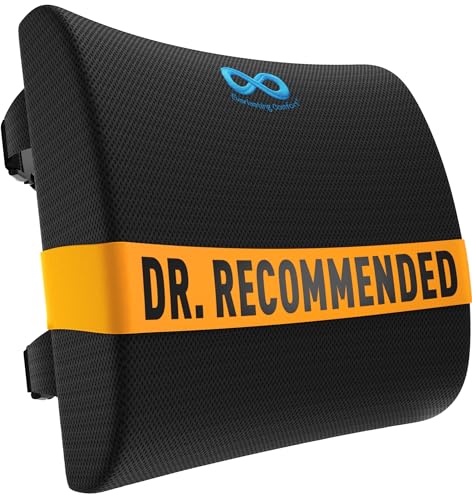
Everlasting Comfort The Original Lumbar Support Pillow for Office Chair - Improves Posture, Promotes Back Pain Relief - Superior Back Support for Gaming and Desk Chairs - Lumbar Pillow for Car, Couch
- High-Density Memory Foam: Balances firm support with comfort
- Supports Natural Spine Curve: Encourages better posture and reduces slouching
- Versatile Use: Suitable for office chairs, cars, couches, and recliners
As an affiliate, we earn on qualifying purchases.
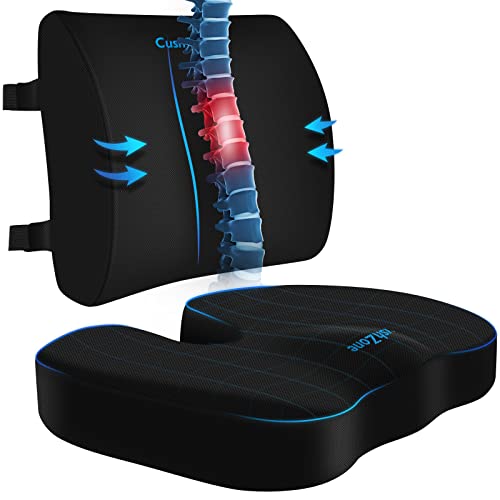
CushZone Seat Cushion and Lumbar Support Pillow for Office Chair, Black
- Ergonomic Dimensions for Comfort: Fits most chairs and users
- High-Quality Materials: Durable fabric with zippers
- Non-Slip Bottom: Ensures stability during use
As an affiliate, we earn on qualifying purchases.