Looking for a teleprompter for webcam use? The right choice depends on your setup, budget, and experience level. The Elgato Prompter stands out as the best overall for its seamless integration and user-friendly features. For those on a budget, the NEEWER 2-in-1 Teleprompter offers solid performance at a lower price point, while the AMBITFUL Portable Teleprompter Kit provides portability for mobile creators. Each option balances ease of use, compatibility, and cost, but tradeoffs include setup complexity and device compatibility. Keep reading for a detailed breakdown to find your ideal teleprompter for webcam use.
Key Takeaways
- The best teleprompter for webcam balances ease of setup with compatibility for common streaming and recording devices.
- Portability is a key factor for mobile creators, making compact models like the AMBITFUL a strong choice despite limited screen size.
- Built-in monitors and remote controls significantly improve usability, especially for longer recording sessions.
- Higher-end options like the Elgato offer seamless integration with streaming software but come at a premium price.
- Compatibility with smartphones, tablets, and DSLR cameras varies, so choosing a model that supports your device ecosystem is essential.





More Details on Our Top Picks
The Original Compact Personal Teleprompter for Video Production
This teleprompter stands out for its portability and compatibility with various devices, including DSLRs, webcams, and laptops, making it ideal for creators who film on the go. Compared with larger, more stationary models like the NEEWER X12B, it sacrifices some screen size and advanced features but gains in ease of setup and transport. Its compact design is perfect for quick edits and mobile workflows, though the limited size might hinder reading longer scripts effectively. Its no-studio approach allows professional-looking videos anywhere, but it offers fewer details on size and accessories, which could be a drawback for detailed planning. Overall, this pick makes the most sense for content creators who need a lightweight, flexible solution without fussing over extensive equipment.
Pros:- Highly portable and easy to set up
- Compatible with multiple camera types and devices
- No studio needed for quality results
Cons:- Limited details on size and compatibility
- No included accessories, which may increase additional costs
Best for: Video creators who film outdoors or at multiple locations and need a lightweight, easy-to-carry teleprompter.
Not ideal for: Producers requiring large script screens or complex setups, as this model’s small size limits extended reading and customization.
- Compatibility:DSLRs, webcams, laptops
- Portability:Very lightweight and easy to assemble
- Screen Size:Not specified, likely small
- Connectivity:None specified
- Size:Compact, portable
- Accessories:Not included
Bottom line: Ideal for mobile creators who prioritize portability over extensive script reading capacity.
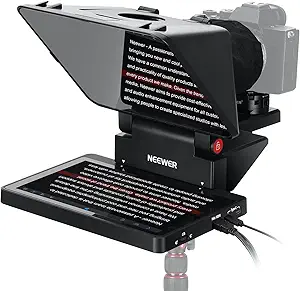
NEEWER 2-in-1 Teleprompter 11 Inch with Monitor for Windows and MacOS
The NEEWER X11 excels in offering both a teleprompter and an external monitor, making it suitable for live streaming, video conferencing, or as a second screen. Its dual functionality outshines simpler teleprompters like the Compact Personal Teleprompter, especially for those who need both script reading and real-time screen mirroring. However, it does not support voice sync, which could cause issues during live presentations, and requires driver installation for HDMI connections, adding setup complexity. The adjustable holder and multiple mounting options make it versatile, though its lens compatibility is limited to lenses up to 72mm. This model is well-suited for streamers or remote presenters who value multitasking over ultra-portability or minimal setup.
Pros:- Dual functionality as teleprompter and external monitor
- Easy plug-and-play with screen mirroring
- Flexible mounting options with adjustable holder
Cons:- Voice sync not supported, limiting live interaction
- Requires driver installation, adding setup time
Best for: Streamers, remote workers, and content creators who need a dual-purpose device for scripting and display management.
Not ideal for: Solo vloggers or mobile creators who prioritize lightweight, portable solutions without needing an external monitor or dual functions.
- Screen Size:11 inch splitter glass, 9 inch LCD monitor
- Resolution:1024 x 768
- Connectivity:USB-C, HDMI
- Mirror Transmission:75%
- Mounting:Arca quick-release, 1/4 inch screw
- Weight:Not specified
- Supports Lenses:up to 72mm filter thread
- Warranty:1 year
Bottom line: Best suited for remote presenters and streamers who need a versatile setup and are okay with a slightly more involved installation process.
AMBITFUL Portable Teleprompter Kit – 7.5” Mini Teleprompter with Desktop Tripod &Remote Control for Phone and DSLR Recording
The AMBITFUL 7.5” Mini Teleprompter is ideal for short videos, interviews, and live streams where portability and simplicity matter most. Its small size makes it easier to set up than bulkier models like the NEEWER X12B, but this also means it might not support longer scripts or larger cameras comfortably. Its advanced light reflection technology ensures clear, readable text, though compatibility depends on the lens focal length and camera size, which could be limiting for some users. The included remote control simplifies operation, but it doesn’t support voice sync or larger screens, which might hinder more professional productions. This teleprompter makes the most sense for content creators seeking a portable, affordable option for quick shoots rather than all-day studio setups.
Pros:- Compact size and easy to set up
- Includes remote control for convenience
- Compatible with DSLR cameras and smartphones
Cons:- Limited support for long scripts or large cameras
- No voice sync feature for live speaking
Best for: Aspiring video bloggers and online educators who need a compact, easy-to-use teleprompter for short-form content.
Not ideal for: Pro videographers or streamers requiring lengthy scripts or larger camera setups, due to size constraints and limited features.
- Screen Size:7.5 inches
- Compatibility:Phones, DSLR cameras
- Light Reflection Tech:Advanced
- Mounting:Desktop tripod
- Remote Control:Included
- Lens Compatibility:Focal length 35mm or longer
Bottom line: Perfect for quick, on-the-move video shoots where portability and affordability outweigh advanced features.
NEEWER Basics X12B Aluminum Alloy Teleprompter 12″ for iPad, Tablet, DSLR Camera, Bluetooth Remote & App Control, Black
The NEEWER X12B offers a sizable 12-inch HD display housed in a lightweight aluminum alloy frame, making it the best choice for users who want a larger viewing area similar to the Elgato Prompter but with added durability. Its compatibility with iPads, tablets, and DSLRs, along with Bluetooth remote and app control, provides a flexible and sturdy setup for longer sessions. Compared to smaller models like the AMBITFUL, the X12B supports more extensive scripts and larger devices, but it requires a bit more space and setup time. The aluminum construction enhances durability, though it’s not the lightest option for mobile use. This model suits professionals or serious hobbyists who prioritize screen size and robustness over extreme portability.
Pros:- Large 12-inch HD display for comfortable reading
- Durable aluminum alloy construction
- Supports app and Bluetooth remote control
Cons:- Not suitable for phone-only shooting
- Requires more space and setup time
Best for: Pro content creators and streamers who need a large, reliable teleprompter for extended recording sessions.
Not ideal for: Mobile creators or those with limited space who prefer ultra-lightweight, portable options and shorter setup times.
- Display Size:12 inches
- Material:Aluminum alloy
- Compatibility:iPad, tablets, DSLR
- Remote Control:Bluetooth remote included
- App Control:Supported
- Weight:Lightweight
Bottom line: Best suited for professionals or serious hobbyists seeking a robust, large-screen teleprompter for studio or fixed setups.
PlexiCam Pro V2 Center Screen Webcam Mount
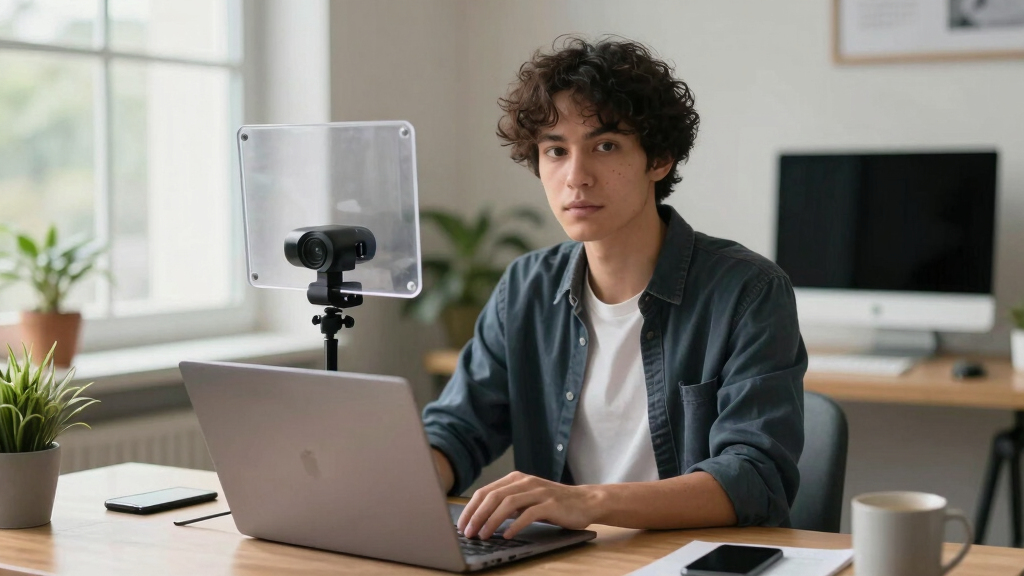
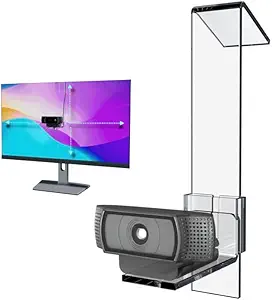
The PlexiCam Pro V2 offers a sleek, nearly invisible solution to improve eye contact during video calls. Its clear acrylic design creates a floating appearance that makes your webcam seem to hover at eye level, similar to how the Elgato Prompter frames a script but without the bulk or complexity. Unlike traditional teleprompters, this mount doesn’t display scripts but subtly positions your camera for more natural engagement. It’s perfect for professionals who want to appear more personable without adding equipment or obstructing the view. However, it requires manual adjustment to achieve the perfect height and is compatible with any webcam that uses a standard 1/4” screw. This product is ideal for remote workers and online presenters seeking a minimalistic, effective framing tool.
Pros:- Creates natural eye contact with nearly invisible design
- Universal webcam compatibility
- Easy to install and adjust
Cons:- Webcam not included, so additional purchase needed
- Requires manual adjustment for optimal positioning
Best for: Remote professionals, educators, and consultants wanting to enhance eye contact during calls without bulky equipment.
Not ideal for: Vloggers or streamers needing on-camera scripts or teleprompting features, as this mount doesn’t display text or scripts.
- Material:Premium acrylic
- Compatibility:Any webcam with 1/4” screw
- Design:Floating, nearly invisible
- Adjustability:Height adjustable
Bottom line: Ideal for professionals aiming for more engaging, natural video calls with minimal setup and equipment.
A10 Portable Teleprompter for Smartphones & DSLR Cameras with Phone Holder, Remote Control
The A10 Portable Teleprompter stands out for its high-definition reflective display and broad compatibility, making it ideal for live streaming, interviews, or speeches where mobility and flexibility are key. Unlike the NEEWER 2-in-1 11-inch monitor that offers a larger screen, the A10’s 10-inch display strikes a balance between portability and readability, though it does come with a slightly bulkier frame, which might be less convenient for on-the-go use. Its wireless remote control adds convenience for smooth script control during recordings. The main tradeoff is that setup and calibration can be time-consuming, and it’s limited to lenses of certain sizes unless you add adapters. This pick works best for content creators needing a portable, multi-device solution, but less so for those prioritizing lightweight, simple setups.
Pros:- High-definition reflective display ensures clear prompting
- Wide compatibility with smartphones and DSLR cameras
- Includes Bluetooth remote control for seamless operation
- Dual cold shoe mounts for external accessories
Cons:- Relatively bulky, less ideal for ultra-portable use
- Requires calibration for optimal performance
- Limited lens size compatibility without adapters
Best for: Content creators or professionals who need a portable, versatile teleprompter compatible with smartphones and DSLR cameras.
Not ideal for: Travelers or mobile streamers who prefer ultra-lightweight gear due to its relative bulk and setup requirements.
- Screen Size:10 inches
- Dimensions:9.37 x 8.62 x 6.26 inches
- Weight:2.42 pounds
- Compatibility:Smartphones, tablets, DSLR cameras with wide-angle lens
- Remote Control:Bluetooth-enabled
- Reflective Glass Transmittance:97%
Bottom line: This option is best suited for creators who value versatility and a high-quality display over ultra-lightweight portability.
Elgato Prompter – Teleprompter with Built-in Screen for YouTube, Twitch, Zoom, and More, 9-inch Display, Supports DSLR/Webcam/Smartphone, Drag & Drop Monitor, Compatible with Mac/PC & Stream Deck
The Elgato Prompter is tailored for streamers and video callers who need a straightforward, plug-and-play setup with a built-in 9-inch display. Compared to the NEEWER Basics X12B, which offers a larger 12-inch screen, the Elgato’s smaller size makes it more manageable and easier to mount in limited space, though it sacrifices some screen real estate. Its compatibility with Mac and PC, along with the Drag & Drop monitor and Stream Deck support, makes it highly customizable for professionals who want seamless integration with their streaming software. The main downside is that it requires downloading software and potentially installing DisplayLink drivers, which can be a hurdle for some users. This makes it ideal for streamers and remote presenters seeking a quick, adaptable setup, but less suitable for those who need extensive customization without software dependencies.
Pros:- Easy setup with no complicated installation process
- Supports a wide range of cameras and devices
- Allows for professional eye contact during streams and calls
- Highly customizable display and chat options
Cons:- Requires software downloads and setup, which may be a barrier for some
- DisplayLink software needed on Mac and Android
- Limited to a 9-inch display size
Best for: Streamers, remote workers, or content creators wanting a quick, easy-to-set-up teleprompter with professional eye contact features.
Not ideal for: Users seeking a large, standalone monitor with no software setup or compatibility concerns, or those with limited technical skills.
- Display:9 inches, 1024 x 600 pixels
- Weight:690 g / 1.52 lb
- Dimensions:224 x 219 x 282 mm
- Interface:USB-C
- Supported Systems:Windows 10 or newer, macOS 11 or newer
- Connectivity:USB
Bottom line: This teleprompter is perfect for streamers and remote professionals who need quick, versatile setup with good integration options.
How We Picked
Products were evaluated based on their compatibility with webcams and streaming setups, ease of use, build quality, and value for money. We prioritized models that offer straightforward setup, reliable performance, and versatile mounting options. Additional considerations included remote control functionality, screen size, and software compatibility. Our ranking reflects a balance of performance and affordability, aiming to help users from beginners to seasoned creators find a suitable option. We avoided models with overly complex setups or limited device support, focusing instead on those that deliver consistent, practical results for webcam-based video production.Factors to Consider When Choosing Teleprompter For Webcam
Choosing a teleprompter for webcam use involves several key factors. First, consider compatibility with your device—whether it’s a smartphone, DSLR, or webcam—so the teleprompter integrates smoothly into your existing setup. Ease of setup and portability matter if you record on the go or have limited space. Screen size and visibility are crucial; a larger, bright display helps you read comfortably without straining your eyes. Remote control features can improve workflow efficiency, especially during live streams or lengthy recordings. Finally, assess your budget against desired features to ensure you get the best value without overpaying for unnecessary extras.Compatibility and Device Support
Ensure the teleprompter supports your primary recording device, whether it’s a smartphone, DSLR, or webcam. Some models are designed specifically for smaller devices like phones, while others accommodate larger cameras. Compatibility with streaming platforms and software is also important if you plan to broadcast live. Overlooking this can lead to frustrating setups or the need for additional accessories. Look for models that explicitly mention support for your device type to avoid compatibility issues later.
Ease of Use and Setup
Many teleprompters boast quick setup, but some require more assembly or calibration. For beginners, a model with minimal setup and simple controls is ideal. Advanced users might prefer options with adjustable angles, remote control operation, or software integration. Consider whether the device’s interface is intuitive and whether the software (if included) is compatible with your operating system. A complicated setup can detract from your content creation flow, so prioritize straightforward, reliable options.
Screen Size and Brightness
The display size directly affects readability, especially during live sessions. Larger screens, like 11 or 12 inches, are easier to read but may be bulkier. Brightness and contrast are equally important; a high-brightness screen ensures clear visibility in various lighting conditions. Some models include adjustable brightness settings, which can help tailor the display to your environment. Picking a size and brightness level that matches your typical recording space will prevent eye strain and improve your confidence on camera.
Portability and Mounting Options
If you record on the move or in different locations, portability becomes a priority. Compact, lightweight models like the AMBITFUL fit easily into bags, but may sacrifice some screen size. Mounting flexibility—such as tripod compatibility or clip mounts—also matters. Ensure the teleprompter can securely attach to your camera or device. For stationary setups, sturdier mounts may be preferable, providing stability and ease of adjustment during shoots.
Budget and Value
Prices range from budget-friendly options to premium models with advanced features. Consider what features you truly need versus what might be excessive for your use case. Cheaper models often lack remote controls or have smaller screens, which could affect usability. Conversely, investing in a higher-end model enhances functionality but may not be necessary for casual or infrequent use. Balancing cost with features ensures you get a teleprompter that fits your budget without sacrificing essential performance.
Frequently Asked Questions
Can a teleprompter for webcam be used with any streaming platform?
Most teleprompters are compatible with popular streaming platforms like OBS, Streamlabs, Zoom, or Skype, especially those that support screen sharing or virtual camera features. However, it’s important to verify whether the teleprompter software or app integrates smoothly with your chosen platform. Some models require additional setup or virtual camera drivers, so checking the compatibility beforehand can save time and frustration during live sessions.
Is a dedicated teleprompter necessary if I only record occasional videos?
Not necessarily. For infrequent use, simpler and more affordable models like portable tablets or smartphone mounts can suffice. These options often do not require complex setups and can be easily stored away when not in use. However, investing in a dedicated teleprompter can improve your reading comfort and professional appearance, especially if you aim for higher-quality content or longer sessions. Consider your frequency of use and production quality goals when deciding.
Do I need special software to use a teleprompter with my webcam?
Many teleprompters come with dedicated apps or software, but some are designed to work as virtual screens that overlay your camera feed. For webcam use, software like Teleprompter apps, OBS, or dedicated driver software often helps control text scrolling and display. Compatibility with your operating system and streaming setup is key; choosing a model with built-in support for common platforms reduces additional configuration work.
How important is screen size when using a teleprompter for webcam recordings?
Screen size significantly impacts your ability to read prompts comfortably, especially during longer sessions. A larger display reduces eye strain and allows you to maintain natural eye contact with the camera. However, bigger screens can add bulk and may require more space or specialized mounts. For tight setups or mobile use, smaller screens might be more practical, but you should ensure the text remains legible from your typical viewing distance.
Are wireless remote controls really necessary for teleprompters?
Remote controls enhance convenience, allowing you to start, pause, or adjust scrolling without interrupting your presentation. They are especially useful during live streams or when you need to make quick adjustments without breaking eye contact. However, some models include physical buttons on the device itself, making remotes optional. If you prefer seamless control or plan long sessions, investing in a remote control can be a worthwhile upgrade.
Conclusion
For most users, the Elgato Prompter offers the best overall experience thanks to its compatibility and ease of use, making it ideal for professionals and serious streamers. Budget-conscious creators will find the NEEWER 2-in-1 Teleprompter provides solid features without a hefty price tag, perfect for casual or infrequent use. Beginners or those seeking portability might prefer the AMBITFUL Portable Teleprompter Kit, offering a compact design that’s easy to set up anywhere. For streamers and content creators who want advanced integration, the Elgato Prompter or PlexiCam Pro V2 stand out. Ultimately, your choice depends on your device setup, budget, and how portable or feature-rich you need your teleprompter to be.