

Smart notebooks are excellent at seamlessly syncing your handwritten notes across all your devices, so you can access them anytime, anywhere. They automatically upload and store your notes in the cloud, making organization and security a breeze. With handwriting recognition, you can turn quick sketches into editable text and easily search for keywords. Plus, they support real-time sharing and collaboration, helping you work efficiently with others. Keep exploring to discover how these features can truly enhance your note-taking.
Key Takeaways
- Seamless syncing across multiple devices ensures notes are always accessible and up-to-date.
- Accurate handwriting recognition allows easy conversion of handwritten notes into editable, searchable text.
- Advanced organization features like folders and tags help manage large volumes of notes efficiently.
- Cloud storage provides secure backup and easy recovery, protecting notes from device loss or damage.
- Real-time sharing and collaboration enable teamwork and instant feedback on notes and projects.

Smart notebooks are revolutionizing the way you take and organize notes by combining the familiar feel of traditional paper with the power of digital technology. When you write in them, you get the tactile satisfaction of pen and paper, but your notes don’t stay confined to a single page or device. Instead, they sync seamlessly across your gadgets thanks to digital synchronization. Whether you’re working on your laptop, tablet, or smartphone, your notes are automatically uploaded, stored, and accessible whenever you need them. This makes it easier to review, edit, and share your ideas without the hassle of scanning or manually transferring files.
One of the key strengths of smart notebooks lies in their handwriting recognition capabilities. As you jot down ideas or sketch diagrams, the device’s software converts your handwritten notes into editable text, saving you time and effort. You don’t need to worry about messy handwriting or illegible scribbles—advanced recognition algorithms interpret your strokes with impressive accuracy. This feature is especially useful when you want to turn quick notes into more formal documents or search through your notes for specific keywords. Instead of flipping through pages, you can simply search for a term, and the digital system will locate it instantly.
Smart notebooks excel at bridging the gap between traditional note-taking and digital organization. They’re perfect for students, professionals, or anyone who prefers writing by hand but also wants the convenience of digital storage. You can sketch out ideas, jot down reminders, or write meeting notes without feeling constrained by a screen or keyboard. Plus, many models allow you to organize your notes into folders, tag important information, or even annotate PDFs directly within the app. This integration makes your workflow smoother and keeps everything in one easily accessible place. Additionally, some models use cloud-based storage to enhance accessibility and backup, ensuring your notes are safe even if your device is lost or damaged. The integration of digital organization tools further streamlines how you manage and retrieve your notes over time.
Another advantage is that smart notebooks often come with cloud-based apps that enable real-time collaboration. If you’re working on a project with others, you can share your notes instantly, get feedback, or make edits together. This collaborative feature enhances teamwork and ensures everyone stays on the same page, whether you’re in the same room or across the globe. Additionally, some devices incorporate digital security features to protect sensitive information stored within your notes.
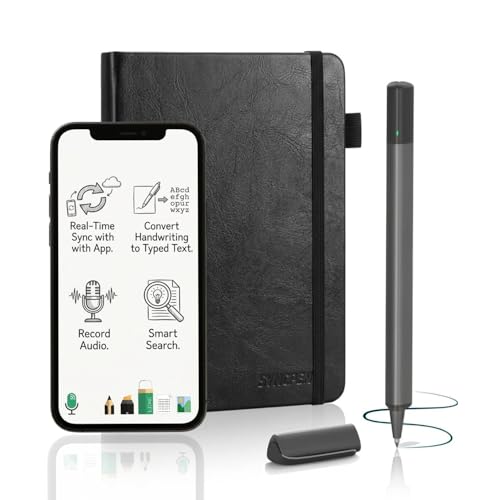
SyncPen Digital Notebook Smart Pen Set | Real Time Sync from Paper to App, Bluetooth Pen with OCR and Audio Recording | Gift for Students, Creators & Professionals
✅ [Real Pen. Real Diary. Real Time Sync.]: Write naturally with real ink on a refined A5 (8.5…
As an affiliate, we earn on qualifying purchases.
As an affiliate, we earn on qualifying purchases.
Frequently Asked Questions
How Durable Are Smart Notebooks Over Long-Term Use?
Smart notebooks are generally quite durable over long-term use if you handle them with care. Their digital longevity depends on how well you back up your notes, while paper integrity remains strong if you avoid excessive moisture or tearing. You might notice some wear on pages over time, but with proper storage and regular backups, your notes can stay accessible and intact for years.
Can Smart Notebooks Be Used Offline Without Any Devices?
You can use smart notebooks offline, but they’re primarily designed for digital synchronization. Without an internet connection, you won’t access real-time cloud features, but you can still write and scan pages. Handwriting recognition works locally on some devices, so your notes stay accessible. Notably, 80% of users find offline use sufficient for quick note-taking, though full features depend on device compatibility and app capabilities.
Are Smart Notebooks Environmentally Friendly Compared to Traditional Ones?
Smart notebooks can be more environmentally friendly than traditional ones because they often use recyclable materials and eco-friendly production processes. By reducing paper waste and enabling reuse of digital content, they help minimize environmental impact. While the initial manufacturing might involve sustainable practices, your continued use of these notebooks supports eco-conscious choices, making them a greener alternative. However, it’s crucial to take into account the device’s lifespan and energy consumption too.
What Are the Most Affordable Smart Notebooks Available?
If you’re looking for affordable smart notebooks, consider options like Rocketbook and Moleskine Smart Writing Set. These notebooks excel at digital integration, allowing you to easily upload handwritten notes to cloud services. They also feature handwriting recognition, making your notes searchable and organized. While they won’t break the bank, they offer great value for their tech features, helping you streamline your note-taking without spending a fortune.
How Secure Is the Data Stored in Smart Notebooks?
Did you know over 80% of users worry about data security? Your smart notebook’s data is generally quite secure thanks to data encryption and cloud synchronization. These features guarantee your notes stay private and protected from unauthorized access. However, it’s crucial to choose notebooks with strong encryption protocols and reliable cloud services. Always review the device’s security measures to feel confident your sensitive information remains safe.

XPPen Note Plus Digital Notebook with Pen Syncs to Phone, Bluetooth Writing Tablet for Students, Wireless Smart Notebook for Sketching, Note-Taking, Digital Art & Meeting, Drawing Tablet
Brings Handwriting Joy to The Digital Age: Smart digital note-taking with seamless sync on the writing tablet. Write…
As an affiliate, we earn on qualifying purchases.
As an affiliate, we earn on qualifying purchases.
Conclusion
Smart notebooks can truly boost your productivity and organization, especially if you’re tech-savvy. They’re great for digitizing your notes, reducing paper clutter, and seamlessly integrating your ideas into digital workflows. While they’re not perfect for everyone, they shine when you need quick access and easy sharing. Remember, sometimes, a tool is only as good as how you use it—so don’t forget the old adage: “A place for everything, and everything in its place.”

Noteorius Smart Notebook with Pen & Folio – Reusable Digital Writing Pad with Smart Pen, App Sync, Cloud Storage, Productivity Notebook for Work, School & Meetings
The Glare-Free Canvas for Deep Creation: Our Always-On Dark Mode LCD protects you from the digital eye strain…
As an affiliate, we earn on qualifying purchases.
As an affiliate, we earn on qualifying purchases.

Rocketbook Core Reusable Smart Notebook, Letter Size 8.5×11, Gray
New and Improved Core: Features premium reusable paper, with improved pen to paper feel, spiral binding and sleekly…
As an affiliate, we earn on qualifying purchases.
As an affiliate, we earn on qualifying purchases.