Using monitor arms with expensive displays is vital because they provide essential support, reducing the risk of damage and accidental falls. They also allow you to easily adjust height and angle, improving comfort and minimizing strain during long work sessions. Plus, monitor arms help maintain a sleek, organized workspace that highlights your high-end setup. If you want to discover more ways monitor arms protect and enhance your investments, keep exploring how they can benefit you.
Key Takeaways
- Expensive displays require proper support to prevent damage and ensure long-term performance.
- Adjustable monitor arms optimize ergonomic positioning, reducing strain on high-value screens during extended use.
- They enhance aesthetic appeal and workspace organization, complementing the sleek design of premium monitors.
- Secure mounting stabilizes costly displays, preventing accidental falls and costly repairs.
- Monitor arms facilitate quick adjustments, maintaining optimal viewing angles for high-end visuals and productivity.

When you invest in an expensive display, the way you position and support it becomes even more critical. High-end monitors often come with impressive features, stunning resolutions, and sleek designs that can significantly elevate your workspace. But without the right support, such as a quality monitor arm, you risk compromising both the monitor’s potential and your comfort. A well-chosen monitor arm ensures you can adjust your display to the perfect height and angle, which is essential when dealing with premium screens that demand careful handling. It allows you to fine-tune your setup for maximum ergonomic benefits, helping reduce neck, shoulder, and eye strain during long hours of work or creative tasks. This flexibility means you can position your display to match your natural line of sight, promoting better posture and reducing fatigue over time. Additionally, a good monitor arm can help optimize color accuracy, ensuring your high-end display maintains its vibrant visuals from multiple viewing angles. Proper workspace ergonomics also contribute to overall comfort, preventing strain and injury over extended periods of use. Incorporating an adjustable monitor arm can also facilitate easy repositioning, allowing you to adapt your workspace quickly to different tasks or collaborators.
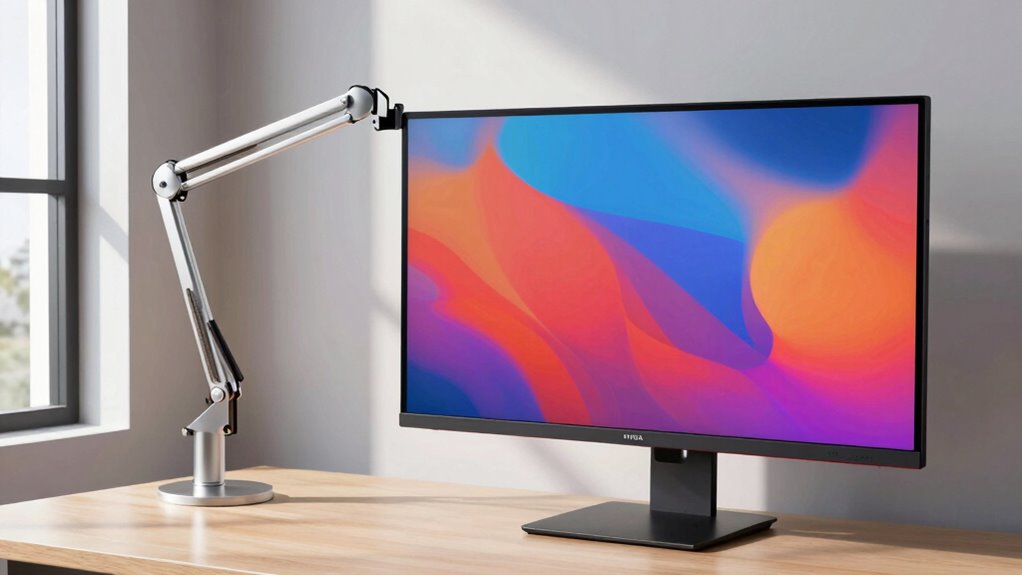
Beyond comfort, an adjustable monitor arm also enhances the aesthetic appeal of your workspace. Expensive displays often feature slim bezels, vibrant colors, and modern designs that deserve to be showcased. Mounting your monitor on an arm minimizes clutter by freeing up desk space and providing a cleaner, more organized look. It allows you to position your screen precisely where it looks best, whether that’s at eye level, slightly to the side, or in a more ergonomic arrangement. The sleek, streamlined appearance of a monitor arm complements the high-end look of your display, creating a professional and visually appealing environment. It also offers the convenience of easily repositioning your monitor if your work needs change, ensuring your workspace remains adaptable and stylish. Proper support and workplace ergonomics are essential for maintaining comfort and productivity in a demanding digital environment. Investing in a quality monitor arm is especially worthwhile with expensive displays because it protects your investment. Heavy or delicate screens benefit from stable, secure mounting, preventing accidental knocks or falls that could cause costly damage. Furthermore, a sturdy arm reduces vibrations and wobbling, keeping your display steady during intense work sessions or when adjusting its position. Over time, this stability preserves the monitor’s longevity and performance. Additionally, with the right setup, you can switch between different tasks seamlessly — whether you’re editing photos, coding, or attending video calls — without sacrificing comfort or aesthetics.
In the end, a monitor arm isn’t just a functional accessory; it’s an investment in your workspace’s overall quality. When you use one with an expensive display, you’re maximizing ergonomic benefits, protecting your device, and elevating the look of your environment. It transforms a simple screen into a centerpiece that supports your productivity and style simultaneously.

ErgoFocus Extra Long Arm Monitor Mount, Fits Max 32" Hold up to 19.8lbs
- Extended Monitor Arm: Extends up to 27.76 inches for deep desktops
- Space-Saving Design: Saves over 80% of desktop space
- Cable Management: Integrated cable routing for organization
As an affiliate, we earn on qualifying purchases.
As an affiliate, we earn on qualifying purchases.
Frequently Asked Questions
How Do Monitor Arms Impact the Longevity of Expensive Displays?
Monitor arms improve the longevity of expensive displays by providing better display stability, reducing the risk of accidental drops or falls. They also help with cable management, preventing strain on the cables and ports which can cause damage over time. By securing your monitor properly, you minimize wear and tear, ensuring your costly display stays functional longer. Plus, adjustable arms make it easier to maintain ergonomic positioning, reducing fatigue and potential damage.
Can Monitor Arms Improve Ergonomics for High-End Monitors?
Imagine you’re in a spaceship—monitor arms are your control panels. They improve ergonomics for high-end monitors by allowing adjustable height and positioning, reducing strain during long hours. With an ergonomic setup, you can maintain proper posture, avoid neck and eye strain, and work more comfortably. A good monitor arm guarantees your high-end display stays perfectly positioned, making your workspace both functional and comfortable.
Are There Specific Monitor Arm Features Suited for Expensive Screens?
Yes, there are specific monitor arm features suited for expensive screens. You should look for adjustable tilt to fine-tune your viewing angle and prevent strain. Additionally, cable management is vital to keep your workspace tidy and protect your investment. High-quality monitor arms with these features ensure your costly display stays secure, easily adjustable, and free from clutter, enhancing both your comfort and the longevity of your screen.
Do Monitor Arms Affect the Warranty of Premium Displays?
A stitch in time saves nine—using the right monitor arm won’t void your warranty if you consider brand compatibility and mounting standards. As long as you select a compatible arm designed for your premium display and follow the manufacturer’s instructions, you won’t jeopardize your warranty. Always check the display’s warranty terms and choose a monitor arm that meets all mounting standards to guarantee both safety and compliance.
What Are the Cost Implications of Using Monitor Arms With Expensive Monitors?
Using monitor arms with expensive displays can save you money by improving mounting stability and reducing the risk of damage. They help prevent accidental drops or falls, which could be costly to repair or replace. Plus, monitor arms often feature cable management, keeping cords organized and reducing clutter. This setup minimizes wear and tear on your expensive monitor, potentially extending its lifespan and saving you money in the long run.

ErGear Single Monitor Arm, Fully Adjustable Monitor Mount for 13–34 Inch Screens, Fast Install Computer Monitor Stand with Tool-Free VESA Mount, Cable Management, Holds 19.8 lbs, Max VESA 100x100mm
- Compatibility: Fits 13–34 inch monitors up to 19.8 lbs
- VESA Compatibility: Supports 75x75mm and 100x100mm patterns
- Durable Construction: Tested over 20,000 cycles for longevity
As an affiliate, we earn on qualifying purchases.
As an affiliate, we earn on qualifying purchases.
Conclusion
You might think a pricey display is enough on its own, but without a good monitor arm, you’re missing out on comfort and flexibility. Just like a luxury car needs a smooth suspension, your expensive monitor deserves proper support to maximize its value. Investing in a quality monitor arm doesn’t just elevate your workspace—it transforms your entire experience, proving that even the most costly screens perform better when paired with the right accessories.

HUANUO Single Monitor Arm with 39 inch Extra-Tall Pole, Adjustable Computer Desk Mount for 13–32 inch Screens and up to 38 inch Ultrawide Screens, Hold 22 lbs, Monitor Stand with C-Clamp & Grommt Base
- Height Adjustable Pole: 39-inch height for comfort and productivity
- Universal Compatibility: Fits 13-32 inch screens and ultrawide up to 38 inches
- Supports Up to 22 lbs: Heavy-duty mount for various monitor sizes
As an affiliate, we earn on qualifying purchases.
As an affiliate, we earn on qualifying purchases.

WALI Single Monitor Mount for 13-34 inch Screens, Adjustable Single Monitors Arm, Regular Screen up to 32 inch, 26.4lbs, Computer Monitor Stand for Desk, VESA 75/100mm (GSMP001N), Black
- Space-Saving Design: Lifts monitor off desk for more space
- Cable Management: Guides wires neatly along the arm
- Wide Compatibility: Fits most screens up to 34 inches
As an affiliate, we earn on qualifying purchases.
As an affiliate, we earn on qualifying purchases.