
This checklist is for people who spend time at a desk and want to consider posture-support products without treating any one accessory as a cure-all. It covers lumbar support cushions, footrests, monitor risers, wrist rests, seat wedges, and posture correctors, with a practical fit-first approach to choosing among them.

Get comfort and recovery gear delivered free — and shop member deals
- Fast, free delivery on millions of items
- Access to Prime Big Deal Days deals on October 6–7
- Prime Video, Amazon Music and more included
Each section explains why that type of product may matter, what to check before buying, and common fit or compatibility pitfalls. Where a product is listed, the pick is named as provided; the monitor-riser section offers selection advice only, with no specific product recommendation.
Use the checklist to identify the setup issue you want to address, then compare the product’s dimensions and adjustments with your chair, desk, and body. Prioritize fit and adjustability over adding accessories by default, and try one change at a time so you can judge whether it suits your workspace.
Lumbar Support Cushions
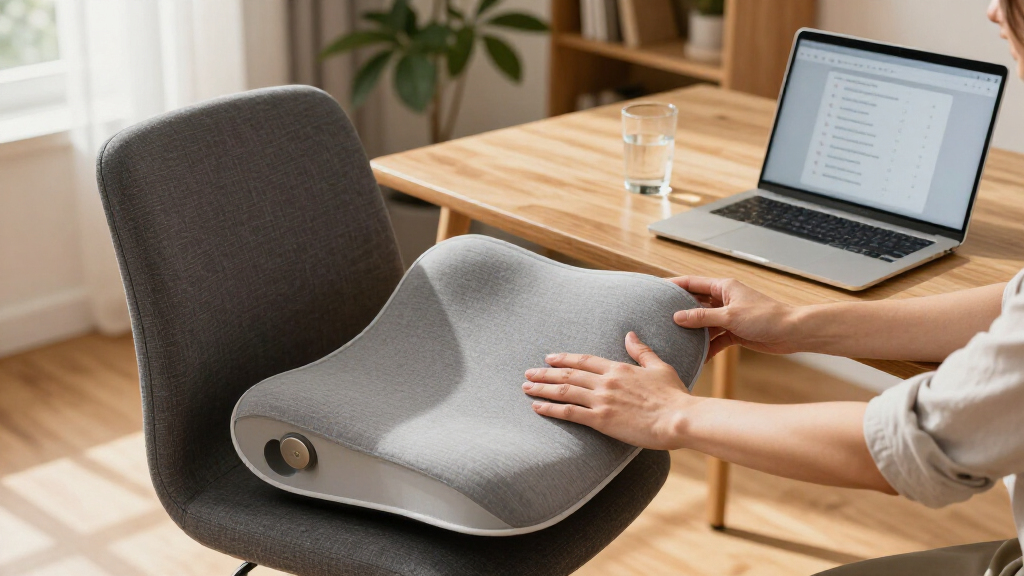
A lumbar cushion is worth considering when your chair does not meet your lower back comfortably or its shape does not suit your sitting posture. The Ergonomic Memory Foam Posture Support Seat Cushion is the listed pick for this slot. A cushion can change how you sit in the chair, so consider it as part of the full seat setup rather than as a standalone fix.
Check the cushion’s dimensions and thickness against both your chair and your seated height. A cushion that takes up too much seat depth may push you forward; one that is too small may not sit where you need support. Also check whether its shape works with the chair’s existing backrest and whether it stays in a useful position as you move. A common mistake is choosing by the word “ergonomic” alone without checking the actual fit.
Before buying, consider how the added cushion could affect your feet reaching the floor and your knees fitting under the desk. If it changes your seating height or position, you may need to reassess foot support and desk reach. Look for clear product dimensions and a shape that matches your chair, and make sure you can still sit with a comfortable, supported position rather than feeling pushed out of place.
What to look for:
- Cushion dimensions compared with your chair’s seat and back area
- Thickness that does not push you too far forward
- A shape that fits the chair’s existing backrest
- Stable placement during ordinary sitting and movement
- Whether the added height affects foot and desk fit
Ergonomic Memory Foam Posture Support Seat Cushion

This contoured seat cushion uses high-density memory foam to support the pelvis, encourage natural spine alignment, and distribute sitting pressure. Its breathable fabric and lightweight design make it easy to move between office chairs, home workspaces, dining chairs, and other seating.
Pros:
- Contoured design supports the pelvis and encourages natural spine alignment
- High-density foam helps distribute sitting pressure
- Breathable fabric
- Lightweight and suitable for several types of seating
Cons:
- Side bolsters may feel restrictive for users above the recommended measurements
- Requires a chair seat at least 19 inches wide
Best for: Desk users whose chair needs a different-feeling lower-back contact point
Not ideal for: Anyone who cannot confirm the cushion’s dimensions will fit their chair
Bottom line: Check the cushion against your chair and seated position before deciding it belongs in your setup.
Footrests for Under Desk
An under-desk footrest may help when your feet do not rest comfortably while you are seated, particularly if chair height and desk clearance make it hard to find a settled position. The listed pick is the Step-to-Adjust Foot Rest – Infinite Height Adjustment from 2.7″ to 13.. Its stated adjustment range makes the usable height an important part of evaluating whether it fits your setup.
Measure the space beneath your desk, including the distance from the floor to the underside of the desk and the room available between your chair and desk. Compare those measurements with the product’s height range and the space it needs in use. A common mistake is checking only whether a footrest fits beneath the desk, without checking whether your legs still have room to move or whether your feet can rest on it without pulling your chair too far away.
Think about how you sit throughout the day: the right setting should work with your chair height and allow you to place your feet comfortably. Check the adjustment method and whether it seems manageable for the changes you expect to make. If you already use a seat cushion, reassess the setup with it in place because it may alter your seated height. Aim for compatible heights and clear legroom, rather than assuming the widest adjustment range guarantees a good fit.
What to look for:
- Available height range compared with your seated position
- Clearance beneath the desk at the intended setting
- Enough legroom to move the chair and reposition your feet
- An adjustment method you can use comfortably
- Fit checked with any seat cushion or other seating accessory in place
Step-to-Adjust Foot Rest – Infinite Height Adjustment from 2.7" to 13.1"
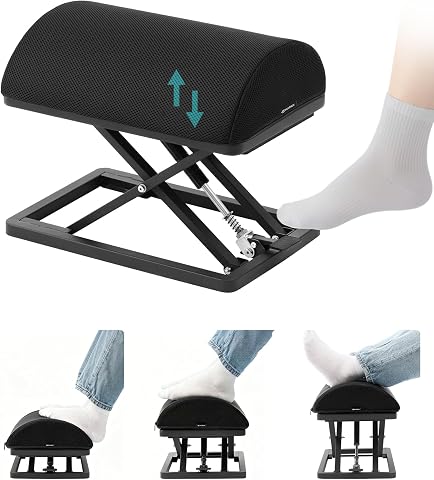
This adjustable foot rest features a patent-pending design that allows instant height adjustment with a simple tap, providing customized ergonomic support. Made from durable carbon steel with a comfortable foam cushion, it enhances comfort during work, gaming, or studying.
Pros:
- Instant, infinite height adjustment with a tap for personalized comfort
- Durable construction tested for over 10 years of use
- Ergonomic foam cushion supports feet and improves circulation
- Non-slip pads ensure stability during use
Cons:
- Warning about potential finger entrapment during operation
- Heavier weight may be less portable
Best for: People who need to check several possible footrest heights against their setup
Not ideal for: Workspaces without enough under-desk clearance or legroom
Bottom line: Measure the desk clearance and test the height range against your chair before choosing a setting.
Monitor Risers
A monitor riser is a way to change screen height, so the key question is whether your current display position suits your seated setup. Start by observing where the screen sits relative to your eyes and how you hold your head while viewing it. The goal of this checklist is not to prescribe one universal height, but to help you assess whether raising the monitor could make your desk arrangement more comfortable.
Before selecting a riser, check the display’s footprint, stand shape, and total space available on your desk. Confirm that the riser can support the monitor and that it will not block items or workspace you need. A common mistake is choosing a riser based only on height while overlooking its width, depth, stability, or the monitor’s stand. Also consider whether the monitor has its own height adjustment; adding a riser may not be necessary if the existing stand already suits you.
Measure the screen position you want to try and compare it with the riser’s dimensions. Check that the change will leave room for the keyboard, mouse, and any other daily-use items. If your monitor has a separate stand or mount, consider how that interacts with a riser before buying. Prefer a solution that fits your screen, desk, and viewing position, and avoid assuming that a taller setup is automatically a better one.
What to look for:
- Monitor footprint and stand compatibility
- Riser dimensions compared with available desk space
- A height change that suits your seated viewing position
- Room for keyboard, mouse, and frequently used items
- Whether the monitor’s existing adjustment is already sufficient
Wrist Rests
Wrist rests are intended to fit into the working area around your keyboard and mouse, so the main consideration is whether their height and placement suit your hands and equipment. The listed pick is the Ergonomic Mouse Pad with Wrist Support and Keyboard Wrist Rest Set. Because it includes support for both mouse and keyboard use, check that each piece fits the way you actually arrange your desk.
Compare the keyboard wrist rest’s length and height with your keyboard, and check whether the mouse pad leaves enough room for your usual mouse movement. A common mistake is choosing a set that matches one device but crowds the other or shifts the keyboard into an awkward position. Consider your desk depth and the distance between the keyboard and mouse, too. The aim is to keep the set compatible with your workspace, not to force your hands into a particular position.
Think about how you use the keyboard and mouse during normal tasks, and whether the rests stay in a useful place as you move between them. Confirm the listed product includes the pieces you need and compare their dimensions with your devices. If the support changes how high your wrists sit relative to the keyboard or mouse, reconsider the overall arrangement. Prioritize comfortable reach and device fit, and avoid assuming that a wrist rest is suitable simply because it is sold as a set.
What to look for:
- Keyboard wrist-rest length and height compared with your keyboard
- Mouse-pad space for your usual mouse movement
- Set dimensions checked against available desk depth
- Placement that does not crowd or misalign your devices
- A hand and wrist position that feels comfortable during regular use
Ergonomic Mouse Pad with Wrist Support and Keyboard Wrist Rest Set

This ergonomic set includes a mouse pad and keyboard wrist rest crafted with memory foam for long-lasting support and comfort. The design features a 15-degree slope, massage beads, and a silky fabric surface to promote wrist health and precise control during extended use.
Pros:
- Provides ergonomic support to reduce wrist strain
- Comfortable massage bead design promotes blood flow
- Non-slip PU base ensures stability during use
- Easy to clean and maintain
Cons:
- May be too large for small desks
- Memory foam may flatten over time with heavy use
Best for: People who want to assess matching support for both keyboard and mouse areas
Not ideal for: Anyone whose desk or devices cannot accommodate the set’s dimensions
Bottom line: Check the dimensions and arrangement of both pieces against your keyboard, mouse, and desk.
Seat Wedges
The pick listed under seat wedges is the Ergonomic Office Chair, Mesh Computer Desk Chair with BIFMA X5.1 Certi. This product name describes a chair rather than a seat wedge, so treat that distinction as a key checklist item. If you specifically want a wedge, confirm that the product is actually a wedge before buying; if you are considering a chair, assess it as a chair instead of assuming it includes a separate wedge.
For a chair purchase, compare its dimensions with your desk, the space around your workstation, and your own seating needs. Check the available adjustments and whether the chair can be positioned comfortably with your keyboard, monitor, and foot support. A common mistake is selecting a product from a category heading without checking what the product itself is. The supplied name also ends with “Certi,” so verify the complete product details rather than inferring any additional specifications from the shortened title.
If your goal is specifically to change the angle of your sitting surface, make sure the item you choose is designed for that purpose and will work with your chair. If you are instead shopping for a chair, consider seat fit, back support, desk clearance, and how its height affects your feet. Keep the decision tied to the item you actually need: chair fit and wedge function are different checks, and the product name alone does not establish that this pick is a seat wedge.
What to look for:
- Whether the item is a chair or an actual seat wedge
- Full product details beyond the shortened supplied name
- Chair dimensions and fit with your desk space
- Adjustments that suit your seated position and workstation
- Compatibility with your foot support and other seating accessories
Ergonomic Office Chair, Mesh Computer Desk Chair with BIFMA X5.1 Certification,

The MOLENTS ergonomic office chair features adjustable lumbar support and 3‑D armrests to customize comfort throughout the workday. Its breathable high‑elastic mesh back and a tilt range of 90°–120° provide both ventilation and relaxed seating options.
Pros:
- Adjustable lumbar support and 3‑D armrests for personalized ergonomics
- Breathable mesh material keeps the seat cool during long periods
- Wide tilt range (90°–120°) allows easy transition between work and rest
- BIFMA X5.1 certified, indicating compliance with commercial office standards
Cons:
- Assembly can be confusing due to multiple parts and instructions
- Limited gas lift options may not suit users at extreme height extremes
Best for: Shoppers willing to confirm whether they need a chair or a wedge
Not ideal for: Anyone seeking a confirmed seat wedge based only on this product name
Bottom line: The listed pick is named as an office chair, so verify the product type before treating it as a seat wedge.
Posture Correctors
The listed pick is Posture Corrector for Men and Women, Full Back Brace with Lumbar Suppo. Since the supplied name is shortened, check the complete product information before deciding whether its design and coverage match what you want. A posture corrector is a wearable item, so fit and comfort matter: consider where it sits on your body and whether it works with the clothing and daily activities you expect.
Before buying, look for clear sizing guidance and compare it with your own measurements rather than relying on a broad audience label in the product name. Check how the brace is adjusted, what areas it is described as supporting, and whether the construction seems suitable for the way you plan to wear it. A common mistake is choosing a size or design without reviewing the instructions, then finding that the fit is difficult to manage or does not suit the intended use.
Consider how long you expect to wear it and whether it will fit comfortably under or over your usual clothing. Confirm that straps and other adjustments are accessible and that the product information explains how to put it on and position it. If you have questions about whether a brace is appropriate for you, seek relevant professional guidance rather than treating a product description as individualized advice. Look for clear sizing, adjustment, and use information before making your selection.
What to look for:
- Complete product details beyond the shortened supplied name
- Sizing instructions that you can compare with your measurements
- Clear information about fit, coverage, and adjustment
- Compatibility with your expected clothing and daily activities
- Instructions for putting on and positioning the brace
Posture Corrector for Men and Women, Full Back Brace with Lumbar Support
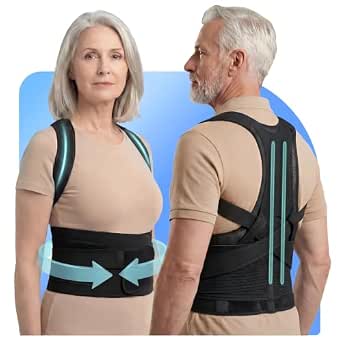
This posture corrector features dual-layer lumbar support and an open-back alignment system, designed to relieve back strain, muscle soreness, and improve posture. Made with flexible, breathable materials, it provides stable support for daily activities like sitting, walking, and bending, helping users stand taller and sit more confidently.
Pros:
- Effective dual-layer lumbar support for back stability
- Breathable and comfortable for extended wear
- Easy to put on and adjust independently
- Designed for daily movement and posture correction
Cons:
- May require proper sizing for optimal fit
- Results may vary depending on individual use
- Not suitable for severe or persistent back issues without professional consultation
Best for: Shoppers who can verify the full details and sizing guidance first
Not ideal for: Anyone unable to confirm the brace’s size, fit, or intended use
Bottom line: Review the complete product information and sizing instructions before deciding whether this brace suits you.
If you are building a setup gradually, start with the issue that is most noticeable in your current workstation. Check measurements and compatibility first, then prioritize the item most likely to address that specific fit concern. For example, compare seat height and foot placement before adding a footrest, and assess screen position and desk space before considering a riser. A one-change-at-a-time approach makes it easier to tell what works for you.
Not every accessory belongs in every workspace, and product names do not replace careful checks of dimensions, fit, and intended use. Use this checklist to ask better questions, verify the details that matter, and make choices that work with your chair, desk, and everyday routine. A more comfortable setup starts with thoughtful fit checks, not a longer list of accessories.
Halloween Picks
halloween
As an affiliate, we earn on qualifying purchases.