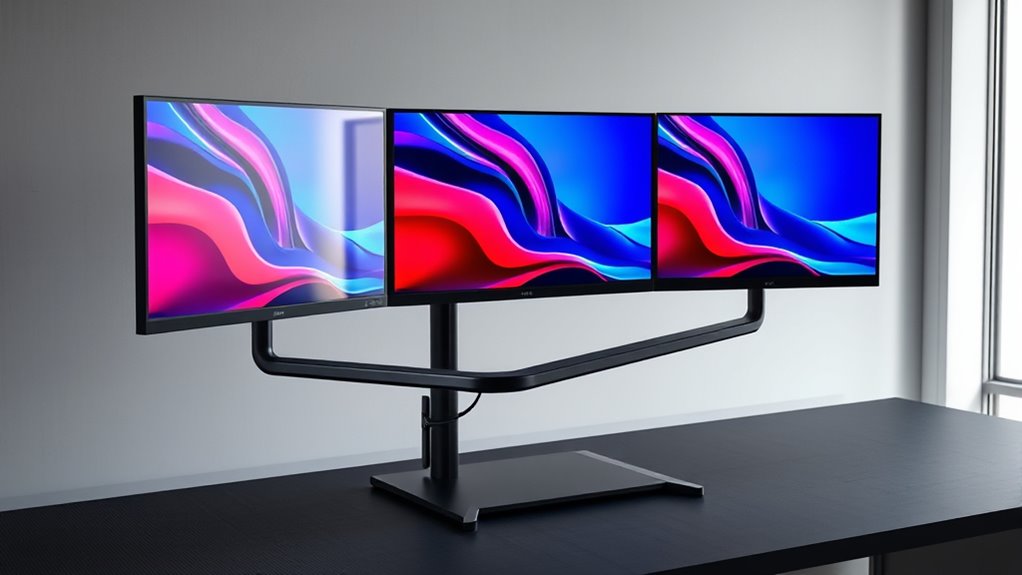
Searching for the best triple monitor stand in 2026? The HUANUO Triple Monitor Mount stands out as the best overall for its versatility and solid build. For those needing extra size capacity, the VIVO Triple Ultrawide Mount offers exceptional support for large screens. Meanwhile, the Mount Pro Triple Mount appeals to users who prioritize full motion flexibility. Each option balances features against tradeoffs like price, adjustability, and ease of installation. Continue reading to explore these choices in detail and find the perfect fit for your workspace.

Get comfort and recovery gear delivered free — and shop member deals
- Fast, free delivery on millions of items
- Access to Prime Big Deal Days deals on October 6–7
- Prime Video, Amazon Music and more included
Complete the kit



Key Takeaways
- The best picks balance adjustability, weight capacity, and build quality, with top models supporting larger screens and heavy-duty use.
- Clamp and grommet mounting options vary widely; the most versatile stands offer both for different desk setups.
- Premium models tend to provide smoother adjustments and more durable materials, justifying higher prices for demanding users.
- Compatibility with screen sizes and VESA patterns is crucial; overlooking this can lead to fit issues or limited flexibility.
- Ease of installation and cable management features significantly impact overall user experience.
| HUANUO Triple Monitor Mount for 17 to 32 inch Screens with Swivel, Tilt, Rotation, Clamp & Grommet Kit |  | Best Overall Triple Monitor Mount | Maximum monitor size: 32 inches | VESA compatibility: 75x75mm or 100x100mm | Weight range: 4.4 lbs to 17.6 lbs | VIEW ON AMAZON | See Our Full Breakdown |
| VIVO Triple Ultrawide Monitor Desk Mount for Up to 49-inch Screens |  | Best Heavy-Duty Ultrawide Support | Screen Size Compatibility: Up to 49 inches and 38 inches (2 monitors) | Maximum Load Capacity: 44 lbs per arm | Material: Cast aluminum | VIEW ON AMAZON | See Our Full Breakdown |
| VIVO Triple LCD LED Computer Monitor Desk Stand, Fully Adjustable Mount for 3 Screens up to 30 inches |  | Best for Budget-Friendly Flexibility | Compatible Screen Size: 13″ to 30″ | Maximum Weight per Monitor: 10 kg | VESA Compatibility: 75x75mm, 100x100mm | VIEW ON AMAZON | See Our Full Breakdown |
| HUANUO Triple Monitor Mount for 13-27 inch Screens, Adjustable Desk Mount with Arms Supports 19.8 lbs, VESA 75×75/100x100mm |  | Best for Small to Medium Monitors | Monitor Size Compatibility: 13-27 inches | Weight Capacity: 19.8 lbs per arm | VESA Pattern: 75x75mm, 100x100mm | VIEW ON AMAZON | See Our Full Breakdown |
| VIVO Premium Freestanding Triple Monitor Desk Mount for 3 Screens up to 22 lbs, Fits up to 38 inch Ultrawides |  | Best Freestanding Versatility | Max weight per monitor: 22 lbs | VESA compatibility: 75x75mm, 100x100mm | Monitor size range: 24 to 38 inches | VIEW ON AMAZON | See Our Full Breakdown |
| Mount Pro Triple Monitor Mount for 13-32 inch Screens, Adjustable Desk Mount with Tilt, Swivel, Rotation, VESA Compatibility | 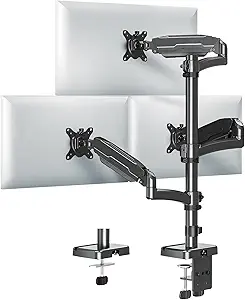 | Best Overall for Versatile Ergonomics | Supported Screen Size: 13-32 inches | Maximum Weight per Monitor: 19.8 lbs | VESA Compatibility: 75x75mm, 100x100mm | VIEW ON AMAZON | See Our Full Breakdown |
| VIVO Triple Monitor Mount Fully Adjustable Desk Stand for 3 LCD Screens up to 24 inches |  | Best for Budget-Conscious Setup with Full Adjustability | Compatibility: Screens 13″ to 24″ (up to 17.6 lbs each) | VESA Mounting: 75x75mm or 100x100mm | Adjustments: 90° tilt, 90° swivel, 360° rotation, height adjustment 1.1″ | VIEW ON AMAZON | See Our Full Breakdown |
| MountUp Triple Monitor Mount for 17-32 inch Screens, Full Motion Desk Stand, Holds 4.4-19.8 lbs per Monitor, Clamp & Grommet Mount, Black |  | Best for Heavy Monitors and Versatile Mounting Options | Screen Size Compatibility: 17-32 inches | VESA Compatibility: 75x75mm, 100x100mm | Weight Capacity: 4.4-19.8 lbs per arm | VIEW ON AMAZON | See Our Full Breakdown |
| WALI Triple Monitor Stand for 13-27 inch Screens, Supports Up to 22 lbs |  | Best for Versatile Mounting with Long-Term Warranty | Compatibility: Monitors up to 27 inches | Weight Capacity: 22 lbs per arm | Mounting Options: Grommet-base, free-standing | VIEW ON AMAZON | See Our Full Breakdown |
| MOUNTUP Triple Monitor Stand Mount – Fits 3 Monitors Up to 27 inch, Heavy Duty, Black |  | Best Heavy-Duty Support for 27-Inch Monitors | Compatibility: Monitors up to 27 inches | Weight Capacity: 4.4-19.8 lbs per arm | Mounting Options: C-clamp and grommet | VIEW ON AMAZON | See Our Full Breakdown |
| Triple Monitor Mount for up to 49 inches, Fully Adjustable Heavy Duty 3 Monitor Arm with Gas Spring, Desk Mount for 3 Screens, C-Clamp & Grommet Base, Holds 44 lbs, Black |  | Best for Large Ultrawide Monitors | Monitor Compatibility: Up to 49 inches (center), 35 inches (side monitors) | Weight Capacity: 44 lbs (center), 26.4 lbs (each side) | VESA Compatibility: 75x75mm and 100x100mm | VIEW ON AMAZON | See Our Full Breakdown |
| WALI Triple Monitor Mount for 13-32 inch Screens, up to 19.8 lbs per Arm |  | Best for Budget-Conscious Multi-Display Users | Screen Size Compatibility: 13-32 inches | Max Load Capacity: 19.8 lbs per arm | VESA Pattern: 75x75mm and 100x100mm | VIEW ON AMAZON | See Our Full Breakdown |
| WALI Adjustable Triple Monitor Mount for 13-27 inch Screens, 22 lbs per Arm |  | Best for Smaller Monitors and Fine-Tuned Ergonomics | Compatibility: Monitors up to 27 inches, 22 lbs | VESA Compatibility: 75x75mm or 100x100mm | Number of Monitors: 3 | VIEW ON AMAZON | See Our Full Breakdown |
| VIVO Black Triple Monitor Mount Freestanding Desk Stand with Glass Base for 13-24 inch Screens |  | Best for Aesthetic and Stable Smaller Monitors | Supports Monitors: 3 monitors | Monitor Size Range: 13-24 inches | Weight Capacity: 22 lbs per monitor | VIEW ON AMAZON | See Our Full Breakdown |
| VIVO Triple Pneumatic Monitor Mount for 3 Screens up to 32 inches, Fully Adjustable, Heavy Duty Desk Stand with C-Clamp, Black |  | Best for Smooth, Effortless Positioning | Supported Screen Size: 17-32 inches | Maximum Weight per Monitor: 17.6 lbs | VESA Compatibility: 75x75mm, 100x100mm | VIEW ON AMAZON | See Our Full Breakdown |
| triple monitor stand | VESA compatibility |
|---|---|
| HUANUO Triple Monitor Mount fo | 75x75mm or 100x100mm |
| VIVO Triple Ultrawide Monitor | — |
| VIVO Triple LCD LED Computer M | 75x75mm, 100x100mm |
| HUANUO Triple Monitor Mount fo | — |
| VIVO Premium Freestanding Trip | 75x75mm, 100x100mm |
| Mount Pro Triple Monitor Mount | 75x75mm, 100x100mm |
| VIVO Triple Monitor Mount Full | — |
| MountUp Triple Monitor Mount f | 75x75mm, 100x100mm |
| WALI Triple Monitor Stand for | — |
| MOUNTUP Triple Monitor Stand M | — |
| Triple Monitor Mount for up to | 75x75mm and 100x100mm |
| WALI Triple Monitor Mount for | — |
| WALI Adjustable Triple Monitor | 75x75mm or 100x100mm |
| VIVO Black Triple Monitor Moun | 75x75mm and 100x100mm |
| VIVO Triple Pneumatic Monitor | 75x75mm, 100x100mm |
More Details on Our Top Picks
HUANUO Triple Monitor Mount for 17 to 32 inch Screens with Swivel, Tilt, Rotation, Clamp & Grommet Kit
This HUANUO model stands out for its versatile support of monitors from 17 to 32 inches, offering full motion adjustments—swivel, tilt, and rotation—that promote ergonomic comfort. Compared with the WALI options, its dual installation choices provide greater flexibility for different desk setups. However, its weight limit of 17.6 lbs per monitor may restrict heavier displays. The support for multiple installation methods makes it especially suitable for users who want a customizable, space-saving solution without sacrificing flexibility. Its compatibility with standard VESA mounts and adjustable arm positioning make it a reliable choice for most mid-sized monitors, though larger or heavier models will need a different setup. Overall, this stand balances functionality and adaptability for a wide range of desk environments.
Pros:- Supports full motion with swivel, tilt, and rotation for ergonomic positioning
- Space-saving design elevates three monitors off the desk surface
- Two installation options enhance versatility for different desk types
Cons:- Limited to monitors up to 17.6 lbs, restricting heavier displays
- Requires monitors to have VESA mounting holes for compatibility
- Not suitable for monitors larger than 32 inches
Best for: Desk workers or gamers with monitors between 17 and 32 inches seeking flexible, space-efficient mounting.
Not ideal for: Users with larger, heavier monitors exceeding 32 inches or 17.6 lbs, or those requiring extremely high weight capacity.
- Maximum monitor size:32 inches
- VESA compatibility:75x75mm or 100x100mm
- Weight range:4.4 lbs to 17.6 lbs
- Desk thickness (C-clamp):0.39-3.15 inches
- Desk thickness (Grommet):0.39-2.36 inches
Our verdict“This stand is ideal for users with mid-sized monitors who prioritize adjustable ergonomics and flexible installation options.”
VIVO Triple Ultrawide Monitor Desk Mount for Up to 49-inch Screens
This VIVO mount is tailored for users who need to support a combination of ultrawide screens, including one up to 49 inches, with robust articulation. Its cast aluminum construction offers durability, and pneumatic height adjustment ensures effortless positioning. Compared to the lighter HUANUO model, this mount handles larger, heavier ultrawide monitors more confidently, making it ideal for professional or creative workflows. However, its bulkiness and weight can hinder mobility, requiring a sturdy desk and some effort during setup. The 180° swivel and 360° rotation provide extensive flexibility, especially for users working with multiple large displays. This makes it suitable for those prioritizing support for large screens with heavy-duty stability, though it may be overkill for standard-sized monitors.
Pros:- Supports ultrawide monitors up to 49 inches with high load capacity
- Heavy-duty cast aluminum ensures durability and stability
- Pneumatic height adjustment allows easy, precise positioning
- Supports extensive tilt, swivel, and rotation for ergonomic use
Cons:- Heavy and bulky, making repositioning difficult
- Requires a sturdy desk to handle the weight and size
- Setup can be complex for less experienced users
Best for: Professionals or content creators with ultrawide or large monitors seeking maximum stability and adjustability.
Not ideal for: Casual users with standard-sized monitors or those with limited desk space, due to its size and weight.
- Screen Size Compatibility:Up to 49 inches and 38 inches (2 monitors)
- Maximum Load Capacity:44 lbs per arm
- Material:Cast aluminum
- Tilt Range:+55° to -25°
- Swivel:180°
- Rotation:360°
Our verdict“This mount is best suited for professionals working with large, heavy ultrawide monitors who need maximum stability and flexibility.”
VIVO Triple LCD LED Computer Monitor Desk Stand, Fully Adjustable Mount for 3 Screens up to 30 inches
This VIVO stand offers full articulation for three screens up to 30 inches, making it a versatile choice for users needing precise control over their monitor positioning. Compared to the more premium options like the HUANUO or the VIVO ultrawide mount, this model emphasizes affordability while still providing tilting, swiveling, and height adjustments. Its heavy-duty base ensures stability, but users may need to bolt monitors for added security—especially if they frequently move or pull the displays. The 3-year warranty adds peace of mind, and its straightforward assembly makes it accessible for beginners. However, its maximum weight per monitor (10 kg) and size limit to 30 inches mean it’s less suited for larger or heavier setups, making it ideal for standard office environments.
Pros:- Supports full tilt, swivel, and height adjustments for ergonomic comfort
- Stable base with desk protection padding
- Easy assembly with included hardware and clear instructions
- 3-year warranty for added reliability
Cons:- Requires bolting for stability if monitors are frequently moved
- Limited to monitors up to 30 inches and 10 kg weight
- Bulkier footprint on small desks
Best for: Budget-conscious users with monitors up to 30 inches seeking full articulation and stable support.
Not ideal for: Those with larger, heavier monitors or ultrawide screens beyond 30 inches, or users seeking a sleek, minimal footprint.
- Compatible Screen Size:13″ to 30″
- Maximum Weight per Monitor:10 kg
- VESA Compatibility:75x75mm, 100x100mm
- Base Dimensions:40.0cm x 27.9cm
- Warranty:3 years
Our verdict“This stand is an excellent choice for budget-minded users with standard monitors who want full articulation and stability.”
HUANUO Triple Monitor Mount for 13-27 inch Screens, Adjustable Desk Mount with Arms Supports 19.8 lbs, VESA 75×75/100x100mm
This HUANUO model excels for users with monitors between 13 and 27 inches, offering full motion support and a sturdy aerospace-grade aluminum build. Its flexibility rivals larger mounts like the VIVO ultrawide, but it’s limited to lighter monitors up to 19.8 lbs, making it unsuitable for heavier or larger screens. The 12.2-inch height adjustment and ±45° tilt provide ample ergonomic options, ideal for compact workspaces or gaming setups. Compared to the larger, more complex mounts, this one is easier to install but still requires some effort to optimize stability. It’s best for users with smaller monitors who need a reliable, flexible mount without the bulk of larger models.
Pros:- Supports full tilt, swivel, and rotation for ergonomic use
- Constructed from durable aerospace-grade aluminum
- Supports multiple monitors with full motion flexibility
- Space-saving design suitable for ergonomic setups
Cons:- Limited to monitors up to 19.8 lbs, restricting larger screens
- Potentially complex installation for optimal stability
- Not suitable for monitors larger than 27 inches
Best for: Gamers or office workers with 13-27 inch monitors prioritizing full motion flexibility in a compact form.
Not ideal for: Users with larger or heavier monitors exceeding 27 inches or 19.8 lbs, or those wanting a mount for ultrawide displays.
- Monitor Size Compatibility:13-27 inches
- Weight Capacity:19.8 lbs per arm
- VESA Pattern:75x75mm, 100x100mm
- Desk Thickness Range:0.39″ to 3.15″
- Tilt:±45°
- Height Adjustment:12.2 inches
Our verdict“Ideal for small to medium monitors where full motion flexibility and space efficiency are priorities.”
VIVO Premium Freestanding Triple Monitor Desk Mount for 3 Screens up to 22 lbs, Fits up to 38 inch Ultrawides
This VIVO freestanding mount supports three monitors up to 38 inches, accommodating ultrawides and standard screens with adjustable arms that provide tilt, swivel, and height modifications. Its freestanding design offers an alternative to clamp or grommet mounts, making it versatile for various desk types. Compared to the clamp-based options like HUANUO or the wall-mounted solutions, this model is easier to reposition but requires a sturdy surface to stand on. It’s especially appealing for users who want a clean, uncluttered look without drilling into their desks. However, the limited weight capacity of 22 lbs per monitor means heavier displays might require a more robust solution. Its straightforward setup makes it suitable for users seeking flexible, space-efficient multi-monitor arrangements.
Pros:- Supports ultrawide and standard monitors up to 38 inches
- Adjustable tilt, swivel, and height for ergonomic comfort
- Freestanding design allows easy repositioning
- Creates a clean look with wall-mount compatibility
Cons:- Limited to 22 lbs per monitor, restricting heavier displays
- Requires a sturdy surface for stability
- Potentially takes up more space than clamp-mounted options
Best for: Users with ultrawide or standard monitors up to 38 inches seeking a flexible, freestanding setup that’s easy to reposition.
Not ideal for: Heavy or large monitors exceeding 22 lbs or users who prefer a mounted, space-saving solution that integrates with the desk surface.
- Max weight per monitor:22 lbs
- VESA compatibility:75x75mm, 100x100mm
- Monitor size range:24 to 38 inches
- Tilt:+90° to -90°
- Swivel:360°
- Mounting type:Freestanding
Our verdict“Perfect for users who want a flexible, freestanding multi-monitor setup capable of accommodating large screens without permanent desk modifications.”
Mount Pro Triple Monitor Mount for 13-32 inch Screens, Adjustable Desk Mount with Tilt, Swivel, Rotation, VESA Compatibility
This mount stands out for its full range of motion, supporting monitors from 13 to 32 inches and allowing tilt, swivel, and rotation for personalized ergonomic setups. Compared with the VIVO Triple Monitor Mount, it offers a higher maximum height and more flexible mounting options, making it better suited for users seeking a highly adaptable workspace. However, its limited compatibility with larger or curved screens means users with 34-inch or ultrawide monitors should look elsewhere. The sturdy build and cable management help keep the workspace tidy, but installation may require tools and some effort. This pick makes the most sense for professionals who want a flexible, stable mount that adapts to various monitor sizes and desk configurations.
Pros:- Supports full motion adjustments for ergonomic positioning
- Sturdy construction with a stable base and cable management
- Flexible mounting options suitable for different desk types
Cons:- Not compatible with 1000R curved screens or monitors larger than 32 inches
- Installation can require tools and some assembly effort
Best for: Designers or programmers needing full motion flexibility for multiple monitors of varying sizes
Not ideal for: Owners of ultrawide or 1000R curved screens, as this mount isn’t compatible with those formats
- Supported Screen Size:13-32 inches
- Maximum Weight per Monitor:19.8 lbs
- VESA Compatibility:75x75mm, 100x100mm
- Pole Height:28 inches
- Maximum Height:36.3 inches
- Extension:Up to 18.1 inches
Our verdict“Ideal for users who want versatile, full-motion support for monitors up to 32 inches in a stable, organized workspace.”
VIVO Triple Monitor Mount Fully Adjustable Desk Stand for 3 LCD Screens up to 24 inches
This VIVO model makes the list for its straightforward design that maximizes desk space while supporting three monitors up to 24 inches. Unlike the MountUp Triple Monitor Mount, which supports larger screens, this pick is optimized for users with smaller, lighter displays who prioritize affordability and full adjustability. Its tilt, swivel, and height adjustments allow for ergonomic positioning, but the limited maximum size means it’s not suitable for larger monitors or ultrawides. Assembly is generally manageable, yet careful handling is needed to maintain stability if the monitors are pulled forward. This stand suits entry-level users or those with limited desk real estate seeking a dependable, budget-friendly solution.
Pros:- Fully adjustable for ergonomic viewing angles
- Supports three monitors to maximize workspace
- Compatible with VESA 75x75mm and 100x100mm mounts
Cons:- Limited to monitors up to 24 inches and 22 lbs per arm
- Adjustments may be less smooth with heavier or larger monitors
Best for: Home office workers or students with 24-inch or smaller monitors looking for an affordable, adjustable mount
Not ideal for: Pro gamers or designers with larger or ultrawide monitors who need more extensive support
- Compatibility:Screens 13″ to 24″ (up to 17.6 lbs each)
- VESA Mounting:75x75mm or 100x100mm
- Adjustments:90° tilt, 90° swivel, 360° rotation, height adjustment 1.1″
Our verdict“A solid, budget-conscious choice for smaller monitor setups requiring full adjustability and multiple screens.”
MountUp Triple Monitor Mount for 17-32 inch Screens, Full Motion Desk Stand, Holds 4.4-19.8 lbs per Monitor, Clamp & Grommet Mount, Black
This MountUp model is a top pick for those needing support for larger, heavier monitors up to 32 inches and nearly 20 pounds. Compared to the WALI Triple Monitor Stand, it offers a more robust build with a wider weight capacity, making it better suited for heavier displays or more demanding setups. Its full motion capabilities, including tilt, swivel, and rotation, facilitate ergonomic positioning, but the heavy-duty construction might be excessive for lighter monitors, adding unnecessary weight and complexity. The combination of clamp and grommet mounting makes it adaptable to different desk types, but users with very thin or delicate desks may face installation challenges. This stand is ideal for gamers or professionals with substantial monitors needing a sturdy, flexible mount.
Pros:- Supports monitors up to 32 inches and nearly 20 lbs
- Full motion adjustments for ergonomic positioning
- Flexible mounting options with clamp and grommet compatibility
Cons:- Heavy-duty design may be overkill for lighter monitors
- Grommet mounting can be tricky on some desks
Best for: Gamers or professionals with heavier or larger monitors up to 32 inches seeking a durable, fully adjustable stand
Not ideal for: Users with ultrawide or very lightweight monitors who prefer simpler, less bulky mounts
- Screen Size Compatibility:17-32 inches
- VESA Compatibility:75x75mm, 100x100mm
- Weight Capacity:4.4-19.8 lbs per arm
- Mounting Options:Clamp, Grommet
Our verdict“A highly durable, full-motion stand ideal for larger or heavier monitors in gaming or professional environments.”
WALI Triple Monitor Stand for 13-27 inch Screens, Supports Up to 22 lbs
This WALI stand is a versatile option for those with monitors up to 27 inches, offering full motion adjustments and a generous weight capacity of 22 lbs per arm. Compared with the MOUNTUP Triple Monitor Stand, it includes a 10-year warranty, appealing to users seeking long-term reliability. Its height adjustability, tilt, swivel, and rotation enable ergonomic positioning, but the base’s size and the complexity of assembly can be drawbacks for smaller or cluttered desks. While it supports a wide range of monitor sizes, it isn’t suitable for larger ultrawides or heavier displays, limiting its use for high-end gaming or design setups. It suits office users who want a reliable, adjustable mount with a long warranty.
Pros:- Supports three monitors with full motion adjustments
- High weight capacity of 22 lbs per arm
- Includes a 10-year warranty for peace of mind
Cons:- Base may require significant space and can be bulky
- Assembly could be challenging for some users
Best for: Office workers or casual gamers with monitors up to 27 inches and a preference for long-term support
Not ideal for: Those with ultrawide or very heavy monitors over 27 inches or 22 lbs who need more robust support
- Compatibility:Monitors up to 27 inches
- Weight Capacity:22 lbs per arm
- Mounting Options:Grommet-base, free-standing
- Adjustments:Height adjustable, tilt, swivel, rotation
Our verdict“Reliable, fully adjustable, and backed by a decade-long warranty, perfect for office setups with smaller monitors.”
MOUNTUP Triple Monitor Stand Mount – Fits 3 Monitors Up to 27 inch, Heavy Duty, Black
This MOUNTUP model excels in supporting three monitors up to 27 inches with a sturdy, heavy-gauge steel construction. Compared to the lighter VIVO Triple Monitor Mount, it offers enhanced stability and durability, making it suitable for intense gaming or demanding professional work. Its full motion capabilities—including tilt, swivel, and rotation—help users customize their setup for comfort, but the heavier build may be cumbersome to move or adjust frequently. It supports a wide range of monitor weights, yet its adjustments might require more effort when dealing with heavier displays. This stand suits users who prioritize stability and robustness over ease of movement, particularly in high-use environments.
Pros:- Supports three monitors up to 27 inches with full adjustability
- Heavy-duty steel ensures maximum stability
- Supports monitors up to 19.8 lbs per arm
Cons:- Heavy construction can make adjustments more effortful
- Limited to 27-inch monitors, not suitable for ultrawides
Best for: Gamers or professionals with 27-inch monitors needing a heavy-duty, stable mount
Not ideal for: Users with ultrawide monitors or lighter setups who prefer lighter, more portable mounts
- Compatibility:Monitors up to 27 inches
- Weight Capacity:4.4-19.8 lbs per arm
- Mounting Options:C-clamp and grommet
- Adjustments:Tilt -45°/+90°, swivel ±90°, 360° rotation, height adjustable center screen
Our verdict“A robust, heavy-duty mount perfect for high-stability needs with 27-inch displays in gaming or professional contexts.”
Triple Monitor Mount for up to 49 inches, Fully Adjustable Heavy Duty 3 Monitor Arm with Gas Spring, Desk Mount for 3 Screens, C-Clamp & Grommet Base, Holds 44 lbs, Black
This mount shines when supporting a 49-inch ultrawide in the center, providing exceptional adjustability with tilt, swivel, and 360° rotation, ideal for ergonomic setups. Compared with the VIVO triple ultrawide desk mount, it offers a higher weight capacity and more versatile movement, but it’s notably heavier and more bulky, making it less suitable for small desks. Its durable cast aluminum construction guarantees long-term stability even with large monitors, yet it’s limited to monitors within specified weight limits and requires VESA compatibility. This pick makes the most sense for users who need to support large screens and prioritize flexibility, but those with limited space should consider lighter options.
Pros:- Supports very large, ultrawide monitors up to 49 inches
- Full ergonomic adjustability with tilt, swivel, and rotation
- Durable cast aluminum construction for stability
- Easy installation with included hardware
Cons:- Heavy and bulky for small or crowded desks
- Requires compatible VESA patterns and monitor weight limits
Best for: Professionals working with ultrawide monitors or multi-display setups requiring maximum flexibility and stability.
Not ideal for: Users with small desks or lighter monitors, as the mount’s weight and bulk may be cumbersome, and it could over-specify their needs.
- Monitor Compatibility:Up to 49 inches (center), 35 inches (side monitors)
- Weight Capacity:44 lbs (center), 26.4 lbs (each side)
- VESA Compatibility:75x75mm and 100x100mm
- Tilt:±35°
- Swivel:±90°
- Rotation:360°
Our verdict“This mount suits users with large ultrawide monitors seeking maximum adjustability and stability, but it’s less suited for compact spaces.”
WALI Triple Monitor Mount for 13-32 inch Screens, up to 19.8 lbs per Arm
This mount offers a reliable full-motion solution for screens between 13 and 32 inches, making it a strong choice for everyday office or gaming setups. Unlike the VIVO triple ultrawide mount, it’s more affordable and easier to handle, but it’s limited to lighter monitors, with a maximum of 19.8 lbs per arm. Its extendable arms and height adjustment help create ergonomic positions, yet it’s best suited for wooden desks without crossbeams, as mounting stability can be compromised otherwise. For those seeking a straightforward, budget-friendly triple monitor setup with adequate flexibility, this model hits the mark, though it’s not ideal for very heavy or large screens.
Pros:- Supports monitors 13-32 inches with full motion adjustments
- Keeps desk organized and frees up space
- Durable materials and enhanced stability features
- Easy to install with straightforward mounting
Cons:- Limited to monitors weighing less than 19.8 lbs
- Requires specific desk conditions for full stability
Best for: Home office users or gamers with lightweight monitors up to 32 inches seeking full motion at an affordable price.
Not ideal for: Users with larger, heavier monitors or those with thick desks or crossbeams underneath, which could hinder installation or stability.
- Screen Size Compatibility:13-32 inches
- Max Load Capacity:19.8 lbs per arm
- VESA Pattern:75x75mm and 100x100mm
- Arm Extension:27.2 inches
- Height Adjustment:Up to 17.2 inches
- Mounting Thickness:0.39 to 3.54 inches
Our verdict“This mount provides a solid, budget-friendly option for lighter monitors and ergonomic flexibility, but isn’t suited for heavier or larger screens.”
WALI Adjustable Triple Monitor Mount for 13-27 inch Screens, 22 lbs per Arm
This mount supports monitors up to 27 inches, making it ideal for standard office setups or smaller gaming rigs. Its full-motion capabilities—tilt, swivel, and rotation—are comparable to more expensive models like the MountPro but at a lower price point. The sturdy metal build ensures durability, and the 10-year warranty adds confidence in long-term use. However, it’s limited to 22 lbs per arm, which may exclude some heavier or larger monitors, and the maximum size is 27 inches, making it less suitable for ultrawides or larger displays. It’s best suited for users who want flexible, reliable support for mid-sized screens without overspending.
Pros:- Supports monitors up to 27 inches with full motion adjustments
- Sturdy construction backed by a 10-year warranty
- Easy to install with versatile mounting options
- Reduces neck and eye strain
Cons:- Limited to monitors weighing 22 lbs or less
- Not suitable for ultrawides or larger screens
Best for: Office workers or gamers with monitors up to 27 inches seeking a budget-friendly, fully adjustable mount.
Not ideal for: Those with ultrawide or very heavy monitors, as the weight and size limits will be restrictive.
- Compatibility:Monitors up to 27 inches, 22 lbs
- VESA Compatibility:75x75mm or 100x100mm
- Number of Monitors:3
- Material:High-grade metal
- Mounting Options:C-Clamp & Grommet Base
- Warranty:10 years
Our verdict“This mount offers reliable, full-motion support for medium-sized monitors at a reasonable price, ideal for standard office setups.”
VIVO Black Triple Monitor Mount Freestanding Desk Stand with Glass Base for 13-24 inch Screens
This freestanding mount is well-suited for users who prefer a sleek, stable setup supporting monitors from 13 to 24 inches. The glass base adds an elegant touch and enhances stability, comparable to the heavy-duty feel of the MountUp but with a more refined look. Its full motion adjustments—tilt, swivel, and rotation—allow for ergonomic positioning, yet it requires monitors with compatible VESA holes and can be less flexible if monitors are uneven or have different VESA placements. The 1-inch height adjustment is modest compared to clamp or grommet mounts but enough for minor ergonomic tweaks. Ideal for those seeking a stylish, stable, and easy-to-assemble setup for smaller screens, though it’s less suitable for very large or heavy monitors.
Pros:- Supports three monitors with full motion for ergonomic viewing
- Elegant glass base provides stability and style
- Removable VESA plates simplify mounting
- Supports monitors from 13 to 24 inches
Cons:- Requires monitors with compatible VESA holes and similar placement
- Limited height adjustment might not suit all ergonomic needs
Best for: Design-conscious office users or small-scale setups with monitors 13-24 inches seeking stability and aesthetics.
Not ideal for: Users with larger, heavier monitors or those needing extensive height adjustments, as the height range is limited.
- Supports Monitors:3 monitors
- Monitor Size Range:13-24 inches
- Weight Capacity:22 lbs per monitor
- VESA Compatibility:75x75mm and 100x100mm
- Base Type:Glass base
- Adjustments:Tilt -90° to +90°, swivel 180°, rotation 360°, height adjustable by 1 inch
Our verdict“This stand combines stability and style for small to medium monitors, ideal for aesthetic-conscious setups but less flexible for larger screens.”
VIVO Triple Pneumatic Monitor Mount for 3 Screens up to 32 inches, Fully Adjustable, Heavy Duty Desk Stand with C-Clamp, Black
This mount stands out for its dual pneumatic arms, enabling smooth, effortless adjustments of three monitors from 17 to 32 inches, providing a professional-grade feel. Compared with the WALI models, it emphasizes ease of movement with pneumatic support, making it ideal for dynamic work environments. It supports monitors weighing up to 17.6 lbs each, which is less than some heavier-duty mounts but suitable for most standard screens. The clamp mounting is straightforward, yet it may not be compatible with very thin or thick desks, and assembly can be complex for first-timers. This model is best for users who value quick, effortless adjustments and a sleek, sturdy design for mid-sized monitors.
Pros:- Dual pneumatic arms for smooth, effortless adjustments
- Supports monitors up to 32 inches with 17.6 lbs limit
- Heavy-duty steel and aluminum construction
- Easy to install with straightforward clamp mounting
Cons:- Limited to monitors weighing 17.6 lbs or less
- Clamp may not suit very thin or very thick desks
Best for: Creative professionals or office workers needing quick, smooth repositioning of monitors up to 32 inches.
Not ideal for: Users with very heavy monitors or those with extremely thick or thin desks, as the clamp may not fit or hold securely.
- Supported Screen Size:17-32 inches
- Maximum Weight per Monitor:17.6 lbs
- VESA Compatibility:75x75mm, 100x100mm
- Mounting Method:C-Clamp
- Material:Steel and Aluminum
- Maximum Mounting Thickness:3.25 inches
Our verdict“This mount excels for dynamic setups requiring quick, effortless positioning of mid-sized monitors, but it’s not suited for very large or heavy screens.”

How We Picked
We evaluated these triple monitor stands based on key criteria that matter most for demanding setups. Performance features such as full range of motion, load capacity, and height adjustability were prioritized. Build quality, including materials used and stability, was carefully considered to ensure longevity. Usability factors like ease of installation, cable management, and compatibility with common VESA patterns also influenced the rankings. Lastly, value was assessed by balancing features against price, aiming to recommend options suitable for different budgets and needs.
The products are ranked to reflect their overall versatility, durability, and suitability for various user requirements, from casual users to professionals with heavy workloads.
Factors to Consider When Choosing Triple Monitor Stand
Choosing a triple monitor stand involves more than just size and price. It’s important to consider how the stand’s features align with your workspace needs, monitor sizes, and ergonomic preferences. A well-selected stand can boost productivity and reduce neck or eye strain, but a poor fit can lead to frustration and frequent adjustments. Here are key factors to keep in mind when selecting the right model.Monitor Size and Weight Capacity
Ensure the stand supports your monitor sizes and weights. Larger ultrawide screens require sturdier mounts with higher weight capacities to prevent sagging or instability. Check the maximum weight limit and VESA compatibility to avoid fit issues. Investing in a stand with a higher capacity than your current monitors offers flexibility for future upgrades.
Adjustability and Range of Motion
Look for stands that provide tilt, swivel, rotation, and height adjustments. These features help optimize viewing angles, reduce eye strain, and improve ergonomics. Decide which adjustments are most important for your workflow — full motion capabilities are ideal for dynamic setups, but simpler models may suffice for static configurations. Consider how easily adjustments can be made during daily use.
Mounting Options and Desk Compatibility
Determine whether you prefer clamp or grommet mounts, or a freestanding design. Clamp mounts are easier to install without drilling, ideal for most desks, while grommet mounts offer a more secure fit for permanent setups. Check your desk thickness and available space to ensure compatibility. Some stands also offer both mounting options, providing added flexibility.
Build Quality and Durability
Materials like steel and high-quality plastics contribute to stability and longevity, especially for heavier screens. A sturdy base or arm system prevents wobbling during adjustments. Be wary of cheaper models that may use lightweight or flimsy materials, which can compromise safety and stability over time. Reading user reviews can reveal how stands perform under real-world conditions.
Cable Management and Aesthetics
Good cable management features keep your workspace tidy and prevent clutter. Look for stands with integrated clips or channels to route cables neatly. Consider the overall design, especially if aesthetics matter — sleek, minimal designs blend better into modern workspaces. Remember, a well-organized setup enhances focus and reduces cable wear and tear.
Price and Value
Higher-priced models often offer more features, better materials, and greater durability, which can be worthwhile for intensive users. However, budget options can still provide basic functionality for casual setups. Balance your needs with your budget, and consider investing slightly more if you require heavy-duty support or advanced adjustments. Avoid overpaying for features you won’t use.
Frequently Asked Questions
Will this stand support my ultrawide monitor?
Many triple monitor stands specify maximum monitor sizes and weights. For ultrawide screens up to 49 inches, look for models like the VIVO Triple Ultrawide Mount, which are designed to support large displays securely. Always check the maximum weight capacity and VESA compatibility before purchasing to ensure your ultrawide monitors will fit safely and stably.
Can I adjust the height easily once the monitors are mounted?
Most high-quality stands offer smooth height adjustment mechanisms, often with gas springs or adjustable arms. However, some cheaper models might require manual repositioning or have limited range. Consider how often you plan to change your monitor positions; a model with easy, tool-free adjustments can save time and frustration during daily use.
Is it better to have a freestanding or clamp mount?
Freestanding mounts provide stability and are easy to move, but they take up more desk space. Clamp mounts are more space-efficient and easier to install without tools, making them ideal for most desks. Your choice depends on your workspace constraints and whether you prefer flexibility or a more permanent, stable setup.
What should I consider about cable management?
Effective cable management features prevent clutter and protect cables from wear. Look for stands with built-in clips, channels, or sleeves that organize power and video cables. A tidy setup not only looks better but can also extend the lifespan of your cables and equipment, especially if you frequently adjust or reposition monitors.
Is it worth paying more for a premium triple monitor stand?
Premium stands often feature better materials, smoother adjustments, and higher weight capacities, making them more durable over time. If you use large, heavy monitors or require frequent repositioning, investing in a high-end model can improve your experience and reduce long-term replacement costs. For casual or light use, more affordable options may provide sufficient performance at a better value.
Conclusion
For most users seeking a reliable, versatile setup, the HUANUO Triple Monitor Mount offers an excellent balance of features and affordability, making it the best overall choice. If your priority is large screens and heavy-duty support, the VIVO Triple Ultrawide Mount is ideal. Professionals who demand maximum flexibility might lean toward premium options like the Triple Monitor Mount with Gas Spring. Beginners or those with limited space will benefit from models with simple clamp mounting and straightforward adjustments. Consider your monitor sizes, workspace, and budget carefully to select the stand that best fits your needs.
Fall Picks
fall essentials
As an affiliate, we earn on qualifying purchases.