
A home office security camera can help you check on your workspace, equipment, pets, or deliveries while you are away. My best overall pick is the eufy Security 4K Indoor Camera E30, which pairs detailed video with pan-and-tilt coverage and no-subscription positioning. For broader room coverage on a tighter budget, the Tapo 2K Pan Tilt 2-Pack stands out; the Blink Mini 2K+ is a simpler plug-in choice. The main tradeoffs are resolution versus wider coverage, single-camera simplicity versus multi-camera reach, and local or subscription-based storage options. Read on for how the 15 options differ and which setup fits your office.

Get comfort and recovery gear delivered free with Prime
- Fast, free delivery on millions of items
- Prime Video, Amazon Music and more included
- Member-only deals all year
Complete the kit


Key Takeaways
- The eufy E30 models lead for detail and active room coverage: both list 4K video and pan-and-tilt, while the no-subscription positioning may appeal to buyers who want to avoid a recurring plan.
- The Tapo 2K Pan Tilt 2-Pack is the coverage-first value pick: a pair of cameras can monitor separate angles or rooms, though it does not match the E30’s listed 4K resolution.
- Blink Mini 2K+ appears in several bundle and color configurations: compare camera count and included setup details rather than treating each listing as a distinct feature class.
- Multi-camera kits solve a different problem than premium single cameras: the LaView four-camera set can spread coverage across a home, while a pan-and-tilt model can follow activity within one room.
- Privacy and recording plans deserve a check before purchase: the supplied product details vary in their storage claims, so confirm current recording, subscription, and account requirements for the exact listing.
| Anona 4K UHD Indoor Security Camera (2 Pack) |  | Best for Detailed, Wide-Area Monitoring | Resolution: 4K UHD (8 MP) | Zoom: 8x digital | Pan and tilt: 360° pan, 110° tilt | VIEW ON AMAZON | See Our Full Breakdown |
| Tapo 1080P Indoor Security Camera, Baby Monitor, Dog Camera, C101 |  | Best for Straightforward Desk and Room Monitoring | Resolution: 1080p HD | Night vision: Up to 30 feet | Wi-Fi: 2.4 GHz | VIEW ON AMAZON | See Our Full Breakdown |
| Kasa 1080p Indoor Pan/Tilt Wired Security Camera, EC71 | 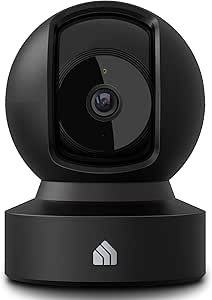 | Best for Pan-and-Tilt Coverage on a Budget Setup | Resolution: 1080p HD | Pan and tilt: 360° horizontal, 113° vertical | Night vision: Up to 30 feet | VIEW ON AMAZON | See Our Full Breakdown |
| Blink Mini 2K+ Indoor Security Camera, 2-Pack, Black |  | Best Two-Camera Kit for a Compact Office | Included: Two cameras, two stands, four mounting screws, two power adapters, and two USB-C cables | Camera resolution: 2K (2560 x 1440) | Field of view: 138° diagonal | VIEW ON AMAZON | See Our Full Breakdown |
| 4K Mini Spy Camera with Night Vision and Motion Detection |  | Best Compact Camera for Short, Cordless Checks | Resolution: 4K Ultra HD | Field of view: 160° | Battery life: Up to 4 hours | VIEW ON AMAZON | See Our Full Breakdown |
| Ring Indoor Cam — Home or business security in 1080p HD video, White |  | Best for Privacy Controls | Video: 1080p HD with Live View | Field of view: 143° diagonal, 115° horizontal, 59° vertical | Night vision: Color Night Vision | VIEW ON AMAZON | See Our Full Breakdown |
| Blink Mini 2K+ Indoor Security Camera, 2-Pack, White |  | Best for Monitoring Two Office Areas | Quantity: 2 cameras | Video resolution: 2K | Zoom: Up to 4x | VIEW ON AMAZON | See Our Full Breakdown |
| 2K Indoor/Outdoor Home Security Cameras with Color Night Vision and Two-Way Audio |  | Best for Indoor-Outdoor Flexibility | Resolution: 2K HD | Night vision: Color Night Vision | Storage: Memory card up to 128GB; cloud storage available | VIEW ON AMAZON | See Our Full Breakdown |
| LaView Security Cameras 4pcs, Home Security Camera Indoor 1080P, Wi-Fi Cameras Wired for Pet, Motion Detection, Two-Way Audio, Night Vision, Phone App, Works with Alexa, iOS & Android & Web Access | 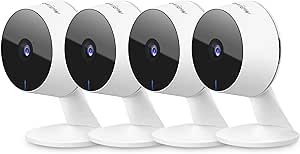 | Best Multi-Camera Value Setup | Quantity: 4 cameras | Video resolution: 1080p; 2.1MP | Field of view: 84° | VIEW ON AMAZON | See Our Full Breakdown |
| Blink Mini 2K+ (newest model) – Plug-in Home & Pet Indoor Security Camera with 2K video resolution, night vision, enhanced audio, motion detection – 1 camera (Black) | | Best Compact 2K Pick | Video resolution: 2K (2560 x 1440) | Field of view: 138° diagonal | Zoom: Up to 4x | VIEW ON AMAZON | See Our Full Breakdown |
| Tapo 2K Pan Tilt Security Camera for Baby Monitor and Pet Monitoring (2-Pack) | 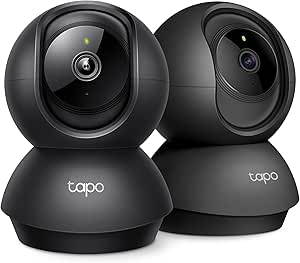 | Best Two-Camera Coverage | Resolution: 2K | Pan/Tilt Range: 360° horizontal, 114° vertical | Storage Options: microSD up to 512 GB; Tapo Care cloud storage | VIEW ON AMAZON | See Our Full Breakdown |
| Tapo 1080P Indoor Security Camera, Baby Monitor, Dog Camera, Wired, C100 |  | Best Simple Wired Pick | Resolution: 1080p | Power: Corded electric | Night Vision Range: Up to 30 feet | VIEW ON AMAZON | See Our Full Breakdown |
| eufy Security 4K Indoor Camera E30, No Subscription, Pan and Tilt |  | Best Premium Detail | Resolution: 4K Ultra HD | Camera Movement: Pan and tilt | Night Vision: Color and infrared | VIEW ON AMAZON | See Our Full Breakdown |
| GNCC 2K Indoor Security Camera with 5G WiFi, AI Motion Tracking & Night Vision |  | Best Dual-Band Flexibility | Resolution: 2K Ultra HD | Night Vision Range: 10 meters | Wi-Fi Bands: 2.4GHz and 5GHz | VIEW ON AMAZON | See Our Full Breakdown |
| eufy Security 4K Indoor Camera E30, No Subscription, Pet Camera |  | Best for Pet-Focused Monitoring | Resolution: 4K Ultra HD | Night Vision: Color night vision with built-in spotlight | Panoramic View: 360° | VIEW ON AMAZON | See Our Full Breakdown |
| home office security camera | Audio | Resolution | Storage | Night vision |
|---|---|---|---|---|
| Anona 4K UHD Indoor Security C | Two-way audio | 4K UHD (8 MP) | MicroSD up to 512 GB; cloud storage available | — |
| Tapo 1080P Indoor Security Cam | Two-way audio with siren | 1080p HD | MicroSD up to 512 GB; Tapo Care cloud storage | Up to 30 feet |
| Kasa 1080p Indoor Pan/Tilt Wir | Two-way audio | 1080p HD | MicroSD up to 256 GB; cloud storage | Up to 30 feet |
| Blink Mini 2K+ Indoor Security | Two-way audio with noise cancellation | — | — | — |
| 4K Mini Spy Camera with Night | — | 4K Ultra HD | MicroSD up to 256 GB; cloud storage available | Enhanced infrared |
| Ring Indoor Cam | Two-way audio with noise cancellation | — | — | Color Night Vision |
| Blink Mini 2K+ Indoor Security | Two-way talk with noise cancellation | — | — | Supported |
| 2K Indoor/Outdoor Home Securit | Two-way audio | 2K HD | Memory card up to 128GB; cloud storage available | Color Night Vision |
| LaView Security Cameras 4pcs | Two-way audio with noise cancellation | — | MicroSD up to 128GB; 30-day US cloud storage trial | Infrared, up to 33 ft |
| Blink Mini 2K+ | Two-way audio with noise cancellation | — | — | — |
| Tapo 2K Pan Tilt Security Came | — | 2K | — | — |
| Tapo 1080P Indoor Security Cam | Two-way audio | 1080p | microSD up to 512 GB; Tapo Care cloud storage | — |
| eufy Security 4K Indoor Camera | Two-way | 4K Ultra HD | SD card, sold separately | Color and infrared |
| GNCC 2K Indoor Security Camera | Two-way | 2K Ultra HD | Cloud with 14-day free trial; SD card, 16–128 GB | — |
| eufy Security 4K Indoor Camera | Two-way | 4K Ultra HD | Local SD card, sold separately | Color night vision with built-in spotlight |
More Details on Our Top Picks
Anona 4K UHD Indoor Security Camera (2 Pack)
For a home office where one camera needs to cover more than a desk, the Anona 4K two-pack pairs high-resolution video with 360-degree pan, 110-degree tilt, and 8x digital zoom. That combination can help you check a wider room and inspect details remotely; its person and pet detection can also make alerts more relevant than basic motion notifications. Compared with the Kasa EC71, Anona offers 4K rather than 1080p video and more storage capacity, but its auto-tracking may be less precise. It also needs a steady Wi-Fi connection and app setup, and local recording requires a separately purchased microSD card. I’d choose it for broad, detail-oriented coverage, not for someone who wants a simple, low-maintenance desk camera.
Pros:- 4K video and 8x digital zoom provide more detail when checking activity remotely.
- 360-degree pan and 110-degree tilt let the camera cover a broad indoor area.
- AI detection distinguishes people and pets, with crying detection also listed.
- Supports microSD storage up to 512 GB as well as cloud storage.
Cons:- A microSD card is not included, adding a separate requirement for local recording.
- Setup depends on the app and a working Wi-Fi connection.
- Auto-tracking may not follow movement precisely.
Best for: Home-office owners who want to monitor a large room or multiple areas with two cameras, detailed video, and person or pet alerts.
Not ideal for: Buyers who want a straightforward plug-in camera with minimal app configuration, or anyone who expects highly precise auto-tracking.
- Resolution:4K UHD (8 MP)
- Zoom:8x digital
- Pan and tilt:360° pan, 110° tilt
- Wi-Fi:Dual-band Wi-Fi 6 (2.4 GHz and 5 GHz)
- Storage:MicroSD up to 512 GB; cloud storage available
- Detection:AI person, pet, and crying detection
- Audio:Two-way audio
- Power:5V, 10W
Our verdict“Choose Anona if you want two high-resolution cameras for broad room coverage; skip it if simple setup and dependable tracking matter more than 4K detail.”
Tapo 1080P Indoor Security Camera, Baby Monitor, Dog Camera, C101
The Tapo C101 is a practical pick for a fixed home-office setup where clear basic monitoring matters more than camera movement. Its 1080p video, night vision up to 30 feet, and person or motion alerts cover everyday checks, while two-way audio and a built-in siren add options for speaking through the camera or drawing attention. Unlike the pan-and-tilt Kasa EC71, the C101 has no listed remote movement or tracking, so it is better suited to a desk or doorway that stays in frame. It supports microSD recording and cloud storage, plus Alexa and Google Assistant voice control. The tradeoff is a fixed position, 2.4GHz Wi-Fi, and constant power from its adapter; it is not a battery camera.
Pros:- 1080p video and night vision up to 30 feet support routine room monitoring.
- Motion, person, and baby-crying notifications offer more specific alerts than motion-only detection.
- Two-way audio includes a built-in siren.
- Works with Alexa and Google Assistant and supports microSD or cloud storage.
Cons:- Requires continuous power from a DC adapter; there is no battery-powered option.
- Fixed framing offers less coverage flexibility than the Kasa EC71’s pan-and-tilt design.
- Uses 2.4GHz Wi-Fi rather than dual-band connectivity.
Best for: Remote workers who want a stationary camera for a desk, office entrance, or pet area, with basic alerts and voice-assistant support.
Not ideal for: Buyers who need one camera to scan a large room, track movement, or operate away from a power outlet.
- Resolution:1080p HD
- Night vision:Up to 30 feet
- Wi-Fi:2.4 GHz
- Storage:MicroSD up to 512 GB; Tapo Care cloud storage
- Audio:Two-way audio with siren
- Power:DC adapter; not battery-powered
- Compatibility:Alexa, Google Assistant, RTSP, and ONVIF
Our verdict“Pick the Tapo C101 for simple, stationary office monitoring with useful alerts, but choose a pan-and-tilt model if you need broader coverage.”
Kasa 1080p Indoor Pan/Tilt Wired Security Camera, EC71
The Kasa EC71 earns its place for home-office buyers who want a camera that can change its view instead of watching only one slice of a room. Its 360-degree horizontal and 113-degree vertical movement, motion tracking, and 30-foot night vision make it more adaptable than the fixed Tapo C101 for a workspace that also needs coverage of an entry or nearby pet area. Video is 1080p, so it gives up the fine detail offered by the Anona 4K, but it still suits general monitoring and supports local recording on a microSD card. Alexa and Google Home compatibility helps it fit into an existing smart-home setup. The compromises are corded power, 2.4GHz Wi-Fi, indoor-only use, and a setup process some buyers may find less direct.
Pros:- 360-degree horizontal and 113-degree vertical movement cover more than a fixed camera.
- Motion tracking can follow activity across the camera’s view.
- Night vision reaches up to 30 feet, with two-way audio for remote communication.
- Supports microSD recording and works with Alexa and Google Home.
Cons:- 1080p resolution provides less detail than the Anona 4K camera.
- Corded power and 2.4GHz Wi-Fi limit placement and connectivity options.
- Designed for indoor use only, and setup may take extra effort.
Best for: People who want one wired camera to scan a home office and nearby room, with motion tracking and smart-home integration.
Not ideal for: Buyers who need 4K image detail, outdoor use, battery operation, or dual-band Wi-Fi.
- Resolution:1080p HD
- Pan and tilt:360° horizontal, 113° vertical
- Night vision:Up to 30 feet
- Storage:MicroSD up to 256 GB; cloud storage
- Connectivity:2.4 GHz Wi-Fi
- Power:Corded electric, 5 watts
- Audio:Two-way audio
- Dimensions:3.23 x 3.23 x 4.43 inches
Our verdict“Choose the Kasa EC71 if flexible pan-and-tilt coverage matters more than 4K detail or cordless placement.”
Blink Mini 2K+ Indoor Security Camera, 2-Pack, Black
This Blink Mini 2K+ two-pack suits buyers who would rather place one small camera at the office entrance and another near a desk than rely on one motorized unit. Each camera records at 2K, offers a 138-degree diagonal view, night vision, up to 4x zoom, and two-way audio with noise cancellation. Compared with the single-camera Kasa EC71, the Blink kit adds a second viewpoint but cannot pan or tilt to follow activity around a room. It also works with Alexa and can serve as a Blink Video Doorbell chime. The main catch is that person and vehicle detection and cloud video storage require an optional subscription. Both cameras need plug-in power, and outdoor use requires a separately sold adapter.
Pros:- Two cameras make it possible to monitor separate office areas at once.
- 2K video, up to 4x zoom, and a 138-degree diagonal field of view provide useful detail and coverage.
- Two-way audio includes noise cancellation.
- Alexa compatibility includes the ability to act as a Blink Video Doorbell chime.
Cons:- Person and vehicle detection and cloud video storage require an optional subscription.
- Fixed cameras cannot pan or tilt like the Kasa EC71.
- Both units require plug-in power; outdoor use needs a separate adapter.
Best for: Remote workers who want two compact, fixed cameras for separate office viewpoints and already use Alexa or Blink devices.
Not ideal for: Buyers who want pan-and-tilt coverage, subscription-free person detection or cloud storage, or a battery-powered camera.
- Included:Two cameras, two stands, four mounting screws, two power adapters, and two USB-C cables
- Camera resolution:2K (2560 x 1440)
- Field of view:138° diagonal
- Zoom:Up to 4x
- Connectivity:2.4 GHz Wi-Fi (802.11b/g/n)
- Audio:Two-way audio with noise cancellation
- Power:Plug-in, 100–240 VAC
- Size and weight:2 x 2 x 1.57 inches; 65 g per camera
Our verdict“Choose the Blink Mini 2K+ two-pack for two compact, fixed office views, but not if you need camera movement or subscription-free detection and cloud storage.”
4K Mini Spy Camera with Night Vision and Motion Detection
For a home-office buyer who needs to move a camera between locations, this compact 4K model stands apart from the plug-in Blink Mini 2K+ with its rechargeable battery and 160-degree wide-angle lens. Its small form and mobile-app access can suit temporary monitoring or a short check of a room without placing a cable beside the camera. The tradeoff is runtime: the stated battery life is up to four hours, so it is a poor fit for continuous office coverage. The product lists enhanced infrared night vision and motion alerts, along with microSD and cloud storage options, but remote access still needs Wi-Fi. Compared with the pan-and-tilt Kasa EC71, it offers higher listed resolution and a wider lens but less ability to reposition its view remotely.
Pros:- 4K video and a 160-degree field of view offer detailed, wide-angle coverage.
- Rechargeable battery allows placement without an immediate power connection.
- Enhanced infrared night vision and motion alerts support low-light monitoring.
- Supports microSD cards up to 256 GB and cloud storage.
Cons:- Battery life is listed at up to four hours, limiting continuous monitoring.
- Remote access requires Wi-Fi, so portability does not mean offline remote viewing.
- A microSD card is not included.
Best for: People who need a small camera for temporary or occasional monitoring and value portability over all-day recording.
Not ideal for: Remote workers who need continuous surveillance, reliable all-day battery operation, or remote pan-and-tilt control.
- Resolution:4K Ultra HD
- Field of view:160°
- Battery life:Up to 4 hours
- Storage:MicroSD up to 256 GB; cloud storage available
- Night vision:Enhanced infrared
- Detection:Motion detection alerts
- Remote access:Mobile app access requires Wi-Fi
Our verdict“Pick this mini camera for short, flexible monitoring sessions, but choose a continuously powered model for an office camera that must stay on all day.”
Ring Indoor Cam — Home or business security in 1080p HD video, White
For a home office that doubles as a shared living space, the Ring Indoor Cam (2nd Gen) makes privacy unusually easy to manage: its manual cover blocks the lens, and the camera and microphone can be turned off until you swivel it back. That practical control sets it apart from the Blink Mini 2K+, which offers sharper 2K footage but does not list a physical privacy cover. Ring records in 1080p HD, with color night vision, two-way audio, and customizable motion coverage, so it suits monitoring a desk or office entrance without alerts for every movement outside the selected area. The tradeoff is resolution, plus a compatible subscription is needed for cloud video history and some advanced features. Its 2.4GHz Wi-Fi requirement and plug-in power also limit placement flexibility.
Pros:- Manual privacy cover physically blocks the camera lens
- Customizable motion detection field helps reduce irrelevant alerts
- Color night vision and two-way audio support day and evening monitoring
- Flexible table placement or swivel mounting, with Alexa compatibility
Cons:- 1080p resolution is lower than the 2K Blink Mini 2K+ options
- Cloud video history and several advanced features require a compatible subscription
- Needs a power outlet and 2.4GHz Wi-Fi
Best for: Remote workers who want a visible, manually closable camera and already use Ring or Alexa devices.
Not ideal for: Buyers who want 2K detail or to review saved event footage without a compatible Ring subscription.
- Video:1080p HD with Live View
- Field of view:143° diagonal, 115° horizontal, 59° vertical
- Night vision:Color Night Vision
- Audio:Two-way audio with noise cancellation
- Motion detection:Customizable motion detection field
- Connectivity:2.4GHz Wi-Fi, 802.11 b/g/n
- Power:Plug-in; 6.5 ft Micro USB power adapter and cable
- Privacy:Manual privacy cover
- Dimensions:1.93 x 1.93 x 3.81 in.
Our verdict“Choose Ring if a physical privacy cover and adjustable motion zones matter more than 2K resolution or subscription-free video history.”
Blink Mini 2K+ Indoor Security Camera, 2-Pack, White
This two-camera bundle is the practical pick when a home office needs coverage in separate spots, such as the desk and a storage or entry area. Each unit records in 2K and supports up to 4x zoom, offering more detail than the 1080p Ring Indoor Cam when checking a person or object in the frame. The included stands, mounting kits, cables, and power adapters make it easier to place both cameras without sourcing separate accessories. Night vision, two-way talk, noise cancellation, and Alexa support add useful everyday coverage. The main catch is that person and vehicle detection requires a separately sold Blink subscription, so the smarter alerts are not included by default. Compared with the single-camera Blink Mini 2K+, this package prioritizes broader room coverage over a lower-commitment one-camera setup.
Pros:- Two 2K cameras cover separate rooms or angles
- Up to 4x zoom helps inspect details in recorded views
- Includes stands, mounting kits, USB cables, and power adapters for both cameras
- Two-way talk, noise cancellation, and Alexa compatibility
Cons:- Person and vehicle detection requires a separately sold subscription
- Both cameras need plug-in power, limiting placement to reachable outlets
- Outdoor use requires a separately sold weather-resistant power adapter
Best for: Remote workers who want to monitor a desk and a second indoor area with matching cameras and included mounting accessories.
Not ideal for: People who need subscription-free person detection or only need one camera for a small office.
- Quantity:2 cameras
- Video resolution:2K
- Zoom:Up to 4x
- Night vision:Supported
- Audio:Two-way talk with noise cancellation
- Smart detection:Optional person and vehicle detection with Blink Subscription Plan
- Connectivity:Plug-in
- Compatibility:Alexa; Blink Video Doorbell chime
- Included accessories:2 mounting kits with stands, 2 USB cables, 2 power adapters
Our verdict“Pick this bundle if two indoor viewpoints and sharper-than-1080p video matter more than included smart detection.”
2K Indoor/Outdoor Home Security Cameras with Color Night Vision and Two-Way Audio
If the same camera may need to watch a home office today and a weather-exposed area later, this 2K indoor/outdoor model is the flexible choice in this group. Its IP66 weatherproof rating and color night vision distinguish it from office-focused indoor models such as the LaView 4-camera set, which is designed for indoor use. Local memory-card recording, with support for cards up to 128GB, gives buyers an alternative to relying only on cloud storage; cloud storage is also listed as available. Two-way audio can help with quick conversations from the app. The tradeoffs are a memory card is not included, full functionality depends on Wi-Fi, and the supplied details do not specify camera quantity or app ecosystem. For a desk-only setup, those outdoor capabilities may matter less than a clearer account of indoor monitoring features.
Pros:- 2K HD resolution with color night vision
- IP66 weatherproof rating supports indoor or outdoor placement
- Supports local memory cards up to 128GB as well as available cloud storage
- Two-way audio supports communication through the camera
Cons:- Memory card is not included
- Wi-Fi is required for full functionality
- Product details do not specify camera quantity or smart-home compatibility
Best for: Home-office owners who may relocate a camera outdoors and want both local memory-card and cloud storage options.
Not ideal for: Buyers seeking a clearly specified multi-camera office kit, or those who prefer a product with detailed app and smart-home compatibility information.
- Resolution:2K HD
- Night vision:Color Night Vision
- Storage:Memory card up to 128GB; cloud storage available
- Connectivity:Wi-Fi
- Power:Plug & Play
- Cable length:6.56 ft
- Audio:Two-way audio
Our verdict“Choose this model if outdoor-ready construction and flexible recording options matter more than office-specific controls.”
LaView Security Cameras 4pcs, Home Security Camera Indoor 1080P, Wi-Fi Cameras Wired for Pet, Motion Detection, Two-Way Audio, Night Vision, Phone App, Works with Alexa, iOS & Android & Web Access
For a home office where one camera will not cover the desk, doorway, and adjacent room, the four-camera LaView set offers broad coverage in one indoor-focused package. It supports up to nine simultaneous live feeds and sharing with up to 20 people, which is more useful for a household or small team than a single Blink Mini 2K+ camera. The tradeoff is that its 1080p resolution and 84° field of view are more modest than the 2K Blink options, and each wired camera needs a suitable power location. Night vision reaches up to 33 ft, while two-way audio, motion alerts, app and web access add basic office monitoring functions. Storage can use a microSD card up to 128GB, but the cloud offer is described as a 30-day trial, not ongoing included service.
Pros:- Four cameras provide coverage across multiple rooms or entry points
- Supports up to nine simultaneous live feeds and sharing with up to 20 people
- MicroSD storage supports cards up to 128GB
- Two-way audio, motion alerts, and night vision up to 33 ft
Cons:- 1080p resolution and 84° field of view are narrower and less detailed than the Blink Mini 2K+
- Supports 2.4GHz Wi-Fi only, not 5GHz
- Cloud storage is described as a 30-day trial, and each camera needs wired power
Best for: Households or small teams that want several fixed indoor views and shared access through mobile or web.
Not ideal for: Buyers who need 2K detail, a wide-angle view from each camera, or 5GHz Wi-Fi support.
- Quantity:4 cameras
- Video resolution:1080p; 2.1MP
- Field of view:84°
- Night vision:Infrared, up to 33 ft
- Audio:Two-way audio with noise cancellation
- Wi-Fi:2.4GHz; 5GHz not supported
- Storage:MicroSD up to 128GB; 30-day US cloud storage trial
- Live feeds:Up to 9 simultaneous feeds
- Access sharing:Share access with up to 20 people
Our verdict“Choose LaView if you need several indoor camera views and shared access more than high resolution or broader wireless support.”
Blink Mini 2K+ (newest model) – Plug-in Home & Pet Indoor Security Camera with 2K video resolution, night vision, enhanced audio, motion detection – 1 camera (Black)
The single-camera Blink Mini 2K+ suits a focused home-office setup: it is compact, plug-in, and records in 2K at up to 24/25 FPS, with a 138° diagonal field of view and up to 4x zoom. That gives it a detail advantage over the Ring Indoor Cam when checking a captured event, while keeping the setup simpler than a multi-camera package such as the Blink Mini 2K+ 2-pack or LaView set. Two-way audio with noise cancellation is handy for speaking to someone in the room, and the camera can also serve as a chime for a Blink Video Doorbell. The tradeoff is that person and vehicle detection needs a subscription, and cloud video storage beyond the trial also requires a plan. Its 2.4GHz Wi-Fi and outlet-powered design restrict placement.
Pros:- 2K resolution and up to 4x zoom provide more detail than 1080p models such as Ring Indoor Cam
- Compact 2 x 2 x 1.57 in. camera with included stand and mounting hardware
- Two-way audio with noise cancellation
- Works with Alexa and can act as a Blink Video Doorbell chime
Cons:- Person and vehicle detection requires a separately sold subscription
- Cloud video storage beyond the trial requires a Blink Subscription Plan
- Requires plug-in power and 2.4GHz Wi-Fi
Best for: Remote workers who want one compact, higher-resolution camera for a desk or small office and already use Alexa or Blink devices.
Not ideal for: Buyers who need multiple room views, subscription-free smart detection, or a camera they can place far from an outlet.
- Video resolution:2K (2560 x 1440)
- Field of view:138° diagonal
- Zoom:Up to 4x
- Frame rate:Up to 24/25 FPS
- Audio:Two-way audio with noise cancellation
- Connectivity:2.4GHz Wi-Fi, 802.11 b/g/n
- Power:Plug-in; indoor power adapter and USB-C cable included
- Dimensions:2 x 2 x 1.57 in.
- Cloud storage:Free 30-day trial; continued cloud storage requires a Blink Subscription Plan
Our verdict“Pick this single Blink camera for compact 2K coverage of one office area, provided subscription-dependent detection and storage fit your setup.”
Tapo 2K Pan Tilt Security Camera for Baby Monitor and Pet Monitoring (2-Pack)
This two-camera set suits a home office where one view cannot cover both the desk and an entryway, shared room, or pet area. Each camera records in 2K and pans 360 degrees horizontally, so it can follow activity across a room rather than stay fixed on one corner. Compared with the Tapo C100, it offers sharper video and movable coverage, but the C100 is a simpler wired choice if you only need one stationary view. Local microSD and cloud storage give buyers a choice, though the card is not included and cloud use may involve a service plan. Its 2.4GHz-only Wi-Fi also makes network compatibility worth checking before buying.
Pros:- Two cameras can cover separate rooms or angles.
- 2K video provides more detail than the Tapo C100’s 1080p image.
- 360° horizontal and 114° vertical movement can follow activity across a room.
- Supports microSD and cloud storage, plus Alexa and Google Assistant.
Cons:- microSD cards are not included.
- Requires a stable 2.4GHz Wi-Fi connection.
- Cloud storage depends on Tapo Care rather than being a fully local option.
Best for: Remote workers who want two movable cameras to cover a home office and a second indoor area, such as a pet room or hallway.
Not ideal for: Buyers who need a single fixed camera, rely on 5GHz-only Wi-Fi, or want storage ready to use without buying a microSD card.
- Resolution:2K
- Pan/Tilt Range:360° horizontal, 114° vertical
- Storage Options:microSD up to 512 GB; Tapo Care cloud storage
- Connectivity:2.4GHz Wi-Fi
- Smart Home Compatibility:Alexa, Google Assistant
- Detection Features:Motion detection and baby crying alerts
Our verdict“Choose this two-camera set if you need flexible 2K coverage in more than one indoor space and can supply compatible Wi-Fi and storage.”
Tapo 1080P Indoor Security Camera, Baby Monitor, Dog Camera, Wired, C100
The Tapo C100 is the straightforward choice for a desk-side view when a dependable outlet is nearby and room-wide tracking is not a priority. Its 1080p video, motion and person alerts, night vision, and two-way audio cover the basic needs of checking a workspace remotely; RTSP/ONVIF support also gives it a route into some NVR setups. Compared with the two-camera Tapo 2K Pan Tilt, the C100 is less flexible and has lower resolution, but it is a single-camera option with a simple fixed view. It needs wired power, and its microSD card is sold separately. The supplied product information also mixes in solar-camera details that do not match the C100, so I have relied on the C100-specific product description and specs here.
Pros:- 1080p video and up to 30-foot night vision cover routine indoor monitoring.
- Motion, person, and baby-crying detection can send relevant alerts.
- Two-way audio and a built-in siren add communication and deterrence options.
- RTSP/ONVIF support can suit some NVR-based setups.
Cons:- Wired power limits placement to locations near an outlet.
- Fixed framing cannot follow activity around the room like the Tapo 2K Pan Tilt.
- microSD card is not included, and cloud storage requires Tapo Care.
Best for: Remote workers who want an uncomplicated, plugged-in camera for a fixed view of a desk, office door, or pet area.
Not ideal for: People who need a battery-powered camera, pan-and-tilt coverage, or more detail than 1080p can provide.
- Resolution:1080p
- Power:Corded electric
- Night Vision Range:Up to 30 feet
- Audio:Two-way audio
- Storage:microSD up to 512 GB; Tapo Care cloud storage
- Compatibility:Alexa, Google Assistant
- NVR Integration:RTSP/ONVIF
Our verdict“Pick the C100 for a basic, fixed office view with wired power, but choose a pan-and-tilt model if you need broader room coverage.”
eufy Security 4K Indoor Camera E30, No Subscription, Pan and Tilt
For a home office where identifying small details matters, the E30’s 4K video is the clearest resolution in this group. Pan-and-tilt movement, human and pet detection, and color or infrared night vision make it more capable than the fixed-view Tapo C100, while local storage means core monitoring does not require a mandatory subscription. That combination can suit a room used for work and pet care, especially when alerts need to distinguish people or animals from general motion. The tradeoff is that an SD card must be purchased separately, and the stated HomeKit support is limited to 1080p. Some advanced features may also require a subscription, so buyers seeking every function without ongoing service should check which features are included.
Pros:- 4K recording captures more detail than the 2K Tapo and GNCC cameras.
- Pan-and-tilt coverage can follow activity around a room.
- Human and pet detection helps make alerts more targeted.
- Local storage and core features do not require a mandatory subscription.
Cons:- SD card is sold separately.
- HomeKit video resolution is limited to 1080p.
- Some advanced features may require a subscription.
Best for: Detail-focused remote workers who want a movable 4K indoor camera, local recording, and smart-home compatibility.
Not ideal for: HomeKit users who expect 4K streaming through Apple Home, or buyers who want all advanced features and storage ready without extra purchases or subscriptions.
- Resolution:4K Ultra HD
- Camera Movement:Pan and tilt
- Night Vision:Color and infrared
- Audio:Two-way
- Storage:SD card, sold separately
- Compatibility:HomeKit, Alexa, Google Assistant
- Subscription:No mandatory subscription for core features
Our verdict“Choose the E30 if 4K detail and local recording matter more than out-of-box storage or unrestricted HomeKit resolution.”
GNCC 2K Indoor Security Camera with 5G WiFi, AI Motion Tracking & Night Vision
The GNCC stands out for buyers whose home network offers both 2.4GHz and 5GHz Wi-Fi, rather than the 2.4GHz-only connection listed for the Tapo two-camera set. Its 2K image, 340° horizontal pan, AI tracking, and customizable detection zones make it a flexible single-camera option for monitoring a desk area while reducing alerts from irrelevant parts of the room. The 10-meter night-vision range is useful beyond a small office, and local SD storage avoids relying entirely on cloud recording. Compared with the 4K eufy E30, it gives up image detail and has a narrower stated movement range, but offers dual-band connectivity. Setup may take more effort, and the card is not included; cloud storage is only described as a free trial.
Pros:- Supports both 2.4GHz and 5GHz Wi-Fi bands.
- 340° horizontal pan and AI tracking can follow room activity.
- Customizable alerts and detection zones help focus notifications.
- Offers both SD-card and cloud storage options.
Cons:- SD card is not included, and supported capacity is listed as 16–128 GB.
- Cloud storage is described as a 14-day free trial, with later costs unspecified.
- Setup may be less straightforward than the simpler fixed-view Tapo C100.
Best for: Remote workers with a dual-band router who want a movable 2K camera with tracking and configurable monitoring zones.
Not ideal for: Buyers who want 4K detail, a simple plug-and-play setup, or cloud storage without a trial or possible ongoing charges.
- Resolution:2K Ultra HD
- Night Vision Range:10 meters
- Wi-Fi Bands:2.4GHz and 5GHz
- Pan/Tilt Range:340° horizontal, 80° vertical
- Audio:Two-way
- Storage:Cloud with 14-day free trial; SD card, 16–128 GB
- Compatibility:Alexa, Google Assistant, Android, iOS
- Dimensions:2.95 x 2.95 x 4.77 inches
Our verdict“Choose the GNCC if dual-band Wi-Fi and motion tracking matter more than 4K resolution or the simplest setup.”
eufy Security 4K Indoor Camera E30, No Subscription, Pet Camera
This E30 listing is a pet-focused take on the same 4K camera concept as the other eufy Security E30 in this roundup: it pairs human and pet detection with two-way audio, a spotlight for color night vision, and local SD recording. For a home office, that means checking whether a pet is in the room and speaking through the camera without giving up the detail of 4K video. Its listed 360° panoramic view makes it a stronger fit for broad room coverage than the fixed Tapo C100. The tradeoff is that an SD card is sold separately, and local storage is the stated route unless cloud service is added. Unlike the more detailed E30 listing, this product data does not specify power requirements, so placement planning is less certain.
Pros:- 4K resolution supports detailed checks of a home office or pet area.
- AI detection covers both humans and pets.
- 360° panoramic view provides broader coverage than a fixed camera.
- Color night vision with a built-in spotlight helps show activity in low light.
Cons:- SD card is sold separately.
- Cloud storage requires an added subscription; local SD is the listed storage option.
- Power requirements are not specified in the supplied product data.
Best for: Remote workers who want to monitor a pet across a room and use two-way audio, with local recording and 4K detail.
Not ideal for: Buyers who need confirmed power and installation details, included storage, or cloud recording without adding a subscription.
- Resolution:4K Ultra HD
- Night Vision:Color night vision with built-in spotlight
- Panoramic View:360°
- Detection:AI detection for humans and pets
- Audio:Two-way
- Storage:Local SD card, sold separately
- Compatibility:HomeKit, Alexa, Google Assistant
Our verdict“Choose this E30 listing for pet-aware 4K room monitoring, but confirm power and storage needs before deciding.”

How We Picked
I compared these cameras through the needs of a home office: clear views of a desk and entry points, useful coverage of a room, straightforward setup, and practical ways to review alerts or recordings. Resolution, pan-and-tilt movement, motion detection, night vision, two-way audio, camera count, and stated storage or subscription positioning all shaped the comparison. I gave more weight to features that change how a camera works in an office than to broad labels such as “pet camera” or “baby monitor.”
The order favors flexible, detailed coverage first, then options that make a clear case through bundle size, simpler setup, or lower-resolution practicality. The Eufy E30 takes the lead for its stated 4K video, pan-and-tilt, and no-subscription positioning. Tapo’s two-camera 2K kit ranks highly for buyers covering more than one angle, while Blink, Ring, Kasa, and the other Tapo models fit simpler or more specific needs. Product listings do not provide equal detail on storage, privacy controls, or network requirements, so I treat those as points readers should verify before choosing.
| home office security camera | Audio |
|---|---|
| Anona 4K UHD Indoor Security C | Two-way audio |
| Tapo 1080P Indoor Security Cam | Two-way audio with siren |
| Kasa 1080p Indoor Pan/Tilt Wir | Two-way audio |
| Blink Mini 2K+ Indoor Security | Two-way audio with noise cancellation |
| 4K Mini Spy Camera with Night | — |
| Ring Indoor Cam | Two-way audio with noise cancellation |
| Blink Mini 2K+ Indoor Security | Two-way talk with noise cancellation |
| 2K Indoor/Outdoor Home Securit | Two-way audio |
| LaView Security Cameras 4pcs | Two-way audio with noise cancellation |
| Blink Mini 2K+ | Two-way audio with noise cancellation |
| Tapo 2K Pan Tilt Security Came | — |
| Tapo 1080P Indoor Security Cam | Two-way audio |
| eufy Security 4K Indoor Camera | Two-way |
| GNCC 2K Indoor Security Camera | Two-way |
| eufy Security 4K Indoor Camera | Two-way |
Factors to Consider When Choosing Home Office Security Camera
A good office camera is not automatically the one with the highest resolution. I would first match the camera’s view, recording approach, and privacy controls to what you actually need to monitor.
Choose the view before choosing the resolution
Start by deciding whether you need to see a fixed desk, an office door, or most of a room. A fixed-view camera can work well when its position captures the only important area, while pan-and-tilt can cover more directions from one mounting point. Movement does not remove blind spots if furniture or walls block the lens, so sketch the camera’s view before buying. Higher resolution can help distinguish small details, but it cannot fix poor placement or glare from a window. For a room with two entrances or separate work and storage areas, a second camera may be more useful than paying for extra pixels in one view. Check whether the camera’s movement is controlled manually, tracks motion, or both; those behaviors are not interchangeable.
Plan for recording, not just live viewing
A live feed is useful for a quick check, but recorded clips matter when you need to review what happened earlier. Before buying, check whether recordings require a subscription, use a memory card, or rely on another storage method. “No subscription” language does not by itself explain every recording limit, so verify what is included and how long clips remain accessible. Cloud storage can make remote playback convenient, while local storage may suit buyers who prefer more control over where footage is kept. Also check whether event clips are saved automatically or whether you must open the app at the right moment. A camera that sends alerts but does not preserve useful footage may not meet an office security goal.
Treat privacy controls as a core feature
An office camera may capture video calls, documents, family members, or visitors, so decide when it should be active. Look for clear ways to disable the camera or microphone, set schedules, and limit who can access the account. If you work in a shared home, tell other occupants where cameras are placed and when they record. Two-way audio can help communicate with someone in the room, but it also makes microphone controls more relevant. Check whether the camera uses a physical shutter or relies on app controls, and decide which feels manageable during a busy workday. Do not point a home office camera at areas where people reasonably expect privacy.
Check Wi-Fi fit and placement constraints
Most indoor cameras depend on a stable wireless connection and nearby power, which can limit placement more than the camera’s advertised range suggests. Test the intended spot with a phone or another device, especially if the office is far from the router or separated by thick walls. Some listings specify 5 GHz support, but compatibility details can vary by model; check the exact camera’s network requirements rather than assuming every home router will work. Wired power avoids battery charging but ties the camera to an outlet and may leave a visible cable. Plan cable routing before mounting, since a camera placed high on a shelf may be difficult to reset or adjust. If you need coverage during an internet outage, check what functions remain available locally.
Match camera count to the layout
Bundle size is useful only when each camera has a clear job. One camera may be enough for a compact office with a single entry point, while a second can cover a doorway or equipment area outside the main view. Multi-camera kits can reduce the need to mix brands, but they may also mean more app alerts, power cables, and account settings to manage. Avoid buying a large bundle solely because it contains more units; unused cameras add setup work without improving coverage. Consider whether each camera can be positioned and managed independently, especially if one room needs different alert settings from another. For a single room, a pan-and-tilt model may be simpler than installing several fixed cameras.
Spend extra only for a benefit you will use
Higher-resolution video, tracking, and pan-and-tilt can add value when you need finer detail or broad room coverage. They matter less if you only want to confirm that a door opened or check whether a pet is in the room. A simpler 1080p model may be a sensible fit for basic monitoring, provided its view and recording options meet your needs. Factor in recurring storage fees, optional accessories, and the effort of managing multiple cameras—not just the initial device choice. Compare the exact listing because bundle count, color, and included features can differ even within one product family. Pay for a feature when it solves a specific problem in your office, not just because it appears on a longer spec sheet.
Frequently Asked Questions
Is a 4K camera worth choosing for a home office?
It can be worthwhile if you need to inspect fine details in a wide view or identify objects farther from the camera. For a close, fixed view of a small office, a lower-resolution camera may already show the activity you care about. Resolution alone does not guarantee useful footage; lighting, lens placement, and recording quality also matter. Check whether recorded clips retain the camera’s full resolution, since live-view specifications may not describe every recording mode. In this lineup, the Eufy E30 and Anona 4K options offer a higher-detail direction, while the Tapo and Blink 2K models may be enough for routine room checks.
Should I choose one pan-and-tilt camera or a multi-camera kit?
Choose pan-and-tilt when one camera can cover the room by changing direction and you want to keep installation simple. A multi-camera kit is a better fit when you need simultaneous views of separate areas, since one moving lens cannot watch two directions at once. Think about whether your priority is monitoring a desk and doorway at the same time or checking different parts of one room as needed. More cameras also mean more power connections, alerts, and privacy settings to manage. The Tapo 2K two-pack and LaView four-camera set suit broader coverage, while the Eufy E30 models emphasize movement within a single camera view.
Can I use an indoor security camera without paying for cloud storage?
That depends on the camera and the recording method it supports. Some models advertise no-subscription use, while others may tie certain recording or playback features to a plan. Read the exact product listing and current manufacturer documentation to learn whether local recording is supported, what hardware it needs, and which features remain available without a subscription. Also distinguish between viewing a live feed and saving clips for later; these are separate capabilities. If avoiding recurring fees is a priority, make that requirement a deciding filter before comparing resolution or camera count.
Will an indoor camera keep working if my office Wi-Fi goes down?
Remote viewing and app alerts generally depend on a working network connection, and some cameras may lose those functions during an outage. Local recording behavior varies, so check whether the specific model can save footage without internet access and how you retrieve it afterward. A power outage is a separate issue: a plug-in camera will stop operating unless it has backup power. If outage coverage matters, verify both network and power behavior rather than relying on general “security camera” wording. For ordinary office monitoring, a stable router connection and a clear plan for what happens during outages are usually more useful than assuming every feature works offline.
How can I reduce false alerts in a home office?
Start with placement: avoid aiming at moving curtains, bright windows, or busy areas outside the room. Use motion zones or sensitivity settings if the camera offers them, and set schedules around your work hours or times when the room is occupied. AI detection and tracking can help separate some types of activity, but their behavior varies by model and may need adjustment. Test alerts from the intended position before relying on them, since a camera facing a monitor or reflective surface can trigger unexpected activity. If you install several cameras, tune each one separately rather than applying the same alert settings across the whole home.
Conclusion
For most buyers, I would choose the eufy Security 4K Indoor Camera E30 as the best overall option because its listed 4K video, pan-and-tilt coverage, and no-subscription positioning address several common office needs. My best value for wider coverage is the Tapo 2K Pan Tilt 2-Pack, especially for monitoring two angles or rooms. For a premium detail-focused setup, the E30 is also the strongest fit in this group; buyers who want a beginner-friendly plug-in camera can look at the Blink Mini 2K+ or the straightforward Tapo C100. Choose the LaView four-camera kit for spreading coverage across multiple spaces, the Ring Indoor Cam if you already use Ring, or the 4K Mini Spy Camera only when its discreet form factor suits a lawful, privacy-conscious use. Before ordering any model, check its current storage terms, network requirements, and exact bundle contents.