If you’re looking for the 15 best dual monitor stands of 2025 to boost your workspace flexibility, I’ve got you covered. These options support monitors from 13 to 34 inches, with some up to 40 inches, and can hold up to around 26 pounds each. They feature full adjustability, easy installation, sturdy build quality, and smart cable management. To find the perfect fit for your setup, keep exploring what each model has to offer.
Key Takeaways
- Compatibility with various monitor sizes (13-34 inches) and weights ensures versatile workspace setups.
- Full-motion adjustability allows ergonomic positioning, reducing neck and eye strain.
- Easy installation options like C-clamp and grommet mounts support diverse desk types and thicknesses.
- Stable, heavy-duty bases and durable materials provide reliable support during intense multitasking.
- Integrated cable management and space-saving designs optimize workspace organization and aesthetics.
HUANUO Dual Monitor Stand with Adjustable Vesa Mount
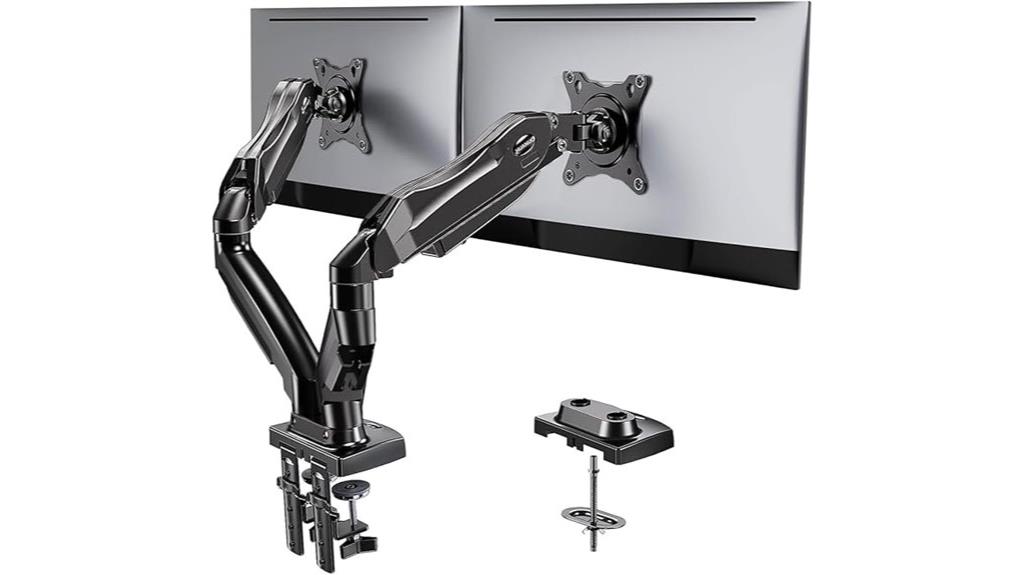
If you’re looking for a versatile and stable dual monitor stand that adapts to different setups, the HUANUO Dual Monitor Stand with Adjustable Vesa Mount is an excellent choice. It supports 13-32 inch monitors weighing up to 19.8 lbs, with VESA compatibility (75x75mm or 100x100mm). You can install it using a C-clamp or grommet base, ensuring a secure fit on your desk. Its full-motion arms allow smooth swiveling, tilting, and rotating, making it easy to find the perfect ergonomic position. Designed for stability and ease of adjustment, this stand helps improve your workspace comfort and productivity.
Best For: professionals, gamers, or students seeking a fully adjustable, stable dual monitor setup to enhance ergonomic comfort and workspace efficiency.
Pros:
- Fully adjustable with smooth swiveling, tilting, and rotating for customizable ergonomic positioning
- Supports monitors from 13 to 32 inches and up to 19.8 lbs each, ensuring broad compatibility
- Stable installation options via C-clamp or grommet base, suitable for wooden desks without cross beams
Cons:
- Requires a desk with a specific thickness (0.59-3.54 inches) and no cross beams underneath for proper installation
- May be heavy (11 pounds), which could be cumbersome for some users to move frequently
- Limited to monitors with VESA mounting holes of 75x75mm or 100x100mm, not compatible with all monitor models
VIVO Dual Monitor Desk Mount for 2 Screens up to 30 Inches

The VIVO Dual Monitor Desk Mount is an excellent choice for professionals or gamers who need to maximize desk space while maintaining flexible monitor positioning. It fits 13 to 30-inch monitors weighing up to 22 lbs each and supports VESA 75x75mm and 100x100mm mounting holes. The articulating arms tilt from +90° to -90°, swivel 180°, and rotate 360°, allowing for customized setups. It’s height adjustable along a sturdy center pole and supports portrait or landscape orientations. Easy to install with cable management clips and durable heavy-duty steel construction, it’s backed by a 3-year warranty and friendly support.
Best For: professionals, gamers, or anyone needing flexible dual monitor setups to maximize desk space and ergonomic positioning.
Pros:
- Supports monitors from 13″ to 30″ up to 22 lbs each, offering versatile compatibility
- Fully adjustable with tilt, swivel, rotation, and height options for customized viewing angles
- Durable heavy-duty steel construction with a 3-year warranty and included cable management
Cons:
- Requires a desk with a thickness of up to 3.25″ for the C-clamp mount, which may not fit all surfaces
- Assembly may be time-consuming due to multiple components and adjustments needed
- Does not include a motorized or automated adjustment feature, limiting automatic repositioning
ErGear Dual Monitor Stand, Adjustable Mount for 2 Screens
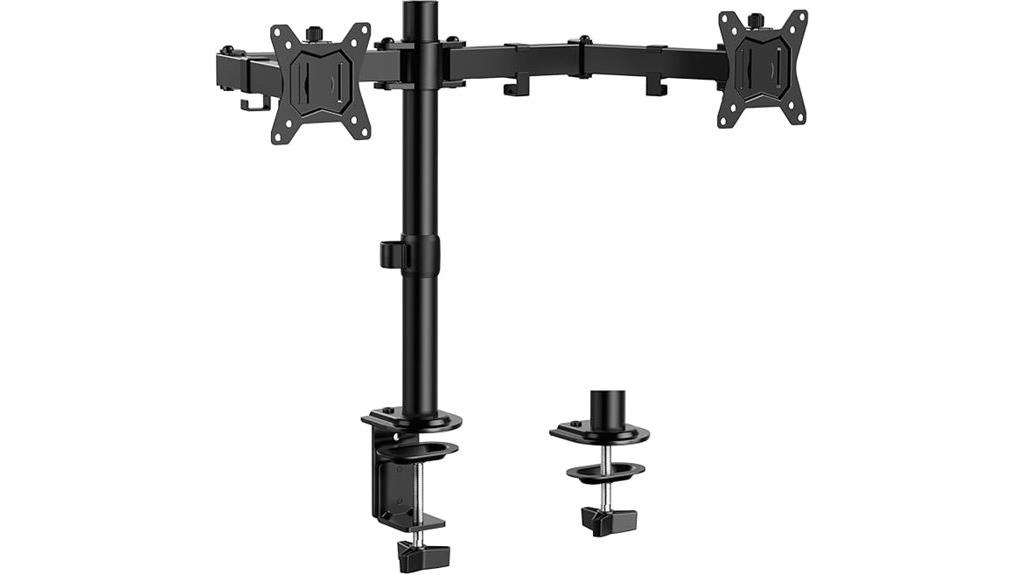
The ErGear Dual Monitor Stand stands out for users who need a versatile and fully adjustable mounting solution for their dual screens. It supports monitors from 13 to 32 inches, weighing up to 17.6 pounds each, and requires VESA mounting holes of 75×75 mm or 100×100 mm. The stand offers extensive adjustability, including +/-90° swivel, +/-45° tilt, and 360° rotation, allowing for ergonomic positioning and reduced neck strain. It elevates monitors to eye level, freeing up desk space, and includes cable management clips to keep your workspace tidy. Easy to install, it’s ideal for office or gaming setups, providing stability and flexibility.
Best For: users seeking a highly adjustable, space-saving dual monitor mount suitable for office work, gaming, or multitasking setups.
Pros:
- Supports monitors from 13 to 32 inches and up to 17.6 lbs each, accommodating a wide range of screens.
- Extensive adjustability with swivel, tilt, and rotation for ergonomic positioning.
- Elevates monitors to eye level and includes cable management for a tidy workspace.
Cons:
- Best suited for wooden desks without interfering beams or panels; may require additional modifications for other desk types.
- Clamp mounts are limited to desk thicknesses of 0.39-3.15 inches, which may not fit very thick surfaces.
- Assembly may be complex for beginners despite detailed instructions.
HUANUO Dual Monitor Stand with Adjustable Arms for 13-32 Inch Screens

For anyone seeking a sturdy, highly adjustable dual monitor stand, the HUANUO model with adjustable arms is an excellent choice. It supports 13-32 inch screens weighing 4.4-19.8 lbs, with VESA mounting options of 75x75mm or 100x100mm. Installation is straightforward, using either a C-clamp or grommet base, and includes detailed instructions and hardware. Its unique structural design offers enhanced stability, preventing monitor movement and ensuring safety. The stand’s full motion capabilities—swivel, tilt, and rotation—allow for customized ergonomic positioning, while freeing up to 50% of your desk space and promoting a cleaner, more organized workspace.
Best For: professionals, gamers, or anyone needing a sturdy, highly adjustable dual monitor setup to improve ergonomics and workspace organization.
Pros:
- Supports a wide range of monitor sizes (13-32 inches) and weights (4.4-19.8 lbs) for versatile use.
- Provides full motion adjustments—swivel, tilt, and rotation—for personalized ergonomic positioning.
- Enhances workspace organization by freeing up to 50% of desktop space and includes cable management features.
Cons:
- Requires monitors to have VESA mounting holes of 75x75mm or 100x100mm, limiting compatibility with some models.
- Assembly may be time-consuming for users unfamiliar with monitor mounts, despite included instructions.
- The clamp or grommet base may not fit all desk thicknesses or materials, potentially affecting stability.
MOUNT PRO Dual Monitor Stand with Adjustable Arm for 27-inch Screens
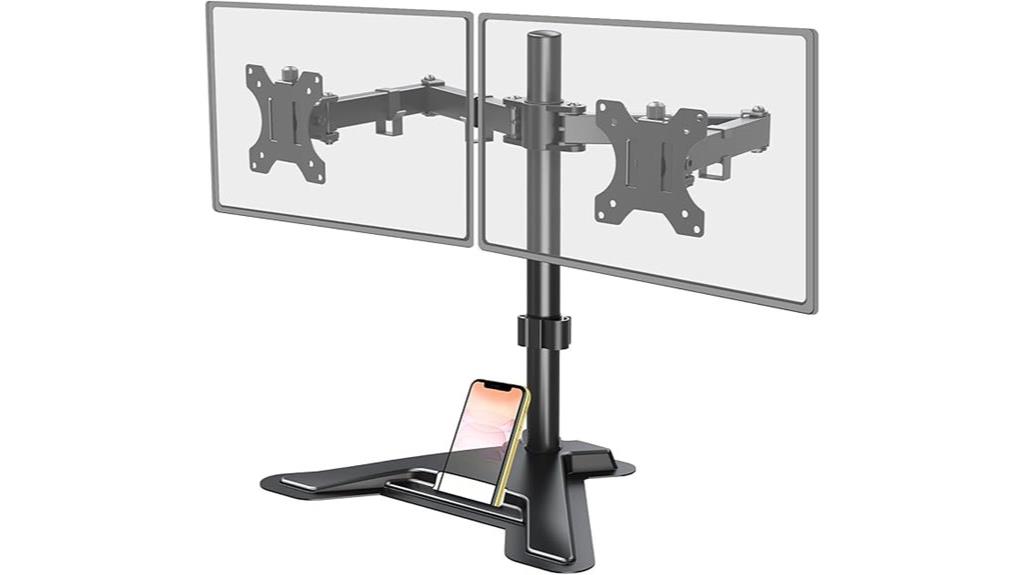
If you’re looking to optimize your workspace with a versatile dual monitor setup, the MOUNT PRO Dual Monitor Stand with Adjustable Arm is an excellent choice. It supports two 27-inch monitors weighing up to 17.6 lbs each, with VESA compatibility for 75×75 mm and 100×100 mm mounts. The stand offers height adjustment up to 18.1 inches, along with tilt, swivel, and 360° rotation, ensuring ergonomic positioning. Its sturdy V-shaped base provides stability, while cable management clips keep cords organized. Easy to assemble, this stand helps free up workspace and improve comfort, making it perfect for boosting productivity.
Best For: professionals and gamers seeking an ergonomic, space-saving dual monitor setup for 13 to 27-inch screens with easy adjustability.
Pros:
- Supports two monitors up to 27 inches and 17.6 lbs each, suitable for most LCD screens
- Fully adjustable with height, tilt, swivel, and rotation features for ergonomic positioning
- Stable V-shaped heavy base with cable management clips to keep workspace organized
Cons:
- Assembly may require careful balancing when installing two monitors simultaneously
- Limited to monitors with VESA mounts of 75×75 mm or 100×100 mm, not compatible with all monitor types
- Weighs 8.47 pounds, which may be heavy for some desk setups or portable use
MOUNTUP Dual Monitor Stand for Desk
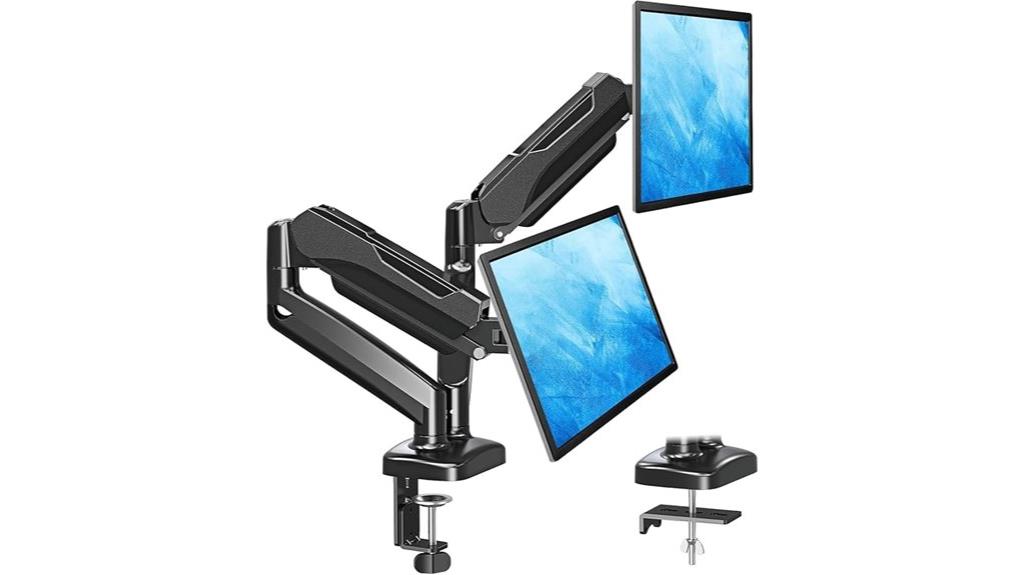
Designed for anyone seeking a versatile and ergonomic workspace, the MOUNTUP Dual Monitor Stand for Desk offers full motion flexibility that allows independent positioning of each monitor. It supports monitors weighing 4.4 to 17.6 pounds and sizes from 22 to 32 inches, compatible with VESA patterns 75×75 mm and 100×100 mm. The stand features tilt up to 135°, swivel 180°, and rotation 360°, enabling customized ergonomic setups. Easy to install via C-clamp or grommet base, it provides smooth pneumatic adjustments with adjustable tension. Its space-saving design and concealed cable management make it ideal for enhancing any work, gaming, or viewing environment.
VIVO Dual Monitor Stand with Adjustable Arms and Glass Base

The VIVO Dual Monitor Stand with Adjustable Arms and Glass Base stands out as an excellent choice for professionals seeking a sleek, stable setup with flexible positioning. It supports 13 to 32-inch monitors weighing up to 10 kg each, with VESA compatibility of 75x75mm and 100x100mm. The tempered glass base measures 42.5 cm by 26 cm, providing solid stability, while the steel arms and pole ensure durability. The adjustable arms tilt from +90° to -90°, swivel 360°, and rotate for portrait or landscape orientation. Easy to assemble, it’s backed by a 3-year warranty and friendly support, making it a versatile workspace upgrade.
Best For: professionals and gamers seeking a sleek, stable dual monitor setup with flexible positioning options.
Pros:
- Supports a wide range of monitor sizes (13-32 inches) and weights up to 10 kg each for versatile compatibility.
- Features adjustable arms with tilt, swivel, and rotation for customized viewing angles.
- Durable steel construction with a stable tempered glass base ensures long-lasting stability and support.
Cons:
- Assembly may require careful handling due to the glass base and multiple moving parts.
- Excessive forward or backward pulling of monitors can destabilize the stand unless bolted down.
- The glass base, while stable, may be heavier and more fragile compared to traditional metal bases.
VIVO Dual LED LCD Monitor Desk Stand (V002F)

For anyone seeking a sturdy and versatile dual monitor stand, the VIVO Dual LED LCD Monitor Desk Stand (V002F) stands out with its heavy-duty, extra-large base that guarantees stability even with larger screens. It supports 13 to 27-inch monitors weighing up to 22 pounds each and is compatible with VESA 75x75mm and 100x100mm mounts. The stand offers full articulation—tilt, swivel, and rotation—and adjustable height for personalized viewing angles. Its padded base protects your desk, and detachable cable clips help keep cords organized. Assembly is straightforward, but avoid pulling monitors excessively forward or backward unless the stand is bolted down.
Best For: users seeking a sturdy, versatile dual monitor stand that can accommodate larger screens with customizable positioning and cable management.
Pros:
- Heavy-duty, extra-large base ensures excellent stability for larger monitors
- Full articulation with tilt, swivel, and rotation for personalized viewing angles
- Compatible with a wide range of monitor sizes (13-27 inches) and VESA mounts
Cons:
- Assembly may require careful handling to avoid instability if not bolted down
- Does not include mounting hardware for wall installation
- Large base may take up significant desk space, limiting workspace flexibility
WALI Dual Monitor Stand for 17-32 inch Screens

If you need a versatile dual monitor stand that can handle a wide range of screen sizes, the WALI Dual Monitor Stand for 17-32 inch screens is an excellent choice. It supports both flat and curved monitors weighing up to 22 lbs each and features VESA compatibility for 75x75mm and 100x100mm mounts. The adjustable arms offer +90°/-90° swivel, +70°/-45° tilt, and 360° rotation, with height adjustments up to 17.3 inches and extension of 19.3 inches. Easy to mount with C-clamp or through-hole options, it’s praised for its durability and flexibility, earning a 4.5-star rating from hundreds of users.
Best For: users seeking a versatile, adjustable dual monitor stand compatible with a wide range of 17-32 inch screens for ergonomic workspace setup.
Pros:
- Supports both flat and curved monitors weighing up to 22 lbs each with VESA 75x75mm and 100x100mm compatibility.
- Offers extensive adjustability with swivel, tilt, rotation, height, and extension options for optimal ergonomic positioning.
- Easy to install using C-clamp or through-hole mounting solutions, suitable for various desk types.
Cons:
- May require a larger desk space due to its maximum extension of 19.3 inches.
- Some users might find the assembly process complex without detailed guidance.
- The weight capacity limits heavier monitors beyond 22 lbs, restricting compatibility with very large or heavier displays.
Dual Monitor Stand, Adjustable Vertical Screen Riser for 13-34 Inch Monitors

Designed for professionals and enthusiasts who need versatile, space-saving setups, the Dual Monitor Stand with adjustable vertical screen riser supports monitors from 13 to 34 inches, each weighing up to 44 pounds. It features compatible VESA mounting holes and integrated cable management, keeping your workspace tidy. With 12-level height adjustments and adjustable brackets, you can customize your viewing angles for ergonomic excellence. The stand swivels +50° to -50° and tilts +10° to -15°, promoting better posture and reducing strain. Easy to install with included hardware, it consolidates two monitors into one stand, freeing up desk space and enhancing productivity.
Best For: professionals and enthusiasts seeking a versatile, space-saving dual monitor setup that enhances ergonomic comfort and workspace organization.
Pros:
- Supports large monitors from 13″ to 34″ up to 44 lbs each, providing versatility for different screen sizes and weights.
- Fully adjustable with 12-level height options, swivel, and tilt for personalized ergonomic positioning.
- Easy to install with included hardware and cables managed neatly for a clutter-free workspace.
Cons:
- May require sufficient desk space for optimal placement and stability.
- Compatibility limited to VESA mounting holes of 50x50mm, 75x75mm, or 100x100mm.
- The adjustable features might require some time to customize for perfect positioning.
HUANUO NITROGLIDE Dual Monitor Stand for 13″–40

The HUANUO NITROGLIDE Dual Monitor Stand stands out with its smooth NITROGLIDE technology, allowing me to make precise adjustments effortlessly. Its solid aluminum arms and larger base guarantee stability, even with monitors weighing up to 26.4 lbs each. I can easily raise the arms up to 21.1 inches and extend them to 25.59 inches, while full motion options—swivel, tilt, and rotation—let me find the perfect ergonomic position. The dual C-clamp design keeps everything secure on my desk, and built-in USB ports plus cable management keep my workspace tidy. It’s a versatile, durable stand that maximizes desk space and comfort.
Best For: professionals and gamers who need a stable, adjustable, and space-saving dual monitor setup for enhanced productivity and ergonomic comfort.
Pros:
- Smooth NITROGLIDE technology allows effortless and precise monitor adjustments.
- Supports large monitors up to 26.4 lbs each with a sturdy aluminum build and dual C-clamp for stability.
- Features integrated USB ports and cable management to keep workspace organized and functional.
Cons:
- May require a desk with sufficient thickness (up to 3.54 inches) for clamp installation.
- Fully extended arms (up to 25.59 inches) might be cumbersome on smaller desks.
- Limited to monitor sizes between 13″ and 40″, restricting compatibility with very large or specialized displays.
VIVO Dual Monitor Stand for 32-inch Screens
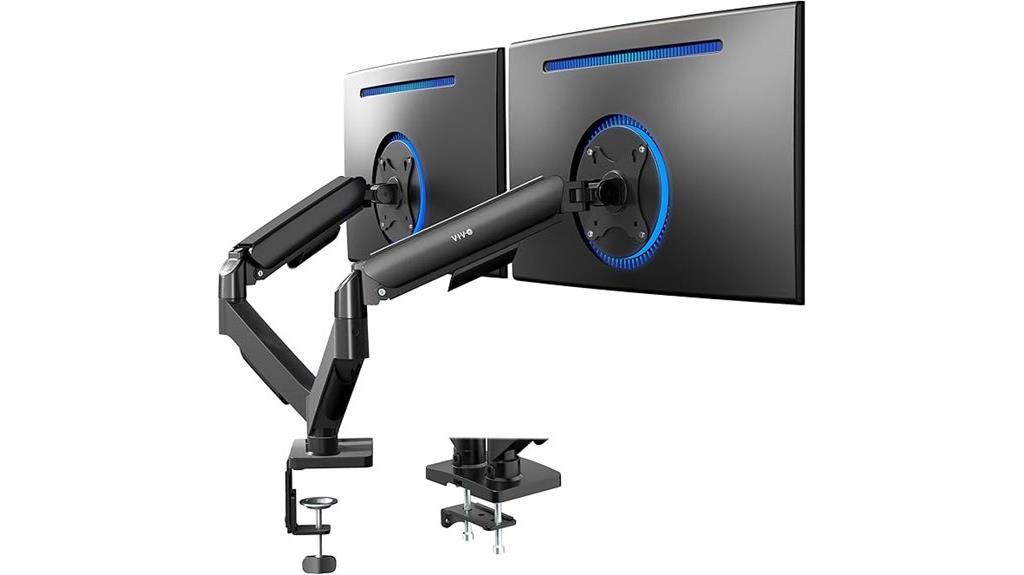
For professionals who need to maximize desk space without sacrificing monitor size or flexibility, the VIVO Dual Monitor Stand for 32-inch screens offers an excellent solution. It supports 17-32 inch monitors weighing up to 19.8 lbs each, compatible with VESA 75x75mm and 100x100mm patterns. The pneumatic arm with counterbalance allows easy, tool-free adjustments, including tilt, swivel, and rotation for perfect viewing angles. Installation is straightforward, with all hardware included and open-top VESA plates for quick monitor mounting. It elevates screens to free up desk space, using a sturdy clamp or optional grommet mount for versatile surface compatibility.
Best For: professionals and enthusiasts seeking to maximize desk space while maintaining flexible and ergonomic monitor positioning for 17-32 inch screens.
Pros:
- Supports a wide range of monitor sizes and weights up to 19.8 lbs for versatile use
- Pneumatic arm with counterbalance enables smooth, tool-free adjustments for optimal viewing angles
- Easy installation with included hardware and open-top VESA plates for quick monitor mounting
Cons:
- Monitor arms may extend past desk edge during use, potentially requiring additional space clearance
- Clamp mount is limited to surface thickness up to 3.1 inches, which may not fit all desks
- Grommet mount option is limited to surfaces up to 1.9 inches thick, reducing compatibility with some desk types
HUANUO Dual Monitor Stand for 17-32 Inch Monitors

If you’re looking to maximize your workspace and achieve ergonomic comfort, the HUANUO Dual Monitor Stand is an excellent choice for monitors up to 32 inches. It supports VESA-compatible monitors weighing between 4.4 and 19.8 pounds and offers adjustable height up to 25.19 inches with an extra 17-inch column. The stand features full motion adjustments—tilt, swivel, and rotation—so you can customize your viewing angles. It saves desk space by mounting on the desktop and includes a cable management system to keep everything tidy. Suitable for solid wood or metal desks, it’s easy to install with clear instructions.
Best For: professionals or gamers seeking to optimize their workspace with ergonomic, adjustable monitor support for monitors up to 32 inches.
Pros:
- Fully adjustable with tilt, swivel, and rotation for personalized viewing angles
- Space-saving desktop mount with integrated cable management for a tidy workspace
- Compatible with a wide range of monitors weighing 4.4 to 19.8 lbs and up to 32 inches
Cons:
- Not suitable for glass desktops, limiting installation options on certain surfaces
- Requires careful tightening of all screws during assembly to ensure stability
- May be less compatible with desks thicker than 3.54 inches or with non-standard VESA patterns
WALI Dual Monitor Stand for Desk
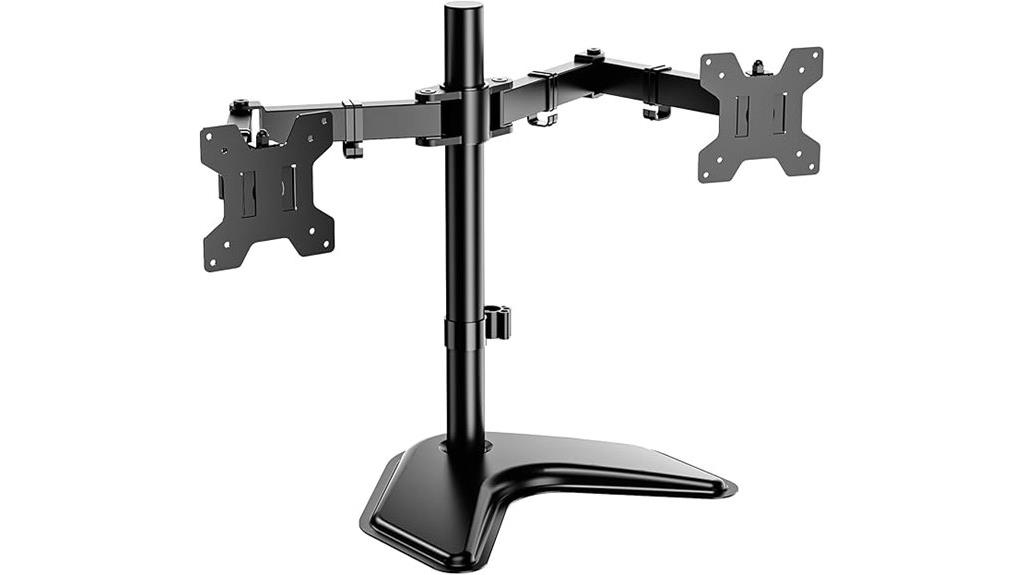
Among the top dual monitor stands of 2025, the WALI Dual Monitor Stand stands out for its impressive compatibility and versatile design. It supports monitors up to 27 inches, as well as TVs and flat screens with mounting patterns of 75x75mm or 100x100mm. Each arm can hold up to 22 pounds and features height-adjustable, detachable plates for easy customization. The sturdy V-base ensures stability on any desk. With full tilt, swivel, and rotation options, plus 16 inches of height adjustment, it promotes ergonomic comfort and workspace efficiency. Whether in a home, office, or school, this stand offers a reliable, adaptable solution for enhanced productivity.
Best For: Professionals, students, and home office users seeking a versatile, stable, and ergonomic dual monitor setup to enhance productivity and workspace comfort.
Pros:
- Supports monitors up to 27 inches and TVs with versatile mounting patterns (75x75mm or 100x100mm).
- Fully adjustable with tilt, swivel, rotation, and 16 inches of height customization for ergonomic positioning.
- Heavy-duty V-base provides excellent stability and durable support for monitors weighing up to 22 lbs per arm.
Cons:
- Assembly may require some effort due to the multiple adjustable components.
- Limited to monitors weighing up to 22 lbs per arm, which may not accommodate very heavy displays.
- The stand’s design may take up considerable desk space depending on placement.
HUANUO Dual Monitor Stand for 2 Screens

The HUANUO Dual Monitor Stand for 2 Screens is an excellent choice for professionals seeking a highly adjustable and stable setup. It supports monitors from 13 to 32 inches, weighing up to 17.6 lbs, with VESA mounting holes (75x75mm or 100x100mm). The fully adjustable arms tilt from -90° to +90°, swivel the same, and rotate 360°, while the center pole adjusts up to 16.4 inches for personalized positioning. Its large, heavy-duty base guarantees stability, and built-in clips help keep cables organized. Easy to install and flexible, it’s perfect for creating a clutter-free, ergonomic workspace.
Best For: professionals and gamers seeking a highly adjustable, stable, and space-efficient dual monitor setup for desktops.
Pros:
- Fully adjustable arms with tilt, swivel, and rotation for customized viewing angles
- Heavy-duty base provides excellent stability and support for monitors up to 17.6 lbs
- Built-in cable management clips keep workspace tidy and organized
Cons:
- Requires sufficient desk space to accommodate the large, heavy base
- Extending monitors too far forward or backward may affect stability
- Compatibility limited to monitors within 13-32 inches and VESA mounting holes (75x75mm or 100x100mm)
Factors to Consider When Choosing a Dual Monitor Stand

When selecting a dual monitor stand, I look at how well it fits my monitors and whether it offers enough adjustability for comfort. I also consider the mounting options and how much desk space it will take up, along with its weight capacity to guarantee stability. These factors help me find a stand that’s both functional and suits my workspace needs.
Compatibility With Monitors
Ensuring your monitors are compatible with a dual monitor stand is essential for a secure and functional setup. First, check if your monitors have VESA mounting holes—typically 75x75mm or 100x100mm—to guarantee they will fit most stands. Verify that each monitor’s size falls within the supported range, usually 13 to 32 inches, for proper support and stability. It’s also important to confirm the stand’s weight capacity; most supports range from 4.4 to 19.8 pounds per monitor. Additionally, match your monitor’s mounting pattern with the stand’s supported VESA configurations for secure attachment. Finally, consider the monitor’s design—flat or curved—so it aligns with the stand’s articulation and adjustment features, guaranteeing ideal compatibility and performance.
Adjustability Features
Choosing a dual monitor stand with the right adjustability features can greatly enhance your workspace comfort. Look for stands with full motion capabilities—tilt, swivel, and rotation—to tailor monitor positioning ergonomically. Adjustable height options, like vertical adjustments or center pole movement, help align monitors at eye level, reducing neck strain. Check if each arm moves independently, allowing personalized angles and minimizing discomfort. Smooth, tool-free adjustments are ideal for quick changes during your workday. Additionally, consider the range of motion specifications: tilt angles of at least ±45°, swivel of 180°, and rotation of 360°, for maximum flexibility. These features ensure you can customize your setup easily, promoting better posture and decreasing fatigue during long hours at your desk.
Mounting Options Available
Selecting the right mounting option for your dual monitor stand is essential to creating a stable and flexible workspace. C-clamp mounts attach directly to the edge of your desk and support desks up to about 4.5 inches thick, making them easy to install and remove. Grommet mounts require a pre-drilled hole, offering a more permanent solution and supporting thicker surfaces. Free-standing stands rest on your desk with a sturdy base, eliminating the need for clamps or holes, which is ideal for temporary setups or renters. Some stands support multiple mounting options, giving you flexibility to adapt to different desk types and preferences. Considering your desk’s material, thickness, and whether you prefer a removable or permanent setup will help you choose the best mounting option.
Desk Space Impact
A well-designed dual monitor stand can considerably free up your desk space by elevating screens and reducing clutter. By lifting monitors off the surface, you gain more room for other essentials or to keep your workspace tidy. Properly mounted stands, especially those with clamp or grommet options, can save up to 50% of desktop area compared to traditional setups, making your workspace more open. The adjustability features, like full-motion arms, allow you to position monitors in compact, ergonomic arrangements, further optimizing space. Additionally, integrated cable management keeps cords organized, preventing tangles and clutter. Your choice of installation method impacts how much space you free up and how stable your setup feels. Overall, a good dual monitor stand can dramatically improve your workspace’s layout and efficiency.
Weight Capacity Limits
Ensuring your dual monitor stand can handle the combined weight of your screens is essential for safety and stability. I recommend checking the weight capacity per arm and making sure it exceeds the total weight of your monitors. Most monitors weigh between 4.4 lbs and 26.4 lbs, so verify each monitor’s supported weight to avoid overloading. Also, confirm that the stand’s overall weight limit isn’t surpassed when both monitors are attached. Some stands feature adjustable tension or counterbalance mechanisms, which help accommodate different weights securely. Ignoring these limits can lead to stand damage, instability, or even monitor falls. To keep everything safe and secure, always match your monitors’ weights to the stand’s specified capacity. This simple step ensures your workspace remains stable and protected.
Build Durability
When choosing a dual monitor stand, durability hinges on the materials and construction quality. I look for stands made from high-quality steel, aluminum, or reinforced plastic, as these guarantee long-term support without sagging or breaking. A wide, heavy base is essential for stability, especially during adjustments or vigorous use, preventing tipping. Fully adjustable arms should feature robust joints and mechanisms that resist wear and maintain smooth motion over time. Compatibility with VESA standards (75x75mm or 100x100mm) guarantees secure monitor attachment and stability. Additionally, well-built stands often include reinforced cable management and sturdy mounting options, which prevent sagging or damage under load. Prioritizing these factors helps assure my workspace remains reliable and safe for everyday use.
Cable Management Solutions
Choosing a dual monitor stand with effective cable management is vital for maintaining a tidy and functional workspace. Good cable management solutions, like clips, channels, and sleeves, help organize and hide wires, reducing clutter and making your desk look cleaner. Built-in features in the stand itself can route cables neatly along arms and poles, making access easier and preventing tangles. Proper cable management also minimizes tripping hazards and keeps cords from becoming tangled or loose. Using cable ties or Velcro straps secures excess length, maintaining a streamlined setup. Plus, well-designed cable management improves airflow around your devices, helping prevent overheating and extending their lifespan. Overall, it’s a indispensable factor for a more efficient, safe, and visually appealing workspace.
Installation Ease
Selecting a dual monitor stand that’s easy to install can save you time and frustration. Look for models that come with clear, step-by-step instructions to simplify assembly. Check if the stand offers both C-clamp and grommet mounting options—this flexibility helps fit different desk types easily. Make sure the necessary hardware and tools are included or readily available, so you won’t face delays. Opt for stands that allow tool-free adjustments, making it quick to reposition monitors as needed. Also, consider the weight and size of your monitors to ensure the stand’s mounting system provides stability and ease of installation. Prioritizing these factors helps create a seamless setup process, letting you enjoy your workspace without unnecessary hassle.
Frequently Asked Questions
Can Dual Monitor Stands Support Curved or Ultrawide Monitors?
Yes, dual monitor stands can support curved and ultrawide monitors. I’ve found that many adjustable stands are designed to handle larger, heavier screens, including curved models, thanks to their sturdy mounts and VESA compatibility. Just make sure to check the weight capacity and mounting specifications before buying. That way, your setup stays secure and flexible, giving you a seamless, immersive viewing experience.
Are Adjustable Monitor Arms Compatible With All Desk Types?
Did you know that over 60% of desks are compatible with adjustable monitor arms? I’ve found that most adjustable monitor arms work with a wide range of desk types, including glass, wood, and metal. As long as your desk has a sturdy surface and the right mounting options, you’ll likely be able to install an adjustable arm easily. Just check the weight capacity and mounting compatibility to guarantee a perfect fit.
What Safety Features Are Included in Premium Dual Monitor Stands?
Premium dual monitor stands often include safety features like sturdy clamps or grommets to secure the stand firmly to your desk, preventing slips or falls. They also have adjustable tension controls for smooth movement without sudden drops. Some models include cable management systems to prevent tripping hazards. I always look for stands with these features to guarantee my workspace stays safe and organized while I focus on my tasks.
How Do I Manage Cable Organization With Dual Monitor Mounts?
Managing cable chaos with dual monitor mounts is easier than wrestling a tangled spaghetti mess. I use cable clips and Velcro straps to tame those wild cords, keeping them neat and out of sight. Running cables through the mount’s grommets or channels also prevents tripping hazards. Trust me, a little organization transforms your workspace from a tech jungle into a sleek, efficient zone—no more cable calamities!
Can Dual Monitor Stands Be Used for Gaming Setups?
Yes, dual monitor stands work great for gaming setups. I love how they free up desk space and let me position my screens at the perfect height and angle for immersive gameplay. They’re sturdy enough to support larger monitors, and many are adjustable, so I can customize my view. Plus, they help reduce clutter, making my gaming experience more comfortable and enjoyable.
Conclusion
So, which dual monitor stand will truly elevate your workspace? With options tailored for different screen sizes and needs, I believe the right choice depends on your setup and preferences. Don’t you want a more flexible, comfortable workspace that boosts productivity? Investing in a good stand can make all the difference, turning your desk into a sleek, efficient hub. Ready to transform your workspace and work smarter, not harder?