
The right ergonomic desk accessories can fix the wrist pain, back aches, and neck strain that come from long hours at a desk — but not every product earns its spot. After comparing 13 popular options, the Everlasting Comfort Memory Foam Seat Cushion stands out as the best overall pick because it delivers the biggest comfort improvement per dollar and works with almost any chair. Close behind are the HUANUO FlowLift Dual Monitor Stand for anyone whose neck takes the brunt of desk work, and the budget-friendly KTRIO Keyboard Wrist Rest and Mouse Pad set for preventing strain before it starts. The main tradeoff in this category is between targeted accessories that solve one problem well and multi-tasking products that try to do everything at a lower price point. There’s also a real quality gap in memory foam: cheap pads flatten within months, while the better options keep their shape. Keep reading for the full breakdown, including who each pick is for and which ones to skip.

Get comfort and recovery gear delivered free with Prime
- Fast, free delivery on millions of items
- Prime Video, Amazon Music and more included
- Member-only deals all year
Complete the kit


Key Takeaways
- Memory foam density was the biggest differentiator in this lineup — the Everlasting Comfort seat cushion and QUTOOL lumbar pillow held their shape under sustained weight, while thinner wrist rests like the MOSISO set felt softer but compress faster over long sessions.
- Vaydeer appears three times in this comparison, and the pattern is consistent: strong ergonomic design with a firm, supportive feel, but its products skew toward keyboard-and-wrist setups rather than full-body support.
- Monitor positioning delivered the biggest postural impact of any accessory type — the HUANUO FlowLift dual arm outperformed the adjustable laptop stand and the OPNICE riser because full articulation lets you set screen height and distance independently.
- The two under-desk foot rests split on philosophy: the CasaZenith keeps things simple with one fixed height, while the BlissTrends‘ two-height design makes it the better choice for sharing a desk or alternating sitting postures.
- Budget accessories solved the right problem at the wrong scale — elbow pads and wrist rest sets cost under $20 and genuinely help, but they complement rather than replace a proper chair cushion or monitor arm.
| Vaydeer 2-Piece L-Shaped Elbow Rest Pad, Memory Foam Desk Edge Cushion | 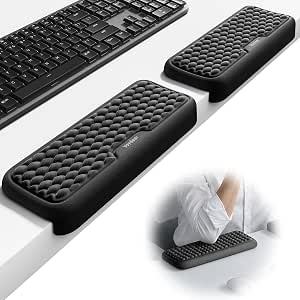 | Best for Desk-Edge Arm Support | Brand: Vaydeer | Material: Memory foam | Shape: L-Shaped | VIEW LATEST PRICE | See Our Full Breakdown |
| QUTOOL Lumbar Support Pillow for Office Chair and Car |  | Best Lumbar Support Pick | Brand: QUTOOL | Product Type: Lumbar support pillow | Dimensions: 16.9 x 15.5 x 4.2 inches | VIEW LATEST PRICE | See Our Full Breakdown |
| Everlasting Comfort Memory Foam Seat Cushion for Office Chairs and Car |  | Best for Tailbone Pressure Relief | Brand: Everlasting Comfort | Color: Black | Size: Large | VIEW LATEST PRICE | See Our Full Breakdown |
| OPNICE 2-Tier Desk Organizer and Monitor Stand Riser with Drawer |  | Best Budget Monitor Riser with Storage | Brand: OPNICE | Color: Black | Material: Metal | VIEW LATEST PRICE | See Our Full Breakdown |
| KTRIO Keyboard Wrist Rest and Mouse Pad with Wrist Rest |  | Best Value Wrist Rest Set | Brand: KTRIO | Color: Black | Keyboard Wrist Rest Dimensions: 17.2 x 3.12 x 0.9 inches | VIEW LATEST PRICE | See Our Full Breakdown |
| CasaZenith Under Desk Foot Rest |  | Best Foot Rest for Active Feet | Brand: CasaZenith | Product Type: Under-desk foot rest | Foot Surface Size: 13 x 9.6 in | VIEW LATEST PRICE | See Our Full Breakdown |
| MOSISO Mouse Pad and Keyboard Wrist Rest Set, Antique Green |  | Best Budget Wrist Rest Combo | Brand: MOSISO | Color: Antique Green | Keyboard Wrist Rest Dimensions: 17.32 x 3.15 in | VIEW LATEST PRICE | See Our Full Breakdown |
| HUANUO FlowLift Dual Monitor Stand |  | Best for Dual-Monitor Workstations | Brand: HUANUO | Model: HNDS6 | Monitor Size Compatibility: 13 to 32 inches | VIEW LATEST PRICE | See Our Full Breakdown |
| Adjustable Metal Laptop Stand for Desk |  | Best Portable Laptop Riser | Material: Metal | Maximum Load Capacity: 17.6 lbs (8 kg) | Compatible Laptop Sizes: 10-15.6 inches | VIEW LATEST PRICE | See Our Full Breakdown |
| Vaydeer Ergonomic Memory Foam Wrist Rest for Keyboard and Mouse | 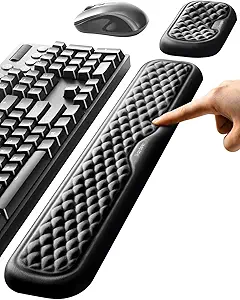 | Best Wrist Rest for Long Typing Sessions | Brand: Vaydeer | Product Type: Keyboard and mouse wrist rest set | Keyboard Wrist Pad Dimensions: 17.32 x 3.15 x 0.83 in | VIEW LATEST PRICE | See Our Full Breakdown |
| BlissTrends Under-Desk Foot Rest with 2 Adjustable Heights |  | Best Foot Rest for Small Budgets | Brand: BlissTrends | Model: MPNBTR0001-0BL | Lower Layer Dimensions: 16.2 x 9.9 x 2.0 in | VIEW LATEST PRICE | See Our Full Breakdown |
| Vaydeer 2-in-1 Ergonomic Keyboard Stand with Wrist Rest |  | Best Integrated Typing Upgrade | Brand: Vaydeer | Product Type: Keyboard stand with wrist rest | Design: 2-in-1 one-piece keyboard riser and wrist rest | VIEW LATEST PRICE | See Our Full Breakdown |
| MEKASS L-Shaped Desk Elbow Pad, Memory Foam Elbow Support Cushion, 2-Pack |  | Best for Hard Desk Edges | Brand: MEKASS | Product Type: Desk elbow pad | Quantity: 2 pieces | VIEW LATEST PRICE | See Our Full Breakdown |
| ergonomic desk accessorie | Brand | Material | Color |
|---|---|---|---|
| Vaydeer 2-Piece L-Shaped Elbow | Vaydeer | Memory foam | Black |
| QUTOOL Lumbar Support Pillow f | QUTOOL | Memory foam | — |
| Everlasting Comfort Memory Foa | Everlasting Comfort | Memory foam | Black |
| OPNICE 2-Tier Desk Organizer a | OPNICE | Metal | Black |
| KTRIO Keyboard Wrist Rest and | KTRIO | Memory foam, fabric, rubber base | Black |
| CasaZenith Under Desk Foot Res | CasaZenith | Polypropylene | — |
| MOSISO Mouse Pad and Keyboard | MOSISO | Neoprene cloth, silicone, memory foam | Antique Green |
| HUANUO FlowLift Dual Monitor S | HUANUO | — | — |
| Adjustable Metal Laptop Stand | — | Metal | — |
| Vaydeer Ergonomic Memory Foam | Vaydeer | Memory foam with lycra cover | — |
| BlissTrends Under-Desk Foot Re | BlissTrends | — | — |
| Vaydeer 2-in-1 Ergonomic Keybo | Vaydeer | — | Army Green |
| MEKASS L-Shaped Desk Elbow Pad | MEKASS | Memory foam, Lycra fabric, rubber base | Diamond Black |
More Details on Our Top Picks
Vaydeer 2-Piece L-Shaped Elbow Rest Pad, Memory Foam Desk Edge Cushion
Most wrist rests stop at the wrist, but elbow and forearm pressure at the front edge of a desk is a separate problem entirely — and that’s exactly where this L-shaped two-piece cushion set focuses. Unlike the KTRIO wrist rest set, which supports only the base of your hands, the Vaydeer pads wrap over the desk edge to cushion the full forearm during long typing or gaming sessions. The modular layout is the standout: the two pads can be split to flank a keyboard and mouse separately, or pushed together for a continuous armrest. The anti-slip silicone base and right-angle edge lock keep everything planted, which matters if you lean into your desk while working. The tradeoff is specialization — this solves desk-edge pressure, not wrist angle, so many buyers will still want a wrist rest alongside it.
Pros:- L-shaped design directly relieves desk-edge pressure on forearms
- Two-piece modular layout adapts to keyboard-only or keyboard-and-mouse setups
- High-density memory foam stays supportive without bottoming out
- Anti-slip silicone base and edge-lock structure keep pads firmly in place
Cons:- Only works on desks with a defined edge, not freestanding arm support
- Warranty terms require contacting the seller directly
Best for: Typists and gamers who lean on a hard desk edge and get sore forearms or elbows after long sessions
Not ideal for: Buyers wanting all-in-one wrist support — this addresses forearms and elbows, not the wrists themselves
- Brand:Vaydeer
- Material:Memory foam
- Shape:L-Shaped
- Pieces Included:2
- Color:Black
- Base:Anti-slip silicone with edge-lock structure
- Model Number:STR#011
Our verdict“If your forearms ache from resting on a hard desk lip, this targeted cushion solves a problem wrist rests ignore.”
QUTOOL Lumbar Support Pillow for Office Chair and Car
Not every ergonomic problem lives at your desk surface — poor lower-back posture is often the biggest culprit, and the QUTOOL lumbar pillow addresses it for less than the cost of a new chair. Compared with the Everlasting Comfort seat cushion, which supports you from below, this pillow works from behind, filling the gap between your spine and the chairback to encourage an upright posture. The high-density memory foam resists the flattening that plagues cheaper cushions, and the removable, machine-washable 3D mesh cover is a real advantage during warmer months. Two adjustable straps let it move between an office chair and a car seat, adding value beyond the desk. The catch: it takes some fiddling to find the right height on your chair, and it’s less effective on sofas or recliners with deep, soft backs.
Pros:- Ergonomic memory foam promotes better posture and relieves mid and lower back strain
- High-density foam retains its shape instead of flattening over time
- Breathable mesh cover removes and machine washes easily
- Two adjustable straps fit office chairs, gaming chairs, and car seats
Cons:- Requires some trial and error to position at the correct height
- Not suited to sofas, recliners, or compact seating
Best for: Office workers and commuters with lower-back discomfort who want one pillow that works at a desk and in the car
Not ideal for: Users outside the 100–200 lb recommended range or those with recliners and soft-backed sofas, where the shape and straps won’t anchor properly
- Brand:QUTOOL
- Product Type:Lumbar support pillow
- Dimensions:16.9 x 15.5 x 4.2 inches
- Material:Memory foam
- Cover:Breathable 3D mesh, removable and machine washable
- Straps:Two adjustable straps
- Compatibility:Office chairs, gaming chairs, car seats, SUVs, trucks
- Recommended User Weight:100–200 lb
Our verdict“A sensible first upgrade for anyone whose chair offers no lower-back support, with the bonus of doubling as a car lumbar pillow.”
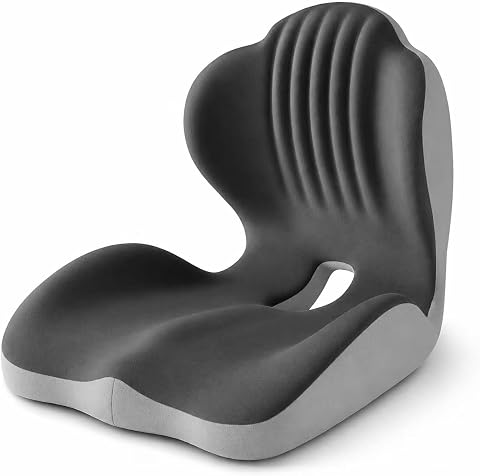
Everlasting Comfort Memory Foam Seat Cushion for Office Chairs and Car
Where the QUTOOL lumbar pillow corrects your posture from behind, the Everlasting Comfort seat cushion attacks discomfort from below. Its U-shaped cutout suspends the tailbone rather than compressing it — the detail that matters most for anyone who finishes long workdays with a sore coccyx. The memory foam conforms to body shape while staying firm enough to actually change how you sit, and the non-slip bottom prevents the slow slide-off that cheaper cushions suffer on polished office chairs. Portability is a genuine strength here: it moves from desk chair to car to airplane seat, which a fixed ergonomic chair obviously can’t do. Be realistic about expectations, though — relief tends to build with consistent use over time rather than instantly, and the large footprint can overwhelm molded or compact bucket seats.
Pros:- U-shaped cutout suspends the tailbone to reduce pressure directly
- Durable memory foam conforms to the body without collapsing
- Machine-washable breathable cover with non-slip bottom
- Portable design works on office chairs, in cars, on planes, and in wheelchairs
Cons:- Pain relief generally requires consistent use over weeks
- Large size may not fit compact or molded seats
Best for: Desk workers, drivers, and travelers dealing with tailbone or lower-back pain who want portable relief across multiple seats
Not ideal for: Owners of compact or contoured bucket-style seats, where the large size won’t sit flat
- Brand:Everlasting Comfort
- Color:Black
- Size:Large
- Material:Memory foam
- Design:Ergonomic U-shaped cutout
- Cover:Breathable, machine-washable
- Bottom:Non-slip
- Recommended Uses:Office chairs, car seats, wheelchairs, airplane seats, gaming chairs
Our verdict“The pick for anyone whose pain starts at the seat rather than the backrest — especially valuable if you split time between a desk and a car.”
OPNICE 2-Tier Desk Organizer and Monitor Stand Riser with Drawer
Neck strain from a monitor sitting too low is one of the easiest ergonomic problems to fix, and the OPNICE 2-tier riser fixes it while clearing desk clutter at the same time. Compared with a fixed riser, the built-in drawer and two hanging pen holders give it a dual role — raising your screen to eye level and reclaiming the space underneath for notebooks and supplies. Against full monitor arms like the HUANUO FlowLift, the tradeoff is clear: no height fine-tuning or desk-side swivel, but also no clamping, no VESA compatibility worries, and a much friendlier price. The metal construction with non-slip adjustable pads keeps the stand stable on uneven desks. The main gap is documentation — no stated weight capacity means buyers with heavy ultrawide monitors are left guessing before ordering.
Pros:- Raises monitor or laptop to a more comfortable viewing height
- Drawer and two pen holders double the stand as desk storage
- Sturdy metal build with non-slip, height-adjustable pads
- Minimalist black design blends into most office setups
Cons:- No published maximum weight capacity or monitor compatibility details
- Fixed height offers none of the adjustability of a monitor arm
Best for: Workers with standard monitors or laptops who want eye-level viewing plus extra desk storage in one inexpensive purchase
Not ideal for: Owners of ultrawide or especially heavy monitors, since no weight capacity or compatibility info is published
- Brand:OPNICE
- Color:Black
- Material:Metal
- Item Dimensions:20.5 x 9.5 x 6.3 inches
- Number of Tiers:2
- Storage:Drawer plus 2 hanging pen holders
- Return Policy:100-day unconditional return policy
Our verdict“A smart low-cost fix for a too-low screen that also tames desk clutter — just verify your monitor’s weight before buying.”
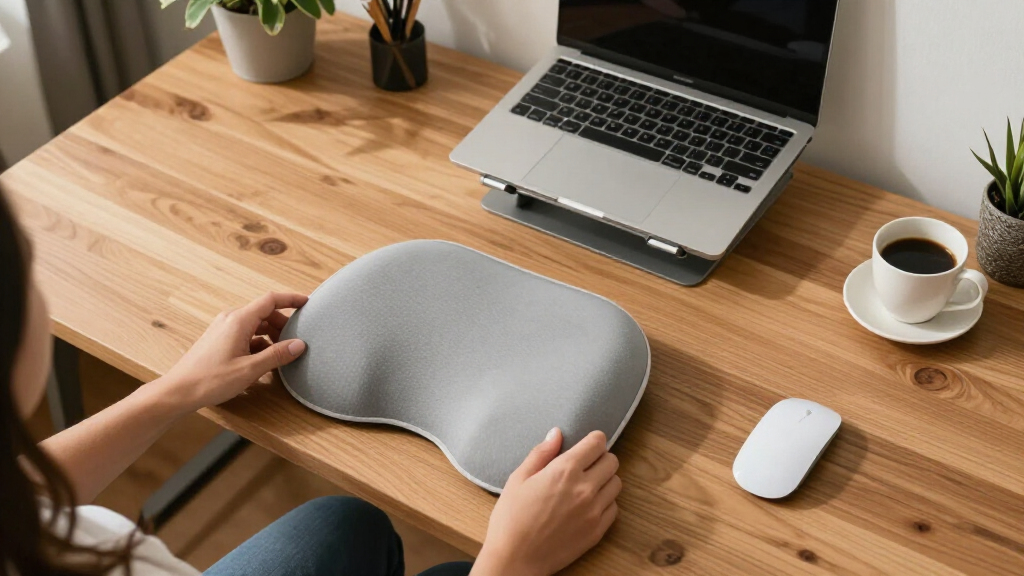
KTRIO Keyboard Wrist Rest and Mouse Pad with Wrist Rest
For most people, wrist strain is the first ergonomic complaint to appear — and the KTRIO set is the simplest, cheapest way to address it. Unlike the Vaydeer L-shaped elbow pads, which tackle the forearm at the desk edge, this pair supports the wrists themselves during typing and mousing, making the two complementary rather than competing. The memory foam hits a good middle ground: soft enough to relieve pressure, dense enough not to flatten within months. The non-slip rubber base matters more than it sounds — a wrist rest that creeps across the desk mid-sentence is worse than none at all. Sizing covers standard, laptop, and gaming keyboards, though buyers with tenkeyless or compact boards may find the 17.2-inch rest extends past the edge. A faint rubber smell on unpacking is the main annoyance, and it fades within days.
Pros:- Ergonomic support reduces wrist pain and fatigue during long sessions
- Memory foam balances softness with lasting density
- Non-slip rubber base keeps both pieces locked in place
- Fits standard, laptop, and gaming keyboards
Cons:- May emit a slight rubber odor when first unpacked
- Keyboard rest is oversized for compact keyboard layouts
Best for: Budget-conscious typists and gamers setting up their first ergonomic workspace
Not ideal for: Users with compact or tenkeyless keyboards, who’ll find the 17.2-inch rest noticeably oversized
- Brand:KTRIO
- Color:Black
- Keyboard Wrist Rest Dimensions:17.2 x 3.12 x 0.9 inches
- Mouse Pad Dimensions:9.8 x 8.6 x 0.9 inches
- Material:Memory foam, fabric, rubber base
- Compatibility:Standard, laptop, and gaming keyboards
- Customer Support:Up to 18 months
Our verdict“The most affordable entry point into ergonomic desk setup — pair it with the Vaydeer elbow pads for full forearm-to-wrist coverage.”
CasaZenith Under Desk Foot Rest
Most foot rests solve one problem: giving your feet something to rest on. The CasaZenith goes a step further with a swingable platform and built-in massage rollers, which keeps legs moving and circulation going during long sessions. Compared with the BlissTrends Under-Desk Foot Rest, which wins on height adjustability, this model trades fixed positioning for a more dynamic experience — and that’s the decision buyers face. The textured polypropylene surface is easy to clean but firm, so anyone expecting a plush place to park their feet will be disappointed. The snap-on, tool-free assembly and lightweight build make it a reasonable travel companion, though the compact 13 x 9.6 in platform may cramp larger users. This pick makes the most sense for people who fidget and want their foot rest to do more than sit there.
Pros:- Swingable design and massage rollers encourage movement and reduce leg fatigue
- Tool-free snap-on assembly takes minutes
- Lightweight and portable enough for office-to-home travel
- Non-slip pads and easy-to-clean textured surface
Cons:- No height adjustment, limiting fit for different chair and desk heights
- Hard plastic surface is less forgiving than padded alternatives
- Compact platform may not comfortably fit larger feet
Best for: Desk workers who shift positions constantly and want a foot rest that encourages movement and circulation
Not ideal for: Taller users or those who need precise height adjustment to hit a neutral seated posture — the fixed height limits customization
- Brand:CasaZenith
- Product Type:Under-desk foot rest
- Foot Surface Size:13 x 9.6 in
- Material:Polypropylene
- Features:Swingable, massage rollers, non-slip pad
- Assembly:Snap-on, tool-free
- Intended Use:Office, home, travel
Our verdict“A solid choice for restless legs that want stimulation and motion, but skip it if you need adjustable height or a cushioned surface.”
MOSISO Mouse Pad and Keyboard Wrist Rest Set, Antique Green
For under the price of lunch, this MOSISO set covers both wrists at once — keyboard rest, mouse pad with integrated cushion, and a bonus coaster in matching Antique Green. The KTRIO Keyboard Wrist Rest set is its closest rival in this lineup, but MOSISO edges it for style-conscious buyers thanks to the color-coordinated aesthetic that suits mechanical keyboard setups. The memory foam is genuinely comfortable for short-to-medium sessions, though it’s on the softer side — heavy typists who bottom out their keystrokes may find it compresses too much. The non-slip base performs well on standard desks, and the neoprene surface stays breathable. That said, the coaster is filler; it adds perceived value without adding function. This option stands out as the cheapest complete entry point into wrist ergonomics, ideal for a first upgrade rather than a final one.
Pros:- Covers both keyboard and mouse wrists in one affordable set
- Non-slip base keeps everything planted during fast mouse movements
- Breathable neoprene with silicone lining resists slipping and adds comfort
- Coordinated colorway looks cohesive on styled desks
Cons:- Soft memory foam may compress too much for firm-support preferences
- Antique Green colorway clashes with most neutral setups
- Coaster adds cost without real ergonomic value
Best for: Students and first-time ergonomics upgraders who want matched wrist support for both keyboard and mouse on a tight budget
Not ideal for: Users with existing wrist pain who need firmer, more structured support — the soft foam won’t provide enough resistance
- Brand:MOSISO
- Color:Antique Green
- Keyboard Wrist Rest Dimensions:17.32 x 3.15 in
- Mouse Pad Dimensions:9.65 x 8.66 in
- Material:Neoprene cloth, silicone, memory foam
- Features:Ergonomic, non-slip, wrist support
- Warranty:1 year
Our verdict“The most affordable way to cushion both wrists at once — buy it for the value, not for premium-grade support.”
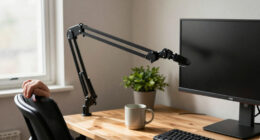
HUANUO FlowLift Dual Monitor Stand
This is the biggest ergonomic lever you can pull in the entire roundup. While wrist rests and foot rests fine-tune comfort, the HUANUO FlowLift addresses monitor height — the single largest driver of neck and shoulder strain. Compared with the OPNICE Monitor Stand Riser, which offers only fixed shelf heights, this full-motion mount provides up to 15.75 inches of lift plus tilt, swivel, and 360° rotation per arm, letting each screen sit exactly at eye level. The built-in cable management genuinely cleans up a two-monitor desk. The tradeoffs are structural: the C-clamp and grommet bases require a sturdy wooden desk between 0.59 and 3.54 inches thick, with no cross beams in the way — plastic and glass desks are off the table entirely. At 19.8 lbs per arm, most monitors fit, but ultrawide or heavyweight displays may exceed the rating. The 5-year warranty softens the commitment.
Pros:- Full-motion adjustment on both arms enables true eye-level monitor placement
- Frees up substantial desk surface by lifting monitors off the desk
- Built-in cable management reduces cord clutter
- 5-year manufacturer warranty backs the build
Cons:- Incompatible with plastic and glass desks
- 19.8 lb per-arm limit excludes heavier ultrawide displays
- Installation requires proper desk thickness and clearance
Best for: Dual-monitor professionals on solid wooden desks who want precise, per-screen positioning and reclaimed workspace
Not ideal for: Anyone with a glass, plastic, or beam-obstructed desk — the mounting hardware simply won’t work safely
- Brand:HUANUO
- Model:HNDS6
- Monitor Size Compatibility:13 to 32 inches
- Weight Capacity per Arm:4.4 to 19.8 lbs
- VESA Compatibility:75×75 mm, 100×100 mm
- Mounting Options:C-Clamp, Grommet
- Maximum Height Raise:15.75 inches
- Desk Thickness Compatibility:0.59″ – 3.54″
- Warranty:5 years
Our verdict“If you run two monitors on a sturdy wooden desk, this delivers the largest posture improvement per dollar in the roundup.”
Adjustable Metal Laptop Stand for Desk
Laptop users get the worst default ergonomics of any setup — screen too low, keyboard too high. This foldable metal stand fixes the first half of that problem by raising a 10-to-15.6-inch laptop to a proper viewing height and angle. Where the HUANUO FlowLift demands permanent desk mounting and VESA compatibility, this stand sets up anywhere in seconds and folds flat for a backpack, making it the clear pick for hybrid workers and travelers. The ventilation holes are a smart touch — raising a laptop also improves airflow, which helps sustained performance. Two honest caveats: the 15.6-inch size ceiling rules out 17-inch machines, and raising the screen means you’ll still want an external keyboard and mouse (the MOSISO or Vaydeer wrist rest sets pair well here). At 17.6 lbs of load capacity, sturdiness isn’t a concern for any modern laptop.
Pros:- Adjustable height and angle for genuinely better neck posture
- Folds flat for genuine portability between locations
- Metal frame holds up to 17.6 lbs without wobble
- Ventilation holes plus silicone pads protect and cool the device
Cons:- Size limit of 15.6 inches excludes larger laptops
- Raising the screen effectively requires an external keyboard and mouse
- Manual repositioning needed each time you change locations
Best for: Hybrid and traveling laptop users who need eye-level screening that collapses into a bag
Not ideal for: Owners of laptops larger than 15.6 inches, or anyone unwilling to add an external keyboard to their setup
- Material:Metal
- Maximum Load Capacity:17.6 lbs (8 kg)
- Compatible Laptop Sizes:10-15.6 inches
- Adjustability:Height and angle
- Design:Foldable
- Cooling:Ventilation holes
- Protective Features:Rubber mats and anti-skid silicone pads
Our verdict“The most travel-friendly way to stop hunching over a laptop — just budget for an external keyboard to complete the setup.”
Vaydeer Ergonomic Memory Foam Wrist Rest for Keyboard and Mouse
The concave ergonomic shape is what separates the Vaydeer set from the flatter MOSISO and KTRIO alternatives in this roundup. Instead of a simple foam bar, the curved surface cradles the wrist in a more neutral angle, which matters most during multi-hour typing or gaming marathons where subtle posture differences compound. The lycra cover is noticeably smoother than standard fabric finishes, reducing friction as hands slide across the desk, and the non-slip rubber base holds firm through aggressive mouse work. The 0.83-inch thickness sits in a comfortable middle ground — softer than a rigid gel pad, firmer than bargain foam. Tradeoffs: the fixed 17.32-inch length won’t accommodate oversized or tenkeyless-plus keyboards with extra width, and the lycra cover collects oils over time, so it needs occasional cleaning to stay fresh.
Pros:- Concave contoured design promotes genuinely neutral wrist angles
- Smooth lycra cover reduces friction during long sessions
- Non-slip rubber base stays planted during fast mouse movements
- Includes both keyboard and mouse supports in matched sizes
Cons:- Fixed dimensions won’t fit oversized keyboards
- Memory foam skews soft for firm-support preferences
- Fabric cover needs periodic cleaning to remove oils
Best for: Programmers, writers, and gamers logging long daily sessions who want contoured wrist support, not just a foam bar
Not ideal for: Owners of oversized or wide keyboards — the fixed keyboard pad length won’t span them
- Brand:Vaydeer
- Product Type:Keyboard and mouse wrist rest set
- Keyboard Wrist Pad Dimensions:17.32 x 3.15 x 0.83 in
- Mouse Wrist Support Dimensions:5.94 x 3.15 x 0.83 in
- Material:Memory foam with lycra cover
- Bottom:Non-slip rubber/silicone base
- Design:Ergonomic concave shape, diamond pattern
- Intended Use:Typing, gaming, office, study
Our verdict“The best wrist rest here for all-day typists who value contoured support over rock-solid firmness.”
BlissTrends Under-Desk Foot Rest with 2 Adjustable Heights
This pick stands out for solving the most overlooked part of desk ergonomics: what your feet are doing. The two-layer foam design lets you choose between a lower 2.0-inch tilt and a taller 3.7-inch position, which matters because proper foot elevation reduces pressure traveling up through the knees and lower back. Compared with the CasaZenith Under Desk Foot Rest, the BlissTrends gains an edge on practicality thanks to its machine-washable zippered cover — a real benefit for anyone working barefoot or in socks all day. The tradeoff is simplicity itself: with only two fixed heights and no angle adjustability, you can’t fine-tune the incline the way pricier rocking footrests allow. Detaching the layers requires peeling apart touch fasteners, which gets noisy and tedious if you change positions often.
Pros:- Two height layers accommodate different desk and chair setups
- Machine-washable zippered cover keeps it hygienic over time
- Non-slip bottom keeps it planted on hard floors
- Doubles as a behind-the-knee cushion for reclining or travel
Cons:- Only two fixed heights with no angle adjustment
- Height changes require separating touch-fastened layers, which is awkward mid-workday
Best for: Office workers and travelers on a budget who need basic leg and lower-back pressure relief without paying for premium adjustability
Not ideal for: Fidgety sitters who constantly shift positions — re-stacking the layers via touch fasteners gets repetitive, and there’s no rocking motion or angle fine-tuning
- Brand:BlissTrends
- Model:MPNBTR0001-0BL
- Lower Layer Dimensions:16.2 x 9.9 x 2.0 in
- Upper Layer Thickness:3.7 in
- Height Adjustment:Two layers with touch fasteners
- Core Material:Foam
- Cover:Zippered, removable, machine washable
- Bottom:Non-slip
- Assembly:No assembly required
Our verdict“A sensible, washable foot rest for desk workers who want lower-back relief on a budget and don’t need fine-grained adjustability.”
Vaydeer 2-in-1 Ergonomic Keyboard Stand with Wrist Rest
Most wrist rest setups fail at the seam — the pad drifts away from the keyboard and your wrists drop into the gap. The Vaydeer’s one-piece 2-in-1 design eliminates that entirely by fusing the riser and memory foam wrist rest into a single unit. Where the KTRIO Keyboard Wrist Rest and Mouse Pad set offers separate pieces and broader desk coverage, this model bets on coherence: the 12.5° and 3° angle options support both a steeper negative-tilt typing posture and a flatter casual one. The non-slip silicone base means the whole unit stays put during gaming sessions. The tradeoffs are real, though. Two fixed angles won’t suit typists who want something in between, and the army green finish clashes with neutral setups. If you use a curved or split keyboard, the rigid one-piece shape may simply not fit.
Pros:- Integrated design eliminates wrist rest drift and gaps
- Two angle options (12.5° and 3°) for different typing postures
- Memory foam with breathable lycra stays comfortable over long sessions
- Anti-slip silicone base keeps the unit stable during fast typing or gaming
Cons:- Only two fixed angles with no intermediate adjustment
- One-piece design is less flexible than pairing a separate stand with a standalone wrist rest
- Army green colorway may clash with some desk aesthetics
Best for: Gamers and standard-keyboard typists who want a stable, gap-free typing angle without managing separate accessories
Not ideal for: Split, curved, or compact keyboard users — the fixed one-piece footprint assumes a standard full-size or TKL layout
- Brand:Vaydeer
- Product Type:Keyboard stand with wrist rest
- Design:2-in-1 one-piece keyboard riser and wrist rest
- Adjustable Angles:12.5° and 3°
- Base Material:Anti-slip silicone
- Cushion Material:Memory foam
- Cover Material:Breathable lycra fabric
- Color:Army Green
Our verdict“The right choice if you want a single stable unit that angles your keyboard and supports your wrists in one move.”
MEKASS L-Shaped Desk Elbow Pad, Memory Foam Elbow Support Cushion, 2-Pack
If your forearms rest on a hard desk edge all day, this two-pack addresses a problem the wrist-focused picks can’t: pressure at the elbow. The L-shaped wraparound design cushions the corner where desk meets forearm, and the memory foam plus Lycra surface does the forgiving. Compared with the Vaydeer 2-Piece L-Shaped Elbow Rest Pad, the MEKASS pulls ahead on maintenance — its stain-resistant, wipe-clean cover handles coffee rings better than fabric covers that need washing. Because the two pads are independent, spacing adjusts freely to match shoulder width, which the fixed-width Vaydeer 2-in-1 keyboard stand can’t replicate. The catches: fit depends heavily on your desk’s edge profile, and unusually thick countertops or rounded corners may leave the pads loose or misaligned. It’s a niche fix, but for the right desk it changes everything.
Pros:- Wraparound L-shape cushions the exact point where elbows meet desk edges
- Adjustable two-piece spacing suits different shoulder widths and desk layouts
- Non-slip rubber base prevents sliding during active typing or gaming
- Wipe-clean stain-resistant Lycra surface simplifies upkeep
Cons:- Fit is inconsistent on thick or rounded desk edges
- Requires periodic repositioning to stay aligned
Best for: Heavy typists and gamers with standard straight-edged desks whose elbows and forearms dig into hard corners for hours
Not ideal for: Owners of desks with unusually thick tops or rounded edges — the L-shape won’t seat properly and will shift or look awkward
- Brand:MEKASS
- Product Type:Desk elbow pad
- Quantity:2 pieces
- Dimensions (Each):11.8 x 3.9 x 1.2 inches
- Shape:L-shaped
- Material:Memory foam, Lycra fabric, rubber base
- Color:Diamond Black
- Compatibility:Straight desks, L-shaped desks
Our verdict“A targeted comfort fix for anyone whose elbows bear the brunt of hard desk edges, provided the desk has standard square edges.”

How We Picked
I evaluated each accessory against the job it’s actually meant to do: reduce strain at a specific contact point between your body and your desk. That meant judging support quality (does the memory foam resist bottoming out?), adjustability (can the product adapt to different body sizes and desk setups?), build quality (covers, straps, clamps, and bases that survive daily use), and value relative to what the accessory replaces or prevents. Products that only mask discomfort — like overly soft cushions that flatten on contact — ranked lower than firmer options that maintain real support.
The ranking also reflects impact per dollar and breadth of fit. Seat and lumbar cushions placed near the top because they address the largest muscle groups and work with nearly any existing chair. Monitor arms followed because correct screen height affects the whole spine. Wrist rests, elbow pads, and foot rests filled the value tier: inexpensive, genuinely helpful for specific pain points, but limited on their own. Where two products solved the same problem — the two elbow pads, the two foot rests, the three wrist rest options — I separated them by durability details, adjustability, and price rather than listing near-duplicates back to back.
Factors to Consider When Choosing Ergonomic Desk Accessories
Buying ergonomic accessories one at a time usually leads to a drawer full of gadgets that don’t quite work together. Before spending anything, it helps to understand how these products interact, where the real quality differences hide, and which mistakes waste the most money.Fix Your Posture Chain From the Top Down
The most common mistake is buying accessories in the reverse order of impact. Screen height drives your neck angle, your neck drives your shoulders, and everything below — wrists, lower back, feet — compensates from there. A monitor arm or laptop stand often improves wrist and neck complaints simultaneously, because raising the screen pulls your whole posture upright. Accessories like wrist rests and foot rests are fine-tuning tools, not foundation pieces. If your budget only covers one item, address the highest point in the chain first and see what symptoms remain before buying the next thing. This approach prevents the classic error of stacking five cheap pads on top of a fundamentally bad desk setup.
Memory Foam Quality Matters More Than Thickness
Almost every cushion in this category advertises memory foam, but the material varies enormously between manufacturers. Low-density foam feels plush on first press and then compresses flat within weeks of daily use, which defeats the purpose entirely. Higher-density foams feel firmer initially and hold their shape for years — that firmness is a feature, not a flaw. A quick way to judge before buying: check whether the product lists foam density or weight capacity, and read reviews that mention use after several months rather than first impressions. Removable, washable covers are the other durability marker, since body oils and heat break down foam faster when the cover can’t be cleaned. The gap between a $15 pad and a $35 cushion in this respect is smaller than the gap between good and bad foam at either price.
Adjustability Separates Long-Term Winners From Quick Fixes
Fixed-height accessories are cheaper, but they assume one body size and one desk configuration — which rarely matches reality. A monitor arm with full articulation outlives desk changes, chair swaps, and even a move from dual monitors to a laptop, while a static riser locks you into one setup forever. The same logic applies to foot rests: a two-height design accommodates different chairs and shoe choices, and some users find they need different heights morning versus afternoon as their posture fatigues. Lumbar pillows with adjustable straps stay put on chairs where loose cushions slide. The tradeoff is complexity — more moving parts mean more potential failure points — so adjustable products deserve extra scrutiny on build quality, especially at clamps and hinges. Pay for adjustability when your setup is still evolving; save with fixed designs when your desk is settled.
Match the Accessory to Your Actual Pain, Not the Trend
Wrist pain at a keyboard usually signals a height mismatch between your chair and desk, which a $20 wrist rest can soften but not solve. Lower back pain while sitting often traces to a seat that’s too low or tilted backward — a lumbar pillow helps, but a seat cushion that raises and tilts the pelvis forward may address the root cause better. Elbow pain from desk edges, common among people who lean on their forearms while mousing, is one of the few problems a simple pad genuinely resolves on its own. Numbness or tingling in hands deserves attention beyond accessories entirely, since it can indicate issues no cushion will fix. The honest framing: these products reduce strain, and they work best when you can name the specific strain you’re reducing. Buyers who diagnose first consistently report better results than those who buy the most-reviewed item and hope.
Small Accessories Multiply Value in Sets
The pricing structure of this category rewards bundling. A keyboard wrist rest, mouse pad with wrist support, and elbow pads bought together typically cost less than one seat cushion, yet they cover three separate contact points. Set buyers should still check one thing: matching heights. A wrist rest that’s taller than the keyboard’s front edge creates its own strain, and mismatched mouse and keyboard supports force uneven shoulder positioning. Manufacturers that sell sets generally match these heights correctly, which is why combo kits often beat piecing items together from different brands. The same applies to dual elbow pads versus singles — symmetric support matters more than most buyers expect. Sets are also the lowest-risk entry point for anyone unsure whether ergonomic accessories will help them at all.
Frequently Asked Questions
Should I buy a seat cushion or a lumbar pillow if I can only afford one?
It depends on where your discomfort sits and what your chair already does. If your chair sags or sits too low, a seat cushion like the Everlasting Comfort addresses the root problem by raising your hips and tilting the pelvis into a better sitting angle, which often relieves lower back strain as a side effect. If your chair is decent but offers no back support, a lumbar pillow like the QUTOOL fills the gap in your lower back curve directly. Many desk workers with generic office chairs benefit from the cushion first, because a corrected seat position changes how the whole spine stacks above it. One caution: stacking both on an already-padded chair can push you too far forward and create new neck strain, so add one, give it a week, and reassess before adding the second.
Are wrist rests actually good for you, or do they cause problems?
Used correctly, wrist rests are helpful — the confusion comes from how people use them. The support should contact your palm or heel of the hand, keeping the wrist neutral while typing, not prop the wrist itself up while you type with bent hands, which compresses the carpal tunnel. A rest that’s too soft lets the wrist sink and bend, which is why firmer, high-density options like the Vaydeer outperform plush alternatives for actual typing sessions. Rests also earn their keep during pauses, giving your hands somewhere to land between bursts of typing. If you feel tingling in your fingers even with a rest, the underlying issue is usually keyboard height or desk angle, not the rest itself. Treat wrist rests as a supplement to a properly positioned keyboard, never a substitute.
Is a monitor arm worth it if I already have a monitor stand or riser?
If your current setup already puts the top of your screen at or slightly below eye level, a riser like the OPNICE does the job for a fraction of the price. A full monitor arm like the HUANUO FlowLift becomes worth it when you need control in more than one direction — pulling the screen closer, rotating to portrait, swiveling to show a colleague, or clearing desk space beneath the monitor. Arms also handle uneven situations better: very tall or very short users, dual monitors at different heights, and sit-stand desks all benefit from full articulation that no fixed riser can match. The tradeoff is installation effort and desk edge requirements, since clamp mounts need a certain desk thickness and clear edge space. If your screen height is currently correct and unchanging, save the money. If you fidget with your setup or share the desk, the arm pays for itself in flexibility.
Do under-desk foot rests actually help, or are they unnecessary?
They help a specific group of people: anyone whose feet don’t rest flat on the floor when seated correctly, which includes shorter users and people with high or non-adjustable chairs. Without foot support, your legs dangle or you slide forward in the seat, which collapses your lumbar curve and undoes whatever your cushions are trying to fix. A foot rest gives your legs a stable platform that lets your back stay against the chair back where it belongs. The BlissTrends two-height model adds flexibility for shared desks or alternating postures, while the CasaZenith’s single-height simplicity suits one person with a consistent setup. If your feet already sit flat with your knees near 90 degrees, a foot rest adds little — and a too-tall rest can push knees into an awkward angle, so measure your seat height before buying.
How many ergonomic accessories do I realistically need?
Most desk workers get 80% of the benefit from two or three well-chosen items, not a fully accessorized station. A logical starting combination is one positioning product — a monitor arm, riser, or laptop stand — plus one body support product like a seat cushion or lumbar pillow, and then a low-cost wrist rest set if you type for hours daily. That covers the three highest-impact contact points: eyes, spine, and wrists. Adding more helps only when a specific symptom persists, and each addition should trace back to a named discomfort rather than a general sense that more support must be better. Over-accessorizing has real downsides, including cluttered desk space and supports that fight each other, like a thick seat cushion that suddenly makes your monitor too low. Buy incrementally, live with each addition for a week or two, and let your body’s feedback drive the next purchase.
Conclusion
After comparing all 13, the right choice comes down to what hurts and how much you want to spend. Best overall goes to the Everlasting Comfort Memory Foam Seat Cushion — it delivers the broadest comfort improvement, fits any chair, and holds up under daily use. For best value, the KTRIO wrist rest and mouse pad set and the Vaydeer and MEKASS elbow pads cover multiple contact points for around $20 each, making them the smartest first purchase for budget-limited buyers. The best premium pick is the HUANUO FlowLift Dual Monitor Stand: it costs more than a static riser but transforms your entire posture chain and desk footprint at once.
Beginners should start with the QUTOOL lumbar pillow — it’s inexpensive, requires no setup, and gives an immediate sense of whether ergonomic support helps before committing to bigger purchases. For specific needs: laptop users get the most from the adjustable metal laptop stand paired with the Vaydeer 2-in-1 keyboard stand; shorter users or anyone with a high chair should grab the BlissTrends two-height foot rest; and anyone wanting a tidier, raised monitor with extra storage will appreciate the OPNICE riser over a full arm. Whatever you choose, fix the top of your posture chain first, add accessories one at a time, and let real comfort — not marketing — tell you when you’re done.
Halloween Picks
halloween
As an affiliate, we earn on qualifying purchases.