
To set up an ergonomic workspace on a budget, start by evaluating your space and needs. Use DIY solutions like stacking books or foam pads for monitor and foot support, and repurpose household items for lumbar and seat cushions. Adjust your desk height with DIY platforms and elevate your monitor using boxes. Keep your workspace organized and add natural elements like plants. Continuing with these ideas will help you create a comfortable, supportive setup without spending much.
Key Takeaways
- Assess your workspace for ergonomic issues and optimize layout using affordable DIY solutions like household items.
- Use repurposed furniture, cushions, and foam pads to create adjustable lumbar and foot supports.
- Elevate monitors and feet with books or boxes to achieve proper eye and leg positioning.
- Minimize clutter and organize tools using inexpensive containers and labels for a tidy workspace.
- Incorporate natural light and DIY lighting solutions alongside budget-friendly plants to enhance comfort and well-being.
Assessing Your Space and Identifying Needs

Before investing in ergonomic equipment, you should evaluate your current workspace to understand what needs improvement. Begin by examining your desk arrangement—how your items are organized and whether they promote comfort and efficiency. Focus on space optimization to ensure your workspace isn’t cluttered, which can hinder productivity and cause discomfort. Identify any areas where your posture might suffer, such as a high or low monitor placement or limited legroom. Take note of your daily tasks and how your current setup supports or hampers them. By assessing these factors, you’ll know what adjustments are necessary to create a more ergonomic environment without overspending. Additionally, understanding how your workspace can facilitate proper posture and alignment is crucial for preventing discomfort during long periods of work. Ensuring your workspace supports ergonomic principles can significantly improve your comfort and reduce strain. This step is vital for making informed, budget-friendly upgrades that truly enhance your work experience. Moreover, considering adjustability options can help you customize your setup to better fit your individual needs without additional expenses. Incorporating simple space-saving solutions can further maximize your area and contribute to a more organized workspace, helping to maintain proper ergonomic support throughout your work sessions.
Choosing an Affordable Desk and Work Surface

Finding an affordable desk and work surface that fits your space and budget is essential for creating an ergonomic workspace. You want something that supports good posture without compromising office aesthetics or exceeding your budget constraints. Look for versatile options like repurposed furniture or DIY solutions that can be customized to your needs. Consider compact desks that maximize small spaces or adjustable surfaces for flexibility. Keep in mind, the right work surface should be sturdy, comfortable, and suit your workflow. Exploring cost-effective options can help you find quality furniture that meets your ergonomic needs without overspending. Additionally, researching affordable ergonomic furniture can provide ideas for setups that balance comfort and budget. Incorporating free floating design principles can also help optimize your workspace layout for better ergonomics and efficiency. Being mindful of ergonomic principles when selecting or designing your workspace will ensure long-term comfort and health benefits. For increased stability and durability, choosing DIY solutions can offer tailored and budget-friendly alternatives to store-bought options.
DIY Adjustable Chair Support Solutions

Creating a DIY adjustable chair support is a practical way to enhance your ergonomic setup without spending much. You can craft a custom lumbar support using a piece of memory foam cut to fit your lower back. Wrap it with a breathable fabric for comfort and attach it to your chair with adjustable straps or elastic bands, allowing you to modify the height and angle as needed. For added support, consider stacking foam layers or repurposing household items like rolled towels, secured with elastic cords. These solutions help maintain proper spinal alignment and reduce fatigue during long work sessions. Remember, the goal is to create a support that adapts to your body and workspace, providing consistent lumbar support without breaking the bank. Incorporating individualized adjustments can further optimize comfort and support, especially when considering ergonomic principles for better posture. Additionally, implementing visual and auditory cues can assist you in maintaining correct posture throughout the day. Paying attention to proper tool setup can also prevent strain and promote a healthier workspace environment. Using low-cost materials can make your DIY solutions more sustainable and accessible.
Creating an Ergonomic Monitor Setup on a Budget
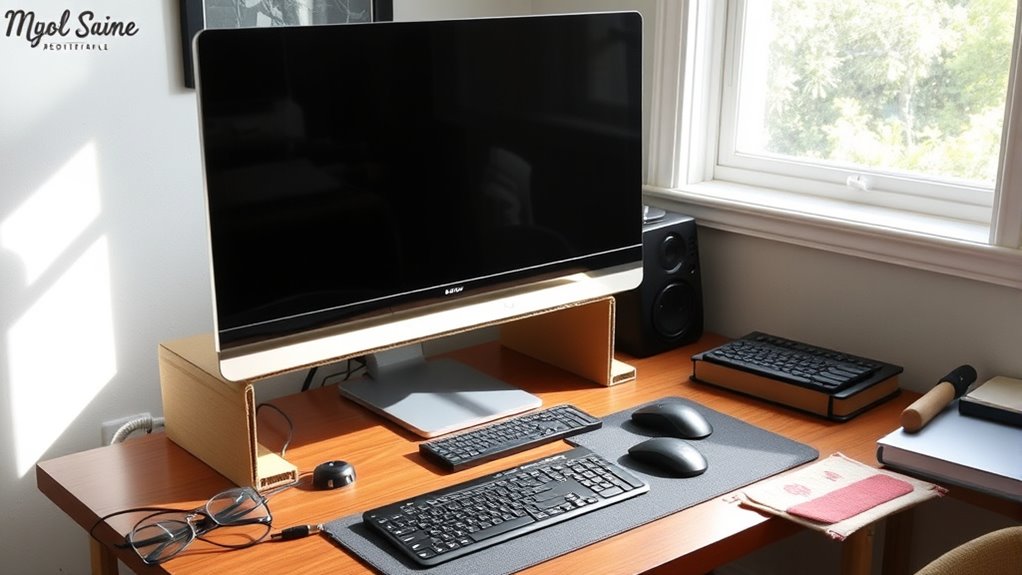
Achieving an ergonomic monitor setup doesn’t have to cost a fortune; with a few simple adjustments, you can substantially improve your comfort and posture. First, set your monitor height so the top of the screen is at or just below eye level, reducing neck strain. Keep the screen about an arm’s length away to prevent eye fatigue. Use household items like books or boxes to elevate your monitor if needed. Adjust the screen distance so that you can view details without leaning forward or straining your eyes. Consider DIY solutions like stacking sturdy boxes or using a small shelf. Regularly check your posture and make small tweaks for *ideal* comfort. Remember, small investments in positioning can lead to big improvements in your ergonomic setup. Additionally, understanding ergonomic best practices can help you tailor your workspace for maximum comfort and productivity. Incorporating smart home fitness principles, such as adjustable standing desks or ergonomic accessories, can further enhance your setup and support long-term health. Being mindful of ergonomic principles ensures your workspace remains comfortable and reduces the risk of strain or injury over time. Incorporating cost-effective ergonomic tools can also make a significant difference without exceeding your budget. For example, using adjustable monitor stands can help you fine-tune your setup more precisely and comfortably.
Crafting Comfortable and Supportive Seating Using Household Items
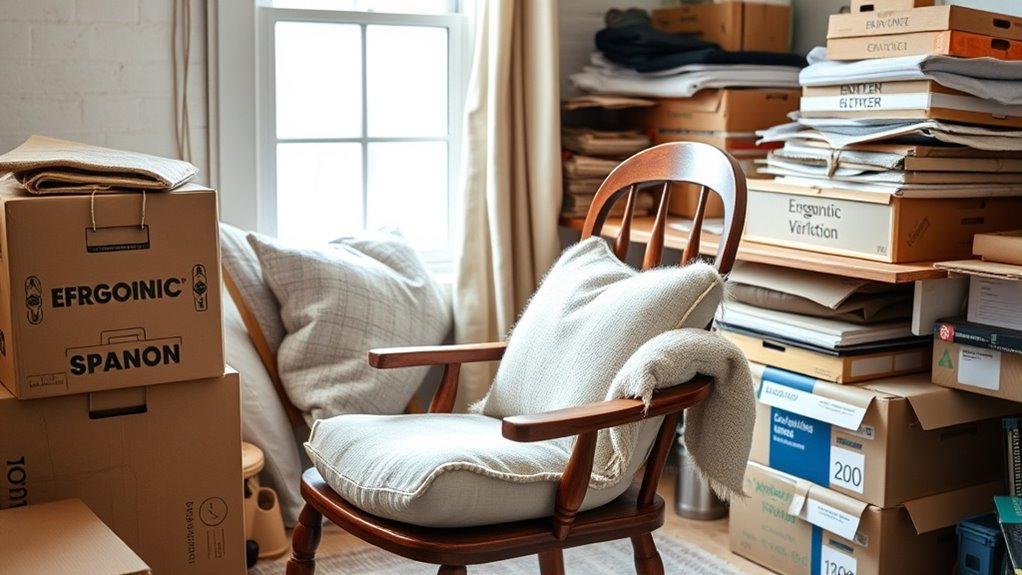
You can improve your seating comfort by using household items like cushions or rolled towels to add padding. Adjustable support can be created with items such as books or boxes placed behind your back or under your thighs. These simple solutions help customize your chair to better support your body without extra expenses. For added stability, consider using ergonomic principles to ensure your workspace promotes good posture and reduces strain. Incorporating supportive positioning techniques can further enhance comfort and prevent long-term discomfort during extended periods of sitting. Additionally, maintaining proper posture awareness can help sustain comfort and prevent musculoskeletal issues over time.
Cushioning With Household Items
If you’re looking to enhance your workspace comfort without spending much, using household items for cushioning is a practical solution. Cushioning alternatives and household padding options can make a big difference in comfort and support. You can repurpose everyday items to create supportive seating that reduces pressure points. For example, layering blankets or towels adds softness, while folded clothing can serve as makeshift lumbar support. Foam from old cushions or pillows can be reshaped to fit your chair. These household padding options are easy to customize and cost-effective. Incorporating ergonomic principles into your DIY padding setup can further improve comfort and reduce strain during long hours of work. Additionally, selecting materials with adequate support helps maintain proper posture and prevents discomfort over time.
Adjustable Support Solutions
Ever wonder how to create adjustable support using household items? You can easily enhance your workspace with simple ergonomic accessories that provide customizable comfort. For instance, stacking sturdy books or boxes behind your lower back offers adjustable support, helping reduce strain during long periods of sitting. You can also use rolled towels or clothing as lumbar cushions, which can be repositioned for personalized comfort. To improve seat height, place a firm pillow or foam pad underneath your chair’s seat, making it easier to align your hips and knees properly. These DIY solutions give you adjustable support without spending much. By incorporating household items into your setup, you create a more ergonomic workspace that adapts to your needs, helping you stay comfortable and focused all day.
Improving Posture With Do-It-Yourself Footrests and Supports

Improving your posture at work can be simple and affordable with do-it-yourself footrests and supports. These options help elevate your feet, reduce pressure on your lower back, and promote better posture correction. Instead of expensive footrest alternatives, you can repurpose household items to create effective supports. Proper foot positioning encourages comfort and reduces fatigue during long hours at your desk.
Consider these ideas:
- Stacked books or sturdy boxes
- Rolled-up towels or cushions
- An upside-down crate or small stool
- A DIY foam pad from craft stores
- Adjustable cardboard platforms
These solutions are customizable, easy to assemble, and budget-friendly, making it simple to enhance your ergonomic setup without extra costs.
Organizing Your Workspace for Efficiency and Comfort

Creating an organized workspace can considerably boost your efficiency and comfort throughout the workday. Start by designing a workspace layout that minimizes clutter and positions your essential tools within easy reach. Use inexpensive ergonomic accessories, like adjustable monitor stands or keyboard trays, to improve posture and reduce strain. Keep frequently used items nearby to avoid unnecessary reaching or twisting. Label storage containers and cables to maintain order, making it simple to find what you need quickly. Arrange your desk to promote good ergonomics, ensuring your monitor is at eye level and your chair supports your lower back. Regularly reassess your setup, making small adjustments to optimize both comfort and productivity. A tidy, well-planned workspace helps you focus and work more efficiently throughout the day.
Enhancing Lighting Without Breaking the Bank

Good lighting is essential for maintaining focus and reducing eye strain, but you don’t need to spend a fortune to achieve it. You can enhance your workspace by using affordable solutions like LED lighting, which is energy-efficient and long-lasting. Add task lamps to direct light exactly where you need it, minimizing shadows and glare. Consider repositioning your desk near a window for natural light, or using reflective surfaces to bounce light around the room. Easy DIY options include attaching inexpensive clip-on lights or repurposing old lamps with energy-efficient bulbs. These simple adjustments can substantially improve your workspace without breaking the bank.
- Use LED strip lights for customizable illumination
- Opt for affordable clip-on or desk lamps
- Place your desk near natural light sources
- Reflect light with white or metallic surfaces
- Install inexpensive, adjustable task lamps
Incorporating Plants and Natural Elements for Better Well-Being

Bringing plants and natural elements into your workspace can substantially boost your well-being and productivity. Indoor gardening is an affordable way to add greenery without cluttering your space. Choose easy-to-care-for plants like pothos, snake plants, or succulents that thrive indoors. These natural aesthetics create a calming environment, reduce stress, and improve air quality. Place plants near your desk or in areas with good natural light to maximize their benefits. Not only do they enhance the visual appeal, but they also foster a connection with nature, which can boost your mood and focus. Incorporating natural elements is a simple, cost-effective DIY solution to make your workspace more inviting, healthier, and conducive to productivity.
Maintaining Ergonomics With Regular DIY Adjustments

To guarantee your workspace remains ergonomically sound, it’s essential to perform regular DIY adjustments that address comfort and posture. Keep an eye on your keyboard ergonomics by adjusting its height and tilt to reduce strain. Make certain your wrist support is adequate; add a homemade cushion or foam to prevent wrist fatigue. Periodically check your chair height and back support to maintain proper spinal alignment. Use objects like books or blocks to fine-tune monitor height, reducing neck strain. Also, stretch your hands and wrists regularly to prevent stiffness. Small tweaks can make a big difference in long-term comfort and health. Consistent adjustments help you stay mindful of ergonomics, ensuring your workspace remains supportive and comfortable.
Frequently Asked Questions
How Can I Measure My Ergonomic Needs Accurately at Home?
To measure your ergonomic needs accurately at home, start with a simple ergonomic assessment. Use measurement tools like a tape measure or a ruler to check your desk height, monitor position, and chair comfort. Confirm your feet are flat on the ground, your knees are at a 90-degree angle, and your monitor is eye level. Regularly reassess your setup to make necessary adjustments, ensuring long-term comfort and health.
What Are the Safest Materials for DIY Ergonomic Tools?
Don’t cut corners when choosing materials for your DIY ergonomic tools—safety comes first. Opt for safe, non-toxic options like high-density foam, bamboo, or sturdy plastics, which are known for their durability and eco-friendliness. These materials are less likely to cause injuries or break down over time, ensuring your workspace stays safe and reliable. Remember, a chain is only as strong as its weakest link, so prioritize material safety and durability.
How Often Should I Adjust My DIY Ergonomic Setup?
You should adjust your DIY ergonomic setup whenever you notice discomfort or after about every 30 minutes of work. Regular ergonomic check-ins help identify if your chair, desk, or monitor position needs tweaking to prevent strain. Don’t wait until pain appears—make small adjustments often. This way, you guarantee your workspace stays comfortable and supportive, reducing the risk of long-term injury and improving your productivity throughout the day.
Can Household Items Fully Replace Professional Ergonomic Equipment?
Household items can help improve your workspace, but they can’t fully substitute professional ergonomic equipment. Think of office accessories like cushions or adjustable supports as visual aids—they offer temporary relief but lack the precision of ergonomic assessments. You need specialized tools for proper alignment and posture. While DIY solutions can be effective, investing in ergonomic gear ensures better long-term comfort and reduces injury risks.
What Signs Indicate My Workspace Needs Ergonomic Improvements?
You should consider ergonomic improvements if you notice persistent discomfort, frequent aches, or poor posture correction. Signs like strain in your neck, back, or wrists indicate your workspace might need adjustments. If you find yourself slouching or struggling to maintain a comfortable position, it’s time to optimize your setup. Making small changes can help prevent discomfort and promote better posture, ultimately supporting your long-term health and productivity.
Conclusion
Just as Da Vinci crafted masterpieces with humble tools, you can create an ergonomic workspace on a budget through thoughtful DIY solutions. By evaluating your needs, repurposing household items, and making small adjustments, you shape an environment that nurtures comfort and productivity. Remember, the key lies in mindful customization—transforming everyday elements into your personal ergonomic sanctuary, proving that even in simplicity, greatness and well-being can flourish.