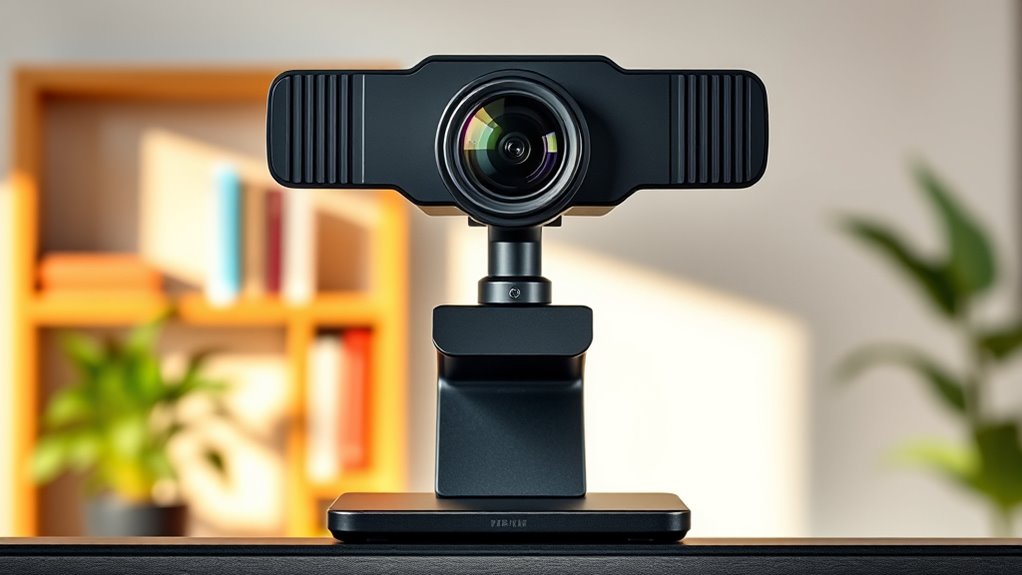

If you’re searching for a 4K webcam, you’re likely aiming for crisp, professional-quality video for streaming, meetings, or content creation. The market offers a wide range of models, from budget-friendly options to high-end devices with advanced features like AI tracking and HDR. The best overall pick balances excellent video quality with usability, but it may come at a premium. Standout options like the Insta360 Link 2 provide versatile features, while models like the EMEET S600 excel in streaming scenarios. Readers face tradeoffs between price, features, and ease of use—continue reading for a detailed breakdown to find the right fit.

Get comfort and recovery gear delivered free with Prime
- Fast, free delivery on millions of items
- Prime Video, Amazon Music and more included
- Member-only deals all year
Complete the kit


Key Takeaways
- The top webcams deliver true 4K resolution with good low-light performance and color accuracy.
- AI features like tracking and framing are increasingly common but often come with higher price tags.
- Built-in microphones vary widely; dual omnidirectional mics generally outperform single mics for clarity.
- Design and build quality impact durability and ease of setup, especially for portable or professional use.
- Price differences often reflect additional features like HDR, noise reduction, or integrated lighting.
| EMEET S600 4K Webcam for Streaming, Sony 1/2.55” Sensor, PDAF Autofocus |  | Best Overall for High-Quality Streaming and Content Creation | Sensor Type: CMOS | Maximum Resolution: 3840×2160 (4K) | Frame Rate: 60FPS at 1080P, 30FPS at 4K | VIEW ON AMAZON | See Our Full Breakdown |
| Insta360 Link 2C 4K Webcam for PC/Mac |  | Best for Versatile Creative Modes and Easy Auto Framing | Sensor: 1/2″ | Resolution: 4K | HDR: Yes | VIEW ON AMAZON | See Our Full Breakdown |
| Insta360 Link 2 – PTZ 4K Webcam for PC/Mac with AI Tracking, HDR, Noise-Canceling Mic, Gesture Control |  | Best for Dynamic Auto-Tracking and Professional Audio | Sensor Type: CMOS | Resolution: 4K | Field of View: Variable, PTZ | VIEW ON AMAZON | See Our Full Breakdown |
| EMEET C960 4K Webcam for PC with Auto Focus and Dual Microphones |  | Best for Easy, Ultra-Clear Video and Compatibility | Resolution: 4K (switchable to 1080P) | Field of View: 73° | Focus: Auto PDAF | VIEW ON AMAZON | See Our Full Breakdown |
| Logitech MX Brio Ultra HD 4K Webcam – Graphite |  | Best for Versatile Professional Use and Conference Calls | Resolution: 4K at 30fps, 1080p at 60fps | Sensor: Large pixel sensor | Microphones: Dual beamforming noise-reducing | VIEW ON AMAZON | See Our Full Breakdown |
| EMEET NOVA 4K Webcam for PC, Ultra HD, PDAF Autofocus, Dual Omnidirectional Mics |  | Best Overall 4K Webcam for Versatile Use | Sensor Type: CMOS | Resolution: 4K@30fps | Focus Type: PDAF Autofocus | VIEW ON AMAZON | See Our Full Breakdown |
| EMEET C950 4K Webcam for PC, PDAF Autofocus, USB Webcam with Microphone |  | Best for Professional Video Calls & Streaming | Resolution: 4K UHD (3840×2160) at 30FPS | Sensor: CMOS | Autofocus: PDAF | VIEW ON AMAZON | See Our Full Breakdown |
| Philips 4K Webcam for PC with Microphone, Computer Camera for Meetings |  | Best for Basic 4K Video Communications | Resolution: 4K Ultra HD | Microphone: Built-in | Privacy Shutter: Yes | VIEW ON AMAZON | See Our Full Breakdown |
| Acer 4K Webcam for PC/Mac with All-Metal Unibody, Sony 1/2″ Sensor, PDAF, Noise Reduction Mics, Privacy Cover |  | Best Premium Build & Low-Light Performance | Resolution: UHD 4K | Sensor: Sony 1/2″ CMOS | Autofocus: Phase Detection | VIEW ON AMAZON | See Our Full Breakdown |
| NexiGo N680E Pro 4K Webcam with Ring Light, Autofocus, 1080p 60FPS, Dual Mics, Privacy Shutter, USB Plug-and-Play |  | Best for Content Creators & Streamers with Lighting Needs | Sensor: Sony 1/2.5″ 4K sensor | Resolution: 1080p at 60FPS | Autofocus: PDAF | VIEW ON AMAZON | See Our Full Breakdown |
| AOC 4K Webcam for PC, Streaming Computer Camera with Noise-Canceling Mic |  | Best Value for Crystal-Clear 4K Video and Audio | Resolution: 4K Ultra HD | Features: Noise-Canceling Microphone | VIEW ON AMAZON | See Our Full Breakdown | |
| OBSBOT Meet 2 4K Webcam for PC with AI Framing and Autofocus |  | Best for Intelligent Framing and Compact Portability | Resolution: 4K UHD | Sensor: 1/2″ CMOS | Connectivity: USB-C | VIEW ON AMAZON | See Our Full Breakdown |
| Acer A640 4K Webcam with AI Noise Canceling Microphone for Streaming and Meetings |  | Best for Professional-Grade Video with Security Features | Resolution: 4K at 30fps, 2K/1080p at 60fps | Sensor: Sony 1/2.8-inch | Autofocus: Phase Detection | VIEW ON AMAZON | See Our Full Breakdown |
| Logitech Brio Ultra 4K HD Webcam for Streaming and Meetings |  | Best for Secure, Adjustable, and Versatile 4K Streaming | Resolution: 4K at 30 fps | Field of View: 65°, 78°, 90° | Zoom: 5x digital | VIEW ON AMAZON | See Our Full Breakdown |
| 4k webcam | Resolution | Microphones | Sensor |
|---|---|---|---|
| EMEET S600 4K Webcam for Strea | — | — | — |
| Insta360 Link 2C 4K Webcam for | 4K | — | 1/2" |
| Insta360 Link 2 | 4K | Noise-canceling | — |
| EMEET C960 4K Webcam for PC wi | 4K (switchable to 1080P) | Dual omnidirectional | — |
| Logitech MX Brio Ultra HD 4K W | 4K at 30fps, 1080p at 60fps | Dual beamforming noise-reducing | Large pixel sensor |
| EMEET NOVA 4K Webcam for PC | 4K@30fps | Dual Omnidirectional | — |
| EMEET C950 4K Webcam for PC | 4K UHD (3840×2160) at 30FPS | — | CMOS |
| Philips 4K Webcam for PC with | 4K Ultra HD | — | — |
| Acer 4K Webcam for PC/Mac with | UHD 4K | Dual noise reduction | Sony 1/2" CMOS |
| NexiGo N680E Pro 4K Webcam wit | 1080p at 60FPS | Dual noise-canceling | Sony 1/2.5" 4K sensor |
| AOC 4K Webcam for PC | 4K Ultra HD | — | — |
| OBSBOT Meet 2 4K Webcam for PC | 4K UHD | Dual omni-directional noise-canceling | 1/2" CMOS |
| Acer A640 4K Webcam with AI No | 4K at 30fps, 2K/1080p at 60fps | — | Sony 1/2.8-inch |
| Logitech Brio Ultra 4K HD Webc | 4K at 30 fps | Dual noise-canceling | — |
More Details on Our Top Picks
EMEET S600 4K Webcam for Streaming, Sony 1/2.55” Sensor, PDAF Autofocus
The EMEET S600 stands out for its exceptional image quality thanks to a Sony 1/2.55” sensor, making it ideal for streamers and content creators who prioritize sharp visuals. Compared with the Logitech MX Brio, it offers comparable 4K resolution but with a more compact design and a built-in privacy cover for added security. Its advanced PDAF autofocus ensures consistently sharp images, even with movement, but it requires software for full customization and isn’t water-resistant, limiting outdoor or rugged use. The auto light adjustment feature helps maintain clear visuals across different lighting conditions, making it versatile for indoor environments. However, its incompatibility with Chrome OS and lack of water resistance are notable tradeoffs for users outside Windows or macOS ecosystems.
Pros:- Exceptional 4K image quality with Sony sensor
- Fast PDAF autofocus for sharp images
- Auto light adjustment for various lighting conditions
- Built-in privacy cover for security
Cons:- Incompatible with Chrome OS
- No water resistance, limiting outdoor use
- Requires software for advanced settings
Best for: Professional streamers and content creators needing high-quality, reliable 4K video with secure, plug-and-play setup.
Not ideal for: Users seeking outdoor or rugged use, or those on Chrome OS, as the webcam isn’t water-resistant or compatible with Chrome OS systems.
- Sensor Type:CMOS
- Maximum Resolution:3840×2160 (4K)
- Frame Rate:60FPS at 1080P, 30FPS at 4K
- Autofocus:Yes, PDAF
- Built-in Microphones:Dual noise-canceling
- Viewing Angle:73 degrees
Our verdict“This webcam is perfect for serious streamers and creators who demand high-quality visuals and security features in an indoor setting.”
Insta360 Link 2C 4K Webcam for PC/Mac
The Insta360 Link 2C excels in adaptive auto framing, making it ideal for remote work and creative presentations. Its 4K HDR video and low-light performance surpass many competitors like the EMEET C960, especially in challenging lighting. The AI noise-canceling mic ensures professional sound quality, while gesture control and modes like DeskView add creative flexibility. However, its incompatibility with ARM-based Windows systems and lack of integration with Windows Hello limit its usefulness for some users. The automatic framing and gesture features make it particularly suited for individuals who value ease of operation and versatile modes for diverse content creation. Still, tech-savvy users seeking broad OS compatibility may find it restrictive.
Pros:- Excellent 4K HDR video quality
- AI auto framing and gesture control
- Low-light performance for varied environments
- Versatile modes like DeskView and Whiteboard
Cons:- Incompatibility with ARM Windows systems
- No Windows Hello Face Recognition support
Best for: Content creators and professionals who need flexible modes, AI tracking, and superior low-light video in a versatile package.
Not ideal for: Users on ARM-based Windows devices or those needing Windows Hello Face Recognition support.
- Sensor:1/2″
- Resolution:4K
- HDR:Yes
- Auto Framing:Yes
- Microphone:AI noise-canceling
- Special Modes:DeskView, Whiteboard
Our verdict“This webcam is ideal for creators who prioritize auto framing, AI modes, and flexible video options on standard PC and Mac setups.”
Insta360 Link 2 – PTZ 4K Webcam for PC/Mac with AI Tracking, HDR, Noise-Canceling Mic, Gesture Control
The Insta360 Link 2 with PTZ capabilities offers exceptional flexibility for streaming, gaming, or professional meetings, thanks to AI tracking and gesture controls. Its 4K HDR output ensures vivid visuals, and the noise-canceling mic provides clear audio, making it a step above basic webcams like the EMEET S600. The AI tracking keeps subjects centered without manual adjustments, which is ideal for presenters or gamers. Still, its incompatibility with ARM Windows systems and reliance on specific software for full features could limit usability. The PTZ and AI tracking make it especially suited for dynamic environments where movement is frequent, but casual users seeking simple plug-and-play might find it overly complex.
Pros:- PTZ with AI tracking for active movement
- Vivid 4K HDR video
- Professional noise-canceling audio
- Gesture controls for seamless operation
Cons:- Incompatibility with ARM Windows systems
- Requires specific software for full feature access
Best for: Streamers, educators, and professionals needing dynamic movement tracking and high-quality audio in a 4K setup.
Not ideal for: Casual users or those on ARM-based Windows systems seeking straightforward, plug-and-play webcams.
- Sensor Type:CMOS
- Resolution:4K
- Field of View:Variable, PTZ
- AI Tracking:Yes
- Microphones:Noise-canceling
- Special Features:Gesture control, HDR
Our verdict“This webcam is best suited for active presenters and streamers who need intelligent tracking and professional audio in a 4K format.”
EMEET C960 4K Webcam for PC with Auto Focus and Dual Microphones
The EMEET C960 offers straightforward 4K video quality with auto focus and auto light correction, making it a practical choice for remote meetings. Its dual omnidirectional microphones provide clear audio, and the plug-and-play USB-A connection ensures quick setup across Windows, macOS, and Linux. Compared to the Logitech MX Brio, it might lack some AI-enhanced features but provides solid 4K performance at a more accessible price. The software for full 4K functionality can be an extra step, and the default resolution is 1080P, which may be limiting for some. It’s well-suited for users who want reliable, high-quality video without complex settings but may not be ideal for those seeking advanced customization or outdoor use.
Pros:- Ultra-clear 4K video with auto focus
- Auto light correction for varied environments
- Dual omnidirectional microphones for clear audio
- Easy plug-and-play setup
Cons:- Default video is 1080P unless switched via software
- No built-in Wi-Fi or Bluetooth
- Requires software for full 4K use
Best for: Remote workers and educators needing reliable 4K video with simple setup and broad OS compatibility.
Not ideal for: Power users requiring advanced controls or those needing built-in Wi-Fi or Bluetooth.
- Resolution:4K (switchable to 1080P)
- Field of View:73°
- Focus:Auto PDAF
- Microphones:Dual omnidirectional
- Compatibility:Windows, macOS, Linux
- Mounting:Tripod thread, versatile
Our verdict“This webcam suits users who prioritize easy, high-quality video and broad compatibility for everyday remote work or teaching.”
Logitech MX Brio Ultra HD 4K Webcam – Graphite
The Logitech MX Brio delivers sophisticated 4K resolution with AI-based enhancements, making it a versatile choice for professional environments. Its large pixel sensor ensures sharp images, while noise-reducing microphones support clear communication. Features like auto white balance, auto-exposure, and adjustable lighting controls give users fine-tuned image quality, comparable to the EMEET S600. However, its premium price can be a barrier, and it relies on USB-C, which may not be available on all devices. The complex settings, while powerful, could overwhelm casual users who prefer simple plug-and-play solutions. It’s designed for users who need detailed image adjustments and seamless integration with conferencing platforms.
Pros:- High-quality 4K resolution
- AI-enhanced image and noise reduction
- Adjustable lighting controls and privacy shutter
- Excellent compatibility with conferencing tools
Cons:- Premium price point
- Requires USB-C port
- Complex settings may be overwhelming for casual users
Best for: Business professionals and serious streamers requiring high-quality, customizable visuals and audio in a secure, multi-platform setup.
Not ideal for: Casual users or those with older devices lacking USB-C ports who seek straightforward, budget-friendly webcams.
- Resolution:4K at 30fps, 1080p at 60fps
- Sensor:Large pixel sensor
- Microphones:Dual beamforming noise-reducing
- Features:Auto white balance, auto-exposure
- Compatibility:Windows, macOS, Chrome OS, Linux
- Privacy:Shutter
Our verdict“This webcam is best suited for professionals who want detailed control and top-tier image quality, despite its higher cost and complexity.”
EMEET NOVA 4K Webcam for PC, Ultra HD, PDAF Autofocus, Dual Omnidirectional Mics
The EMEET NOVA 4K webcam stands out for delivering crisp 4K video at 30FPS, with precise PDAF autofocus that keeps images sharp even when in motion—something the Philips 4K Webcam struggles with due to its simpler autofocus system. Its dual omnidirectional microphones provide clear audio, making it ideal for both professional meetings and streaming. However, its resolution defaults to 1080P unless adjusted via software, which can be frustrating for users expecting native 4K at all times. Unlike the Acer 4K Webcam, it lacks image stabilization and is incompatible with ChromeOS, limiting its flexibility. Overall, this model suits those who want high-quality visuals and audio but are okay with some software tweaks for the best resolution.
Pros:- High-quality 4K video at 30FPS for detailed visuals
- Precise PDAF autofocus ensures sharp images during motion
- Dual omnidirectional mics provide clear, distant audio
- Flexible mounting options and privacy cover
Cons:- Video defaults to 1080P unless manually switched in software
- No facial tracking or adjustable FOV features
- Incompatibility with Chrome OS and Windows Hello
Best for: Content creators and professionals needing sharp video & clear audio in versatile environments
Not ideal for: ChromeOS users or those seeking out-of-the-box 4K resolution without software adjustments
- Sensor Type:CMOS
- Resolution:4K@30fps
- Focus Type:PDAF Autofocus
- Microphones:Dual Omnidirectional
- Viewing Angle:73 degrees
- Display Screen Size:3.8 inches
- Connectivity Technology:USB
- Weight:4.64 ounces
Our verdict“This webcam is ideal for users who prioritize crisp visuals and reliable audio but are comfortable with software adjustments for resolution.”
EMEET C950 4K Webcam for PC, PDAF Autofocus, USB Webcam with Microphone
The EMEET C950 offers sharp 4K resolution with fast PDAF autofocus and a 70° field of view, making it suitable for conference calls, webinars, and streaming. Its plug-and-play USB 2.0 connection simplifies setup, and the omnidirectional microphone ensures clear communication. Compared to the Philips 4K Webcam, the C950 provides a wider FOV, which is better for group calls, but it lacks a physical privacy shutter, which could be a concern for security. Unlike the NexiGo N680E Pro, it doesn’t support adjustable lighting or built-in ring lights, limiting its versatility in dim environments. This camera makes the most sense for professionals who need reliable 4K quality without extra features that might complicate use.
Pros:- High-resolution 4K video with sharp detail
- Fast, accurate PDAF autofocus
- Clear omnidirectional microphone for communication
- Plug-and-play USB 2.0 connection
Cons:- No tripod mount support
- Lacks built-in lighting or adjustable focus features
- No physical privacy shutter
Best for: Remote workers and educators seeking dependable 4K clarity and straightforward setup
Not ideal for: Streamers or creators requiring adjustable lighting or wider angles for dynamic content
- Resolution:4K UHD (3840×2160) at 30FPS
- Sensor:CMOS
- Autofocus:PDAF
- Field of View:70°
- Microphone:Omnidirectional
- Compatibility:Windows, macOS, Android TV
Our verdict“This webcam suits professionals who prioritize crisp 4K video and simple operation over advanced lighting or wide-angle features.”
Philips 4K Webcam for PC with Microphone, Computer Camera for Meetings
The Philips 4K Webcam offers ultra HD resolution with a built-in microphone, making it a straightforward choice for clear video calls and virtual classes. Its physical privacy shutter adds a security layer, and setup is entirely plug-and-play, suitable for users who want minimal fuss. Compared to the Acer 4K Webcam, it’s less focused on durability and low-light performance, but it excels in simplicity and immediate usability. Without adjustable mounting options or advanced features like autofocus, it’s best for users who primarily need reliable HD video without bells and whistles. This makes it a good fit for casual professionals and students who value ease of use over extensive customization.
Pros:- High-quality 4K video for professional calls
- Built-in microphone for clear audio
- Physical privacy shutter for security
- Easy plug-and-play setup
Cons:- May need high-speed USB port for optimal performance
- Limited details on low-light capabilities
- No adjustable mounting or focus features
Best for: Students and casual remote workers needing reliable 4K video with minimal setup
Not ideal for: Content creators or professionals requiring adjustable mounts or enhanced low-light performance
- Resolution:4K Ultra HD
- Microphone:Built-in
- Privacy Shutter:Yes
- Compatibility:Windows, macOS
- Setup:Plug and Play
Our verdict“This webcam is perfect for casual users who want straightforward 4K video quality without extra setup or features.”
Acer 4K Webcam for PC/Mac with All-Metal Unibody, Sony 1/2″ Sensor, PDAF, Noise Reduction Mics, Privacy Cover
The Acer 4K Webcam combines a Sony 1/2″ CMOS sensor with a sleek all-metal unibody, delivering superior low-light clarity and durability. Its responsive PDAF autofocus and noise-reducing dual microphones elevate both image and sound quality, making it an excellent choice for professional streaming or high-stakes conference calls. Its premium design and magnetic privacy cover add to its appeal, but it’s primarily a USB-C device, which may require adapters for some setups—less convenient than USB-A options like the NexiGo N680E Pro. The lack of detailed mounting options could be a drawback for users needing flexible positioning. This model suits those who want a durable, high-quality webcam with excellent low-light performance and a premium aesthetic.
Pros:- Excellent low-light performance with Sony sensor
- Premium all-metal, durable construction
- Responsive PDAF autofocus for crisp focus
- Dual noise-canceling microphones
Cons:- Requires USB-C connection, may need adapters
- Limited mounting flexibility
- Price not specified, potentially high for some budgets
Best for: High-end streamers and professionals demanding top-tier low-light and build quality
Not ideal for: Average users or those on a tight budget who don’t need premium materials or low-light advantages
- Resolution:UHD 4K
- Sensor:Sony 1/2″ CMOS
- Autofocus:Phase Detection
- Microphones:Dual noise reduction
- Material:All-metal unibody
- Connectivity:USB-C to USB-A (adapter included)
Our verdict“This webcam is ideal for users seeking a durable, high-performance device with exceptional low-light clarity and premium build quality.”
NexiGo N680E Pro 4K Webcam with Ring Light, Autofocus, 1080p 60FPS, Dual Mics, Privacy Shutter, USB Plug-and-Play
The NexiGo N680E Pro offers a compelling mix of 4K streaming quality and a built-in tri-tone ring light, making it a favorite for streamers and content creators. Its 1080p 60FPS output ensures smooth, high-quality live streams, while PDAF autofocus keeps images sharp. The adjustable ring light is a major advantage over other webcams like the EMEET NOVA, which lacks integrated lighting. Its privacy shutter enhances security, but the output resolution may depend heavily on software, and it needs a USB-A port, which might require adapters for newer devices. This model suits creators who want flexibility in lighting and smooth video for live audiences.
Pros:- High-quality 4K video with 1080p at 60FPS for smooth streaming
- Built-in tri-tone ring light with stepless brightness
- PDAF autofocus for sharp images
- Privacy shutter enhances security
Cons:- Output resolution may depend on camera software
- Requires USB-A port, may need adapters
- Limited details on mounting flexibility
Best for: Streamers and content creators prioritizing lighting control and high-quality smooth video
Not ideal for: Users seeking native 4K streaming or advanced low-light performance without built-in lighting
- Sensor:Sony 1/2.5″ 4K sensor
- Resolution:1080p at 60FPS
- Autofocus:PDAF
- Ring Light:Tri-tone adjustable
- Microphones:Dual noise-canceling
- Compatibility:Windows 7–11, Mac OS 10.6+
Our verdict“This webcam is best for streamers who want integrated lighting and smooth live video, even if native 4K is not always guaranteed.”
AOC 4K Webcam for PC, Streaming Computer Camera with Noise-Canceling Mic
This AOC webcam stands out for delivering 4K Ultra HD resolution combined with a noise-canceling microphone, making it perfect for professional video calls and streaming on a budget. Unlike the Logitech Brio, it offers similar resolution at a potentially lower price point, but it lacks detailed features like adjustable FOV or advanced privacy controls. Its simplicity favors users who prioritize straightforward high-quality video and audio without extra frills. The main tradeoff is the absence of customizable settings and limited information on additional specs, which could matter for more demanding setups.
Pros:- High-resolution 4K video quality for sharp images
- Clear audio with noise-canceling microphone
- Ideal for professional streaming and video calls
Cons:- Lacks advanced features like adjustable FOV or software controls
- No detailed specifications or user reviews available
Best for: Small business professionals and content creators seeking reliable 4K quality without complexity
Not ideal for: Power users needing extensive customization or advanced camera controls, as it offers limited feature set
- Resolution:4K Ultra HD
- Features:Noise-Canceling Microphone
Our verdict“This webcam suits budget-conscious users who want crisp 4K video and clean audio for professional calls.”
OBSBOT Meet 2 4K Webcam for PC with AI Framing and Autofocus
The OBSBOT Meet 2 excels with its AI-powered framing, autofocus, and gesture control, making it an excellent choice for content creators and streamers who want a camera that adjusts dynamically. Compared to the Logitech Brio, it offers more sophisticated AI features that automatically keep you centered and in focus, though it can get warm during extended use, which may affect performance. Its lightweight design simplifies portability, but its limited software customization and reliance on software for full features mean it’s less suited for users who want deep control over settings. Overall, it’s a smart pick for on-the-go creators who value automation.
Pros:- Bright, clear 4K resolution for professional image quality
- AI framing and autofocus for hands-free professional-looking videos
- Lightweight, portable design with USB-C connectivity
Cons:- Can overheat during long sessions
- Limited software customization options
Best for: Streamers and content creators needing automatic framing and portability
Not ideal for: Power users requiring advanced manual controls or long-duration filming without overheating concerns
- Resolution:4K UHD
- Sensor:1/2″ CMOS
- Connectivity:USB-C
- Microphones:Dual omni-directional noise-canceling
- Features:AI framing, autofocus, gesture control
Our verdict“Ideal for mobile creators who want intelligent framing and high-quality 4K visuals with minimal setup.”
Acer A640 4K Webcam with AI Noise Canceling Microphone for Streaming and Meetings
Compared to the Logitech Brio, the Acer A640 emphasizes a sleek Sony sensor and AI noise cancellation, providing sharp 4K video at 30fps and clear audio for serious work environments. Its privacy shutter and automatic low-light correction add security and usability, but it doesn’t include built-in speakers and requires users to manually select it as the default microphone, introducing minor setup hurdles. While it offers excellent image quality and versatile platform support, its maximum resolution at 4K is limited to 30fps, which might not satisfy those seeking higher frame rates for fast-paced content or gaming.
Pros:- Sharp 4K video with Sony sensor technology
- AI noise cancellation for clear audio
- Privacy shutter for added security
Cons:- No built-in speakers
- Requires manual setting as default microphone
- Limited to 4K at 30fps
Best for: Remote professionals and streamers who prioritize security, image quality, and easy setup
Not ideal for: Gamers or high-frame-rate video producers seeking 60fps or higher for fast motion
- Resolution:4K at 30fps, 2K/1080p at 60fps
- Sensor:Sony 1/2.8-inch
- Autofocus:Phase Detection
- Microphone:AI Noise Cancelling
- Features:Privacy shutter, low-light correction
- Connectivity:USB-A to C adapter
Our verdict“Best suited for security-conscious professionals who need high-quality 4K video with reliable audio in a plug-and-play package.”
Logitech Brio Ultra 4K HD Webcam for Streaming and Meetings
The Logitech Brio remains a favorite for users needing customizable field of view, digital zoom, and Windows Hello compatibility. Its 4K resolution at 30fps paired with noise-canceling dual microphones makes it versatile for professional streaming and secure login. Compared with the Acer A640, it offers more control over framing and zoom, but it requires more setup and may have a higher price, which could be a barrier for budget-conscious buyers. Its attachable privacy shutter adds a layer of security, although the setup process might be a bit more involved for less tech-savvy users. This pick makes the most sense for those who want flexibility and high-quality video in a trusted brand.
Pros:- Excellent 4K video with adjustable FOV
- Supports Windows Hello for secure login
- Attachable privacy shutter for peace of mind
Cons:- Requires additional setup, especially for zoom and FOV adjustments
- Price not specified in the description
Best for: Professionals and streamers wanting customizable framing and security features
Not ideal for: Casual users or those seeking a simple plug-and-play solution without extensive setup
- Resolution:4K at 30 fps
- Field of View:65°, 78°, 90°
- Zoom:5x digital
- Microphones:Dual noise-canceling
- Compatibility:Windows, Mac, ChromeOS
- Privacy Shutter:Yes
Our verdict“Best for users who need high flexibility, security, and superior image quality in a 4K webcam.”

How We Picked
To determine the best 4K webcams, I evaluated each model based on video quality, ease of setup, build quality, and feature set. Performance considerations such as low-light handling, autofocus, and color accuracy were prioritized, along with usability factors like interface and mounting options. Value was assessed by comparing features to price, ensuring that each option offers a meaningful upgrade over lower-resolution alternatives. Devices with advanced AI functions, like auto-framing and gesture control, were given extra weight for versatility. The ranking aims to highlight options that meet diverse needs—from casual streamers to professional broadcasters—while maintaining a fair balance of features and costs.
| 4k webcam | Microphones |
|---|---|
| EMEET S600 4K Webcam for Strea | — |
| Insta360 Link 2C 4K Webcam for | — |
| Insta360 Link 2 | Noise-canceling |
| EMEET C960 4K Webcam for PC wi | Dual omnidirectional |
| Logitech MX Brio Ultra HD 4K W | Dual beamforming noise-reducing |
| EMEET NOVA 4K Webcam for PC | Dual Omnidirectional |
| EMEET C950 4K Webcam for PC | — |
| Philips 4K Webcam for PC with | — |
| Acer 4K Webcam for PC/Mac with | Dual noise reduction |
| NexiGo N680E Pro 4K Webcam wit | Dual noise-canceling |
| AOC 4K Webcam for PC | — |
| OBSBOT Meet 2 4K Webcam for PC | Dual omni-directional noise-canceling |
| Acer A640 4K Webcam with AI No | — |
| Logitech Brio Ultra 4K HD Webc | Dual noise-canceling |
Factors to Consider When Choosing 4k Webcam
Choosing the right 4K webcam involves more than just resolution. It’s important to consider factors that impact your video quality, usability, and long-term value. Features like autofocus, low-light performance, and microphone quality can significantly influence your experience. Understanding your primary use—whether streaming, professional meetings, or content creation—helps narrow down the best options. This guide explores key factors to keep in mind so you can select a webcam that aligns with your needs and budget.
Video Quality and Sensor Performance
While 4K resolution is a baseline, the sensor quality and image processing algorithms determine how sharp and vibrant your video appears. Look for webcams with large sensors and good low-light capabilities, especially if you plan to record in dim environments. Some models feature Sony sensors or similar high-quality components that deliver better color fidelity and detail. Beware of lower-cost options that claim 4K but struggle with noise or poor color accuracy in real-world conditions.
Autofocus and Framing Features
Autofocus is essential for maintaining sharpness during movement or changing angles. Many high-end webcams now include AI-driven auto-framing or tracking, which can be a game-changer for dynamic setups or multi-person use. However, these features often come with higher prices and can sometimes introduce lag or inaccuracies. Consider whether you need AI features or if simple autofocus suffices for your use case.
Microphone Quality and Audio Features
Good audio quality is just as important as video. Most webcams include built-in microphones, but their performance varies. Dual omnidirectional mics generally provide clearer sound and better noise cancellation, which is essential for professional meetings or streaming. Some models include noise reduction or echo cancellation, which can make a noticeable difference in noisy environments. Don’t overlook microphone quality if audio clarity is a priority for your setup.
Build Quality and Design
Durability and ease of use often hinge on build quality. Metal unibody designs and versatile mounting options help ensure your webcam stays secure and easy to position. Compact models are ideal for portable setups or small desks, but may sacrifice some features or stability. Consider your environment and whether your webcam will be static or moved frequently, then choose accordingly.
Price and Value
Higher prices often reflect additional features like HDR, AI tracking, or premium sensors. Evaluate whether these extras genuinely add value for your needs or if a simpler, less expensive model will suffice. Remember that investing in a webcam with better low-light performance and audio quality can pay off in professional settings. Conversely, budget options can deliver surprisingly good results if your use is casual or infrequent.
Frequently Asked Questions
Is 4K webcam necessary for professional meetings?
While a 4K webcam can deliver sharper images, most professional video conferencing platforms compress video, reducing the visible benefit of 4K resolution. If your environment has good lighting and your internet bandwidth is solid, a 4K webcam can future-proof your setup and provide better cropping options. However, for most standard meetings, a high-quality 1080p webcam often suffices, especially if it offers excellent autofocus and audio. Consider your specific needs and whether the extra resolution aligns with your workflow.
Do I need AI tracking features in my webcam?
AI tracking and auto-framing are useful if you move around a lot or want a more dynamic presentation style. These features help keep you centered without manual adjustments, which is especially convenient for content creators or presenters. However, they add cost and sometimes introduce lag or inaccuracies. If your setup is static and you prefer a straightforward camera, a model without AI tracking may save you money while still providing excellent video quality.
How important is microphone quality in a 4K webcam?
Audio quality can significantly impact your overall presentation, especially during meetings or live streams. Many webcams include microphones that are adequate for casual use, but for professional environments, dual omnidirectional mics with noise cancellation are preferable. Superior microphone quality ensures your voice comes through clearly, reducing misunderstandings and the need for external audio equipment. If sound quality is a priority, consider models with dedicated or advanced microphones.
Should I prioritize build quality or features?
Both matter, but your choice depends on your use case. A sturdy, well-built webcam with versatile mounting options offers durability and flexibility, especially in professional or portable setups. Features like HDR, AI tracking, or ring lights enhance functionality but may not be necessary for all users. Balance your needs by considering whether you need a rugged device for frequent movement or a feature-rich model for specific tasks. Sometimes, investing in build quality ensures your webcam lasts longer and performs reliably over time.
Is it worth paying extra for HDR and low-light performance?
HDR and low-light capabilities can dramatically improve image quality in challenging lighting conditions, making your video clearer and more vibrant. If you often stream or attend meetings in environments with variable lighting, these features are worth considering. They help your face look natural and reduce grain or noise. However, for well-lit rooms or casual use, simpler webcams may suffice, and the additional cost might not justify the gains. Evaluate your typical setup before investing in these advanced features.
Conclusion
For casual users or those new to high-quality video, models like the EMEET C960 or NexiGo N680E Pro offer solid 4K performance at accessible prices. Professionals seeking the best overall quality should consider the Logitech MX Brio or Logitech Brio Ultra, which combine excellent video and audio features. Content creators or those with more demanding setups might lean toward the Insta360 Link 2 or OBSBOT Meet 2 for AI tracking and advanced capabilities. Budget-conscious buyers should focus on models with good autofocus and microphone quality, while premium users will appreciate features like HDR, AI framing, and premium sensors. The right choice hinges on your specific needs, environment, and budget.
Veterans Day Picks

Shark Matrix Plus 2-in-1 Robot Vacuum and Mop with 60-Day Self-Emptying Base
As an affiliate, we earn on qualifying purchases.