Using a webcam cover is a simple but effective way to protect your privacy from unauthorized spying. It physically blocks the camera, so malware or hackers can’t see through it. Beyond this, regularly updating your device’s security settings, only granting camera access to trusted apps, and being cautious online further tighten your safety. Staying vigilant about potential risks and implementing multiple layers of protection can keep you secure—if you keep exploring, you’ll find even more useful tips.
Key Takeaways
- Webcam covers physically block unauthorized access and malware from spying through your camera.
- Regularly updating security software and disabling webcams when unused reduce vulnerability risks.
- Grant camera access only to trusted apps and revoke permissions from suspicious programs.
- Be vigilant for unusual camera activity or blinking lights indicating potential hacking attempts.
- Combining physical covers with software updates and safe browsing practices provides comprehensive privacy protection.

Have you ever considered how vulnerable your webcam might be to hackers? Many people overlook the risks associated with their camera privacy, assuming that as long as it’s built into their device, it’s secure. But hackers are always finding new ways to access webcams without your knowledge, turning what should be a simple convenience into a serious privacy threat. That’s why taking proactive steps for hacking prevention is essential. Using a physical cover for your webcam is one of the easiest, most effective methods to protect yourself. When you cover your camera, you eliminate the possibility of someone spying on you through software or malware. It’s a simple step that provides immediate peace of mind. Even if a hacker manages to infiltrate your device, they won’t be able to see through a covered lens, safeguarding your privacy.
Beyond using a cover, you should also pay attention to your device’s security settings. Regularly updating your operating system and software patches closes vulnerabilities hackers might exploit. Many cybercriminals take advantage of outdated software to gain access to cameras, so staying current is a crucial part of hacking prevention. Additionally, consider disabling your webcam when it’s not in use. Some devices allow you to turn off the camera in device settings or BIOS, which adds an extra layer of security. This way, even if malware attempts to activate your camera remotely, there’s no hardware to turn on. Combining these practices with a physical cover creates an all-encompassing approach to camera privacy.
Another important aspect is understanding the net worth of individuals involved in technology and media, as it can influence security measures and privacy awareness—knowing that public figures and professionals prioritize digital safety can motivate users to adopt better practices.
You also need to be cautious about the applications you grant access to your camera. Only allow trusted apps to use it and revoke permissions for anything suspicious or unnecessary. Keep an eye out for unusual activity, like your camera light turning on unexpectedly, which could indicate unauthorized access. Installing reputable security software can help detect and block hacking attempts before they reach your camera. Remember, cybercriminals often use phishing emails or malicious links to gain entry into your system. Practicing safe browsing habits and avoiding suspicious downloads can considerably reduce your risk.

Lumbar Support Pillow for Office Chair, Office Home Essentials,Gifts for Mom,Dad, Back Support Pillow for Car, Chair Cushions,Back Pain Relief Improve Posture,Mesh Cover Double Adjustable Straps
- Extended Adjustable Straps: Fits more chairs securely
- Ergonomic Back Support: Relieves back pain and tightness
- Supports Proper Posture: Maintains natural spine curve
As an affiliate, we earn on qualifying purchases.
Frequently Asked Questions
Can a Hacked Webcam Still Be Accessed Remotely Without a Cover?
Yes, a hacked webcam can still be accessed remotely without a cover if vulnerabilities exist. Hackers exploit remote access vulnerabilities through malware or weak security settings, making your device susceptible. To prevent this, you should use hacking prevention techniques like updating software, enabling firewalls, and strong passwords. Covering your webcam adds an extra layer of security by physically blocking unauthorized access, especially if remote access vulnerabilities are present.
What Are the Signs My Webcam Has Been Compromised?
You might notice signs of unauthorized access if your webcam suddenly activates on its own or shows suspicious activity. Keep an eye out for unusual blinking lights or software updates you didn’t initiate. Strange noises or unexpected system slowdowns can also hint at compromise. Trust your instincts—if something feels off, it’s wise to investigate further, update your security software, and consider covering your webcam to prevent any further privacy breaches.
Are Built-In Webcam Covers Effective Against All Hacking Attempts?
Built-in webcam covers are effective for hardware protection against accidental or unauthorized access, but they don’t prevent all hacking attempts. Skilled hackers can exploit software vulnerabilities or malware to activate your webcam remotely. To stay safe, use a cover along with regular software updates, strong passwords, and security software. Combining hardware protection with software defense offers the best protection against hacking attempts.
How Often Should I Update My Webcam Security Settings?
You should update your webcam security settings regularly, ideally every few months. Keep your software updated to patch vulnerabilities and improve security. Also, practice good password management by changing passwords periodically and using strong, unique ones for your accounts. This proactive approach helps protect your privacy from hacking attempts. Regular updates and vigilant password management create a stronger defense against potential threats to your webcam security.
Is It Safe to Disable My Webcam Completely When Not in Use?
Disabling your webcam when not in use is a smart move to address privacy concerns and minimize hardware vulnerabilities. It’s like locking a door to keep intruders out — simple and effective. While it’s safe to turn it off, make sure you disable it properly through your device settings or physically disconnect it. This extra step gives you peace of mind, knowing your camera isn’t vulnerable to unauthorized access.

Samsonite Lumbar Support Pillow for Office Chair, Lower Back Support for Car, Back Pillow Desk Chair Cushion with Memory Foam, Improved Posture Backrest
- Contouring Memory Foam: Supports spine and maintains posture
- Adjustable Secure Fit: Fits office chairs and car seats
- Ventilated Mesh Cover: Enhances airflow and cooling
As an affiliate, we earn on qualifying purchases.
Conclusion
Remember, your webcam is like a window to your world—it can let in light or unwanted shadows. Covering it is your shield against lurking eyes, turning a passive security measure into an active defense. Think of it as locking your digital door; it keeps intruders out and your privacy intact. Stay vigilant, stay protected, and don’t let unseen threats cast a shadow over your peace of mind. Your privacy is the treasure—guard it fiercely.
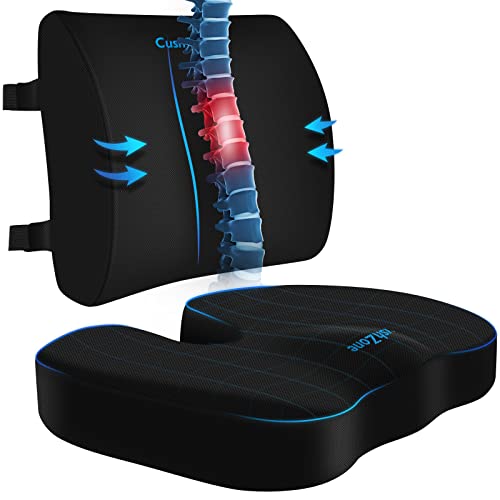
CushZone Seat Cushion and Lumbar Support Pillow for Office Chair, Black
- Ergonomic Dimensions for Comfort: Fits most chairs and users
- High-Quality Materials: Durable fabric with zippers
- Non-Slip Bottom: Ensures stability during use
As an affiliate, we earn on qualifying purchases.

LOXP Laptop Stand for Desk, Aluminum Laptop Riser Holder with Wrist Support
- Ergonomic Height and Wrist Support: Raises laptop to 2.6 inches for better posture
- Enhanced Ventilation and Heat Dissipation: Open frame design with high airflow and aluminum alloy
- Non-slip and Stable Design: Rubber pads prevent slipping and protect surfaces
As an affiliate, we earn on qualifying purchases.