The best Logitech computer accessories depend on whether you need a more capable mouse, a matched keyboard-and-mouse set, or a setup tailored to comfort and creative work. My best overall pick is the MX Master 4, whose ergonomic design and haptic feedback give it the strongest feature set for demanding everyday use. The MX Keys S Combo stands out as a ready-made premium desk setup, while the M196 is a simpler compact choice for basic wireless use. The main tradeoff is between advanced controls and comfort on one side, and simplicity, portability, or wired reliability on the other. Read on for the full comparison and advice on choosing the right fit.

Get comfort and recovery gear delivered free with Prime
- Fast, free delivery on millions of items
- Prime Video, Amazon Music and more included
- Member-only deals all year
Complete the kit


Key Takeaways
The MX Master 4 ranks first for buyers who want an advanced everyday mouse; the MX Master 3S is the more straightforward alternative without the newer model’s haptic feedback.
The MX Keys S Combo is the clearest all-in-one desk upgrade, while the MK120, MK270, and MK235 focus on basic keyboard-and-mouse coverage rather than premium controls.
Ergonomics means different things across the lineup: the MX Vertical changes hand position, the ERGO M575S moves cursor control to a stationary trackball, and the MX Master models keep a familiar mouse shape.
Wireless simplicity comes with different compromises: the M196 is compact and ambidextrous, the M185 is a basic wireless mouse, and the M720 adds multi-device flexibility for people switching between computers.
The MX Creative Console and G840 XL serve specialist needs rather than general desk upgrades: the console adds customizable controls for creative workflows, while the large mouse pad provides a broad tracking surface.
| Logitech MX Master 3S Bluetooth Wireless Mouse, Graphite |  | Best Premium Productivity Mouse | Connectivity: Bluetooth | Sensor: Darkfield high-precision optical | Maximum sensitivity: 8,000 DPI | VIEW LATEST PRICE | See Our Full Breakdown |
| Logitech M196 Compact Ambidextrous Bluetooth Wireless Mouse, Rose |  | Best Compact Bluetooth Value | Connectivity: Bluetooth | Tracking: Optical | Maximum sensitivity: 1,000 DPI | VIEW LATEST PRICE | See Our Full Breakdown |
| Logitech MX Creative Console with 9 Customizable Keys, Graphite | 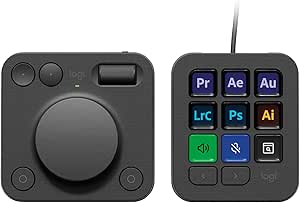 | Best for Creative Workflows | Key quantity: 9 customizable LCD keys | Controls: Low-friction dial, roller, and programmable keypad | Customizable pages: Up to 15 per profile | VIEW LATEST PRICE | See Our Full Breakdown |
| Logitech ERGO M575S Wireless Trackball Mouse |  | Best for a Small Desk Footprint | Connectivity: Bluetooth and USB | Movement detection: Trackball | Hand orientation: Right-handed | VIEW LATEST PRICE | See Our Full Breakdown |
| Logitech M185 Compact Ambidextrous Wireless Mouse, Swift Grey |  | Best for USB Receiver Simplicity | Connectivity: 2.4 GHz wireless via USB nano receiver | Tracking: Optical | Maximum sensitivity: 1,000 DPI | VIEW LATEST PRICE | See Our Full Breakdown |
| Logitech G840 XL Cloth Gaming Mouse Pad, 900 × 400 × 3 mm, Black |  | Best Extended Desk Mat | Material: Cloth | Dimensions: 900 × 400 × 3 mm | Color: Black | VIEW LATEST PRICE | See Our Full Breakdown |
| Logitech MX Master 4 Ergonomic Wireless Mouse with Haptic Feedback, Graphite |  | Best Premium Productivity Mouse | Connectivity: Bluetooth, radio frequency, USB-C dongle | Sensor: Optical, up to 8,000 DPI | Buttons: 7 programmable buttons | VIEW LATEST PRICE | See Our Full Breakdown |
| Logitech M720 Triathlon Full-Size Multi-Device Wireless Mouse | 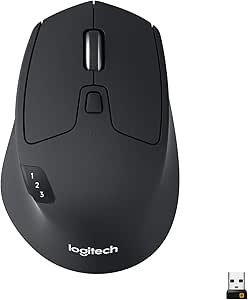 | Best for Switching Between Computers | Connectivity: Bluetooth and USB Unifying receiver | Movement detection: Optical | Buttons: 6 customizable buttons | VIEW LATEST PRICE | See Our Full Breakdown |
| Logitech MX Keys S Combo Wireless Keyboard and Mouse – Graphite |  | Best Complete Premium Desk Setup | Keyboard dimensions: 20.5 × 430.2 × 131.63 mm | Keyboard weight: 810 g | Keyboard battery: Rechargeable Li-Po, 1,500 mAh | VIEW LATEST PRICE | See Our Full Breakdown |
| Logitech MK120 Full-Size Wired Keyboard and Mouse Combo – Black | 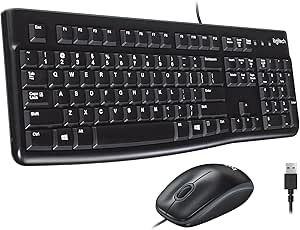 | Best No-Fuss Wired Combo | Connectivity: USB | Power source: Corded electric | Keyboard layout: QWERTY | VIEW LATEST PRICE | See Our Full Breakdown |
| Logitech MX Vertical Wireless Ergonomic Mouse |  | Best Ergonomic Mouse | Design: 57° vertical, right-handed | Sensor: Optical, up to 4000 DPI | Buttons: 4 | VIEW LATEST PRICE | See Our Full Breakdown |
| Logitech MK270 Full Size Wireless Keyboard and Mouse Combo – Black |  | Best Long-Battery-Life Combo | Connection: 2.4 GHz wireless via USB nano receiver | Wireless range: Up to 33 ft (10 m) | Keyboard: Full-size, 104 keys | VIEW LATEST PRICE | See Our Full Breakdown |
| Logitech MK235 Full-Size Wireless Keyboard and Mouse Combo |  | Best Plug-and-Play Combo | Connectivity: 2.4 GHz wireless via USB receiver | Wireless range: Up to 33 ft (10 m) | Keyboard layout: QWERTY, 104 keys | VIEW LATEST PRICE | See Our Full Breakdown |
| Logitech computer accessorie | Connectivity | Buttons | Battery life |
|---|---|---|---|
| Logitech MX Master 3S Bluetoot | Bluetooth | 7 | Up to 70 days |
| Logitech M196 Compact Ambidext | Bluetooth | 2 | Up to 12 months |
| Logitech MX Creative Console w | USB-C | — | — |
| Logitech ERGO M575S Wireless T | Bluetooth and USB | 2 | Up to 18 months |
| Logitech M185 Compact Ambidext | 2.4 GHz wireless via USB nano receiver | — | Up to 12 months |
| Logitech G840 XL Cloth Gaming | — | — | — |
| Logitech MX Master 4 Ergonomic | Bluetooth, radio frequency, USB-C dongle | 7 programmable buttons | Up to 70 days |
| Logitech M720 Triathlon Full-S | Bluetooth and USB Unifying receiver | 6 customizable buttons | Up to 24 months |
| Logitech MX Keys S Combo Wirel | Bluetooth Low Energy, Logi Bolt USB receiver | 7 programmable mouse buttons | — |
| Logitech MK120 Full-Size Wired | USB | — | — |
| Logitech MX Vertical Wireless | Bluetooth Low Energy and USB | 4 | — |
| Logitech MK270 Full Size Wirel | — | — | — |
| Logitech MK235 Full-Size Wirel | 2.4 GHz wireless via USB receiver | — | Up to 3 years for keyboard; up to 1 year for mouse |
More Details on Our Top Picks
Logitech MX Master 3S Bluetooth Wireless Mouse, Graphite
The MX Master 3S is the most capable general-purpose mouse in this group, pairing an 8,000 DPI sensor that tracks on glass with quiet clicks and a fast MagSpeed wheel. That combination suits detailed work across spreadsheets, editing timelines, and multiple displays better than the simpler M196 or M185. It can pair with up to three devices, making it a strong fit for switching between a work computer and personal devices without moving a receiver. The tradeoff is its right-handed, 141 g body: buyers who want a light travel mouse may prefer the M196, while anyone who needs a trackball’s compact desk footprint should look at the ERGO M575S. Customization also depends on Logi Options+, and the box lacks a charging cable and USB receiver.
Pros:- Tracks on glass and many other surfaces with its 8,000 DPI sensor
- MagSpeed wheel supports fast scrolling and fine control
- Bluetooth connections for up to three devices
- Rechargeable battery rated for up to 70 days
Cons:- Large, right-handed shape is a poor fit for some hands and travel setups
- USB receiver and charging cable are not included
- Some customization features require Logi Options+
Best for: Right-handed professionals who switch between several computers and want precise scrolling, quiet clicks, and broad surface tracking.
Not ideal for: Travelers seeking a small, light mouse, left-handed users, or buyers who need a USB receiver and charging cable included.
- Connectivity:Bluetooth
- Sensor:Darkfield high-precision optical
- Maximum sensitivity:8,000 DPI
- Buttons:7
- Weight:141 g (4.97 oz)
- Battery:Rechargeable 500 mAh Li-Po
- Battery life:Up to 70 days
- Device connections:Up to 3 via Bluetooth
Our verdict“Choose the MX Master 3S for feature-rich, multi-device productivity; choose the M196 instead if portability and a simpler setup matter more.”
Logitech M196 Compact Ambidextrous Bluetooth Wireless Mouse, Rose
The M196 keeps the basics straightforward: Bluetooth pairing, optical tracking, and a compact ambidextrous shape, with no USB receiver to occupy a port. Its included AA battery is rated for up to 12 months, a low-maintenance setup that contrasts with the rechargeable MX Master 3S and its more advanced controls. The M196 is easier to pack and accommodates left- or right-handed use, but it gives up the Master’s multi-device switching, quiet-click design, and customization. Its two buttons and 1,000 DPI sensitivity suit everyday navigation rather than demanding editing or fine pointer work. Buyers who prefer a receiver-based plug-and-play connection can choose the M185, though that mouse needs a USB port.
Pros:- Bluetooth connection works without a USB receiver
- Ambidextrous shape accommodates left- and right-handed users
- Lightweight, compact design is easy to carry
- Included AA battery is rated for up to 12 months
Cons:- Two buttons are not customizable
- 1,000 DPI tracking is less suited to precision-heavy work than the MX Master 3S
- Uses a replaceable AA battery rather than a rechargeable battery
Best for: Students and mobile laptop users who want a small, ambidextrous Bluetooth mouse for everyday browsing and document work.
Not ideal for: Power users who need programmable controls, multi-device switching, higher sensitivity, or a rechargeable battery.
- Connectivity:Bluetooth
- Tracking:Optical
- Maximum sensitivity:1,000 DPI
- Buttons:2
- Hand orientation:Ambidextrous
- Battery:1 AA battery, included
- Battery life:Up to 12 months
- Weight:2.65 oz
- Recycled plastic:66% for Rose
Our verdict“Pick the M196 for portable, uncomplicated Bluetooth use, but step up to the MX Master 3S for advanced controls and more precise work.”
Logitech MX Creative Console with 9 Customizable Keys, Graphite
The MX Creative Console is the specialist pick here: instead of replacing a mouse, it adds nine customizable LCD keys plus a tactile dial and roller for app shortcuts and precise adjustments. That makes it a better match for repeated actions in tools such as Adobe Creative Cloud, Final Cut Pro, Figma, and DaVinci Resolve than the MX Master 3S, whose strength is general-purpose pointer control and scrolling. Profiles and up to 15 keypad pages give the console room to adapt to different apps, but the setup requires Logi Options+ and a USB-C connection. The keypad has only nine physical keys, so users may need to switch pages rather than reach every command at once. It is also a less useful purchase for routine browsing or office work without a shortcut-heavy workflow.
Pros:- LCD keys show customizable actions and icons
- Dial and roller provide tactile control for precise adjustments
- Profiles and up to 15 pages support different apps and workflows
- Integrations cover creative and productivity apps
Cons:- Requires Logi Options+ for customization
- Only nine physical keypad keys, so additional actions rely on pages
- USB-C connection limits placement compared with a wireless accessory
Best for: Creative professionals and frequent app users who want dedicated shortcuts and tactile adjustment controls at a computer.
Not ideal for: People seeking a mouse replacement, a wireless accessory, or a simple peripheral for basic browsing and office tasks.
- Key quantity:9 customizable LCD keys
- Controls:Low-friction dial, roller, and programmable keypad
- Customizable pages:Up to 15 per profile
- Connectivity:USB-C
- Compatible devices:Laptop, PC
- Compatible operating systems:Windows and macOS
- Enclosure material:Plastic
- Included membership:3 months of Adobe Creative Cloud All Apps
Our verdict“Choose the MX Creative Console to speed up shortcut-heavy creative work; choose the MX Master 3S if you need a versatile everyday pointing device instead.”
Logitech ERGO M575S Wireless Trackball Mouse
The ERGO M575S moves the cursor with a thumb-operated trackball, so the mouse itself stays in place. That is a practical distinction from the MX Master 3S: the Master offers more buttons and higher sensitivity for active pointer work, while the M575S needs little desk space and can work on surfaces where a conventional mouse has no room to glide. Its ergonomic, right-handed shape is designed to support the hand, and Bluetooth or the included Logi Bolt receiver gives users a choice of connections. The long 18-month battery rating also suits a set-and-forget desktop setup. Its fixed right-handed form and listed two-button configuration limit flexibility, and the trackball’s thumb control may not suit buyers accustomed to moving a mouse across the desk.
Pros:- Trackball cursor control requires little desk space
- Works without needing a clear surface to move the mouse
- Connects by Bluetooth or included Logi Bolt USB receiver
- Battery life is rated for up to 18 months
Cons:- Right-handed shape excludes left-handed users
- Thumb-operated trackball may take adjustment for conventional mouse users
- Only two buttons are listed in the specifications
Best for: Right-handed users with limited desk space who want a stationary pointing device and a choice of Bluetooth or USB receiver connection.
Not ideal for: Left-handed users or anyone who prefers conventional mouse movement, more listed buttons, or a lighter travel-friendly shape.
- Connectivity:Bluetooth and USB
- Movement detection:Trackball
- Hand orientation:Right-handed
- Buttons:2
- Maximum sensitivity:2,000 DPI
- Battery:1 AA battery, included
- Battery life:Up to 18 months
- Recycled plastic content:52% for Graphite
Our verdict“Pick the ERGO M575S for stationary, space-saving control; choose the MX Master 3S if you prefer a conventional mouse with more controls.”
Logitech M185 Compact Ambidextrous Wireless Mouse, Swift Grey
The M185 is the straightforward receiver-based choice: plug its nano receiver into a USB port and use the compact, ambidextrous mouse without Bluetooth pairing. That makes it a different fit from the M196, which connects directly over Bluetooth and leaves the port free. The M185’s up-to-12-month battery life and included AA battery keep routine maintenance low, while optical tracking and support for Windows, Mac, Chrome OS, and Linux cover common computer setups. Its 1,000 DPI sensor and basic controls are suited to everyday pointing, not the precise scrolling or multi-device workflow of the MX Master 3S. The receiver also occupies a USB port, and the compact body may feel cramped for people who prefer a full-size mouse.
Pros:- Nano receiver provides plug-and-play wireless connection
- Compact, contoured shape works for either hand
- Included AA battery is rated for up to 12 months
- Compatible with Windows, Mac, Chrome OS, and Linux
Cons:- Requires a USB port for the nano receiver
- Compact size may not suit users who prefer a larger mouse
- Basic 1,000 DPI tracking lacks the precision features of the MX Master 3S
Best for: Laptop and desktop users who want a compact, ambidextrous mouse with a simple USB receiver connection and no Bluetooth setup.
Not ideal for: People with no spare USB port, Bluetooth-only devices, or users who prefer a larger mouse with advanced controls.
- Connectivity:2.4 GHz wireless via USB nano receiver
- Tracking:Optical
- Maximum sensitivity:1,000 DPI
- Hand orientation:Ambidextrous
- Battery:1 AA battery, included
- Battery life:Up to 12 months
- Wireless range:Up to 10 m (33 ft)
- Compatibility:Windows, Mac, Chrome OS, Linux
- Warranty:3-year limited hardware warranty
Our verdict“Choose the M185 if you want simple receiver-based use and have a free USB port; choose the M196 to connect over Bluetooth instead.”
Logitech G840 XL Cloth Gaming Mouse Pad, 900 × 400 × 3 mm, Black
The G840 XL is the clear pick here for buyers who want one continuous surface for both keyboard and mouse, rather than another input device. Its 900 × 400 mm cloth area leaves room for broad mouse movements beside a full-size keyboard, while the tracking-focused surface is designed to keep sensor response consistent. Unlike the MX Keys S Combo, which upgrades typing and pointing together, this pad improves the physical workspace around gear you already own. The nonslip rubber base helps limit desk drift, and its flexible construction can be rolled for transport. The tradeoff is footprint: it needs a wide, mostly clear desk, and its 3 mm thickness won’t provide the cushioning of a thicker pad. Choose it for coverage, not portability-first use.
Pros:- Large surface fits a keyboard and mouse together
- Cloth surface is designed for consistent sensor tracking
- Nonslip rubber base helps keep the pad stable
- Flexible construction can be rolled for transport
Cons:- 900 × 400 mm footprint takes substantial desk space
- Thin 3 mm profile offers limited cushioning
Best for: PC gamers and desk users with enough room for a keyboard and mouse to share one stable, consistent surface.
Not ideal for: People with narrow or crowded desks, or anyone seeking a compact pad that can be tucked away between sessions.
- Material:Cloth
- Dimensions:900 × 400 × 3 mm
- Color:Black
- Base:Nonslip rubber
- Model number:943-000776
- Warranty:1-year limited hardware warranty
Our verdict“Choose the G840 XL if you want a broad, stable cloth surface for both keyboard and mouse and have room to leave it on your desk.”
Logitech MX Master 4 Ergonomic Wireless Mouse with Haptic Feedback, Graphite
The MX Master 4 is the most feature-rich standalone mouse in this group, aimed at people who want shortcuts and detailed control rather than a basic pointer. Its Actions Ring and customizable haptic feedback can put app commands close at hand, while the MagSpeed wheel suits long documents and precise navigation. The sensor tracks on glass, a useful advantage when a desk has no mouse mat. Compared with the M720 Triathlon, this model prioritizes richer customization and a higher-resolution sensor over straightforward multi-computer utility and long stated battery life. Quiet clicks and an ergonomic, right-handed shape favor focused work, but left-handed users are excluded. Advanced features depend on Logi Options+ software, and the charging cable is not included, so the added control comes with setup and accessory tradeoffs.
Pros:- Actions Ring and programmable haptic feedback offer customizable shortcuts
- MagSpeed wheel supports both fast and controlled scrolling
- Optical sensor tracks on glass and reaches 8,000 DPI
- Quiet clicks and up to 70 days of stated battery life
Cons:- Advanced customization requires the Logi Options+ app
- Charging cable is not included
- Right-handed design does not suit left-handed users
Best for: Right-handed professionals who regularly use app-specific shortcuts, scroll through long content, and want a premium wireless mouse for several operating systems.
Not ideal for: Left-handed buyers, people who prefer a simple mouse without companion software, or anyone who needs a charging cable included.
- Connectivity:Bluetooth, radio frequency, USB-C dongle
- Sensor:Optical, up to 8,000 DPI
- Buttons:7 programmable buttons
- Hand orientation:Right-handed
- Battery life:Up to 70 days
- Compatible operating systems:Android, Chrome OS, Linux, Windows, iPadOS, macOS
- Materials:Plastic enclosure; plastic parts include recycled plastic
- Color:Graphite
Our verdict“Pick the MX Master 4 for software-driven shortcuts and precise control; choose the M720 Triathlon instead if simpler three-computer switching matters more.”
Logitech M720 Triathlon Full-Size Multi-Device Wireless Mouse
The M720 Triathlon makes the most sense for people who move between computers and want one mouse to follow. It pairs with up to three devices over Bluetooth or the included Unifying receiver, while its sculpted rubber grip and six customizable buttons provide a more substantial work feel than the compact M196. Hyper-fast scrolling with an instant-stop option helps when moving through long spreadsheets or documents. Its stated battery life of up to 24 months on one AA battery also favors low-maintenance use, unlike rechargeable options such as the MX Master 4. The tradeoff is a more basic 1,000 dpi sensor and a right-handed shape; it lacks the MX Master 4’s advanced haptics and glass-tracking claim. Pick it for practical switching, not high-end customization.
Pros:- Switches between up to three computers
- Bluetooth and included Unifying receiver provide connection options
- Hyper-fast scrolling includes an instant-stop feature
- One included AA battery has a stated life of up to 24 months
Cons:- Right-handed sculpted shape excludes left-handed use
- Uses a replaceable AA battery rather than a rechargeable battery
- 1,000 dpi maximum sensitivity is modest beside the MX Master 4
Best for: People who use a desktop, laptop, or tablet in rotation and want a full-size mouse that can switch among three computers.
Not ideal for: Left-handed users, buyers who want a high-resolution sensor or app-driven premium features, and those who prefer rechargeable devices over AA batteries.
- Connectivity:Bluetooth and USB Unifying receiver
- Movement detection:Optical
- Buttons:6 customizable buttons
- Hand orientation:Right-handed
- Compatible operating systems:Windows, macOS, Chrome OS, Linux, iPadOS, Android
- Battery:1 AA battery (included)
- Battery life:Up to 24 months
- Maximum sensitivity:1,000 dpi
- Multi-device support:Up to 3 computers
Our verdict“Choose the M720 Triathlon if you need practical multi-computer switching and long battery life more than premium sensor performance.”
Logitech MX Keys S Combo Wireless Keyboard and Mouse – Graphite
The MX Keys S Combo is the most complete productivity upgrade in this group: it pairs a low-profile backlit keyboard with the MX Master 3S mouse, so buyers don’t have to assemble a matching setup piece by piece. Spherically dished keys and adaptive backlighting support comfortable typing across changing light, while the mouse’s 8K Darkfield sensor and MagSpeed wheel suit detailed work and long scrolling sessions. Both devices can connect to up to three devices through Bluetooth or Logi Bolt, giving it broader desk coverage than buying the MX Master 4 alone. The cost of that completeness is a larger commitment: it includes a full-size keyboard and a right-handed mouse, and custom Smart Actions depend on Logi Options+. Battery life varies with use, and the included receiver works only with Logi Bolt-compatible devices.
Pros:- Keyboard combines low-profile keys with adaptive backlighting
- MX Master 3S mouse has an 8K Darkfield sensor and MagSpeed wheel
- Both devices support pairing with up to three devices
- Rechargeable batteries and post-consumer recycled plastic construction
Cons:- Full Smart Actions customization requires Logi Options+
- Logi Bolt receiver is not compatible with other Logitech receivers
- Battery life varies with usage conditions
Best for: Hybrid workers and multi-device users who want a coordinated premium keyboard-and-mouse setup with backlighting, precise scrolling, and rechargeable power.
Not ideal for: Buyers who need only a mouse, prefer a compact keyboard, or want to use an existing Logitech receiver rather than the Logi Bolt receiver.
- Keyboard dimensions:20.5 × 430.2 × 131.63 mm
- Keyboard weight:810 g
- Keyboard battery:Rechargeable Li-Po, 1,500 mAh
- Mouse dimensions:51 × 84.3 × 124.9 mm
- Mouse weight:141 g
- Sensor technology:Darkfield high precision, 8K DPI
- Buttons:7 programmable mouse buttons
- Connectivity:Bluetooth Low Energy, Logi Bolt USB receiver
- Compatible operating systems:Windows, macOS, Linux, Chrome OS, iPadOS, Android
Our verdict“Choose the MX Keys S Combo if you want a coordinated premium keyboard and mouse for multi-device work; skip it if you need only one accessory.”
Logitech MK120 Full-Size Wired Keyboard and Mouse Combo – Black
The MK120 is the straightforward choice for a desk that needs a keyboard and mouse ready to work without pairing or battery management. Its USB connection is plug-and-play, and the full-size 104-key layout keeps a familiar number pad and standard arrangement. Spill-resistant construction and keys rated for 10 million keystrokes suit shared or everyday workstations better than a wireless setup designed around mobility. Compared with the MK270, the MK120 gives up wireless freedom in favor of a direct wired connection; compared with the MX Keys S Combo, it has no backlighting or advanced customization. The ambidextrous mouse is a practical fit for either hand, but the cable limits placement, and the supplied compatibility information lists Windows only. This is function-first equipment, not a flexible multi-device setup.
Pros:- USB plug-and-play setup avoids wireless pairing
- Spill-resistant keyboard with keys rated for 10 million keystrokes
- Full-size 104-key layout with adjustable tilt legs
- Ambidextrous optical mouse suits either hand
Cons:- Wired connection limits desk placement and portability
- Listed compatibility is limited to Windows operating systems
- No keyboard backlighting for dim workspaces
Best for: Home offices, shared desks, and Windows workstations that need a familiar full-size keyboard and ambidextrous mouse with simple USB setup.
Not ideal for: Laptop users who want a cable-free desk, people who work across multiple operating systems, or anyone who needs backlit keys.
- Connectivity:USB
- Power source:Corded electric
- Keyboard layout:QWERTY
- Number of keys:104
- Hand orientation:Ambidextrous mouse
- Switch type:Linear
- Color:Black
- Compatible devices:Laptop
Our verdict“Pick the MK120 for a reliable, uncomplicated wired setup on a Windows desk, but choose the MK270 if wireless placement matters more.”
Logitech MX Vertical Wireless Ergonomic Mouse
The MX Vertical takes a different approach from the conventional mice in this roundup: its 57° handshake angle is designed to support a more natural hand position, making it the ergonomic-focused pick rather than an all-purpose compact option. Its adjustable sensor speed up to 4000 DPI lets users tune cursor movement without relying on a large desk area. Bluetooth and USB connectivity also give it more connection flexibility than the USB-receiver-only MK270 and MK235 combos. The tradeoff is its specialized shape: it is right-handed only, and buyers who prefer a traditional mouse may need time to adapt. Unlike the ambidextrous M196, it is not a simple shared-device choice. I’d choose it for right-handed users prioritizing posture, not for households that need one mouse to suit everyone.
Pros:- 57° vertical design supports a natural handshake-style hand position
- Adjustable optical sensor sensitivity up to 4000 DPI
- Offers both Bluetooth Low Energy and USB connectivity
- Rechargeable battery is rated for up to four months
Cons:- Right-handed design excludes left-handed users
- Vertical shape may take adjustment for users accustomed to a standard mouse
- Operating system compatibility details can vary by version
Best for: Right-handed office workers who want a vertical mouse shape and adjustable cursor speed for extended computer use.
Not ideal for: Left-handed users, shared-device households, or anyone who prefers a familiar conventional mouse shape.
- Design:57° vertical, right-handed
- Sensor:Optical, up to 4000 DPI
- Buttons:4
- Connectivity:Bluetooth Low Energy and USB
- Wireless range:10 m
- Battery:Rechargeable lithium polymer; up to 4 months
- Compatible operating systems:Windows, macOS, iPadOS, Chrome OS, Linux, Android
- Color:Graphite
Our verdict“Choose the MX Vertical if you want a right-handed ergonomic mouse with adjustable tracking, and skip it if you need an ambidextrous or conventional shape.”
Logitech MK270 Full Size Wireless Keyboard and Mouse Combo – Black
The MK270 is the straightforward choice for buyers who want a full-size keyboard and mouse in one wireless set, with little need for upkeep. Its standout advantage is long stated battery life: up to 36 months for the keyboard and 12 months for the mouse. The 33-foot 2.4 GHz connection and included USB nano receiver suit a fixed desktop setup, while multimedia hotkeys make common controls easy to reach. Compared with the MK235, the MK270 specifies a longer keyboard battery life, while both offer a full-size layout, spill resistance, and a compact ambidextrous mouse. The compromises are practical: there is no backlighting, and the keyboard lacks the ergonomic palm rest found on more feature-rich sets such as the MX Keys S Combo. I’d pick it for a dependable everyday setup, not low-light typing or added wrist support.
Pros:- Keyboard battery life rated for up to 36 months and mouse for up to 12 months
- Wireless connection reaches up to 33 feet through a USB nano receiver
- Full-size, spill-resistant keyboard includes multimedia hotkeys
- Compact ambidextrous mouse suits left- and right-handed users
Cons:- Keyboard has no backlighting for low-light use
- No ergonomic palm rest is included
- USB receiver occupies a port and the set does not offer Bluetooth connectivity
Best for: Home-office and family computer users who want a full-size wireless keyboard and mouse with long battery life and quick media controls.
Not ideal for: People who type in dim rooms, want a backlit keyboard, or need an ergonomic palm rest for extended sessions.
- Connection:2.4 GHz wireless via USB nano receiver
- Wireless range:Up to 33 ft (10 m)
- Keyboard:Full-size, 104 keys
- Keyboard battery life:Up to 36 months
- Mouse battery life:Up to 12 months
- Spill resistance:Yes
- Mouse orientation:Ambidextrous
- Materials:Plastic; 49% recycled mouse and 54% recycled keyboard
- Color:Black
Our verdict“Choose the MK270 for a no-fuss desktop combo with long battery life, but look elsewhere if you need backlighting or ergonomic support.”
Logitech MK235 Full-Size Wireless Keyboard and Mouse Combo
The MK235 suits buyers who want a familiar full-size layout and a simple setup, without pairing steps or software installation. A single USB receiver connects both devices, and the 104-key keyboard adds a number pad and 15 shortcut keys for office tasks and everyday controls. Its stated battery life—up to three years for the keyboard and one year for the mouse—makes it a low-maintenance alternative to a wired set such as the MK120, while the wireless connection reaches up to 33 feet. Compared with the MK270, the MK235 lists a shorter maximum keyboard battery life, but shares the spill-resistant design and ambidextrous compact mouse. The limits are clear: it requires three AAA batteries, and its spill protection is not a license to soak it. I’d choose it for a basic, ready-to-connect setup, not for Bluetooth or backlit keys.
Pros:- Full-size 104-key layout includes a number pad and 15 shortcut keys
- Single USB receiver offers plug-and-play connection up to 33 feet
- Compact ambidextrous optical mouse accommodates either hand
- Spill-resistant keyboard and long stated battery life
Cons:- Requires three AAA batteries
- Spill resistance is limited and does not mean the keyboard can be immersed
- Compatibility is listed for Windows and Chrome OS rather than a broad range of systems
Best for: Windows or Chrome OS users who want a full-size keyboard with number pad and shortcuts, plus a compact mouse that works for either hand.
Not ideal for: Buyers who need Bluetooth, backlit keys, or a rechargeable keyboard and mouse rather than replaceable AAA batteries.
- Connectivity:2.4 GHz wireless via USB receiver
- Wireless range:Up to 33 ft (10 m)
- Keyboard layout:QWERTY, 104 keys
- Keyboard shortcuts:15 shortcut keys
- Mouse:Compact optical, ambidextrous; 70.5 g
- Battery life:Up to 3 years for keyboard; up to 1 year for mouse
- Batteries:3 AAA batteries included
- Compatibility:Windows 10, Windows 11 or later, Chrome OS
- Keyboard features:Spill-resistant, anti-fading keys, tilt legs
Our verdict“Choose the MK235 for a simple full-size wireless set with useful shortcuts, but skip it if you need Bluetooth or rechargeable power.”

How We Picked
I compared these 13 Logitech accessories by the job they solve, not by treating every mouse or keyboard as interchangeable. My criteria included everyday usability, comfort and shape, connection and device flexibility, build and layout, specialized controls, and how much capability each item adds to a setup. I also weighed whether an accessory makes sense on its own or works best as part of a larger workstation.
The ranking gives the lead to options with a strong mix of usefulness and clear differentiation. The MX Master 4 takes the top spot for its combination of ergonomic design and haptic feedback; the MX Keys S Combo follows as a cohesive keyboard-and-mouse upgrade. Specialist picks such as the MX Vertical, ERGO M575S, and MX Creative Console rank for the users they serve, while basic and compact options remain sensible when straightforward operation matters more than extra features. The G840 XL earns a place for a particular desk need, but it is not a substitute for a mouse or keyboard.
| Logitech computer accessorie | Battery life |
|---|---|
| Logitech MX Master 3S Bluetoot | Up to 70 days |
| Logitech M196 Compact Ambidext | Up to 12 months |
| Logitech MX Creative Console w | — |
| Logitech ERGO M575S Wireless T | Up to 18 months |
| Logitech M185 Compact Ambidext | Up to 12 months |
| Logitech G840 XL Cloth Gaming | — |
| Logitech MX Master 4 Ergonomic | Up to 70 days |
| Logitech M720 Triathlon Full-S | Up to 24 months |
| Logitech MX Keys S Combo Wirel | — |
| Logitech MK120 Full-Size Wired | — |
| Logitech MX Vertical Wireless | — |
| Logitech MK270 Full Size Wirel | — |
| Logitech MK235 Full-Size Wirel | Up to 3 years for keyboard; up to 1 year for mouse |
Factors to Consider When Choosing Best Logitech Computer Accessories
Logitech’s range spans standalone pointing devices, productivity tools, ergonomic designs, desk accessories, and complete keyboard-and-mouse sets. I’d start by identifying what is missing from your current setup, then check how the accessory will fit your desk, devices, and daily habits.
Choose a Complete Set Only If Both Devices Fit Your Needs
A keyboard-and-mouse combo can simplify buying when you need to replace both at once, but it can also lock you into a mouse that is less comfortable or capable than a standalone option. The MX Keys S Combo makes sense when you want a coordinated premium workstation; the MK120, MK270, and MK235 are more focused on familiar, straightforward input. Before choosing a set, check keyboard size, mouse shape, and whether you need wireless or wired connections. A bundled mouse is not a bargain in practical terms if you soon replace it. If your current keyboard is already comfortable, spend attention on the mouse instead. Match the set to the weakest part of your current setup, not just the number of pieces in the box.
Treat Ergonomics as a Fit Question, Not a Feature Checklist
Ergonomic accessories change how you interact with the computer, but no single design suits every hand or work style. A vertical mouse alters wrist and forearm position; a trackball keeps the device in place and moves the pointer with a thumb; a conventional ergonomic mouse preserves familiar movement. Switching designs may take an adjustment period, so avoid assuming that a product labeled ergonomic will automatically feel better. Consider the motions that bother you, the space available for mouse movement, and whether you can try the shape before committing. For persistent pain, an accessory is not a substitute for professional advice or broader workstation changes. Comfort depends on fit and setup as much as the product category.
Decide Whether Multi-Device Control Will Save Real Effort
Multi-device support is most useful when you regularly work across separate computers, such as a personal laptop and a work desktop. A mouse like the M720 is designed for that kind of switching; for a single-computer setup, extra device controls may add little value. Count how often you change machines and whether the keyboard needs to follow the same workflow. Also check which connection methods your devices support rather than assuming every computer will pair the same way. If you only switch occasionally, a simpler wireless mouse may be easier to manage. Choose flexibility because it removes a recurring friction point, not because the specification sounds advanced.
Match Controls to the Work You Actually Do
Programmable buttons and customizable controls can shorten repeated tasks, but they are only useful when your software and habits make room for them. The MX Creative Console targets workflows where dedicated shortcuts can help manage creative applications; an everyday office user may get more from a capable mouse or keyboard instead. List the actions you repeat most often before paying for extra controls. If the tasks vary by application, check whether the software you rely on can use the controls as intended. A device with many options can take time to configure and learn. For occasional use, familiar shortcuts may be faster than building a custom control scheme.
Check Desk Space and Portability Before Choosing a Surface or Shape
Large accessories need to fit the working area you actually have. The G840 XL provides a broad mouse surface, but its footprint may crowd a compact desk or leave less room for other equipment. Compact mice such as the M196 suit travel and smaller setups, while full-size devices can feel more settled for long sessions. Measure the available space, including room for keyboard placement and mouse movement, rather than relying on a general sense of desk size. Think about where the accessory will live when not in use. A product that fits your routine is more useful than one that only fits your idealized workstation.
Choose Connection Style Around Your Work Environment
Wireless accessories reduce cable clutter and can make a desk easier to rearrange, while a wired setup avoids the need to manage a wireless connection or device power. The MK120 is a straightforward wired option; the wireless combos suit desks where cable-free placement matters. For individual mice, consider whether you will use the accessory at one fixed workstation or carry it between locations. Check the connection options and compatibility for your computer before buying, especially if your setup has limited ports or strict workplace restrictions. A wireless design is not automatically better if your device rarely moves. The right choice is the one that fits your environment with the least ongoing hassle.
Frequently Asked Questions
Should I choose the MX Master 4 or MX Master 3S?
I’d choose the MX Master 4 if haptic feedback and its newer feature set matter to your daily workflow. The MX Master 3S remains a strong fit if you want an advanced productivity mouse but do not need that added feedback. Both sit above basic options like the M196 in capability, so neither is the obvious choice for someone seeking only a compact pointer. Compare the controls and shape against the tasks you repeat most, rather than upgrading for a model name alone. If your current mouse already handles your work comfortably, the newer features may not change your routine enough to justify switching.
Which Logitech option makes the most sense if I need both a keyboard and a mouse?
The MX Keys S Combo is the stronger match for a buyer seeking a premium, coordinated desk setup. The MK120, MK270, and MK235 make more sense when basic keyboard-and-mouse coverage is the main goal and advanced controls are not a priority. Choose wired or wireless based on where the computer sits and how much cable clutter you can tolerate. Before buying any combo, check that you like both the keyboard layout and the included mouse shape. If only one device needs replacing, buying a set may leave you with an unused accessory.
Is a vertical mouse or a trackball a better ergonomic choice?
Neither design is universally better: the MX Vertical changes the angle of your hand, while the ERGO M575S keeps the mouse stationary and uses a thumb-operated trackball to move the pointer. The vertical model may suit someone who wants to keep a familiar pointer movement with a different hand position. The trackball can be appealing when desk space is limited or broad arm movement is inconvenient. Both feel different from a standard mouse, so adjustment time is part of the decision. Focus on the motion you want to reduce and seek a chance to check the fit before choosing.
Are compact Logitech mice a good choice for daily work?
Compact models such as the M196 and M185 suit travel, smaller desks, and buyers who want uncomplicated pointing. Their smaller form may be less comfortable for some people during long sessions than a fuller-sized mouse such as the M720 or MX Master models. The M196 is ambidextrous, which can matter if you share a device or prefer a symmetrical shape. Decide based on how long you use a mouse at a stretch, not only whether it fits in a bag. If portability is occasional but desk work is constant, a larger shape may be the better everyday fit.
Do I need the MX Creative Console or the G840 XL for a standard home-office setup?
Most standard home-office setups do not need either accessory. The MX Creative Console is aimed at workflows that benefit from dedicated customizable controls, while the G840 XL is for buyers who want a large, continuous mouse surface. If you mainly write, browse, and join calls, a suitable mouse and keyboard will usually address more of your daily needs. Check whether you have room for the G840 XL before choosing it, and whether your applications can make practical use of the console’s controls. These are purpose-specific additions, not replacements for core input devices.
Conclusion
For most buyers seeking one capable Logitech mouse, I recommend the MX Master 4 as the best overall; choose the MX Master 3S if you want a productivity-focused alternative without the newer haptic feature. The MX Keys S Combo is my pick for a best premium complete setup, while the basic MK120, MK270, and MK235 combos suit buyers who want familiar everyday input without extra controls. For beginners, I’d start with the M196 for uncomplicated compact wireless use or a basic combo if a keyboard is needed too. Choose the MX Vertical or ERGO M575S for different ergonomic approaches, the M720 for multi-device switching, the MX Creative Console for creative shortcuts, and the G840 XL for a large mouse surface. The best match is the one that solves a specific problem in your setup without adding features you will not use.
Halloween Picks
halloween
As an affiliate, we earn on qualifying purchases.