
Welcome to our comprehensive Ergonomic Office Comfort Gear Checklist 2026, designed for anyone who spends extended hours at a desk and wants to prioritize comfort, health, and productivity. Whether you’re setting up a new workspace or upgrading your current setup, this guide offers expert insights to help you make informed choices. We’ve organized the list into essential categories, each focusing on a key aspect of ergonomic health, from seating to desk accessories.
Use this checklist as a practical reference when shopping for your office gear. We highlight the most important features to consider, common pitfalls to avoid, and tips for selecting the right size and fit for your unique needs. Remember, the goal is to create a workspace that supports your body and enhances your focus, so take your time to evaluate each product carefully.
By following this guide, you’ll be well-equipped to assemble an ergonomic office setup that promotes well-being and efficiency. Happy shopping!
Ergonomic Office Chairs
An ergonomic office chair is the cornerstone of a healthy workspace. The Steelcase Gesture Office Chair is renowned for its innovative design that supports a wide range of postures, making it ideal for long working hours. This chair’s adjustable features, including seat height, armrests, and lumbar support, help you customize your seating position for maximum comfort. When selecting an ergonomic chair, prioritize adjustability, lumbar support, and breathability. Proper fit is essential to prevent discomfort and long-term health issues.
Common buying mistakes include choosing a chair based solely on aesthetics or ignoring adjustability options. Make sure to test the chair for proper lumbar support and seat depth. Check if the armrests can be positioned to avoid shoulder strain. Also, consider the chair’s compatibility with your desk height and your body size to ensure a seamless fit.
In terms of sizing, measure your seat height and width to ensure the chair fits your body comfortably. Look for a model that offers adjustable lumbar support to cater to your back’s natural curve. The chair should encourage good posture without restricting movement, helping you stay comfortable throughout the day.
What to look for:
- Adjustable seat height and depth
- Lumbar support that conforms to your back
- Breathable mesh or fabric for airflow
- Armrests that adjust in height and width
- Smooth-rolling casters for mobility

Steelcase Gesture Office Chair - Ergonomic Work Chair with Wheels for Carpet - Comfortable - Intuitive-to-Adjust for Desk - 360-Degree Arms - Graphite Gray Fabric
- Ergonomic Design: Adjusts to your body and posture
- Extended Comfort: Ideal for long hours of use
- Premium Features: Includes carpet wheels, 360-degree arms, and intuitive adjustments
As an affiliate, we earn on qualifying purchases.
Steelcase Gesture Office Chair – Ergonomic Work Chair with Wheels for Carpet – C

The Steelcase Gesture Office Chair is designed for ergonomic comfort and adjustability, supporting long hours of work with features like 360-degree arms, a contoured back, and intuitive adjustments. It offers a full recline and lock options, making it suitable for various postures and preferences.
Pros:
- Highly adjustable for personalized comfort
- Contoured back supports natural spine shape
- Suitable for extended use and long hours
Cons:
- Premium price may be high for some users
- Heavy and may be difficult to move frequently
Best for: Long hours of desk work
Not ideal for: Minimal adjustability
Bottom line: A highly adjustable chair enhances comfort and posture.
Adjustable Desk Stands
An adjustable laptop stand is vital for maintaining proper screen height and reducing neck strain. The Adjustable Laptop Stand with Wrist Rest offers versatile positioning, allowing you to elevate your laptop to eye level, which helps prevent hunching and promotes better posture. The included wrist rest adds an extra layer of comfort for prolonged typing sessions. When choosing a desk stand, consider adjustability, stability, and compatibility with your workspace.
Many buyers overlook the importance of a sturdy base that doesn’t wobble or slide during use. An adjustable stand should have a smooth mechanism for height changes and a wide range of angles. Compatibility with various laptop sizes and your desk setup is crucial to ensure seamless integration. Don’t forget to check if the stand allows for good ventilation to prevent overheating.
A reversible lap desk can double as a portable workstation, making it ideal for flexible work environments. When selecting, ensure it fits your laptop size and offers comfortable wrist support. Proper positioning can significantly reduce neck and shoulder tension, especially if you work in a small or shared space.
What to look for:
- Adjustable height and tilt
- Stable, non-slip base
- Fits your laptop size
- Wrist support for typing comfort
- Ventilated surface for cooling

Ergonomic Lumbar Support Cushion for Back Support & Pain Relief | 6-Zone Pressure Distribution Posture Corrector for Office Chair, Car Seat, Desk, etc. | Great for Father's day (Gray)
- Posture Correction: Automatically aligns your spine
- Orthopedic Support: Mirrors natural spine S-curve
- Pressure Distribution: Supports lumbar, hips, and tailbone
As an affiliate, we earn on qualifying purchases.
Adjustable Laptop Stand with Wrist Rest, Reversible Lap Desk

This reversible lap desk features a cushioned wrist rest on one side and a flat surface on the other, suitable for writing, drawing, or casual use. It offers adjustable tilt angles, a wave-textured top for grip and airflow, and is lightweight for portability.
Pros:
- Reversible design offers dual functionality for different tasks
- Adjustable tilt angles improve viewing comfort
- Lightweight and portable for easy transport
- Ergonomic wrist rest enhances comfort during use
Cons:
- Limited surface area may not accommodate larger laptops
- Foam material might wear over time
- No mention of adjustable height beyond tilt
Best for: Flexible workspace setups
Not ideal for: Limited tilt or height options
Bottom line: An adjustable stand promotes healthier posture.
Lumbar Support Cushions
A lumbar support cushion is a simple yet effective way to enhance your chair’s ergonomics. The Ergonomic Lumbar Support Cushion offers targeted back support, helping to maintain the natural curve of your spine and reduce back pain during long sitting periods. Proper lumbar support can prevent slouching and promote better posture, which is essential for overall comfort and spinal health.
Many people make the mistake of neglecting lumbar support or choosing cushions that are too firm or too soft. Look for a cushion that provides firm support but molds comfortably to your back. Adjustable straps are helpful to keep the cushion securely in place. Consider the size and shape of the cushion to ensure it fits your chair and aligns with your lower back.
When selecting a lumbar support cushion, check its compatibility with your chair’s size and your body type. The cushion should be portable enough to transfer between chairs if needed. Proper placement and support can significantly reduce lower back stress, especially during extended work sessions.
What to look for:
- Adjustable straps for secure fit
- Firm yet comfortable support
- Portable and lightweight
- Coverage for lower back
- Durable, breathable cover
Ergonomic Lumbar Support Cushion for Back Support & Pain Relief

This ergonomic lumbar support cushion features a 6-zone pressure distribution system that promotes proper spinal alignment and alleviates back pain during extended sitting. Designed with orthopedic-grade contouring, it helps improve posture and reduce muscle fatigue, making it suitable for office chairs, car seats, and more.
Pros:
- Promotes proper posture and spinal alignment
- Reduces back pain and muscle fatigue
- Versatile for use on various seating surfaces
- Durable with high-density foam
Cons:
- May require adjustment for optimal comfort
- Potentially less effective for severe back conditions
- Requires regular cleaning to maintain breathability
Best for: Long hours sitting
Not ideal for: Lack of adjustability
Bottom line: A good lumbar cushion supports healthy spine alignment.
Anti-Fatigue Mats
An anti-fatigue mat is a must-have for anyone who stands at their desk for long periods. The WellnessMats Trellis Collection offers superior cushioning that reduces foot and leg fatigue, making standing more comfortable and sustainable. These mats are made from durable polyurethane, providing both comfort and support, which can help improve circulation and reduce discomfort.
Common mistakes include choosing mats that are too thin or slippery, leading to discomfort or safety hazards. Look for mats with a textured surface for grip and sufficient cushioning to absorb shock. The size should accommodate your workspace without creating trip hazards. Also, check the material for ease of cleaning and durability over time.
While standing desks are excellent for health, the right anti-fatigue mat maximizes their benefits by providing a comfortable standing surface. Ensure the mat’s thickness and material support your weight and standing style, and position it correctly to prevent slipping or bunching during use.
What to look for:
- Adequate cushioning thickness
- Non-slip textured surface
- Durable and easy to clean
- Size compatible with workspace
- Supports standing comfort
WellnessMats Trellis Collection Anti-Fatigue Floor Mat, Polyurethane, Water Resi

The WellnessMats Trellis Collection is an ergonomic anti-fatigue floor mat featuring a floral design, providing comfort and support for standing tasks in home, kitchen, garage, or office. Made from durable, water-resistant polyurethane, it reduces muscle and joint fatigue while being easy to clean.
Pros:
- Provides ergonomic support to reduce fatigue
- Durable and water-resistant polyurethane material
- Non-slip, ADA compliant beveled edges
- Easy to clean and maintain
Cons:
- May be more expensive than basic mats
- Design may not suit all decor styles
Best for: Prolonged standing sessions
Not ideal for: Thin or slippery mats
Bottom line: A quality anti-fatigue mat enhances standing health.
Ergonomic Keyboard & Mouse
An ergonomic wireless trackball mouse is designed to reduce strain on your hand and wrist, making it an excellent accessory for long hours of computer use. The Rechargeable Adjustable 0°/18° Angle feature allows you to customize the angle for optimal comfort, which can help prevent repetitive strain injuries. Pairing this with an ergonomic keyboard creates a balanced setup that minimizes wrist extension and promotes a natural hand position.
Many users fall into the trap of choosing a keyboard and mouse based solely on aesthetics or brand reputation, neglecting fit and comfort. Look for features like adjustable angles, responsive tracking, and a shape that fits your hand size. Wireless models eliminate cable clutter, but ensure they have reliable connectivity and a good battery life.
When selecting an ergonomic mouse and keyboard, consider your hand size and the space available on your desk. The right combination can drastically reduce discomfort and fatigue, especially during extended typing or mouse-use sessions. Remember, a properly aligned setup supports overall ergonomic health and productivity.
What to look for:
- Adjustable angles and height
- Responsive tracking and buttons
- Wireless connectivity
- Fits your hand size
- Compatible with your workspace
Ergonomic Wireless Trackball Mouse, Rechargeable Adjustable 0°/18° Angle, Multi-
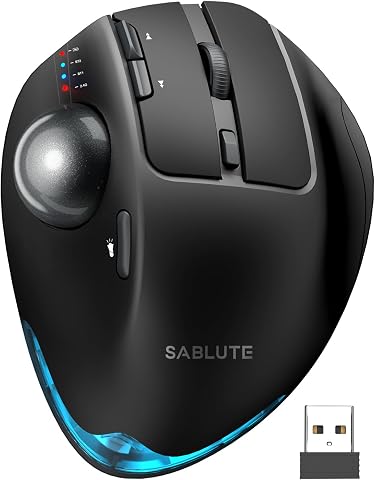
This ergonomic wireless trackball mouse features an adjustable tilt for natural wrist positioning, reducing strain during extended use. It offers precise thumb control, multi-device connectivity, quiet clicks, and customizable DPI settings.
Pros:
- Ergonomic design reduces wrist and forearm strain
- Multi-device connectivity for seamless switching
- Quiet clicks and adjustable DPI for personalized use
- Rechargeable battery eliminates need for disposable batteries
Cons:
- May require 1-2 weeks to adapt for new users
- Driver not compatible with Mac OS
- Trackball operation may take time to master
Best for: Extended computer use
Not ideal for: Non-adjustable, fixed design
Bottom line: A well-designed ergonomic keyboard and mouse prevent strain.
Desk Foot Rests
While we don’t recommend a specific product here, using a desk foot rest can significantly improve your ergonomic posture. Elevating your feet helps maintain proper spinal alignment, reduces pressure on your lower back, and promotes better circulation. When choosing a footrest, focus on adjustability, stability, and size to ensure it supports your legs comfortably without slipping or causing discomfort.
Many buyers overlook the importance of foot support, leading to poor posture and fatigue. Look for a footrest that can be easily adjusted in height and angle. A non-slip base and a size that fits comfortably under your desk are essential. It should allow your feet to rest flat and support your legs at a comfortable angle, ideally around 90 degrees.
Proper foot positioning is a simple but impactful way to enhance overall ergonomic health. Incorporate a footrest into your setup to encourage active sitting and reduce strain during long work hours. Remember, the right footrest is a small investment that pays off in long-term comfort and health.
What to look for:
- Adjustable height and tilt
- Non-slip base
- Fits comfortably under desk
- Supports feet flat
- Durable material
When building or upgrading your ergonomic office setup, prioritize your comfort and health first. Start with a quality adjustable chair, then add supportive accessories like lumbar cushions, footrests, and anti-fatigue mats. Remember, investing in ergonomic gear is an investment in your well-being and productivity.
Take your time to evaluate each product carefully, and don’t be afraid to try different configurations to find what works best for you. With the right tools and setup, you’ll create a workspace that promotes long-term health and makes your workday more enjoyable. Happy shopping and ergonomic success!