When selecting a business laptop workstation, the key considerations often come down to performance, durability, and versatility. The Dell Precision 7680 stands out as the best overall choice, offering high-end specs and robust build quality. For those prioritizing cost-efficiency, the Lenovo ThinkPad E16 provides solid power at a more accessible price. Meanwhile, the NIMO Copilot+ caters to users needing AI-enhanced features and portability. Each of these options balances tradeoffs between raw power, portability, and price, making the decision complex. Continue reading for a detailed breakdown of each model and how they compare across critical factors.
Key Takeaways
- Performance varies significantly, with high-end CPUs and GPUs essential for demanding workloads.
- Build quality and keyboard comfort are key for long hours of productivity, especially in portable models.
- Price often reflects the level of professional features, with premium options offering better durability and performance.
- Display quality and connectivity options impact usability in professional environments.
- Tradeoffs between portability and power are common; lighter models tend to have fewer high-end specs.




More Details on Our Top Picks
Dell Precision 7680 Mobile Workstation 16″ FHD+ Laptop, Intel Core i7-13850HX, 64GB RAM, 1TB NVMe SSD, NVIDIA RTX 1000 6GB, Windows 11 Pro
This model stands out for its powerful Intel Core i7-13850HX processor with 20 cores, making it ideal for demanding tasks like CAD, 3D rendering, and AI. Compared with the Dell Precision 3580, it offers significantly more processing and graphics performance, though at a higher price and with increased weight, which affects portability. Its 64GB RAM and 1TB SSD ensure smooth multitasking and fast data access, vital for professional workflows. Connectivity options, including Thunderbolt 4, HDMI, and RJ-45, support complex setups, but the premium hardware comes with a premium price tag. Battery life isn’t specified, which could be a concern for mobile professionals needing all-day use. Overall, this makes the most sense for users who prioritize raw performance over portability and cost.
Pros:- Exceptional processing power with 20-core CPU
- Professional-grade NVIDIA RTX 1000 graphics
- Extensive connectivity including Thunderbolt 4
Cons:- High price point may be prohibitive
- Heavy and less portable for frequent travel
- Battery life details are not provided
Best for: Power users requiring high-end performance for CAD, 3D, or AI workloads
Not ideal for: Travelers needing lightweight or longer battery life, or budget-conscious buyers
- Processor:Intel Core i7-13850HX, 20 cores
- Display:16″ FHD+ (1900 x 1200)
- RAM:64GB
- Storage:1TB NVMe SSD
- Graphics:NVIDIA RTX 1000 6GB
- Ports:HDMI, USB-C, USB-A, Thunderbolt 4, RJ-45
Bottom line: This is best suited for professionals who need desktop-class performance on the go and are willing to carry extra weight and pay a premium.
Dell Precision 3580 Mobile Workstation Laptop (15.6″ FHD, Intel Core i7-1355U vPro, 32GB RAM, 1TB SSD)
This lightweight Dell Precision 3580 offers a powerful Intel Core i7-1355U vPro processor with 10 cores, making it suitable for demanding business tasks while maintaining a portable form factor. When compared to the Dell Precision 7680, it sacrifices some raw power for a lighter weight—just 3.56 lbs—and a more manageable size, making it perfect for frequent travelers or remote workers. Its 32GB RAM and 1TB SSD support multitasking and fast data access, while the array of connectivity options, including Thunderbolt 4 and HDMI, supports versatile setups. The high-quality 1080p IR webcam and security features like facial recognition add enterprise-level value. However, the use of integrated graphics limits its suitability for graphics-intensive tasks, and its battery life details are missing, which is critical for on-the-go use. This pick makes the most sense for professionals who need solid performance combined with portability.
Pros:- Lightweight at 3.56 lbs for easy portability
- Strong performance with high-end Core i7 vPro processor
- Multiple connectivity options including Thunderbolt 4
Cons:- Limited to integrated graphics, not ideal for graphics-intensive tasks
- Possible concerns over resealed packaging and SSD upgrades
- Battery life not specified
Best for: Business users who prioritize portability without sacrificing significant processing power
Not ideal for: High-end creative professionals needing advanced graphics or heavy workloads
- Processor:Intel Core i7-1355U vPro, 10 cores
- Display:15.6″ FHD Anti-Glare
- RAM:32GB DDR4
- Storage:1TB PCIe NVMe SSD
- Graphics:Integrated Intel Graphics
- Weight:3.56 lbs
Bottom line: This laptop is ideal for mobile professionals seeking a balance of performance and portability for business tasks.
Lenovo ThinkPad P14s Gen 6 Mobile Workstation with AMD Ryzen AI 7 PRO 350, 32GB DDR5, 1TB SSD, 14” WUXGA Display, Wi-Fi 7, Windows 11 Pro
This ThinkPad P14s Gen 6 combines portability with advanced processing, featuring an AMD Ryzen AI 7 PRO 350 with AI acceleration, making it ideal for workflows that benefit from neural processing. Its 14-inch WUXGA display offers excellent color accuracy and brightness, surpassing many 15.6-inch models like the Dell Precision 3580 in display quality. Compared to larger workstations, this is significantly lighter, focusing on mobility. The inclusion of Wi-Fi 7 and multiple ports, including Thunderbolt 4, ensures fast connectivity and expandability. The 32GB DDR5 RAM and 1TB SSD support multitasking and quick data handling. Its main tradeoff is the limited upgradeability and the lack of detailed battery life data, which can be crucial for remote work. This model suits professionals who need high performance in a compact form factor, especially for AI-driven tasks.
Pros:- Lightweight and portable at 14 inches
- AI acceleration with Ryzen AI 7 PRO 350
- Excellent display with high color accuracy
Cons:- Limited upgrade options
- Battery life details are not provided
- Premium price for high-end features
Best for: Mobile professionals requiring AI acceleration and high-quality display in a portable device
Not ideal for: Heavy-duty 3D rendering or gaming, due to integrated graphics and possible upgrade constraints
- Processor:AMD Ryzen AI 7 PRO 350
- Display:14” WUXGA, 500 nits, 100% sRGB
- RAM:32GB DDR5
- Storage:1TB SSD
- Graphics:AMD Radeon integrated
- Connectivity:Wi-Fi 7, Thunderbolt 4
Bottom line: This is a great choice for professionals needing AI capabilities and high-quality visuals in a lightweight package.
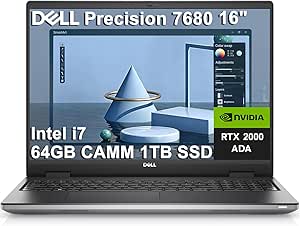
Dell Precision 7680 Mobile Workstation Laptop (NVIDIA RTX 2000 Ada 8GB, 16″ FHD+, Intel Core i7-13850HX, 64GB RAM, 1TB SSD, Windows 11 Pro)
This Dell Precision 7680 with an NVIDIA RTX 2000 Ada 8GB GPU elevates the graphics performance compared to the RTX 1000, making it well-suited for demanding content creation, design, and engineering applications. The 16-inch FHD+ display offers a sharper and more detailed visual experience than larger 16″ options like the first 7680, ideal for detailed work. When compared to the earlier 7680 model with RTX 1000, the RTX 2000 provides a significant boost for rendering, simulation, and visualization tasks, at the cost of increased power consumption and potential heat generation. Its 64GB RAM and 1TB SSD support large datasets and multitasking, with versatile connectivity options, including Thunderbolt 4 and HDMI. The premium build and long-term Dell support make it a reliable choice, but the high cost and weight may deter those seeking portability. This is best for users who need top-tier graphics and performance for professional workflows.
Pros:- High-performance NVIDIA RTX 2000 GPU
- Crisp 16” FHD+ display with detailed visuals
- Long-term support with Dell ProSupport until 2029
Cons:- Premium price makes it less accessible for some
- Heavy and less portable for frequent travelers
- Battery life details are not specified
Best for: Designers, engineers, and content creators needing GPU-intensive tasks
Not ideal for: Casual users or those prioritizing ultra-light portability over raw graphics power
- Processor:Intel Core i7-13850HX
- Display:16″ FHD+ (1920 x 1200)
- GPU:NVIDIA RTX 2000 Ada 8GB
- RAM:64GB DDR5
- Storage:1TB PCIe NVMe SSD
- Ports:Thunderbolt 4, USB-C, USB-A, HDMI, Ethernet
Bottom line: This workstation is best for professionals who need serious GPU power and display clarity for demanding creative or engineering tasks.
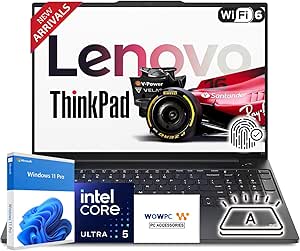
Lenovo ThinkPad E16 Business Workstation Laptop, 16″ WUXGA, Intel Core Ultra 5 125U, 32GB RAM, 1TB PCIe SSD, Windows 11 Pro
The Lenovo ThinkPad E16 combines durability with performance, featuring an Intel Core Ultra 5 125U with 12 cores, making it suitable for multitasking and intensive business applications. Its 16-inch WUXGA display offers vivid visuals with 1920×1200 resolution, slightly larger than the 14-inch options, making it good for extended work sessions. When compared to the other E16 model with 16GB RAM, this version’s 32GB RAM delivers better multitasking capability, ideal for busy professionals. The inclusion of a privacy shutter, fingerprint reader, and MIL-STD-810H durability ensures security and resilience. The main tradeoff is that its weight and bulk are higher than ultralight models, and battery life details are not specified, which might impact mobility. It fits best for users who need a tough, secure, and powerful business laptop for daily use.
Pros:- Robust MIL-STD-810H durability
- Powerful 12-core Core Ultra 5 processor
- Enhanced security features including privacy shutter and fingerprint reader
Cons:- Bulkier and heavier than ultraportable options
- Battery life details are not provided
- Premium price for security-focused features
Best for: Business professionals needing durability and security in a powerful portable device
Not ideal for: Travelers seeking ultra-lightweight or long battery life for extended mobility
- Processor:Intel Core Ultra 5 125U, 12 cores
- Display:16″ WUXGA IPS
- RAM:32GB
- Storage:1TB PCIe SSD
- Graphics:Integrated Intel Graphics
- Features:MIL-STD-810H, fingerprint reader, privacy shutter
Bottom line: This laptop suits professionals who need a durable, secure, and high-performance device for daily demanding tasks.
Dell Precision 3591 Mobile Workstation Laptop (15.6″ FHD, Intel 16-Core, 64GB DDR5, 2TB SSD, NVIDIA RTX 1000 6GB) for Business and Engineering
This Dell Precision 3591 stands out for combining top-tier performance with a durable design, making it ideal for professionals who need mobility without sacrificing power. Its Intel 16-Core processor and NVIDIA RTX 1000 graphics outperform most competitors, including the Lenovo ThinkPad E16, especially for demanding workloads like engineering or 3D modeling. The 64GB DDR5 RAM and 2TB SSD ensure swift multitasking and ample storage, but this premium specs package comes at a higher price. The 15.6-inch display is crisp and portable, though some may prefer larger screens for extended work sessions. The security features—fingerprint reader and webcam privacy shutter—add peace of mind, but resealing for upgrades might concern buyers wary of warranty issues. Overall, this model excels for users needing robust power on the go, with a tradeoff in price and slight portability constraints.
Pros:- Exceptional 16-Core Intel processor and NVIDIA RTX graphics for demanding tasks
- Large 64GB DDR5 RAM and 2TB SSD for fast multitasking and storage
- Versatile connectivity options including Thunderbolt 4 and Wi-Fi 6E
- Enhanced security features like fingerprint reader and webcam privacy shutter
Cons:- High price point may limit accessibility for some users
- Resealed for upgrades, which might raise warranty concerns
- Limited to a 15.6-inch display, less ideal for those needing larger screens
Best for: Engineers and power users who require high performance in a mobile form factor
Not ideal for: Budget-conscious professionals or those preferring larger displays for extended multitasking
- Processor:Intel Core Ultra 7 165H vPro (16 Cores, 22 Threads, up to 5.0GHz)
- Graphics:NVIDIA RTX 1000 Ada 6GB GDDR6
- Display:15.6″ FHD IPS Anti-Glare, 1920 x 1080, 250 nits
- Memory:64GB DDR5 RAM
- Storage:2TB PCIe NVMe M.2 SSD
- Ports:2x Thunderbolt 4, 2x USB-A, HDMI 2.1, Ethernet
Bottom line: This is the best choice for professionals who prioritize raw performance and security in a portable workstation, despite its premium cost.
Lenovo V-Series V15 Business Laptop, 15.6″ FHD Display, AMD Ryzen 7 7730U, 40GB RAM, 1TB SSD, Numeric Keypad, HDMI, RJ45, Webcam, Wi-Fi, Windows 11 Pro
This Lenovo V-Series V15 makes a compelling case for budget-minded professionals who still need solid performance. Its AMD Ryzen 7 7730U offers enough power for everyday tasks and moderate multitasking, outperforming entry-level models like the Dell Precision 3550. The 40GB RAM is generous for a business laptop, ensuring smooth workflows, while the 1TB SSD provides ample fast storage. Its full suite of ports, including HDMI and RJ45, supports flexible setups, and the inclusion of Windows 11 Pro adds enterprise features. However, the bulkier design and lack of high-end graphics mean it’s less suited for graphics-intensive tasks or frequent travel with tight space constraints. The relatively high price for the specs might also deter some budget-sensitive buyers. This pick is ideal for those seeking reliable performance at a more accessible price point.
Pros:- Powerful AMD Ryzen 7 7730U ensures smooth multitasking
- 40GB RAM supports multiple applications and browsers simultaneously
- Ample 1TB SSD for fast data access and space
- Wide connectivity including HDMI, RJ45, and multiple USB ports
Cons:- Bulkier design can hinder portability
- Lacks dedicated graphics for demanding creative work
- Potentially high cost relative to entry-level competitors
Best for: Small to medium-sized business users needing dependable multitasking and extensive port options
Not ideal for: Creative professionals or gamers requiring high-end graphics or ultra-portability
- Processor:AMD Ryzen 7 7730U (8 Cores, 16 Threads, 2.0 GHz up to 4.5 GHz)
- Display:15.6″ FHD (1920 x 1080)
- RAM:40GB
- Storage:1TB PCIe NVMe SSD
- Graphics:AMD Radeon Graphics
- Ports:USB-C, USB-A, HDMI, RJ45
Bottom line: This model offers strong multitasking performance and connectivity at a reasonable price for business users who prioritize reliability over portability.
Lenovo ThinkPad E16 Business Workstation Laptop, 16″ WUXGA, Intel Core Ultra 5 125U, 16GB RAM, 512GB SSD, Windows 11 Pro
The Lenovo ThinkPad E16 offers a balanced mix of performance and security features, making it well-suited for professionals who need reliable multitasking in a portable package. Its Intel Core Ultra 5 125U, with 12 cores, provides efficient processing power for most business tasks, outperforming the older Dell Precision 3550 in multitasking efficiency. The 16″ WUXGA display delivers crisp visuals with anti-glare coating, ideal for long work hours, especially compared to smaller screens like the Dell Precision 3591. Connectivity options are robust, including Thunderbolt 4 and Wi-Fi 6E, ensuring future-proofed network speed. While its weight of 3.9 pounds makes it portable, battery life specifics are lacking, and the 512GB SSD might require upgrade for heavy data users. This model appeals to users prioritizing security, portability, and a larger display.
Pros:- Powerful Intel Core Ultra 5 125U processor with 12 cores
- High-quality 16″ WUXGA display with anti-glare coating
- Excellent connectivity including Thunderbolt 4 and Wi-Fi 6E
- Security features like fingerprint reader and Windows 11 Pro
Cons:- Battery life details are not specified, affecting portability expectations
- Weight, while manageable, could be a concern for ultra-light travel
- Limited to 512GB SSD, though upgradeable
Best for: Business professionals who need secure, portable multitasking with a larger screen
Not ideal for: Heavy creative workflows needing dedicated graphics or extended battery life
- Processor:Intel Core Ultra 5 125U, 12 cores, up to 4.3 GHz
- Display:16″ WUXGA IPS, 1920×1200, anti-glare
- RAM:16GB DDR4
- Storage:512GB PCIe SSD
- Graphics:Integrated Intel Xe Graphics
- Connectivity:Wi-Fi 6E, Bluetooth 5.3, Thunderbolt 4
Bottom line: Ideal for mobile professionals requiring a secure, larger-screen laptop with future-ready connectivity, despite some unanswered battery questions.
NIMO Copilot+ PC 17.3-inch AI Laptop with AMD Ryzen AI 9 HX 370, 32GB DDR5, 1TB SSD, 144Hz, Wi-Fi 6E, Backlit Keyboard, Fingerprint, Numeric Keypad
The NIMO Copilot+ distinguishes itself with a large 17.3-inch 144Hz display and a high-end AMD Ryzen AI 9 HX 370 processor, making it suitable for demanding tasks like gaming, content creation, and intensive multitasking. Its 32GB DDR5 RAM and 1TB SSD provide speedy data access and ample storage, surpassing smaller models like the Dell Precision 3591 for multimedia workflows. The long battery life of approximately 12 hours and fast USB-C 4.0 ports support extended use and quick data transfers, although its weight of 4.6 pounds makes it less ideal for frequent travel. The premium features come at a higher price, and upgradeability details are limited, which could concern future-proofing. This laptop is best suited for users who need a large screen and high performance in portable form, but not for those prioritizing ultra-lightweight design.
Pros:- Powerful AMD Ryzen AI 9 HX 370 processor handles demanding workloads
- High-refresh 144Hz display for smooth visuals
- Long battery life supports extended work sessions
- Fast data transfer via USB-C 4.0 and external display support
Cons:- Relatively heavy for portability
- Premium price point may limit affordability
- Limited upgrade options may impact future-proofing
Best for: Creative professionals, gamers, and content creators needing large visuals and high processing power
Not ideal for: Travelers seeking ultra-light laptops or those on a tight budget
- Processor:AMD Ryzen AI 9 HX 370
- Display:17.3-inch, 144Hz
- Memory:32GB DDR5
- Storage:1TB SSD
- Graphics:AMD Radeon 890M
- Connectivity:Wi-Fi 6E, USB-C 4.0
Bottom line: This large-screen powerhouse fits creative and gaming professionals who need high performance on the move, with some portability tradeoffs.
Dell Precision 3550 15.6″ FHD Business Laptop – Intel Core i5, 16GB RAM, 512GB SSD, Windows 11 Pro (Renewed)
The Dell Precision 3550 offers a practical option for those who need reliable performance without the premium price tag. Its Intel Core i5-10310U delivers solid everyday performance, outpacing older or lower-tier models like the Lenovo ThinkPad E16 in basic tasks. The 16GB RAM and 512GB SSD provide smooth multitasking and fast data access, though its graphics capabilities are limited compared to higher-end workstations like the Dell Precision 3591. The anti-glare 15.6-inch display is bright and clear, suitable for long hours of work. Being a refurbished unit, some users should consider potential longevity concerns. It’s a good fit for budget-conscious professionals who primarily handle office apps, spreadsheets, and light creative work, but not for intensive graphics or demanding engineering tasks.
Pros:- Decent performance with 10th Gen Intel Core i5 processor
- Bright, anti-glare 15.6″ display suitable for prolonged use
- Fast 512GB SSD for quick data access
- Backlit keyboard for low-light environments
Cons:- Refurbished condition may impact longevity and warranty
- Limited to integrated graphics, not suitable for graphics-intensive tasks
- No dedicated ports for high-end peripherals
Best for: Cost-conscious professionals needing dependable performance for everyday tasks
Not ideal for: Power users requiring dedicated graphics or heavy multitasking with large datasets
- Processor:Intel Core i5-10310U (1.7 GHz up to 4.4 GHz, 4 cores)
- Display:15.6″ FHD (1920×1080) Anti-glare
- RAM:16GB
- Storage:512GB SSD
- Graphics:Intel HD Graphics 520
- Operating System:Windows 11 Pro
Bottom line: This refurbished Dell Precision 3550 is well-suited for budget-conscious users needing dependable everyday performance, with some caveats regarding longevity.
Dell Precision 3591 Mobile Workstation Laptop (15.6″ FHD, Intel 16-Core, 32GB DDR5, 1TB SSD, NVIDIA RTX 1000 6GB) for Business and Engineering
The Dell Precision 3591 stands out for its combination of raw processing power and mobility, equipped with an Intel Core Ultra 7 165H 16-core processor and NVIDIA RTX graphics, making it ideal for demanding engineering and creative tasks. Its versatile connectivity, including Thunderbolt 4 and HDMI 2.1, supports multiple peripherals without hassle. Compared with the Lenovo ThinkPad E16, it offers more robust hardware specs but comes at a higher cost and potentially shorter battery life. The 3591’s security features, such as a fingerprint reader and webcam privacy shutter, add confidence for sensitive work. However, its premium features suggest a higher price point, and the resealed upgrade access might concern some users. It’s best suited for professionals who need a portable yet powerful workstation that can handle intensive multitasking and graphics work on the go.
Pros:- Powerful Intel 16-Core processor and NVIDIA RTX graphics for demanding tasks
- Versatile connectivity including Thunderbolt 4 and HDMI 2.1
- Enhanced security features like fingerprint reader and webcam privacy shutter
Cons:- Premium features come with a higher price tag
- Battery life details are not specified, which may impact portability
Best for: Engineers and creative professionals requiring high performance in a portable form factor
Not ideal for: Budget-conscious buyers or those prioritizing long battery life over raw power
- Processor:Intel Core Ultra 7 165H, 16 cores
- Graphics:NVIDIA RTX 1000 Ada 6GB GDDR6
- Display:15.6″ FHD IPS Anti-Glare, 1920 x 1080
- Memory:32GB DDR5
- Storage:1TB PCIe NVMe SSD
- Connectivity:Wi-Fi 6E, Thunderbolt 4, HDMI 2.1
Bottom line: This laptop is best for professionals who need a portable, high-performance workstation capable of handling intense workloads.
HP 15.6″ FHD Touchscreen Laptop with AMD Ryzen 5 7520U, 8GB DDR5 RAM, 128GB SSD, Windows 11 Pro, WiFi 6, Docking Station Included
The HP 15.6″ touchscreen laptop makes a compelling case for users needing reliable performance for daily tasks, equipped with a powerful AMD Ryzen 5 7520U processor and fast DDR5 RAM. Its full HD touchscreen adds flexibility for presentations and note-taking. Compared to the Lenovo ThinkPad E16, it offers a more affordable, lightweight option but with significantly less storage and graphics power, limiting its use for resource-heavy applications. The included docking station enhances connectivity, ideal for home or remote office setups. Its main drawbacks are the small 128GB SSD, which may quickly fill, and a lack of dedicated graphics, restricting gaming or GPU-accelerated tasks. This pick suits users who prioritize mobility and responsiveness for standard office or educational work but don’t require extensive local storage or high-end graphics.
Pros:- Fast AMD Ryzen 5 processor and DDR5 RAM for smooth multitasking
- Full HD touchscreen display for versatile interaction
- Includes docking station for expanded connectivity
Cons:- Limited storage capacity with only 128GB SSD
- No dedicated graphics card for gaming or intensive graphics work
- Battery life is not specified, which could impact portability
Best for: Remote workers, students, and light productivity users needing a versatile touchscreen laptop
Not ideal for: Power users or professionals who run intensive applications or require large storage capacity
- Processor:AMD Ryzen 5 7520U
- RAM:8GB DDR5
- Storage:128GB SSD
- Display:15.6″ FHD Touchscreen
- Operating System:Windows 11 Pro
- Connectivity:WiFi 6, HDMI, USB
Bottom line: This laptop is ideal for users seeking an affordable, portable touchscreen device for everyday productivity and remote work.
Lenovo ThinkPad E16 Business Workstation Laptop, 16″ WUXGA, Intel Core Ultra 5 125U, 16GB RAM, 1TB SSD, Windows 11 Pro
The Lenovo ThinkPad E16 offers a larger 16-inch WUXGA display, making it an excellent choice for multitasking, detailed spreadsheets, and content review. Its Intel Core Ultra 5 125U with 12 cores ensures strong performance for office productivity, comparable to the Dell Precision 3591 in multitasking but with a focus on business workflows. Compared to the HP 15.6″, it provides a bigger, higher resolution screen but adds weight, at around 3.9 pounds, which may hinder portability. Security features like a fingerprint reader and privacy shutter webcam enhance data protection. A drawback is its higher price and limited storage options in the base configuration, which might not suit users needing extensive local storage. It’s best for professionals who prioritize a larger display and robust performance while managing moderate mobility needs.
Pros:- Bright, 16-inch WUXGA display with anti-glare coating
- Powerful 12-core Intel Core Ultra 5 processor for multitasking
- Robust security features including fingerprint reader and privacy shutter
Cons:- Relatively heavy for portable use
- Limited storage options in base models
- Premium features may increase overall cost
Best for: Business professionals who need a larger screen for multitasking and detailed work
Not ideal for: Frequent travelers or users prioritizing ultra-lightweight laptops with longer battery life
- Processor:Intel Core Ultra 5 125U, 12 cores
- Display:16″ WUXGA IPS, 1920×1200
- Memory:16GB DDR5
- Storage:1TB PCIe SSD
- Graphics:Integrated Intel Xe Graphics
- Connectivity:Wi-Fi 6E, Bluetooth 5.3, Thunderbolt 4
Bottom line: This laptop is best suited for professionals who need a large, detailed display combined with strong performance for business tasks without sacrificing security.

How We Picked
These laptops were evaluated based on core performance metrics, build quality, usability features, and value for money. We prioritized models with professional-grade CPUs, ample RAM, and dedicated graphics for demanding tasks like CAD or video editing. Durability, keyboard comfort, and display quality also played critical roles, especially for users who work long hours on the go. Price was a factor, but premium features and reliability weighed more heavily in our rankings, ensuring that each model offers a compelling balance for different types of business users.Factors to Consider When Choosing Business Laptop Workstation
Choosing the right business laptop workstation involves balancing multiple factors beyond raw specs. Considering your typical workload, portability needs, and budget can help narrow options. Here are key factors to keep in mind:Performance Capabilities
Look for high-performance CPUs like Intel Xeon or Core i7/i9, and dedicated GPUs such as NVIDIA RTX series, if your work involves 3D modeling, video editing, or CAD. RAM is equally important — 32GB often becomes a sweet spot for multitasking and large files. Avoid sacrificing performance for portability if your tasks are resource-intensive, as bottlenecks can severely impact productivity.
Build Quality and Durability
Business laptops should withstand daily wear and tear, so pay attention to chassis materials, hinges, and keyboard durability. Metal or magnesium alloys tend to last longer than plastic. A spill-resistant keyboard and reinforced hinges are also worth considering, especially if you travel often or work in challenging environments.
Display and Connectivity
High-resolution displays (at least Full HD, preferably 4K for detailed work) enhance clarity and reduce eye strain. Color accuracy may matter for creative tasks. Connectivity options like Thunderbolt, HDMI, and multiple USB ports ensure compatibility with external devices, docks, and monitors, reducing clutter and improving workflow.
Portability and Battery Life
If mobility is a priority, lighter models under 4 pounds and with long-lasting batteries are crucial. However, compact designs often compromise high-end performance or port selection. Balance your need for portability with the power demanded by your workload to avoid frequent charging or performance bottlenecks.
Price and Value
Premium features come at a cost, but they often translate into better longevity and reliability. Setting a realistic budget helps narrow choices, but investing in a slightly more expensive model can reduce future replacement costs and downtime. Consider warranty and service options, which add to the overall value.
Frequently Asked Questions
Is a dedicated GPU necessary for a business laptop workstation?
For most business tasks like word processing, spreadsheets, and video conferencing, integrated graphics are sufficient. However, if your work involves 3D modeling, CAD, video editing, or data visualization, a dedicated GPU such as NVIDIA RTX can significantly boost performance. Weigh the need for graphics power against increased cost and power consumption to determine if it’s worth the investment for your specific workload.
How important is battery life in a business workstation laptop?
Battery life is crucial if you frequently work remotely or travel. A longer-lasting battery ensures you can work unplugged for extended periods, reducing dependence on power sources. However, high-performance laptops with powerful CPUs and GPUs often sacrifice some battery life. Balance your mobility needs with the power requirements of your typical workload to select the right model.
Should I prioritize a lightweight design or high performance?
This depends on your work environment. If mobility is key, a lightweight, ultraportable model makes sense, but it may lack some high-end specs or ports. Conversely, high-performance workstations tend to be heavier and bulkier, better suited for a dedicated desk setup. Consider how often you’ll need to carry your laptop and balance that with your performance needs.
Are refurbished or renewed laptops a good option?
Refurbished or renewed laptops can offer significant savings and often come with warranties, making them a viable choice for budget-conscious buyers. Ensure the seller provides certification and testing to confirm reliability. Keep in mind, refurbished models may have limited configurations and potentially shorter lifespans compared to new units, so assess your risk tolerance accordingly.
What is the best way to future-proof my business workstation?
Investing in a model with higher-end CPUs, more RAM, and better graphics capabilities can extend its relevance. Opt for a device with upgrade options, such as additional RAM slots or storage bays, if possible. Paying attention to standards like Thunderbolt 4 and Wi-Fi 6E also helps ensure compatibility with future peripherals and networks, making your investment last longer.
Conclusion
For those seeking the best overall performance, the Dell Precision 7680 offers a balance of power, durability, and professional features suitable for demanding workloads. Budget-conscious buyers or those with lighter needs should consider the Lenovo ThinkPad E16, which provides solid performance at a more accessible price point. For users who prioritize portability and AI capabilities, the NIMO Copilot+ stands out. Beginners or general business users might find the HP 15.6″ touchscreen laptop a good entry point, while professionals requiring high-end specs for intensive tasks will benefit from the high-performance Dell or Lenovo models. Tailor your choice to your specific workflow, mobility needs, and budget to get the most value from your investment.