Finding the best all in one printer for a small office involves balancing print quality, speed, cost, and ease of use. The HP OfficeJet Pro 9135e stands out as the overall best choice for its versatile features and reliable performance. For those prioritizing cost efficiency, the HP DeskJet 2855e offers a budget-friendly solution, while the HP LaserJet Pro MFP 3101fdw excels for fast, high-volume monochrome printing. These options reveal a common tradeoff: more features often come with higher costs or larger footprints. Keep reading for a detailed breakdown of how each model stacks up and which one fits your office best.
Key Takeaways
- Performance and print speed vary significantly, with laser models generally offering faster output for high-volume use.
- Inkjet printers provide superior color quality but tend to have higher running costs compared to laser options.
- All-in-one models with wireless connectivity and mobile printing features are essential for modern small offices.
- Size and footprint matter; compact models save space but may sacrifice some features or speed.
- Pricing ranges widely; balancing initial cost with ongoing expenses like ink or toner is key to choosing the right model.
| HP OfficeJet Pro 9135e Wireless All-in-One Color Inkjet Printer |  | Best Overall | Print Speed: 20 ppm color, 25 ppm black | Auto Duplex Printing: Yes | Auto Document Feeder: Yes | VIEW LATEST PRICE | See Our Full Breakdown |
| HP LaserJet Pro MFP 3101fdw Wireless Black & White All-in-One Laser Printer |  | Best for Small Teams | Print Speed: Up to 35 ppm | Functions: Print, scan, copy, fax | Connectivity: Wi-Fi, Ethernet, Bluetooth | VIEW LATEST PRICE | See Our Full Breakdown |
| HP Color LaserJet Pro MFP 3301sdw Wireless All-in-One Color Laser Printer |  | Best for Color Quality | Print Speed: 26 ppm black/color | Functions: Print, Scan, Copy | Connectivity: Wireless | VIEW LATEST PRICE | See Our Full Breakdown |
| HP OfficeJet Pro 8135e Wireless All-in-One Color Inkjet Printer |  | Best for Home Offices | Print Speed (Color): 10 ppm | Print Speed (Black): 20 ppm | Input Tray Capacity: 225 sheets | VIEW LATEST PRICE | See Our Full Breakdown |
| HP OfficeJet Pro 9125e Wireless All-in-One Color Inkjet Printer |  | Best Eco-Friendly Choice | Print Speed: 18 ppm color, 22 ppm black | Auto Duplex: Yes | Input Tray Capacity: 250 sheets | VIEW LATEST PRICE | See Our Full Breakdown |
| HP LaserJet Pro MFP 3101sdw Wireless All-in-One Laser Printer for Small Teams |  | Best Overall for Small Office Teams | Printer Type: Laser | Print Speed: Up to 35 ppm | Print Resolution: 1200 x 1200 dpi | VIEW LATEST PRICE | See Our Full Breakdown |
| HP DeskJet 2855e Wireless All-in-One Color Inkjet Printer | 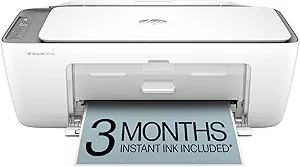 | Best Compact Inkjet for Home and Light Office Use | Printer Type: Inkjet | Maximum Print Resolution: 4800 x 1200 dpi | Black and White Print Speed: 7.5 ppm | VIEW LATEST PRICE | See Our Full Breakdown |
| HP OfficeJet Pro 8125e Wireless All-in-One Color Inkjet Printer | 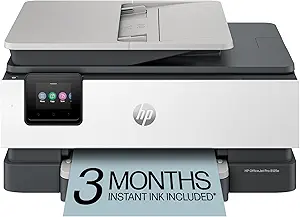 | Best for Versatile High-Speed Home Office Printing | Printer Type: Color Inkjet | Print Speed: 10 ppm color / 20 ppm black | Paper Capacity: 225 sheets | VIEW LATEST PRICE | See Our Full Breakdown |
More Details on Our Top Picks
HP OfficeJet Pro 9135e Wireless All-in-One Color Inkjet Printer
The HP OfficeJet Pro 9135e stands out for its ability to produce professional-quality color documents quickly, making it ideal for busy small offices that need vibrant prints. Compared to the monochrome LaserJet 3101fdw, it offers color versatility at the expense of higher running costs, especially after the free Instant Ink trial ends. Its high-speed printing, automatic duplex, and large input trays support efficient workflows, but its bulkier size can be a challenge in tight spaces. This model is perfect for offices valuing color accuracy and multimedia presentations, though casual users or those with limited space might find it less convenient.
Pros:- Vibrant, professional-quality color printing
- Fast print speeds up to 25 ppm in black, 20 ppm in color
- Large input capacity with two 250-sheet trays
- Wireless connectivity supporting mobile printing
Cons:- Higher ongoing costs after the free Instant Ink trial
- Size may be problematic for very tight spaces
- Complex setup might challenge casual users
Best for: Small offices that prioritize high-quality color printing and need a versatile all-in-one with large capacity
Not ideal for: Very small offices or users seeking budget-friendly monochrome printing, as it’s bulkier and more costly to run
- Print Speed:20 ppm color, 25 ppm black
- Auto Duplex Printing:Yes
- Auto Document Feeder:Yes
- Input Trays:Two 250-sheet trays
- Connectivity:Dual-band Wi-Fi, HP App
- Includes:3 months Instant Ink trial
Bottom line: This printer suits small offices that need fast, high-quality color output and ample paper capacity, accepting some size and cost tradeoffs.
HP LaserJet Pro MFP 3101fdw Wireless Black & White All-in-One Laser Printer
The LaserJet Pro 3101fdw excels in high-speed monochrome printing, making it an excellent choice for small teams needing reliable, fast document handling. Unlike the color-capable LaserJet 3301sdw, it focuses solely on black-and-white output, which simplifies operation and reduces running costs. Its impressive speed of up to 35 ppm and auto duplex function enhance productivity, while security features like HP Wolf Pro Security safeguard sensitive data. However, its lack of color printing limits its use cases, and it’s tailored primarily for teams of up to 7 users, making it less suitable for larger offices or those needing color documents.
Pros:- Fast printing speed of up to 35 ppm
- Secure printing with advanced security features
- Auto duplex printing and document feeder for efficiency
- Wireless, Ethernet, and Bluetooth connectivity
Cons:- Limited to black & white printing, restricting use cases
- Designed for small teams, not ideal for large offices
- No color printing capabilities
Best for: Small offices or teams prioritizing fast, secure monochrome printing for documents and reports
Not ideal for: Offices requiring color printing or larger workgroups, due to its monochrome focus and limited capacity
- Print Speed:Up to 35 ppm
- Functions:Print, scan, copy, fax
- Connectivity:Wi-Fi, Ethernet, Bluetooth
- Auto 2-sided Printing:Yes
- Auto Document Feeder:Yes
- Recommended Users:Up to 7 people
Bottom line: This model is perfect for small teams needing fast, secure monochrome printing with minimal fuss and high efficiency.
HP Color LaserJet Pro MFP 3301sdw Wireless All-in-One Color Laser Printer
The Color LaserJet Pro 3301sdw offers rapid color printing at 26 ppm, making it suitable for offices that need vibrant, professional-quality visuals regularly. It surpasses inkjet options like the OfficeJet 9135e in speed and toner durability, but relies on original HP toner cartridges, which can add to ongoing costs. Its all-in-one capabilities cover scanning and copying, with reliable auto duplexing. However, it’s limited to small office environments and may face firmware restrictions on third-party cartridges, which could pose a challenge for budget-conscious users. This laser option is ideal where color accuracy and consistent speed are priorities over upfront affordability.
Pros:- Fast color printing at 26 ppm
- All-in-one with scan and copy functions
- Auto duplex for efficient double-sided printing
- Reliable performance for business needs
Cons:- Requires original HP toner with chips, increasing costs
- Firmware updates may limit third-party cartridges
- Limited to small office use due to size and cost
Best for: Small teams requiring dependable, high-quality color printing for marketing or presentations
Not ideal for: Offices on a tight budget or those needing occasional color, due to cartridge costs and restrictions
- Print Speed:26 ppm black/color
- Functions:Print, Scan, Copy
- Connectivity:Wireless
- Automatic Duplex:Yes
- Input Tray Capacity:250 sheets
- Compatible Toner:HP 218A, 218X
Bottom line: This laser printer is a smart choice for small offices emphasizing speed and color quality, accepting higher toner expenses and restrictions.
HP OfficeJet Pro 8135e Wireless All-in-One Color Inkjet Printer
The OfficeJet Pro 8135e is tailored more toward home office users needing reliable color printing, scanning, copying, and faxing. Its modest print speed of 10 ppm in color is suitable for light to moderate use, and its 225-sheet tray balances capacity with space considerations. Its use of recycled plastic aligns with eco-conscious priorities, but it requires cartridges with HP chips or circuitry, which could be limiting for those wanting to use third-party options. The 2.7-inch touchscreen makes setup straightforward for home users, though its slower color output compared to larger office models makes it less ideal for high-volume environments.
Pros:- High-quality color printing with versatile features
- Automatic duplex and sizable input tray
- Eco-friendly design with over 45% recycled plastic
- User-friendly touchscreen interface
Cons:- Slower color print speed at 10 ppm
- Cartridges require specific HP chips, limiting third-party use
- Firmware updates may restrict non-HP cartridges
Best for: Home office users or small businesses with moderate color printing needs and eco-friendly priorities
Not ideal for: Offices with high-volume or fast-paced printing needs, where speed and volume are critical
- Print Speed (Color):10 ppm
- Print Speed (Black):20 ppm
- Input Tray Capacity:225 sheets
- Touchscreen:2.7-inch color
- Connectivity:Dual-band Wi-Fi
- Included Trial:3 months Instant Ink
Bottom line: This printer suits eco-conscious home offices needing reliable, moderate color printing with straightforward operation.
HP OfficeJet Pro 9125e Wireless All-in-One Color Inkjet Printer
The OfficeJet Pro 9125e offers a well-rounded set of features for small offices prioritizing environmental impact without sacrificing speed or versatility. Its 18 ppm color and 22 ppm black print speeds are solid, though slightly slower than some laser models. Its use of over 40% recycled plastic and inclusion of a 3-month Instant Ink trial highlight its eco-conscious design. It boasts reliable wireless connections and enhanced security, but cartridges with HP chips or circuitry can be limiting for cost-conscious buyers. This printer is ideal for small offices seeking a balance of performance and sustainability, though those with high-volume needs might find it less efficient.
Pros:- Fast color and black printing speeds
- Eco-friendly with over 40% recycled plastic
- Secure printing with HP Wolf Pro Security
- Wireless connectivity supporting HP app
Cons:- Cartridges require specific chips, limiting third-party options
- Firmware updates may restrict non-HP cartridges
- Setup can be complex for some users
Best for: Small offices emphasizing eco-friendly operations and reliable all-in-one performance
Not ideal for: High-volume or fast-paced environments that require the utmost speed and lower ongoing costs
- Print Speed:18 ppm color, 22 ppm black
- Auto Duplex:Yes
- Input Tray Capacity:250 sheets
- Connectivity:Dual-band Wi-Fi, HP app
- Security:HP Wolf Pro Security
- Included Trial:3 months Instant Ink
Bottom line: This model offers a balanced combination of performance and sustainability, ideal for small offices with moderate printing demands.
HP LaserJet Pro MFP 3101sdw Wireless All-in-One Laser Printer for Small Teams
This monochrome laser printer makes a compelling case as the best all-in-one for small offices that primarily need high-speed, professional-quality black-and-white documents. Compared with the HP OfficeJet Pro 8125e, it offers faster print speeds of up to 35 ppm, which is ideal for busy workgroups. Its automatic duplex feature not only saves paper but also boosts efficiency, a key advantage over inkjet models that often lack reliable duplexing. However, its monochrome-only output limits versatility, making it less suitable if color is sometimes needed. The 250-sheet input tray supports larger print volumes without frequent refills, but the device’s design is less compact than inkjet options, which could be a drawback in very tight spaces. Overall, this model is best for teams prioritizing speed, lower ongoing costs for black-and-white printing, and reliability in a professional setting.
Pros:- Fast printing and copying speeds of up to 35 ppm
- Automatic duplex printing reduces paper use
- Reliable performance with professional-quality output
- Large 250-sheet input tray for high-volume tasks
Cons:- Limited to monochrome printing only, restricting versatility
- Requires specific HP cartridges with circuitry, which can increase ongoing costs
Best for: Small office teams or departments that need fast, high-volume black-and-white printing and copying without color requirements.
Not ideal for: Creative teams or small businesses requiring frequent color printing, or those with very limited space needing a more compact device.
- Printer Type:Laser
- Print Speed:Up to 35 ppm
- Print Resolution:1200 x 1200 dpi
- Input Tray Capacity:250 sheets
- Auto Document Feeder:Yes
- Connectivity:Wireless, Wi-Fi
Bottom line: This model suits small offices that need a dependable, fast monochrome printer with high capacity and minimal fuss.
HP DeskJet 2855e Wireless All-in-One Color Inkjet Printer
The HP DeskJet 2855e is a versatile, space-saving inkjet printer perfect for those who need occasional color printing and scanning. It stands out for its compact form, making it suitable for small desks or home offices. Compared to the OfficeJet Pro 8125e, it’s less suited for high-volume or fast-paced environments because of its slower print speeds—7.5 ppm for black and 5.5 ppm for color. It includes 3 months of Instant Ink, which simplifies ink management and reduces running costs, but its limited input tray capacity of only 60 sheets means frequent refills for larger jobs. Its Wi-Fi connectivity supports easy printing from smartphones, yet it only operates on 2.4 GHz networks, which can reduce reliability in crowded Wi-Fi environments. Overall, this pick is best for light printing needs combined with space constraints and occasional color printing.
Pros:- Compact, space-efficient design
- Includes 3 months of Instant Ink service
- Wireless printing from smartphones and tablets
- All-in-one functionality for print, scan, and copy
Cons:- Limited to 2.4 GHz Wi-Fi networks, affecting connectivity reliability
- Small 60-sheet input tray limits continuous printing capacity
Best for: Home-based workers or small offices with low to moderate print volume needing color output and space efficiency.
Not ideal for: High-volume or fast-paced offices, or environments requiring robust network performance, due to its slower speeds and limited Wi-Fi compatibility.
- Printer Type:Inkjet
- Maximum Print Resolution:4800 x 1200 dpi
- Black and White Print Speed:7.5 ppm
- Color Print Speed:5.5 ppm
- Input Tray Capacity:60 sheets
- Connectivity:Wireless
Bottom line: This printer is best for small offices or homes needing occasional color printing in a compact form.
HP OfficeJet Pro 8125e Wireless All-in-One Color Inkjet Printer
The HP OfficeJet Pro 8125e offers a compelling mix of speed, versatility, and large paper capacity, making it suitable for busy home offices that need reliable color printing. It outperforms many inkjet competitors with print speeds of 10 ppm in color and 20 ppm in black, and its 225-sheet capacity minimizes frequent refills. Its dual-band Wi-Fi ensures stable wireless connections, unlike some single-band models that can struggle in crowded networks. The inclusion of a 3-month Instant Ink trial helps manage ink costs, but post-trial expenses can be high, which could be a concern for budget-conscious users. While it’s more expensive than smaller inkjet models, its auto duplex printing and fast speeds justify the higher price for users with moderate to heavy printing needs. This model is well-suited for small offices that demand speed, color versatility, and connectivity reliability.
Pros:- Fast color printing with 10 ppm speed
- Large 225-sheet paper capacity
- Reliable dual-band Wi-Fi connection
- Includes 3-month Instant Ink trial
Cons:- Potentially high ongoing ink costs after the trial
- Initial setup can be complex for less tech-savvy users
- Larger footprint than basic models
Best for: Small home offices requiring fast, reliable color printing with large capacity and multi-functionality.
Not ideal for: Very tight spaces or users with minimal printing needs, as its larger footprint and higher operating costs may be overkill.
- Printer Type:Color Inkjet
- Print Speed:10 ppm color / 20 ppm black
- Paper Capacity:225 sheets
- Connectivity:Wireless, dual-band Wi-Fi
- Automatic Document Feeder:Yes
- Dimensions:13.29″D x 18.11″W x 9.17″H
Bottom line: Ideal for small offices that need quick, versatile, and reliable color printing with substantial paper capacity.
How We Picked
To determine the best all in one printers for small offices, I evaluated each model based on performance, usability, build quality, and value. Priority was given to printers that balance fast, reliable printing with affordable maintenance costs and user-friendly features. I also considered versatility, such as scanning and copying capabilities, wireless connectivity, and compatibility with mobile devices. The ranking reflects a combination of these factors, favoring models that deliver consistent performance without excessive size, cost, or complexity. This approach ensures recommendations suited to a variety of small office needs and budgets.Factors to Consider When Choosing Best All In One Printer For Small Office
Choosing the best all in one printer for a small office requires understanding your specific needs and weighing several key factors. From print volume to connectivity, each aspect impacts daily usability and long-term value. Avoiding common pitfalls, such as overspending on unnecessary features or underestimating ongoing ink or toner costs, is essential for making a smart investment. The following sections highlight critical considerations to help you select a model that aligns with your office workflow and budget.Print Volume and Speed
Assess your typical monthly print volume to determine whether a laser or inkjet model is better suited. Laser printers generally excel at high-volume, fast printing, making them ideal for busy small offices. Inkjet models often suffice for lower volumes and color-heavy tasks but may slow down under heavy use. Matching your expected workload with the printer’s rated pages per minute (PPM) helps prevent bottlenecks and ensures efficiency over time.
Color Capabilities and Quality
If your work involves marketing materials, presentations, or detailed graphics, prioritize models with strong color printing performance. Inkjet printers typically produce more vibrant images, but laser options are improving in this area while offering sharper text. Consider whether color is essential daily or only for occasional use, as this influences ongoing ink or toner costs and the choice of the right model.
Connectivity and Mobile Printing
Wireless connectivity, including Wi-Fi and mobile printing support, is a must-have for small offices seeking flexibility. Look for printers compatible with AirPrint, Google Cloud Print, or dedicated mobile apps that streamline printing from smartphones and tablets. Avoid models with cumbersome setup or limited app support, as smooth connectivity significantly impacts day-to-day productivity and convenience.
Size, Footprint, and Ease of Use
Space constraints are common in small offices, so choosing a compact printer with an intuitive interface can save frustration. Features like touchscreen controls, automatic document feeders, and straightforward paper handling boost ease of use. Be wary of overly bulky models that might not fit comfortably in your workspace or require complex setup procedures, which can hinder daily operations.
Cost of Ownership
Initial purchase price is just one part of the equation. Ongoing costs, such as ink or toner replacements and maintenance, significantly affect overall value. Laser printers tend to have higher upfront costs but lower per-page expenses, making them more economical for high-volume use. Inkjet models are cheaper initially but may incur higher costs over time, especially if color printing is frequent. Consider your expected usage patterns to avoid surprises.