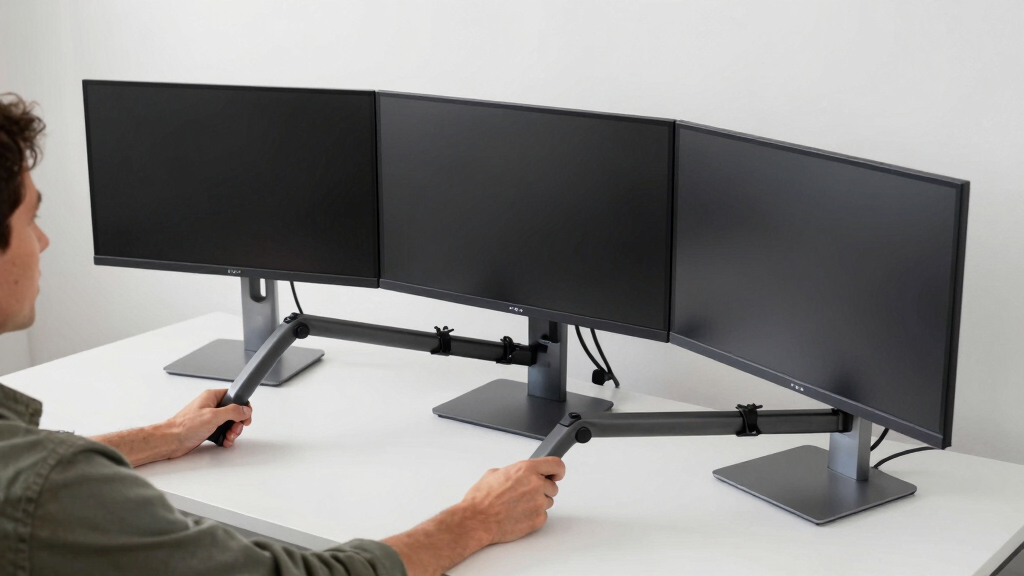
For those needing a triple monitor arm heavy duty that can support multiple large screens securely, choosing the right model is essential. The best overall pick, the Triple Monitor Mount up to 49 inches with Gas Spring, offers robust support and full adjustability. The VIVO Triple Ultrawide Mount stands out for its affordability and heavy-duty clamp, making it ideal for budget-conscious setups. Meanwhile, the Mount Pro Triple Mount balances weight capacity with a compact design, perfect for space-constrained desks. Readers will face tradeoffs between maximum load capacity, ease of installation, and price. Continue reading for a detailed comparison to help you find the perfect fit for your heavy-duty multi-monitor needs.

Get comfort and recovery gear delivered free with Prime
- Fast, free delivery on millions of items
- Prime Video, Amazon Music and more included
- Member-only deals all year
Complete the kit


Key Takeaways
- The best heavy-duty triple monitor arms prioritize high weight capacity and robust construction to support large screens securely.
- Adjustability features like gas springs and flexible joints significantly improve ergonomic comfort and usability.
- Compatibility with various monitor sizes and VESA standards is critical for ensuring the arm fits your specific screens.
- Installation method (clamp vs. grommet) impacts stability and ease of setup, especially for heavier setups.
- Budget options often trade off some adjustability or build quality, so investing more typically yields better durability and flexibility.
| WALI Triple Monitor Mount for 49″ Ultrawide and Dual 34″ Monitors |  | Best Overall for Large Ultrawide and Dual Monitors | Monitor Size Compatibility: 49-inch ultrawide, dual 34-inch monitors | Maximum Load: 44 lbs on top, 26.4 lbs per lower bracket | VESA Compatibility: 75x75mm, 100x100mm | VIEW LATEST PRICE | See Our Full Breakdown |
| Triple Monitor Mount for up to 35’’ Ultrawide Screens, Heavy Duty, Black |  | Best for High Capacity and Precise Adjustment | Supported Monitor Size: up to 35 inches | Load Capacity per Arm: 12kg | VESA Compatibility: 75×75, 100×100 | VIEW LATEST PRICE | See Our Full Breakdown |
| Mount Pro Triple Monitor Mount for Max 32″ Screens, Up to 19.8 lbs Each |  | Best for Versatile Size Range and Full Motion | Supports Screen Size: 13-32 inches | Max Weight per Arm: 19.8 lbs | VESA Compatibility: 75x75mm, 100x100mm | VIEW LATEST PRICE | See Our Full Breakdown |
| Triple Monitor Mount up to 49 inches, Fully Adjustable Gas Spring Arm |  | Best for Ultrawide and Curved Monitors up to 49″ | Monitor Size Support: up to 49 inches | Weight Capacity: 44 lbs total | VESA Compatibility: 75x75mm and 100x100mm | VIEW LATEST PRICE | See Our Full Breakdown |
| Triple Monitor Mount up to 49 inches, Fully Adjustable Heavy Duty 3 Monitor Arm with Gas Spring, Desk Mount for 3 Screens, C-Clamp & Grommet Base, Holds 44 lbs, Black |  | Best for Heavy-Duty Large Monitors with Maximum Support | Monitor Size Support: Up to 49 inches (center), 35 inches (side) | Weight Capacity: 44 lbs per arm | VESA Compatibility: 75x75mm and 100x100mm | VIEW LATEST PRICE | See Our Full Breakdown |
| VIVO Triple Ultrawide Monitor Desk Mount for Up to 49-inch Screens, Heavy Duty Clamp, Holds 3 Monitors up to 44 lbs, Black |  | Best Overall for Heavy-Duty Ultrawide Setups | Monitor Compatibility: Up to 49 inches (1 monitor), up to 38 inches (2 monitors) | Maximum Load per Arm: 44 lbs | Material: Cast aluminum | VIEW LATEST PRICE | See Our Full Breakdown |
| Ergounion Heavy Duty Triple Monitor Mount for 13-40 Inch Displays |  | Best for Versatile, Medium-Sized Monitors | Supports Monitors: Three 13-40 inch displays | Maximum Load per Arm: 25 lbs | Material: Aerospace-grade aluminum | VIEW LATEST PRICE | See Our Full Breakdown |
| Triple Monitor Desk Mount for 13-32 inch Screens |  | Best for Compact, Budget-Friendly Setups | Supported Screen Size: 13-32 inches | Max Load per Arm: 19.8 lbs | VESA Compatibility: 75x75mm, 100x100mm | VIEW LATEST PRICE | See Our Full Breakdown |
| WALI Stacked Triple Monitor Mount for 49″ Ultrawide and Dual 34″ Monitors |  | Best for Maximum Ultrawide and Dual Monitor Support | Monitor Compatibility: 49″ ultrawide, dual 34″ monitors | VESA Mounting: 75x75mm, 100x100mm | Weight Capacity: 44 lbs on top, 22 lbs per lower bracket | VIEW LATEST PRICE | See Our Full Breakdown |
| VIVO Triple Pneumatic Monitor Mount for 3 Screens up to 32 inches, Fully Adjustable, Heavy Duty Desk Stand with C-Clamp, Black, STAND-V300G |  | Best for Compact, Adjustable Multi-Monitor Ergonomics | Supported Screen Size: 17-32 inches | Maximum Weight per Monitor: 17.6 lbs | VESA Compatibility: 75x75mm, 100x100mm | VIEW LATEST PRICE | See Our Full Breakdown |
| Mount-It! Heavy-Duty 2+1 Triple Monitor Mount for Ultrawide and Standard Monitors |  | Best Heavy-Duty Triple Monitor Mount for Large and Versatile Setups | Monitor Compatibility: Up to 49″ for center, 35″ for side monitors | Weight Capacity: 44 lbs per arm | Mounting Options: Clamp & Grommet for desks 0.4″–1.8″ thick | VIEW LATEST PRICE | See Our Full Breakdown |
| triple monitor arm heavy duty | VESA Compatibility | Material | Swivel | Rotation |
|---|---|---|---|---|
| WALI Triple Monitor Mount for | 75x75mm, 100x100mm | Steel | — | — |
| Triple Monitor Mount for up to | 75×75, 100×100 | — | — | — |
| Mount Pro Triple Monitor Mount | 75x75mm, 100x100mm | High-quality aluminum | — | — |
| Triple Monitor Mount up to 49 | 75x75mm and 100x100mm | Heavy Duty | ±90° | 360° |
| Triple Monitor Mount up to 49 | 75x75mm and 100x100mm | Cast aluminum | ±90° | 360° |
| VIVO Triple Ultrawide Monitor | — | Cast aluminum | 180° | 360° |
| Ergounion Heavy Duty Triple Mo | — | Aerospace-grade aluminum | 180° | 360° |
| Triple Monitor Desk Mount for | 75x75mm, 100x100mm | — | — | — |
| WALI Stacked Triple Monitor Mo | — | — | 180° | 360° |
| VIVO Triple Pneumatic Monitor | 75x75mm, 100x100mm | — | — | — |
| Mount-It! Heavy-Duty 2+1 Tripl | — | — | ±90° | ±180° |
More Details on Our Top Picks
WALI Triple Monitor Mount for 49″ Ultrawide and Dual 34″ Monitors
This WALI mount stands out for supporting extremely large displays, including a 49-inch ultrawide and two 34-inch monitors, making it ideal for those with expansive setups. Its sturdy steel construction offers exceptional stability, especially compared with lighter options like the Mount Pro, which may wobble under heavy loads. The fully adjustable features—tilt, swivel, and rotation—allow for ergonomic customization, but the weight and size mean it requires a substantial desk footprint and can be challenging for beginners to install. Compared to the lighter, simpler options, this model sacrifices ease of setup for maximum support of large displays.
Pros:- Supports large ultrawide and dual monitors with sturdy steel build
- Fully adjustable for ergonomic comfort with tilt, swivel, and rotation
- Includes cable management for clutter-free workspace
Cons:- Heavy and requires ample desk space for installation
- Maximum weight limits may restrict some larger monitors
- Installation can be complex for beginners
Best for: Professionals or gamers with ultrawide and large monitor setups needing maximum stability.
Not ideal for: Users with limited desk space or lighter monitors, as the mount’s weight and size may be overkill.
- Monitor Size Compatibility:49-inch ultrawide, dual 34-inch monitors
- Maximum Load:44 lbs on top, 26.4 lbs per lower bracket
- VESA Compatibility:75x75mm, 100x100mm
- Material:Steel
- Clamp Range:Desk thickness 0.39” to 1.77”
- Warranty:3 years
Our verdict“This mount is perfect for those with large, heavy monitors who prioritize stability and full adjustability over simplicity.”
Triple Monitor Mount for up to 35’’ Ultrawide Screens, Heavy Duty, Black
This model excels at supporting ultrawide screens up to 35 inches with high load capacity, making it well-suited for professional environments. Its independent gas spring arms allow precise control over each monitor’s height and angle, outperforming simpler clamp-based mounts like the VIVO triple in terms of fine-tuning. However, it requires a sturdy desk to hold the weight of large ultrawides and can be tricky to set up, especially for those unfamiliar with gas spring mechanisms. Compared to the Mount Pro, which offers full motion but smaller size limits, this mount balances large monitor support and adjustment flexibility.
Pros:- Supports large ultrawide monitors up to 35 inches
- Independent gas spring arms enable precise height and angle adjustments
- Compatible with various mounting options including desk clamp and grommet
Cons:- Requires a sturdy, reinforced desk for full ultrawide support
- Setup can be complex for beginners unfamiliar with gas spring technology
Best for: Designers or developers working with large ultrawides needing precise positioning and high load capacity.
Not ideal for: Casual users or those with lightweight monitors who don’t require complex adjustments or ultrawide support.
- Supported Monitor Size:up to 35 inches
- Load Capacity per Arm:12kg
- VESA Compatibility:75×75, 100×100
- Mounting Options:Desk clamp, grommet
Our verdict“Ideal for professionals needing heavy-duty support and precise control over large ultrawide displays.”
Mount Pro Triple Monitor Mount for Max 32″ Screens, Up to 19.8 lbs Each
This Mount Pro model supports a broad range of monitors from 13 to 32 inches, making it flexible for various setups. Its full motion capabilities—including tilt, swivel, and rotation—are more refined than simpler mounts like the VIVO, giving users highly customizable viewing angles. The aluminum construction offers durability and corrosion resistance, but assembly can be tricky if you’re mounting heavier monitors or on thin desks. It’s a solid choice for those who need versatility without the extremes of ultrawide support, though it might not handle very large or heavy displays as well as larger models.
Pros:- Supports a wide range of monitor sizes up to 32 inches
- Full motion adjustment for optimal ergonomic positioning
- Durable aluminum construction with corrosion resistance
Cons:- Assembly may require reinforcement for heavier monitors
- Limited to monitors up to 32 inches, not suitable for ultrawides or larger displays
Best for: Designers or office workers with a mixture of monitor sizes up to 32 inches requiring full motion adjustment.
Not ideal for: Users with monitors larger than 32 inches or ultra-heavy displays, as the weight limit might be insufficient.
- Supports Screen Size:13-32 inches
- Max Weight per Arm:19.8 lbs
- VESA Compatibility:75x75mm, 100x100mm
- Material:High-quality aluminum
- Mounting Options:C-clamp, grommet
- Desk Thickness Compatibility:0.39-3.15 inches (clamp), 0.39-1.97 inches (grommet)
Our verdict“This mount is best suited for users needing versatile size support and full motion flexibility within a 32-inch limit.”
Triple Monitor Mount up to 49 inches, Fully Adjustable Gas Spring Arm
This mount supports ultrawide, curved, or flat screens up to 49 inches, making it ideal for immersive setups. Its gas spring arms provide fluid adjustment, surpassing rigid clamp mounts like the VIVO in ease of positioning. The inclusion of tilt, swivel, and rotation ensures ergonomic versatility, but the maximum weight capacity might be limiting for very heavy monitors, especially larger ultrawides. Compared to the B0F9LFFDQX model, which supports three large monitors with cast aluminum, this version offers more flexibility with curved screens but slightly less raw weight capacity.
Pros:- Supports ultrawide and curved monitors up to 49 inches
- Fully adjustable with tilt, swivel, rotation, and height
- Includes cable management for a tidy workspace
Cons:- Maximum weight capacity may limit support for very heavy ultrawides
- Assembly can be complex for some users
Best for: Content creators or gamers with ultrawide or curved monitors up to 49 inches seeking maximum flexibility.
Not ideal for: Users with extremely heavy or very large monitors exceeding 44 lbs, or those with very thick desks outside the specified range.
- Monitor Size Support:up to 49 inches
- Weight Capacity:44 lbs total
- VESA Compatibility:75x75mm and 100x100mm
- Tilt:±45°
- Swivel:±90°
- Rotation:360°
- Material:Heavy Duty
- Warranty:2 years
Our verdict“This mount is perfect for large, curved, or ultrawide monitors where full adjustability enhances comfort and productivity.”
Triple Monitor Mount up to 49 inches, Fully Adjustable Heavy Duty 3 Monitor Arm with Gas Spring, Desk Mount for 3 Screens, C-Clamp & Grommet Base, Holds 44 lbs, Black
This model supports three large monitors, including a 49-inch centerpiece and two 35-inch side screens, with a robust 44 lbs per arm capacity. Its cast aluminum construction offers exceptional durability, surpassing lighter aluminum models like the Mount Pro when it comes to stability. The fully adjustable tilt, swivel, rotation, and height features provide tailored ergonomic setups, but the weight and complexity of assembly mean it’s best for users with sturdy desks and some monitor mount experience. Compared with lighter mounts, this one emphasizes maximum support and longevity for demanding setups.
Pros:- Supports monitors up to 49 inches with 44 lbs per arm
- Fully adjustable tilt, swivel, rotation, and height
- Durable cast aluminum construction ensures stability and longevity
Cons:- Heavy and may require reinforced desk support
- Complex setup that may be daunting for beginners
Best for: Power users with large, heavy monitors requiring maximum stability and full adjustability.
Not ideal for: Users with lightweight monitors or limited desk support, due to the mount’s weight and installation demands.
- Monitor Size Support:Up to 49 inches (center), 35 inches (side)
- Weight Capacity:44 lbs per arm
- VESA Compatibility:75x75mm and 100x100mm
- Tilt:±35°
- Swivel:±90°
- Rotation:360°
- Desk Thickness:0.4” to 1.8”
- Material:Cast aluminum
Our verdict“This mount is ideal for heavy-duty setups demanding maximum support, stability, and full ergonomic flexibility for large monitors.”
VIVO Triple Ultrawide Monitor Desk Mount for Up to 49-inch Screens, Heavy Duty Clamp, Holds 3 Monitors up to 44 lbs, Black
This VIVO mount stands out for supporting a single ultrawide monitor up to 49 inches alongside two additional 38-inch screens, making it ideal for expansive workspaces or content creation. Its cast aluminum construction offers durability that surpasses lighter options like the WALI STAND-V300G, which is better suited for lighter, smaller monitors. The pneumatic arms allow for effortless height adjustments, but the setup can be bulky and challenging to maneuver on small desks. The heavy-duty clamp ensures stability but may be too large for desks under 2 inches thick. While its extensive tilt, swivel, and rotation range provides excellent flexibility, the mount’s weight and size limit compatibility with compact workspaces. Overall, this model suits users needing maximum stability and support for ultrawide setups, though it demands ample desk space and proper mounting clearance.
Pros:- Supports a 49-inch ultrawide plus two additional monitors for expansive setups
- Heavy-duty cast aluminum offers superior durability and stability
- Flexible articulation with tilt, swivel, and rotation for precise positioning
- Easy height adjustment via pneumatic arms
Cons:- Bulky design may not fit in smaller or cluttered workspaces
- Heavy weight requires sturdy desk or wall mounting for optimal stability
Best for: Professionals or content creators with large ultrawide monitors requiring maximum stability and adjustability on a spacious desk.
Not ideal for: Users with small or cluttered desks, or those with lighter, smaller monitors who won’t need such heavy-duty support.
- Monitor Compatibility:Up to 49 inches (1 monitor), up to 38 inches (2 monitors)
- Maximum Load per Arm:44 lbs
- Material:Cast aluminum
- Tilt Range:+55° to -25°
- Swivel:180°
- Rotation:360°
Our verdict“This mount is best suited for users with large ultrawide and multi-monitor configurations who prioritize stability and flexibility over compactness.”
Ergounion Heavy Duty Triple Monitor Mount for 13-40 Inch Displays
This model makes the list for users needing full ergonomic flexibility on monitors from 13 to 40 inches, with a support for up to 25 lbs per arm. Its aerospace-grade aluminum frame offers a lighter yet sturdy alternative to steel-heavy mounts like the WALI B0GZP45J6P, which supports heavier loads but is less versatile for smaller displays. The mechanical springs provide consistent tension over time, unlike some gas spring models that may weaken with use. Installation supports both C-Clamp and Grommet mounting, offering versatility but requiring a solid desk surface for stability. The full tilt, swivel, and rotation capabilities help optimize viewing angles, yet the 25 lbs weight limit per arm may restrict heavier or larger monitors. This pick is ideal for professionals who want adaptable positioning without the bulk of ultra-heavy-duty mounts.
Pros:- Supports a wide range of monitor sizes and curved screens
- Mechanical springs ensure consistent tension for smooth adjustments
- Full ergonomic adjustment including tilt, swivel, and rotation
- Supports multiple mounting options with cable management
Cons:- Requires a sturdy desk for maximum stability
- Installation complexity may challenge some users
Best for: Professionals or gamers with medium-sized screens who need ergonomic flexibility and adaptable mounting options.
Not ideal for: Users with very heavy or large ultrawide monitors, as the weight limit may be restrictive.
- Supports Monitors:Three 13-40 inch displays
- Maximum Load per Arm:25 lbs
- Material:Aerospace-grade aluminum
- Tilt Range:+90°/-25°
- Rotation:360°
- Swivel:180°
Our verdict“This mount is well-suited for those needing flexible, ergonomic support for medium-sized monitors with versatile mounting options.”
Triple Monitor Desk Mount for 13-32 inch Screens
This mount earns its spot for supporting smaller screens from 13 to 32 inches, making it suitable for office workers or gamers with limited space. Its adjustable arms and full range of movement provide good ergonomic positioning, comparable to the VIVO B0DFFNMPJJ, but at a lower price point and with a simpler design. The installation process, however, may be more involved, especially for those unfamiliar with mounting hardware. The weight limit of about 19.8 lbs per arm limits support for heavier monitors, unlike heavier-duty options like the WALI B0GZP45J6P. Its compact size and affordability make it appealing for budget-conscious users, but users with larger or heavier screens should look elsewhere.
Pros:- Supports multiple small to medium monitors with full adjustability
- Helps conserve desk space with efficient design
- Supports various VESA patterns for flexibility
- Affordable option for basic multi-monitor setups
Cons:- Limited weight capacity restricts support for larger monitors
- Assembly can be time-consuming and tricky for beginners
Best for: Home office users or gamers with smaller monitors seeking an affordable, space-saving multi-monitor solution.
Not ideal for: Users with large, ultrawide, or heavy monitors that exceed the weight limits or size range.
- Supported Screen Size:13-32 inches
- Max Load per Arm:19.8 lbs
- VESA Compatibility:75x75mm, 100x100mm
- Mounting Options:C-Clamp, Grommet
- Desk Thickness:0.39-3.15 inches (C-Clamp), 0.39-1.97 inches (Grommet)
Our verdict“This mount offers a practical, space-efficient solution for smaller screens at an affordable price, ideal for casual or home office users.”
WALI Stacked Triple Monitor Mount for 49″ Ultrawide and Dual 34″ Monitors
This WALI mount stands out for supporting a 49-inch ultrawide monitor plus two 34-inch monitors, making it perfect for intensive multitasking or high-end gaming setups. Its steel construction offers high durability, comparable to the VIVO B0DFFNMPJJ, but with a focus on ultrawide and high-capacity displays. The adjustable tilt, swivel, and height features enable ergonomic positioning, though its weight capacity of 44 lbs on top and 22 lbs on each lower bracket may restrict some very heavy or large monitors. Installation can be complex for newcomers, especially when verifying compatibility and proper weight distribution. Heavy-duty and highly versatile, this mount demands a spacious, sturdy desk and is best suited for advanced users with substantial multi-monitor needs.
Pros:- Supports large ultrawide and dual 34-inch monitors simultaneously
- High weight capacity for demanding setups
- Full adjustability for ergonomic positioning
- Steel construction ensures durability
Cons:- Installation can be complex for beginners
- Requires a large, sturdy desk for optimal stability
Best for: High-end multitaskers or gamers managing multiple large screens, especially ultrawide and dual 34-inch monitors.
Not ideal for: Casual users or those with small, lightweight monitors, as the support capacity may be excessive and unnecessary.
- Monitor Compatibility:49″ ultrawide, dual 34″ monitors
- VESA Mounting:75x75mm, 100x100mm
- Weight Capacity:44 lbs on top, 22 lbs per lower bracket
- Tilt:+50° to -20° (top), +55° to -55° (side)
- Swivel:180°
- Rotation:360°
Our verdict“This mount is best for users with extensive, high-capacity monitor setups who need maximum support and adjustability in a stable, durable design.”
VIVO Triple Pneumatic Monitor Mount for 3 Screens up to 32 inches, Fully Adjustable, Heavy Duty Desk Stand with C-Clamp, Black, STAND-V300G
This VIVO model is tailored for users needing full adjustability for screens up to 32 inches, with each monitor supporting up to 17.6 lbs. Its dual pneumatic arms make smooth, effortless adjustments, similar to the Ergounion, but with a more straightforward, steel-and-aluminum build that offers a sturdy feel. The clamp mounting makes for easy installation without drilling, but the maximum thickness of 3.25 inches could limit placement on thicker desks. While ideal for smaller, standard-sized monitors, it’s less suitable for larger or heavier displays. The full range of tilt, swivel, and rotation helps optimize ergonomics, yet its support weight limits may restrict heavier or larger screens for demanding setups.
Pros:- Supports up to three 32-inch monitors with full adjustability
- Dual pneumatic arms for smooth, effortless adjustments
- Easy, drill-free C-Clamp installation
- Supports ergonomic positioning for long work sessions
Cons:- Limited to monitors up to 17.6 lbs each
- Not suitable for very large or ultrawide monitors
Best for: Office workers or gamers with standard-sized monitors seeking full ergonomic control and easy installation.
Not ideal for: Users with larger, ultrawide, or very heavy monitors exceeding 17.6 lbs per arm, or those with thick desks beyond 3.25 inches.
- Supported Screen Size:17-32 inches
- Maximum Weight per Monitor:17.6 lbs
- VESA Compatibility:75x75mm, 100x100mm
- Mounting Type:C-Clamp
- Maximum Mounting Thickness:3.25 inches
Our verdict“This mount is ideal for users needing reliable, adjustable support for standard-sized monitors in space-constrained environments.”
Mount-It! Heavy-Duty 2+1 Triple Monitor Mount for Ultrawide and Standard Monitors
This mount stands out for supporting a highly adaptable triple monitor configuration, accommodating a single 49-inch ultrawide and two 35-inch monitors—something few other mounts can handle with such flexibility. Its independent gas spring arms provide smooth, effortless adjustments, unlike the more limited tilt or swivel of models like the VIVO Triple Ultrawide Mount. The quick-disconnect VESA plates simplify swaps and maintenance, though the setup can be intricate for those unfamiliar with heavy-duty mounts. Unlike lighter-duty options that struggle with large ultrawides, this model excels at managing significant weight and size, making it ideal for professional multi-screen workflows. However, it demands a robust desk with sufficient thickness (0.4″–1.8″) for clamp or grommet mounting, and initial setup may be daunting for beginners. Overall, this pick makes the most sense for users needing a highly capable, large-format triple monitor solution that prioritizes stability and ergonomic flexibility over effortless installation.
Pros:- Supports enormous ultrawide and standard monitors with independent adjustments
- Heavy-duty gas spring arms provide smooth, reliable movement
- Easy to detach and reattach monitors via quick-disconnect VESA plates
- Cable management features keep workspace tidy
Cons:- Requires a sturdy, sufficiently thick desk for mounting
- Complex initial setup may be challenging for new users
- Heavy weight might require additional support or anchors on some desks
Best for: Professionals and power users who operate large ultrawide and multiple monitors and need precise ergonomic control.
Not ideal for: Casual users or those with smaller desks that can’t support the mounting requirements or complex setup process.
- Monitor Compatibility:Up to 49″ for center, 35″ for side monitors
- Weight Capacity:44 lbs per arm
- Mounting Options:Clamp & Grommet for desks 0.4″–1.8″ thick
- Tilt:-20° to +50°
- Swivel:±90°
- Rotation:±180°
Our verdict“This mount is perfect for users with large, heavy monitors seeking maximum flexibility and stability, willing to handle a more involved setup process.”

How We Picked
The products in this roundup were evaluated based on their maximum weight capacity, build quality, ease of installation, adjustability, and compatibility with different monitor sizes. We prioritized models that specifically cater to heavy-duty needs, supporting larger and heavier screens without sagging or instability. Value for money and user safety were also key factors, along with the flexibility of movement and mounting options. The ranking reflects a balance between performance, durability, and affordability, ensuring that each pick serves a distinct user need—from premium professional setups to budget-conscious configurations.| triple monitor arm heavy duty | Material |
|---|---|
| WALI Triple Monitor Mount for | Steel |
| Triple Monitor Mount for up to | — |
| Mount Pro Triple Monitor Mount | High-quality aluminum |
| Triple Monitor Mount up to 49 | Heavy Duty |
| Triple Monitor Mount up to 49 | Cast aluminum |
| VIVO Triple Ultrawide Monitor | Cast aluminum |
| Ergounion Heavy Duty Triple Mo | Aerospace-grade aluminum |
| Triple Monitor Desk Mount for | — |
| WALI Stacked Triple Monitor Mo | — |
| VIVO Triple Pneumatic Monitor | — |
| Mount-It! Heavy-Duty 2+1 Tripl | — |
Factors to Consider When Choosing Triple Monitor Arm Heavy Duty
Choosing a heavy-duty triple monitor arm requires careful consideration of several key factors. Beyond just weight capacity, you should assess adjustability features to ensure ergonomic comfort, compatibility with your monitor sizes, and installation options that suit your workspace. Understanding these broader considerations can help prevent common pitfalls, such as buying an arm that can’t support your screens or one that is difficult to set up. Balancing these factors will lead to a more satisfying and long-lasting investment.Weight Capacity and Durability
For a triple monitor setup, especially with large ultrawide screens, weight capacity is paramount. Look for arms that support at least 44 lbs per monitor to prevent sagging or instability. High-quality materials like steel and reinforced joints contribute to durability under heavy loads, reducing long-term maintenance or replacement costs. Cheaper, lighter models might seem appealing but often lack the robustness needed for consistent heavy-duty use, risking damage or accidents.
Adjustability and Ergonomics
Flexibility in movement—such as tilt, swivel, height adjustment, and rotation—allows you to customize your workspace for comfort and productivity. Gas spring mechanisms often provide smoother, easier adjustments, especially for larger screens. However, more complex adjustability can mean increased cost and potential mechanical failure points, so consider your specific ergonomic needs versus the complexity of the arm. A well-adjusted setup can reduce strain and improve workflow over long work sessions.
Compatibility and VESA Standards
Ensuring your monitors are compatible with the arm’s VESA mounting standards (typically 75x75mm or 100x100mm) is essential. Some heavy-duty arms support larger or non-standard VESA patterns, but verifying this in advance prevents mismatched setups. The size and weight of your monitors also influence the choice—larger ultrawides may require specialized mounts or additional reinforcement. Choosing a model with flexible VESA support can future-proof your investment as your monitor collection evolves.
Installation Method and Space Considerations
Most heavy-duty arms use either clamp or grommet mounting. Clamps are easier to install and generally suitable for desks with thickness limits, but grommets often provide more stability for heavier loads. The available workspace and desk material can influence which method is best—ensure your desk can handle the mounting hardware without damage. Also, consider the arm’s reach and clearance to avoid cluttered or awkward setups.
Price vs. Features
While budget options might seem attractive, they often compromise on load capacity, adjustability, or build quality. Investing in a higher-priced model typically results in better durability and more reliable performance, especially for demanding setups. However, premium models usually come with advanced features like integrated cable management and smoother motion. Weigh your specific needs against your budget to find a balance that offers long-term value and performance.
Frequently Asked Questions
Can a triple monitor arm support ultrawide monitors?
Yes, many triple monitor arms are designed to support ultrawide monitors, but it’s essential to check the maximum width and weight capacity. Arms like the VIVO or Mount Pro models are compatible with up to 49-inch ultrawides, offering sturdy support with reinforced joints. Confirm the VESA pattern and weight limits for your specific ultrawides to ensure safe, reliable mounting. Proper support prevents sagging or damage over time, especially with heavy or large screens.
What’s the best way to install a heavy-duty triple monitor arm?
Most heavy-duty arms can be mounted using either a clamp or grommet method. Clamp mounts are generally easier and quicker to install on desks with enough thickness, while grommet mounts provide more stability for heavier loads. Always follow the manufacturer’s instructions and ensure your desk material can handle the mounting hardware. Proper installation is vital for safety and to prevent damage to your workspace, especially when supporting large, heavy screens.
How do I know if a triple monitor arm can support my monitor size and weight?
Check the arm’s specified maximum weight capacity per monitor—most heavy-duty models support at least 44 lbs. Also, verify the VESA compatibility and maximum monitor width supported by the arm. Larger ultrawide monitors often require specialized mounts or reinforced joints. Matching your monitor’s size and weight to the arm’s specifications is essential for a secure, stable setup that won’t sag or risk falling.
Are gas spring arms better than other types for heavy-duty use?
Gas spring arms are favored for their smooth, effortless adjustments, especially useful with large or heavy monitors. They offer better precision in positioning and easier one-handed adjustments. However, quality varies, and cheaper gas springs may lose tension over time. For consistent heavy-duty support, investing in a high-quality gas spring arm offers the best balance of ease of use and durability, although traditional spring or rigid arms can sometimes provide more stability at a lower cost.
What features should I prioritize if I want a long-lasting heavy-duty triple monitor arm?
Look for models built from high-strength materials like steel or reinforced aluminum, with a proven maximum load capacity. Mechanical components such as gas springs or dual-joint systems should be smooth and tight, indicating quality craftsmanship. Additional features like sturdy clamp or grommet bases, integrated cable management, and easy adjustability also enhance longevity. Investing in a reputable brand with good reviews can help ensure your arm remains reliable over years of demanding use.
Conclusion
For users seeking the best overall experience, the Triple Monitor Mount up to 49 inches with Gas Spring offers robust support and versatile adjustability. Budget-conscious buyers or lighter setups will find the VIVO Triple Ultrawide Mount to be a dependable, affordable choice. Professionals or those with ultra-large monitors should consider premium options like the Mount Pro Triple Mount for maximum stability. Beginners or those new to multi-monitor setups might prefer simpler, easier-to-install models like the WALI Triple Monitor Mount. Ultimately, your choice depends on your monitor sizes, workspace, and budget, but prioritizing durability and support will ensure your investment remains effective for years to come.